本文為英文版的機器翻譯版本,如內容有任何歧義或不一致之處,概以英文版為準。
案例:客戶使用 AgentCore Memory 支援 AI 代理器
在本節中,您將了解如何建置客戶支援 AI 代理器,該代理程式使用 AgentCore 記憶體,透過維護對話歷史記錄並擷取有關使用者偏好設定的長期洞見來提供個人化的協助。主題包含 AgentCore CLI 和 AWS SDK 的程式碼範例。
假設有客戶 Sarah 與您購物網站的支援 AI 代理器互動,詢問有關延遲訂單的問題。透過 AgentCore 記憶體 APIs的互動流程如下所示:
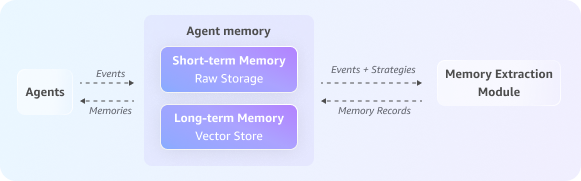
步驟 1:建立 AgentCore 記憶體
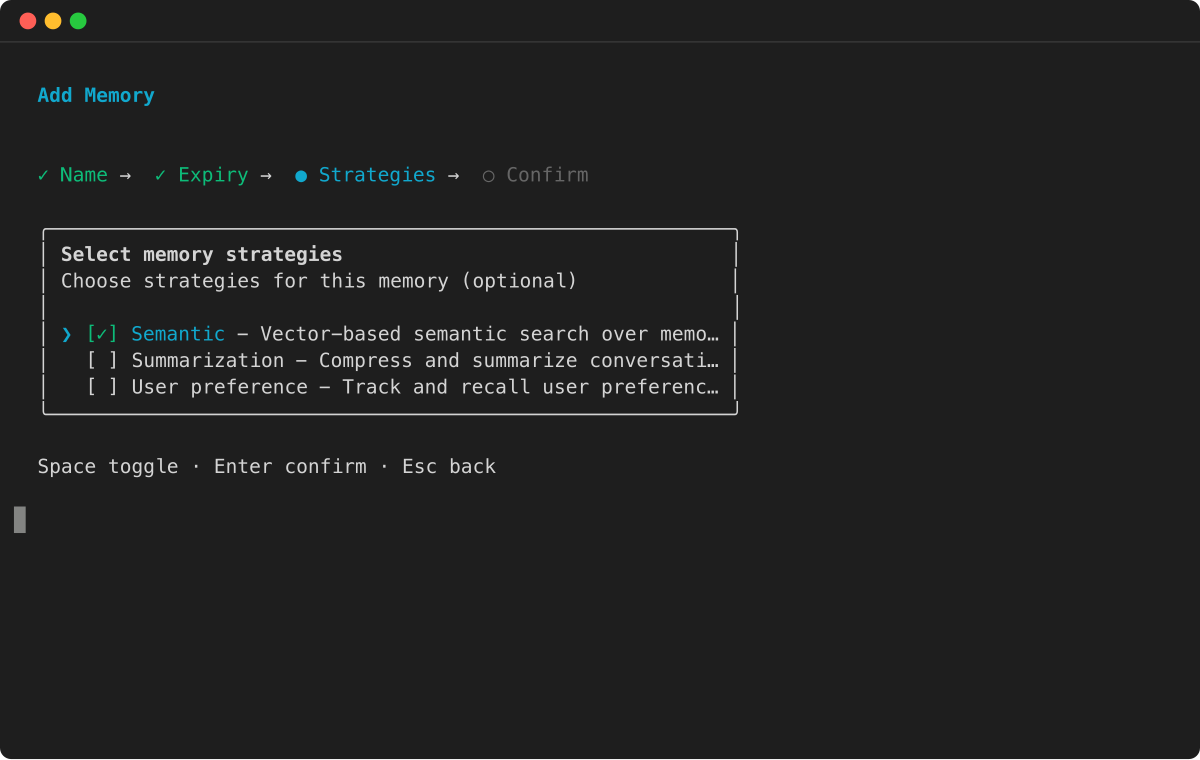
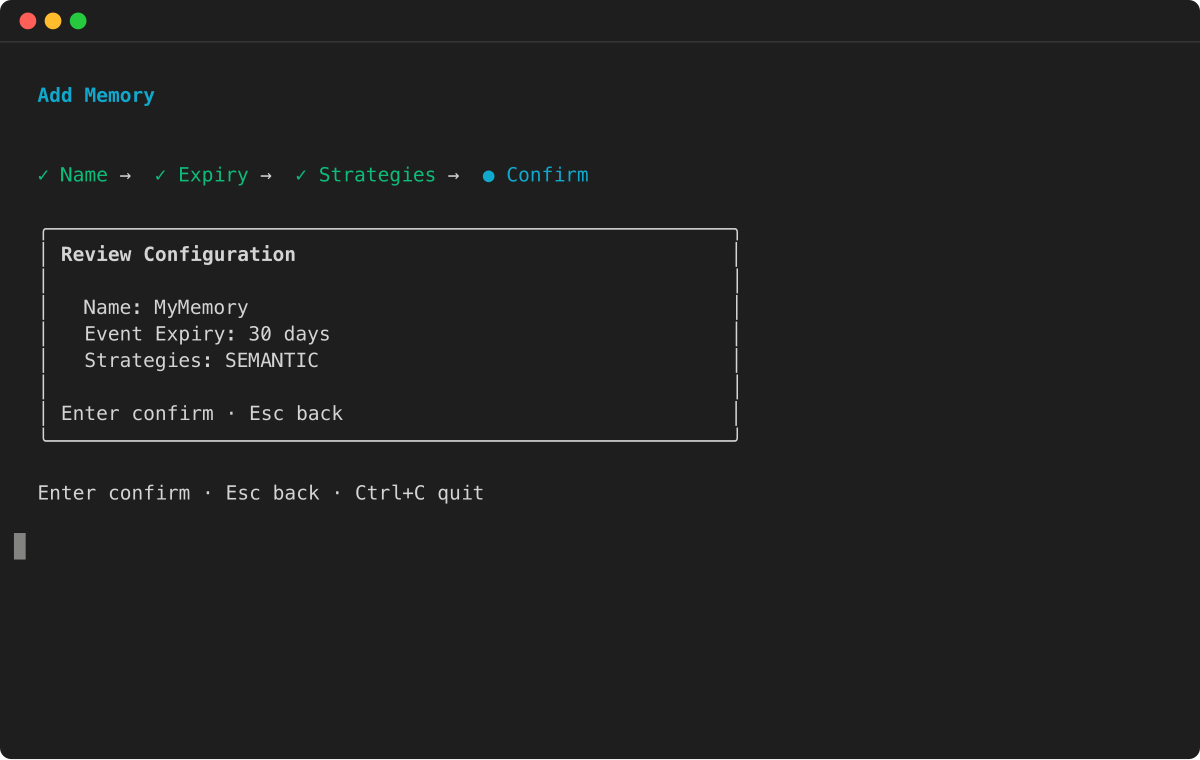
首先,建立同時具有短期和長期記憶體功能的記憶體資源,設定要擷取哪些長期資訊的策略。
範例
步驟 2:啟動工作階段
當 Sarah 啟動對話時,客服人員會建立新的且唯一的工作階段 ID,以分別追蹤此互動。
# Unique identifier for the customer, Sarah
sarah_actor_id = "user-sarah-123"

# Unique identifier for this specific support session
support_session_id = "customer-support-session-1"

print(f"Session started for Actor ID: {sarah_actor_id}, Session ID: {support_session_id}")
步驟 3:擷取對話歷史記錄
當 Sarah 解釋她的問題時,客服人員會擷取對話的每個回合 (包括她的問題和客服人員的回應)。這會在短期記憶體中填入完整的對話,並提供要處理的長期記憶體策略的原始資料。
print("Capturing conversational events...")

full_conversation_payload = [
    {
        'conversational': {
            'role': 'USER',
            'content': {'text': "Hi, my order #ABC-456 is delayed."}
        }
    },
    {
        'conversational': {
            'role': 'ASSISTANT',
            'content': {'text': "I'm sorry to hear that, Sarah. Let me check the status for you."}
        }
    },
    {
        'conversational': {
            'role': 'USER',
            'content': {'text': "By the way, for future orders, please always use FedEx. I've had issues with other carriers."}
        }
    },
    {
        'conversational': {
            'role': 'ASSISTANT',
            'content': {'text': "Thank you for that information. I have made a note to use FedEx for your future shipments."}
        }
    }
]

data_client.create_event(
    memoryId=memory_id,
    actorId=sarah_actor_id,
    sessionId=support_session_id,
    eventTimestamp=datetime.now(),
    payload=full_conversation_payload
)

print("Conversation history has been captured in short-term memory.")
步驟 4:產生長期記憶體
在背景中,執行非同步擷取程序。此程序會使用您設定的記憶體策略來分析最近的原始事件,以擷取長期記憶體,例如摘要、語意事實或使用者偏好設定,然後存放以供日後使用。
步驟 5:從短期記憶體擷取過去的互動
為了提供內容感知協助,客服人員會載入目前的對話歷史記錄。這有助於客服人員了解 Sarah 在持續聊天中引發的問題。
print("\nRetrieving current conversation history from short-term memory...")

response = data_client.list_events(
    memoryId=memory_id,
    actorId=sarah_actor_id,
    sessionId=support_session_id,
    maxResults=10
)

# Reverse the list of events to display them in chronological order
event_list = reversed(response.get('events', []))

for event in event_list: print(event)
步驟 6:使用長期記憶進行個人化協助
客服人員會跨擷取的長期記憶體執行語意搜尋,以尋找有關 Sarah 偏好設定、訂單歷史記錄或過去疑慮的相關洞見。這可讓客服人員提供高度個人化的協助,而無需要求 Sarah 重複之前聊天中已分享的資訊。
# Wait for the asynchronous extraction to finish
print("\nWaiting 60 seconds for long-term memory processing...")
time.sleep(60)

# --- Example 1: Retrieve the user's shipping preference ---
print("\nRetrieving user preferences from long-term memory...")
preference_response = data_client.retrieve_memory_records(
    memoryId=memory_id,
    namespace=f"/users/{sarah_actor_id}/preferences/",
    searchCriteria={"searchQuery": "Does the user have a preferred shipping carrier?"}
)
for record in preference_response.get('memoryRecordSummaries', []):
    print(f"- Retrieved Record: {record}")

# --- Example 2: Broad query about the user's issue (across sessions with the help of namespacePath) ---
print("\nPerforming a broad search for user's reported issues...")
issue_response = data_client.retrieve_memory_records(
    memoryId=memory_id,
    namespacePath=f"/summaries/{sarah_actor_id}/",
    searchCriteria={"searchQuery": "What problem did the user report with their order?"}
)
for record in issue_response.get('memoryRecordSummaries', []):
    print(f"- Retrieved Record: {record}")
這種整合方法可讓客服人員跨工作階段維持豐富的內容、辨識回訪客戶、回收重要詳細資訊,以及順暢地提供個人化體驗,進而獲得更快速、更自然且有效的客戶支援。
