View a markdown version of this page

一次性洞見報告 - Amazon Bedrock AgentCore

一次性洞見報告

使用 StartBatchEvaluation對代理程式的工作階段執行隨需洞見分析。當您想要調查部署之後的客服人員行為、失敗激增或定期手動檢查時,此功能非常有用。

開始分析

範例
AgentCore CLI
agentcore run insights --runtime MyAgent --insights Builtin.Insight.FailureAnalysis --lookback-days 7 --json

CLI 預設為非同步 - 它會列印任務 ID 並結束。使用 --wait封鎖 ,直到任務完成:

agentcore run insights --runtime MyAgent --insights Builtin.Insight.FailureAnalysis --lookback-days 7 --wait --json

如果您已經部署線上評估組態,則可以繼承其設定:

agentcore run insights --online-eval-config-arn <arn> --json
Interactive
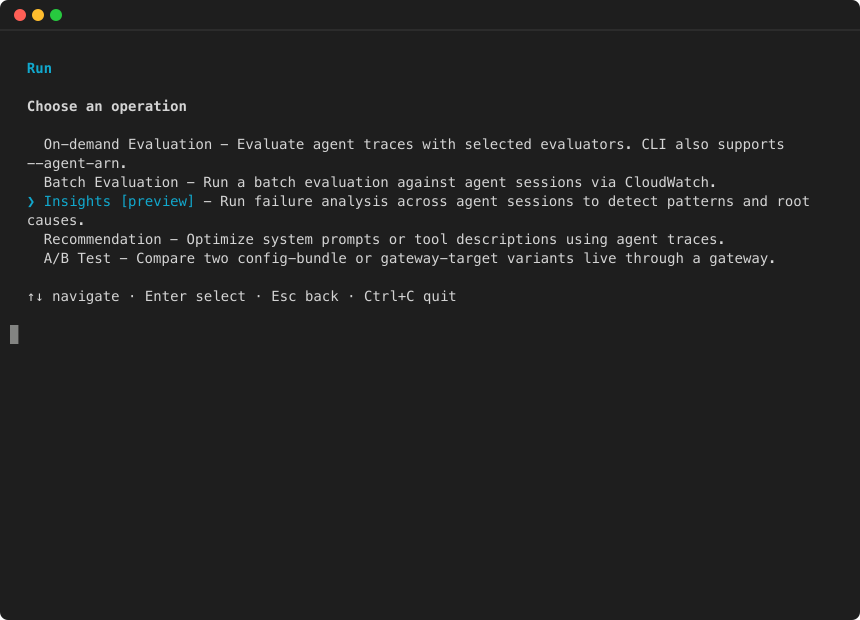
  1. 執行 agentcore以開啟 TUI,然後選取執行,然後選擇 Insights

    執行功能表:選取洞見
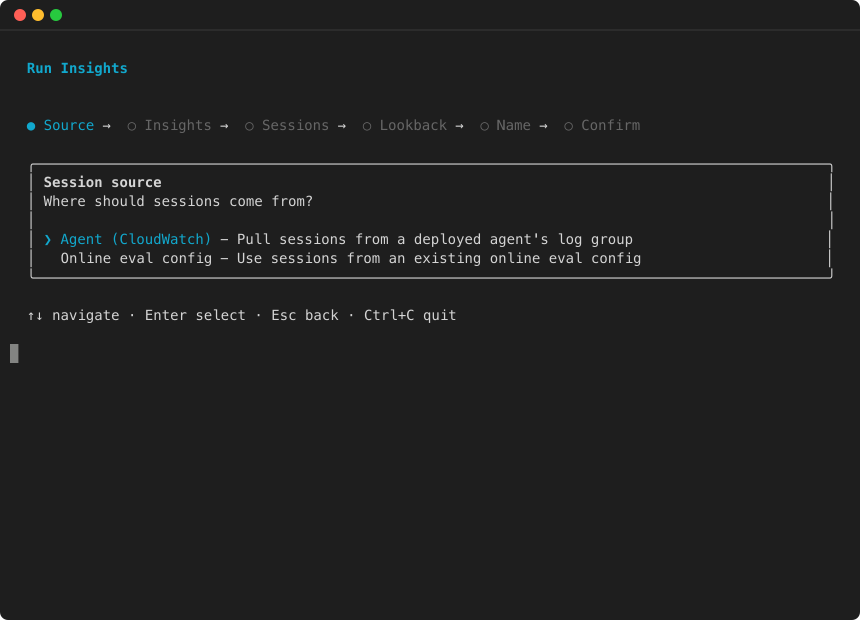
  2. 選擇工作階段來源:

    Run Insights 精靈:選取工作階段來源
  3. 選取要執行的洞察:

    Run Insights 精靈:選取洞見

    繼續完成剩餘的精靈步驟 (工作階段、回顧期間、名稱) 並確認。

AWS SDK (boto3)
import boto3 import uuid client = boto3.client("bedrock-agentcore", region_name="us-west-2") response = client.start_batch_evaluation( batchEvaluationName=f"insights-run-{uuid.uuid4().hex[:8]}", insights=[ {"insightId": "Builtin.Insight.FailureAnalysis"}, {"insightId": "Builtin.Insight.UserIntent"}, ], dataSourceConfig={ "cloudWatchLogs": { "serviceNames": ["MyAgent.DEFAULT"], "logGroupNames": [ "/aws/bedrock-agentcore/runtimes/MyAgent-abc123-DEFAULT" ], } }, # Optional: narrow to a specific time range filterConfig={ "timeRange": { "startTime": "2026-05-27T00:00:00Z", "endTime": "2026-06-03T00:00:00Z", }, # Or analyze specific sessions by ID "sessionIds": ["session-001", "session-002", "session-003"] }, clientToken=str(uuid.uuid4()), ) batch_eval_id = response["batchEvaluationId"] print(f"Started: {batch_eval_id}")

您也可以:

  • 透過新增 ,將分析縮小到特定時間範圍 filterConfig.timeRange

  • 使用 依 ID 分析特定工作階段 filterConfig.sessionIds

輪詢結果

範例
AgentCore CLI

列出所有洞見任務:

agentcore view insights --json

檢視特定任務的詳細資訊:

agentcore view insights <id> --json
AWS SDK (boto3)
import time while True: result = client.get_batch_evaluation(batchEvaluationId=batch_eval_id) status = result["status"] print(f"Status: {status}") if status in ("COMPLETED", "COMPLETED_WITH_ERRORS", "FAILED", "STOPPED"): break time.sleep(30)

檢閱失敗分析問題清單

if "failureAnalysisResult" in result: for category in result["failureAnalysisResult"]["failures"]: print(f"\nCategory: {category['name']} ({category['affectedSessionCount']} sessions)") for sub in category.get("subCategories", []): print(f" Subcategory: {sub['name']} ({sub['affectedSessionCount']} sessions)") for rc in sub.get("rootCauses", []): print(f" Root cause: {rc['name']}") print(f" Recommendation: {rc['recommendation']}") print(f" Affected sessions: {rc['affectedSessionCount']}")
欄位 Type Description

failures[].name

String

失敗類別名稱 (例如「執行錯誤」、「Hallucinations」)。

failures[].affectedSessionCount

Integer

受此類別影響的工作階段數量。

failures[].subCategories[].name

String

子類別名稱 (例如「速率限制」、「工具結構描述違規」)。

failures[].subCategories[].affectedSessionCount

Integer

受此子類別影響的工作階段數量。

failures[].subCategories[].rootCauses[].name

String

根本原因叢集名稱。

failures[].subCategories[].rootCauses[].recommendation

String

此根本原因的建議修正。

failures[].subCategories[].rootCauses[].affectedSessionCount

Integer

受此根本原因影響的工作階段數量。

failures[].subCategories[].rootCauses[].affectedSessions

清單

此叢集中的工作階段,每個工作階段都有 sessionId

使用者意圖結果

userIntentResult 欄位包含叢集使用者意圖:

if "userIntentResult" in result: for cluster in result["userIntentResult"]["userIntents"]: print(f" {cluster['name']} ({cluster['affectedSessionCount']} sessions)") print(f" {cluster['description']}")
欄位 Type 說明

userIntents[].clusterId

Integer

叢集識別符。

userIntents[].name

String

描述常見意圖的叢集名稱。

userIntents[].description

String

意圖模式的詳細描述。

userIntents[].affectedSessionCount

Integer

具有此意圖的工作階段數量。

userIntents[].affectedSessions

清單

此叢集中的工作階段,每個工作階段都有 sessionIduserMessages

執行摘要結果

executionSummaryResult 欄位包含叢集執行模式:

欄位 Type 說明

executionSummaries[].clusterId

Integer

叢集識別符。

executionSummaries[].name

String

描述執行模式的叢集名稱。

executionSummaries[].description

String

模式的詳細描述。

executionSummaries[].affectedSessionCount

Integer

此模式的工作階段數量。

executionSummaries[].affectedSessions

清單

此叢集中的工作階段,每個工作階段都有 sessionIdapproachTakenfinalOutcome

解譯結果

  • 從失敗分析開始:專注於具有最高 的類別affectedSessionCount。這些代表最有影響力的問題。

  • 深入了解根本原因:在每個子類別中,根本原因叢集會確切告訴您發生了什麼問題,以及如何修正它。每個叢集都包含 recommendation 欄位。

  • 使用使用者意圖來排定優先順序:具有使用者意圖叢集的交互參考失敗類別。影響您最常見使用者意圖的失敗應該是最高優先順序。

  • 追蹤執行模式:執行摘要顯示代理程式如何處理問題 — 有助於了解失敗是否來自代理程式的策略與工具/環境問題。

驗證規則

  • insightsevaluators 互斥 — 提供其中一個,而不是兩者。

  • 每個請求最多 10 個洞見。

  • dataSourceConfig 是必要項目,且必須包含至少一個日誌群組和一個服務名稱。

  • 如果使用 onlineEvaluationConfigSource,請勿提供 insightsevaluators(組態會繼承)。

  • 如果指定 filterConfig.timeRange ,則 startTime 必須早於 endTime

  • 時間戳記必須是有效的 ISO 8601 格式。

  • 每個帳戶一次只能啟用一個批次評估。

  • 每個洞察執行最多分析 500 個工作階段。