本文為英文版的機器翻譯版本,如內容有任何歧義或不一致之處,概以英文版為準。
隨需評估入門
請依照下列步驟設定並執行您的第一個隨需評估。
先決條件
若要使用 AgentCore Evaluations OnDemand Evaluation 功能,您需要:
-
AWS 具有適當 IAM 許可的帳戶
-
具有模型調用許可的 Amazon Bedrock 存取
-
CloudWatch 中啟用的交易搜尋 - 請參閱啟用交易搜尋
-
已安裝 Python 3.10 或更新版本
-
OpenTelemetry 程式庫 – 在您的
requirements.txt檔案中包含aws-opentelemetry-distro(ADOT)
支援的架構
使用 AgentCore Evaluations 支援的架構和檢測程式庫建置您的代理程式。如需支援的架構和檢測程式庫的詳細資訊,請參閱支援的代理程式架構。
步驟 1:建立和部署您的代理程式
注意
如果您的代理程式已在 AgentCore 執行期中啟動並執行,您可以直接移至步驟 2
遵循 AgentCore 執行期 的入門指南,建立和部署您的代理程式。您可以在 AgentCore 評估範例
步驟 2:叫用您的代理程式
使用以下命令叫用您的代理程式,並在 CloudWatch 的 GenAI 可觀測性儀表板上檢視追蹤、工作階段和指標。
範例 invoke_agent.py
import boto3
import json
import uuid

region = "region-code"
ace_demo_agent_arn = "agent-arn from step-2"

agent_core_client = boto3.client('bedrock-agentcore', region_name=region)

text_to_analyze = "Sample text to test agent for agentcore evaluations demo"

payload = json.dumps({
    "prompt": f"Can you analyze this text and tell me about its statistics: {text_to_analyze}"
})

# random session-id, you can set your own here
session_id = "test-ace-demo-session-18a1dba0-62a0-462g"

response = agent_core_client.invoke_agent_runtime(
    agentRuntimeArn=ace_demo_agent_arn,
    runtimeSessionId=session_id,
    payload=payload,
    qualifier="DEFAULT"
)

response_body = response['response'].read()
response_data = json.loads(response_body)
print("Agent Response:", response_data)
print("SessionId:", session_id)
步驟 3:評估代理程式
對客服人員進行幾次調用後,您就可以進行評估。對於我們需要的評估:
-
EvaluatorId:這可以是內建評估器或自訂建立評估器的 ID -
SessionSpans:panns 是與應用程式互動時發出的遙測區塊。我們範例中的應用程式是在 AgentCore 執行時間上託管的代理程式。-
為了進行隨需評估,我們需要從 CloudWatch 日誌群組下載範圍,並將其用於評估。
-
AgentCore CLI 會自動為您執行此操作,是開始使用的最簡單方法。
-
如果您不是使用 AgentCore CLI,我們會示範如何使用 session-id 下載日誌,並使用 SDK 進行評估 AWS 。
-
AgentCore CLI 和 AgentCore SDK 的程式碼範例
下列程式碼範例示範如何使用不同的開發方法執行隨需評估。選擇最適合您的開發環境和偏好設定的方法。
範例
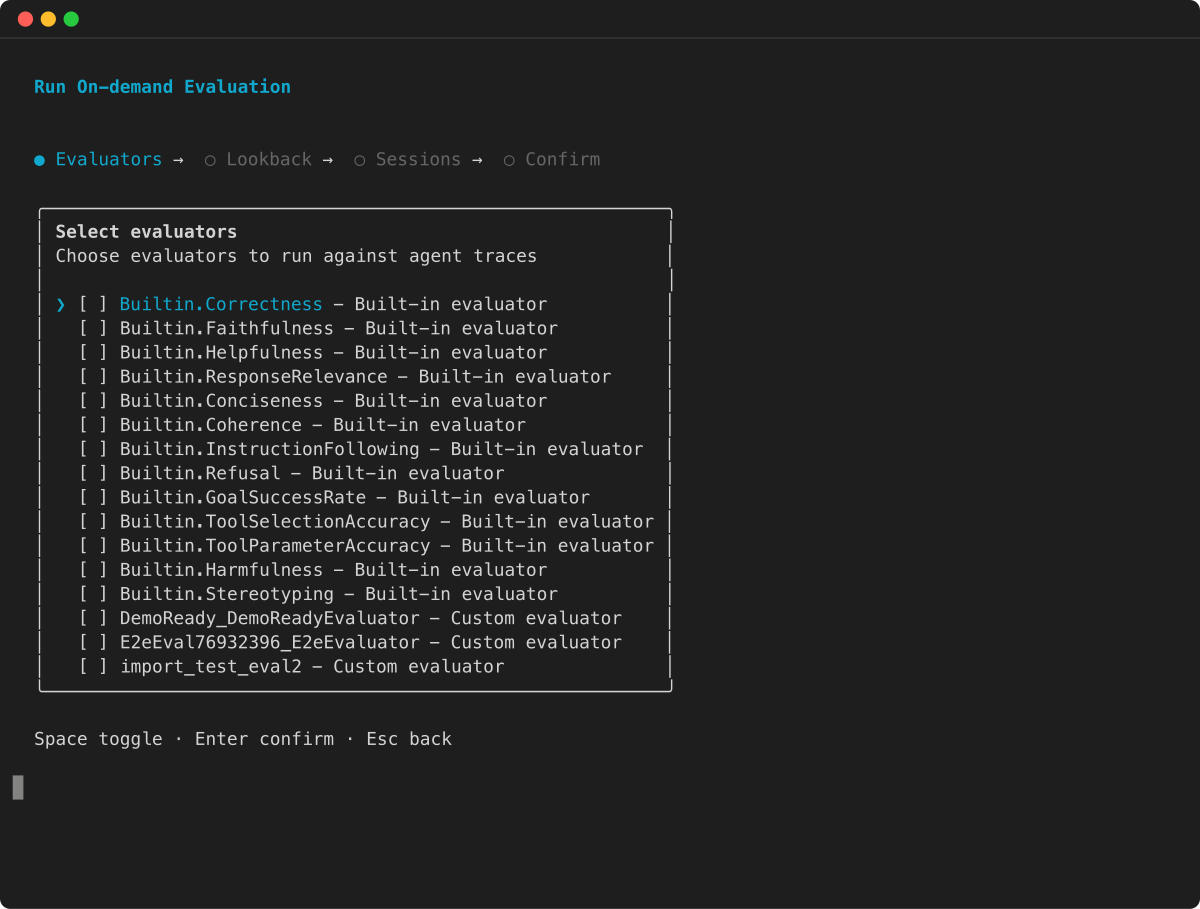
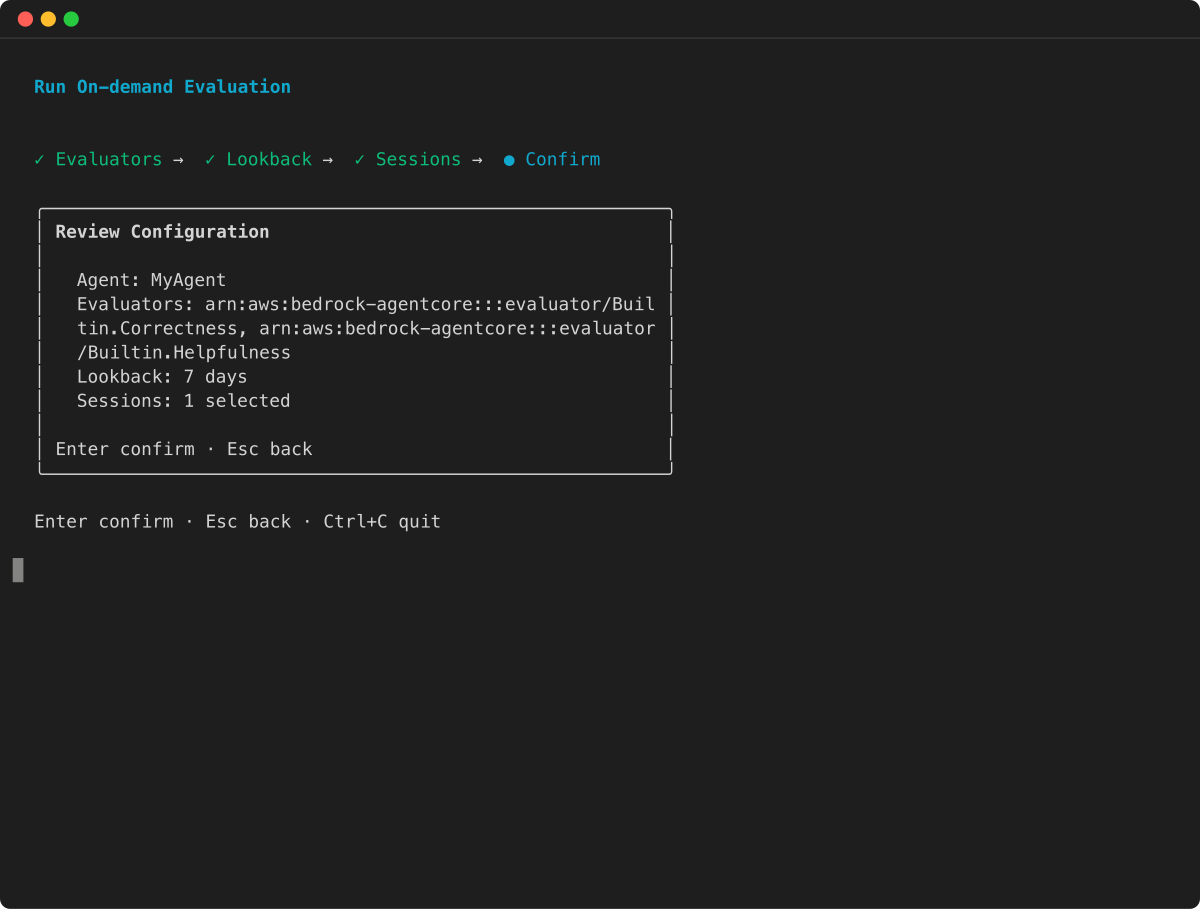
AWS 開發套件
從 CloudWatch 下載 span-logs
呼叫 Evaluate API 之前,您需要從 CloudWatch 下載跨度日誌。您可以使用以下 Python 程式碼來執行此操作,並選擇性地將其儲存在 JSON 檔案中。這可讓您更輕鬆地對具有不同評估者的相同工作階段提出請求。
注意
日誌在 CloudWatch 中填入需要幾分鐘的時間,因此如果您在客服人員叫用後立即嘗試執行以下指令碼,則日誌可能是空的或不完整的
import boto3
import time
import json
from datetime import datetime, timedelta

region = "region-code"
agent_id = "agent-id-from-step-2"
session_id = "session-id-from-step-3"

def query_logs(log_group_name, query_string):
    client = boto3.client('logs', region_name=region)
    start_time = datetime.now() - timedelta(minutes=60) # past 1 hour
    end_time = datetime.now()

    query_id = client.start_query(
        logGroupName=log_group_name,
        startTime=int(start_time.timestamp()),
        endTime=int(end_time.timestamp()),
        queryString=query_string
    )['queryId']

    while (result := client.get_query_results(queryId=query_id))['status'] not in ['Complete', 'Failed']:
        time.sleep(1)

    if result['status'] == 'Failed':
        raise Exception("Query failed")
    return result['results']

def query_session_logs(log_group_name, session_id, **kwargs):
    query = f"""fields @timestamp, @message
    | filter ispresent(scope.name) and ispresent(attributes.session.id)
    | filter attributes.session.id = "{session_id}"
    | sort @timestamp asc"""
    return query_logs(log_group_name, query, **kwargs)

def query_agent_runtime_logs(agent_id, endpoint, session_id, **kwargs):
    return query_session_logs(
        f"/aws/bedrock-agentcore/runtimes/{agent_id}-{endpoint}",
        session_id, **kwargs)

def query_aws_spans_logs(session_id, **kwargs):
    return query_session_logs("aws/spans", session_id, **kwargs)

def extract_messages_as_json(query_results):
    return [json.loads(f['value']) for row in query_results
            for f in row if f['field'] == '@message'
            and f['value'].strip().startswith('{')]

def get_session_span_logs():
    agent_runtime_logs = query_agent_runtime_logs(
        agent_id=agent_id, endpoint="DEFAULT", session_id=session_id
    )
    print(f"Downloaded {len(agent_runtime_logs)} runtime-log entries")

    aws_span_logs = query_aws_spans_logs(session_id=session_id)
    print(f"Downloaded {len(aws_span_logs)} aws/span entries")

    session_span_logs = extract_messages_as_json(aws_span_logs) + extract_messages_as_json(agent_runtime_logs)
    print(f"Returning {len(aws_span_logs) + len(agent_runtime_logs)} total records")
    return session_span_logs

# get the spans from cloudwatch
session_span_logs = get_session_span_logs()

# optional (dump in a json file for reuse)
session_span_logs_file_name = "ace-demo-session.json"
with open(session_span_logs_file_name, "w") as f:
    json.dump(session_span_logs, f, indent=2)
通話評估
一旦您擁有輸入範圍,就可以叫用 Evaluate API。請注意,回應可能需要一些時間,因為大型語言模型正在對您的追蹤進行評分。
# initialise client
ace_dp_client = boto3.client('bedrock-agentcore', region_name = region)

# call evaluate
response = ace_dp_client.evaluate(
    evaluatorId = "Builtin.Helpfulness", # can be a custom evaluator id as well
    evaluationInput = {"sessionSpans": session_span_logs})

print(response["evaluationResults"])
如果您使用上述 並將工作階段跨度傾印在 json 檔案中,您也可以執行評估,如下所示
with open(session_span_logs_file_name, "r") as f:
    session_span_logs = json.load(f)

# initialise client
ace_dp_client = boto3.client('bedrock-agentcore', region_name = region)

# call evaluate
response = ace_dp_client.evaluate(
    evaluatorId = "Builtin.ToolSelectionAccuracy", # can be a custom evaluator id as well
    evaluationInput = {"sessionSpans": session_span_logs})

print(response["evaluationResults"])
使用評估目標
若要評估工作階段中的特定追蹤或工具,您可以使用請求中的 evaluationTarget 參數來指定目標。
工作階段層級評估器
由於服務每次評估僅支援一個工作階段,因此您不需要明確設定評估目標。
追蹤層級評估器
對於追蹤層級評估器 (例如 Builtin.Helpfulness或 Builtin.Correctness ),請在 evaluationTarget 參數中設定追蹤 IDs:
response = ace_dp_client.evaluate(
    evaluatorId = "Builtin.Helpfulness",
    evaluationInput = {"sessionSpans": session_span_logs},
    evaluationTarget = {"traceIds": ["trace-id-1", "trace-id-2"]}
)
工具呼叫層級評估器
對於跨層級評估器 (例如 Builtin.ToolSelectionAccuracy ),請在 evaluationTarget 參數中設定跨度 IDs:
response = ace_dp_client.evaluate(
    evaluatorId = "Builtin.ToolSelectionAccuracy",
    evaluationInput = {"sessionSpans": session_span_logs},
    evaluationTarget = {"spanIds": ["span-id-1", "span-id-2"]}
)
步驟 4:評估結果
每個 Evaluate API 呼叫都會傳回包含評估者結果清單的回應。由於單一工作階段可以包含多個追蹤和工具呼叫,因此這些元素會評估為不同的實體。因此,單一 API 呼叫可能會傳回多個評估結果。
{
    "evaluationResults": [ {evaluation-result-1}, {evaluation-result_2},.... ]
}
結果限制
每個 API 呼叫傳回的評估數量限制為 10 個結果。例如,如果您使用追蹤層級評估器評估包含 15 個追蹤的工作階段,回應最多可包含 10 個結果。根據預設,API 會傳回最後 10 個評估,因為這些評估通常包含與評估品質最相關的內容。
部分失敗
API 呼叫可能會在 m 評估失敗時處理 n 個評估。故障可能因為各種原因而發生,包括:
-
從模型提供者調節
-
剖析錯誤
-
模型逾時
-
其他處理問題
在部分失敗的情況下,回應包含成功和失敗的評估。失敗的結果包括錯誤代碼和錯誤訊息,以協助您診斷問題。
範圍內容
每個評估者結果都有一個spanContext欄位,可識別評估的實體:
-
對於工作階段層級評估器,只有
sessionId存在。 -
對於追蹤層級評估器,
sessionId和traceId存在。 -
對於工具層級評估器,、
traceId和sessionIdspanId存在。
成功結果項目範例
這只是一個項目。如果工作階段有多個追蹤,您會看到多個這類項目,每個追蹤各一個。同樣地,對於工具層級評估器,如果有多個工具呼叫並提供工具評估器 (例如 Builtin.ToolSelectionAccuracy ),則每個工具範圍都會有一個結果。
{
  "evaluatorArn": "arn:aws:bedrock-agentcore:::evaluator/Builtin.Helpfulness",
  "evaluatorId": "Builtin.Helpfulness",
  "evaluatorName": "Builtin.Helpfulness",
  "explanation": ".... evaluation explanation will be added here ...",
  "context": {
    "spanContext": {
      "sessionId": "test-ace-demo-session-18a1dba0-62a0-462e",
      "traceId": "....trace_id......."
    }
  },
  "value": 0.83,
  "label": "Very Helpful",
  "tokenUsage": {
    "inputTokens": 958,
    "outputTokens": 211,
    "totalTokens": 1169
  }
}
失敗的結果項目範例
{
    "evaluatorArn": "arn:aws:bedrock-agentcore:::evaluator/Builtin.Helpfulness",
    "evaluatorId": "Builtin.Helpfulness",
    "evaluatorName": "Builtin.Helpfulness",
    "context": {
        "spanContext": {
            "sessionId": "test-ace-demo-session-18a1dba0-62a0-462e",
            "traceId": "....trace_id......."
        }
    },
    "errorMessage": ".... details of the error....",
    "errorCode": ".... name/code of the error...."
}
