**此頁面僅適用於使用 Vaults 和 2012 年原始 REST API 的 Amazon Glacier 服務的現有客戶。**
如果您要尋找封存儲存解決方案,建議您在 Amazon Glacier Instant Retrieval、S3 Glacier Flexible Retrieval 和 S3 Glacier Deep Archive 中使用 Amazon Glacier 儲存類別。 Amazon S3 若要進一步了解這些儲存選項,請參閱 [Amazon Glacier 儲存類別](https://aws.amazon.com/s3/storage-classes/glacier/)。
Amazon Glacier (原始獨立保存庫型服務) 不再接受新客戶。Amazon Glacier 是一項獨立服務,具有自己的 APIs,可將資料存放在保存庫中,並與 Amazon S3 和 Amazon S3 Glacier 儲存類別不同。您現有的資料將在 Amazon Glacier 中無限期保持安全且可存取。不需要遷移。對於低成本、長期的封存儲存, AWS 建議使用 [Amazon S3 Glacier 儲存類別](https://aws.amazon.com/s3/storage-classes/glacier/),透過 S3 儲存貯體型 APIs、完整 AWS 區域 可用性、降低成本 AWS 和服務整合,提供卓越的客戶體驗。如果您想要增強功能,請考慮使用我們的解決方案指南,將資料從 Amazon S3 Glacier 保存庫傳輸至 Amazon S3 Glacier 儲存類別,以遷移至 Amazon S3 Glacier 儲存類別。 [AWS Amazon Glacier Amazon S3 ](https://aws.amazon.com/solutions/guidance/data-transfer-from-amazon-s3-glacier-vaults-to-amazon-s3/)
本文為英文版的機器翻譯版本,如內容有任何歧義或不一致之處,概以英文版為準。
# 運算檢查總和
當上傳封存時,您必須同時包含 `x-amz-sha256-tree-hash` 和 `x-amz-content-sha256` 標頭。`x-amz-sha256-tree-hash` 標題是您的請求內文中承載的檢查總和。此主題說明如何計算 `x-amz-sha256-tree-hash` 標頭。`x-amz-content-sha256` 標頭是整個承載的雜湊,並且是授權所需。如需詳細資訊,請參閱[串流 API 的簽章計算範例](amazon-glacier-signing-requests.md#example-signature-calculation-streaming)。
請求的承載內容可以是:
+ **整個封存:**在單一請求中使用上傳封存 API 上傳封存時,您在請求內文傳送整個封存。在這種情況下,您必須包含整個封存的檢查總和。
+ **封存部分:**使用分段上傳 API 以部分形式上傳封存時,您僅在請求內文傳送部分封存。在這種情況下,會包含封存部分的檢查總和。而且在上傳所有的部分後,您會完成分段上傳請求,其必須包含整個封存的檢查總和。
承載的檢查總和是 SHA-256 樹雜湊。其稱為樹雜湊的原因是,在運算檢查總和的過程中,您會計算 SHA-256 樹雜湊值。根的雜湊值是整個封存的檢查總和。
**注意**
本節說明運算 SHA-256 樹雜湊的方式。不過,您可以使用任何會產生相同結果的程序。
您運算 SHA-256 樹雜湊,如下所示:
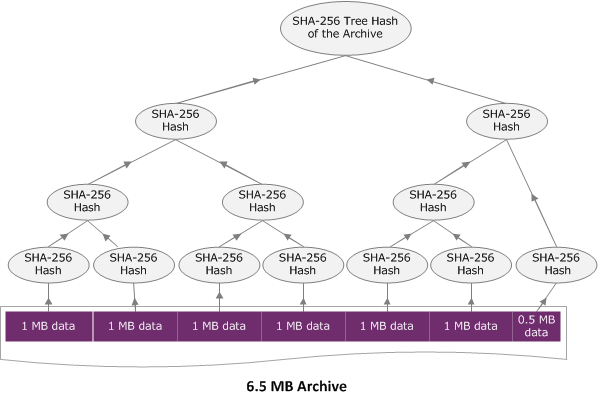
1. 對於每個 1 MB 區塊的承載資料,運算 SHA-256 雜湊。最後區塊的資料可能小於 1 MB。例如,如果上傳 3.2 MB 的封存,您為前三個 1 MB 的資料區塊的每一個運算 SHA-256 雜湊值,然後運算剩餘 0.2 MB 資料的 SHA-256 雜湊。這些雜湊值形成樹狀結構的分葉節點。
1. 建置下一個層級的樹狀結構。
1. 串連兩個連續的子節點雜湊值,並且運算已串連雜湊值的 SHA-256 雜湊。這個串連及 SHA-256 雜湊的產生會產生兩個子節點的父節點。
1. 如果只剩一個子節點,就會將該雜湊值提升到樹狀結構的下一個層級。
1. 重複步驟 2,直到產生的樹狀結構有根。樹狀結構的根提供整個封存的雜湊,而適當子樹狀結構則提供分段上傳部分的雜湊。
**Topics**
+ [樹雜湊範例 1:在單一請求上傳封存](#checksum-calculations-upload-archive-in-single-payload)
+ [樹雜湊範例 2:使用分段上傳來上傳封存](#checksum-calculations-upload-archive-using-mpu)
+ [運算檔案的樹雜湊](#checksum-calculations-examples)
+ [下載資料時接收檢查總和](checksum-calculations-range.md)
## 樹雜湊範例 1:在單一請求上傳封存
在單一請求中使用上傳封存 API 上傳封存時 (請參閱 [上傳封存 (POST 封存)](api-archive-post.md)) 請求承載包含整個封存。因此,您必須在 `x-amz-sha256-tree-hash` 請求標頭中包含整個封存的樹雜湊。假設您想要上傳 6.5 MB 的封存。下圖說明建立封存的 SHA-256 雜湊的程序。您讀取封存並運算每 1 MB 區塊的 SHA-256 雜湊。您也運算剩餘 0.5 MB 資料的雜湊,然後依所述的樹狀結構建置程序。
## 樹雜湊範例 2:使用分段上傳來上傳封存
在使用分段上傳來上傳封存時,其運算樹雜湊的程序和在單一請求上傳封存的程序是相同的。唯一的差別是,在分段上傳只上傳每個請求的一部分封存 (使用 [分段上傳 (PUT uploadID)](api-upload-part.md) API),因此,您只提供 `x-amz-sha256-tree-hash` 請求標頭部分的檢查總和。不過,在上傳所有部分後,您必須隨著 [完成分段上傳 (POST uploadID)](api-multipart-complete-upload.md) 請求標頭中整個封存的樹雜湊,傳送「完成分段上傳」(請參閱 `x-amz-sha256-tree-hash`) 請求。

## 運算檔案的樹雜湊
這裡所顯示的演算法僅示範之目定而選定。您可以視您實作情況的需要最佳化程式碼。如果您使用 Amazon SDK 針對 Amazon Glacier (Amazon Glacier) 進行程式設計,則會為您完成樹雜湊計算,而且您只需要提供檔案參考。
**Example 1: Java 範例**
以下範例說明如何計算使用 Java 的檔案的 SHA256 樹雜湊。您可以執行這個範例,做法是提供檔案位置做為引數,或可直接從您的程式碼使用 `TreeHashExample.computeSHA256TreeHash` 方法。
```
import java.io.File;
import java.io.FileInputStream;
import java.io.IOException;
import java.security.MessageDigest;
import java.security.NoSuchAlgorithmException;
public class TreeHashExample {
static final int ONE_MB = 1024 * 1024;
/**
* Compute the Hex representation of the SHA-256 tree hash for the specified
* File
*
* @param args
* args[0]: a file to compute a SHA-256 tree hash for
*/
public static void main(String[] args) {
if (args.length < 1) {
System.err.println("Missing required filename argument");
System.exit(-1);
}
File inputFile = new File(args[0]);
try {
byte[] treeHash = computeSHA256TreeHash(inputFile);
System.out.printf("SHA-256 Tree Hash = %s\n", toHex(treeHash));
} catch (IOException ioe) {
System.err.format("Exception when reading from file %s: %s", inputFile,
ioe.getMessage());
System.exit(-1);
} catch (NoSuchAlgorithmException nsae) {
System.err.format("Cannot locate MessageDigest algorithm for SHA-256: %s",
nsae.getMessage());
System.exit(-1);
}
}
/**
* Computes the SHA-256 tree hash for the given file
*
* @param inputFile
* a File to compute the SHA-256 tree hash for
* @return a byte[] containing the SHA-256 tree hash
* @throws IOException
* Thrown if there's an issue reading the input file
* @throws NoSuchAlgorithmException
*/
public static byte[] computeSHA256TreeHash(File inputFile) throws IOException,
NoSuchAlgorithmException {
byte[][] chunkSHA256Hashes = getChunkSHA256Hashes(inputFile);
return computeSHA256TreeHash(chunkSHA256Hashes);
}
/**
* Computes a SHA256 checksum for each 1 MB chunk of the input file. This
* includes the checksum for the last chunk even if it is smaller than 1 MB.
*
* @param file
* A file to compute checksums on
* @return a byte[][] containing the checksums of each 1 MB chunk
* @throws IOException
* Thrown if there's an IOException when reading the file
* @throws NoSuchAlgorithmException
* Thrown if SHA-256 MessageDigest can't be found
*/
public static byte[][] getChunkSHA256Hashes(File file) throws IOException,
NoSuchAlgorithmException {
MessageDigest md = MessageDigest.getInstance("SHA-256");
long numChunks = file.length() / ONE_MB;
if (file.length() % ONE_MB > 0) {
numChunks++;
}
if (numChunks == 0) {
return new byte[][] { md.digest() };
}
byte[][] chunkSHA256Hashes = new byte[(int) numChunks][];
FileInputStream fileStream = null;
try {
fileStream = new FileInputStream(file);
byte[] buff = new byte[ONE_MB];
int bytesRead;
int idx = 0;
int offset = 0;
while ((bytesRead = fileStream.read(buff, offset, ONE_MB)) > 0) {
md.reset();
md.update(buff, 0, bytesRead);
chunkSHA256Hashes[idx++] = md.digest();
offset += bytesRead;
}
return chunkSHA256Hashes;
} finally {
if (fileStream != null) {
try {
fileStream.close();
} catch (IOException ioe) {
System.err.printf("Exception while closing %s.\n %s", file.getName(),
ioe.getMessage());
}
}
}
}
/**
* Computes the SHA-256 tree hash for the passed array of 1 MB chunk
* checksums.
*
* This method uses a pair of arrays to iteratively compute the tree hash
* level by level. Each iteration takes two adjacent elements from the
* previous level source array, computes the SHA-256 hash on their
* concatenated value and places the result in the next level's destination
* array. At the end of an iteration, the destination array becomes the
* source array for the next level.
*
* @param chunkSHA256Hashes
* An array of SHA-256 checksums
* @return A byte[] containing the SHA-256 tree hash for the input chunks
* @throws NoSuchAlgorithmException
* Thrown if SHA-256 MessageDigest can't be found
*/
public static byte[] computeSHA256TreeHash(byte[][] chunkSHA256Hashes)
throws NoSuchAlgorithmException {
MessageDigest md = MessageDigest.getInstance("SHA-256");
byte[][] prevLvlHashes = chunkSHA256Hashes;
while (prevLvlHashes.length > 1) {
int len = prevLvlHashes.length / 2;
if (prevLvlHashes.length % 2 != 0) {
len++;
}
byte[][] currLvlHashes = new byte[len][];
int j = 0;
for (int i = 0; i < prevLvlHashes.length; i = i + 2, j++) {
// If there are at least two elements remaining
if (prevLvlHashes.length - i > 1) {
// Calculate a digest of the concatenated nodes
md.reset();
md.update(prevLvlHashes[i]);
md.update(prevLvlHashes[i + 1]);
currLvlHashes[j] = md.digest();
} else { // Take care of remaining odd chunk
currLvlHashes[j] = prevLvlHashes[i];
}
}
prevLvlHashes = currLvlHashes;
}
return prevLvlHashes[0];
}
/**
* Returns the hexadecimal representation of the input byte array
*
* @param data
* a byte[] to convert to Hex characters
* @return A String containing Hex characters
*/
public static String toHex(byte[] data) {
StringBuilder sb = new StringBuilder(data.length * 2);
for (int i = 0; i < data.length; i++) {
String hex = Integer.toHexString(data[i] & 0xFF);
if (hex.length() == 1) {
// Append leading zero.
sb.append("0");
}
sb.append(hex);
}
return sb.toString().toLowerCase();
}
}
```
**Example 2: C\# .NET 範例**
以下範例說明如何計算使檔案的 SHA256 樹雜湊。您可以執行此範例,做法是提供檔案位置做為引數。
```
using System;
using System.IO;
using System.Security.Cryptography;
namespace ExampleTreeHash
{
class Program
{
static int ONE_MB = 1024 * 1024;
/**
* Compute the Hex representation of the SHA-256 tree hash for the
* specified file
*
* @param args
* args[0]: a file to compute a SHA-256 tree hash for
*/
public static void Main(string[] args)
{
if (args.Length < 1)
{
Console.WriteLine("Missing required filename argument");
Environment.Exit(-1);
}
FileStream inputFile = File.Open(args[0], FileMode.Open, FileAccess.Read);
try
{
byte[] treeHash = ComputeSHA256TreeHash(inputFile);
Console.WriteLine("SHA-256 Tree Hash = {0}", BitConverter.ToString(treeHash).Replace("-", "").ToLower());
Console.ReadLine();
Environment.Exit(-1);
}
catch (IOException ioe)
{
Console.WriteLine("Exception when reading from file {0}: {1}",
inputFile, ioe.Message);
Console.ReadLine();
Environment.Exit(-1);
}
catch (Exception e)
{
Console.WriteLine("Cannot locate MessageDigest algorithm for SHA-256: {0}",
e.Message);
Console.WriteLine(e.GetType());
Console.ReadLine();
Environment.Exit(-1);
}
Console.ReadLine();
}
/**
* Computes the SHA-256 tree hash for the given file
*
* @param inputFile
* A file to compute the SHA-256 tree hash for
* @return a byte[] containing the SHA-256 tree hash
*/
public static byte[] ComputeSHA256TreeHash(FileStream inputFile)
{
byte[][] chunkSHA256Hashes = GetChunkSHA256Hashes(inputFile);
return ComputeSHA256TreeHash(chunkSHA256Hashes);
}
/**
* Computes a SHA256 checksum for each 1 MB chunk of the input file. This
* includes the checksum for the last chunk even if it is smaller than 1 MB.
*
* @param file
* A file to compute checksums on
* @return a byte[][] containing the checksums of each 1MB chunk
*/
public static byte[][] GetChunkSHA256Hashes(FileStream file)
{
long numChunks = file.Length / ONE_MB;
if (file.Length % ONE_MB > 0)
{
numChunks++;
}
if (numChunks == 0)
{
return new byte[][] { CalculateSHA256Hash(null, 0) };
}
byte[][] chunkSHA256Hashes = new byte[(int)numChunks][];
try
{
byte[] buff = new byte[ONE_MB];
int bytesRead;
int idx = 0;
while ((bytesRead = file.Read(buff, 0, ONE_MB)) > 0)
{
chunkSHA256Hashes[idx++] = CalculateSHA256Hash(buff, bytesRead);
}
return chunkSHA256Hashes;
}
finally
{
if (file != null)
{
try
{
file.Close();
}
catch (IOException ioe)
{
throw ioe;
}
}
}
}
/**
* Computes the SHA-256 tree hash for the passed array of 1MB chunk
* checksums.
*
* This method uses a pair of arrays to iteratively compute the tree hash
* level by level. Each iteration takes two adjacent elements from the
* previous level source array, computes the SHA-256 hash on their
* concatenated value and places the result in the next level's destination
* array. At the end of an iteration, the destination array becomes the
* source array for the next level.
*
* @param chunkSHA256Hashes
* An array of SHA-256 checksums
* @return A byte[] containing the SHA-256 tree hash for the input chunks
*/
public static byte[] ComputeSHA256TreeHash(byte[][] chunkSHA256Hashes)
{
byte[][] prevLvlHashes = chunkSHA256Hashes;
while (prevLvlHashes.GetLength(0) > 1)
{
int len = prevLvlHashes.GetLength(0) / 2;
if (prevLvlHashes.GetLength(0) % 2 != 0)
{
len++;
}
byte[][] currLvlHashes = new byte[len][];
int j = 0;
for (int i = 0; i < prevLvlHashes.GetLength(0); i = i + 2, j++)
{
// If there are at least two elements remaining
if (prevLvlHashes.GetLength(0) - i > 1)
{
// Calculate a digest of the concatenated nodes
byte[] firstPart = prevLvlHashes[i];
byte[] secondPart = prevLvlHashes[i + 1];
byte[] concatenation = new byte[firstPart.Length + secondPart.Length];
System.Buffer.BlockCopy(firstPart, 0, concatenation, 0, firstPart.Length);
System.Buffer.BlockCopy(secondPart, 0, concatenation, firstPart.Length, secondPart.Length);
currLvlHashes[j] = CalculateSHA256Hash(concatenation, concatenation.Length);
}
else
{ // Take care of remaining odd chunk
currLvlHashes[j] = prevLvlHashes[i];
}
}
prevLvlHashes = currLvlHashes;
}
return prevLvlHashes[0];
}
public static byte[] CalculateSHA256Hash(byte[] inputBytes, int count)
{
SHA256 sha256 = System.Security.Cryptography.SHA256.Create();
byte[] hash = sha256.ComputeHash(inputBytes, 0, count);
return hash;
}
}
}
```