本文為英文版的機器翻譯版本,如內容有任何歧義或不一致之處,概以英文版為準。
在 DynamoDB 中啟用存留時間 (TTL)
注意
為協助偵錯與驗證 TTL 功能是否正常運作,項目的 TTL 值會以純文字形式記錄在 DynamoDB 診斷日誌中。
您可以在 Amazon DynamoDB 主控台、 AWS Command Line Interface (AWS CLI) 中啟用 TTL,或使用 Amazon DynamoDB API 參考與任何支援的 AWS SDKs。在所有分割區啟用 TTL 約需一小時。
登入 AWS 管理主控台 ,並在 https://https://console.aws.amazon.com/dynamodb/
開啟 DynamoDB 主控台。 -
選擇 Tables (資料表),然後選擇您想要修改的資料表。
-
在附加設定分頁的存留時間 (TTL)區段中,選取開啟以啟用 TTL。
-
在資料表上啟用 TTL 時,DynamoDB 會要求您識別服務在判斷項目是否符合過期資格時將尋找的特定屬性名稱。如下所示的 TTL 屬性名稱區分大小寫,且必須與讀寫操作中定義的屬性一致。若不一致,過期項目將無法被刪除。若要重新命名 TTL 屬性,您必須先停用 TTL,然後使用新的屬性名稱重新啟用。停用後,TTL 仍會在約 30 分鐘內持續處理刪除作業。還原資料表後,必須重新設定 TTL。
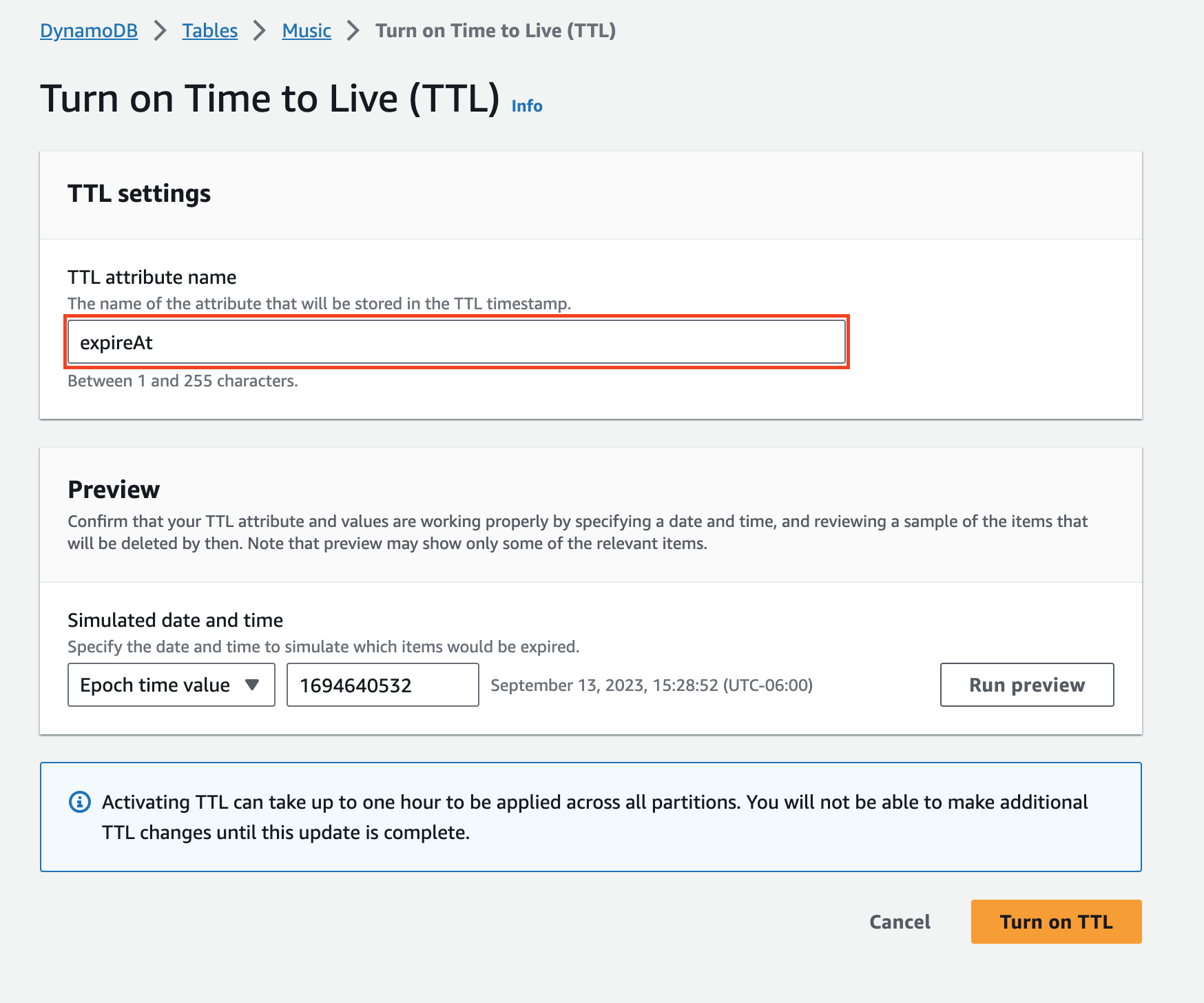
-
(選用) 您可以模擬到期日期與時間,並比對部分項目以進行測試。這將提供項目範例清單,並確認其中包含設定了 TTL 屬性名稱與到期時間的項目。
啟用 TTL 後,當您在 DynamoDB 主控台檢視項目時,TTL 屬性會顯示為 TTL。您可以將滑鼠游標懸停到屬性上,來檢視項目過期的日期和時間。
注意
UpdateTimeToLive 不是等冪。如果 TTL 已啟用,或者如果您在一小時時段內為相同資料表呼叫UpdateTimeToLive多次,則操作會傳回 ValidationException(HTTP 400),而不是以無提示方式成功。當 TTL 已處於作用中狀態時,啟用具有不同屬性名稱的 TTL 也會傳回 ValidationException。在呼叫程式碼中處理此例外狀況,而不是假設呼叫一律成功。例如,您可以將「TimeToLive 已啟用」錯誤視為確認設定已就緒。
-
啟用
TTLExample表中的 TTL。aws dynamodb update-time-to-live --table-name TTLExample --time-to-live-specification "Enabled=true, AttributeName=ttl" -
描述
TTLExample表中的 TTL。aws dynamodb describe-time-to-live --table-name TTLExample { "TimeToLiveDescription": { "AttributeName": "ttl", "TimeToLiveStatus": "ENABLED" } } -
使用 BASH shell 及 AWS CLI,將項目新增至已設定存留時間屬性的
TTLExample資料表。EXP=`date -d '+5 days' +%s` aws dynamodb put-item --table-name "TTLExample" --item '{"id": {"N": "1"}, "ttl": {"N": "'$EXP'"}}'
此範例建立的過期時間為從目前的日期開始加 5 天。然後,將過期時間轉換成 Epoch 時間格式,最終將項目新增到 "TTLExample" 表。
注意
設定存留時間過期數值的其中一種方式,是計算要新增到過期時間的秒數。例如,5 天等於 432,000 秒。但是通常建議從日期開始操作。
取得目前時間的 Epoch 時間格式非常容易,如以下範例所示。
-
Linux 終端機:
date +%s -
Python:
import time; int(time.time()) -
Java:
System.currentTimeMillis() / 1000L -
JavaScript:
Math.floor(Date.now() / 1000)
AWSTemplateFormatVersion: "2010-09-09"
Resources:
  TTLExampleTable:
    Type: AWS::DynamoDB::Table
    Description: "A DynamoDB table with TTL Specification enabled"
    Properties:
      AttributeDefinitions:
        - AttributeName: "Album"
          AttributeType: "S"
        - AttributeName: "Artist"
          AttributeType: "S"
      KeySchema:
        - AttributeName: "Album"
          KeyType: "HASH"
        - AttributeName: "Artist"
          KeyType: "RANGE"
      ProvisionedThroughput:
        ReadCapacityUnits: "5"
        WriteCapacityUnits: "5"
      TimeToLiveSpecification:
        AttributeName: "TTLExampleAttribute"
        Enabled: true
您可以在此處找到有關在 CloudFormation 範本中使用 TTL 的其他詳細資訊。
