本文為英文版的機器翻譯版本,如內容有任何歧義或不一致之處,概以英文版為準。
# DynamoDB 中的投訴管理系統結構描述設計
## 投訴管理系統商業使用案例
DynamoDB 是非常適合投訴管理系統 (或聯絡中心) 使用案例的資料庫,因為與其相關聯的大多數存取模式都是採用鍵值型交易查詢。這種情況的典型存取模式會是:
+ 建立和更新投訴
+ 呈報投訴
+ 建立和讀取投訴的評論
+ 取得某一位客戶的所有投訴
+ 取得某一位客服人員的所有評論並取得所有呈報
某些評論可能包含描述投訴或解決方案的附件。雖然這些全都是鍵值存取模式,但可能會有其他需求,例如,有新評論新增至投訴時傳送通知,或是執行分析查詢,以便了解每週在嚴重性 (或客服人員表現) 方面的投訴分佈情形。與生命週期管理或合規有關的其他需求,可能包括從記錄投訴起算經過三年後封存投訴資料。
## 投訴管理系統架構圖
下圖顯示投訴管理系統的架構圖。此圖表顯示投訴管理系統使用的不同 AWS 服務 整合。
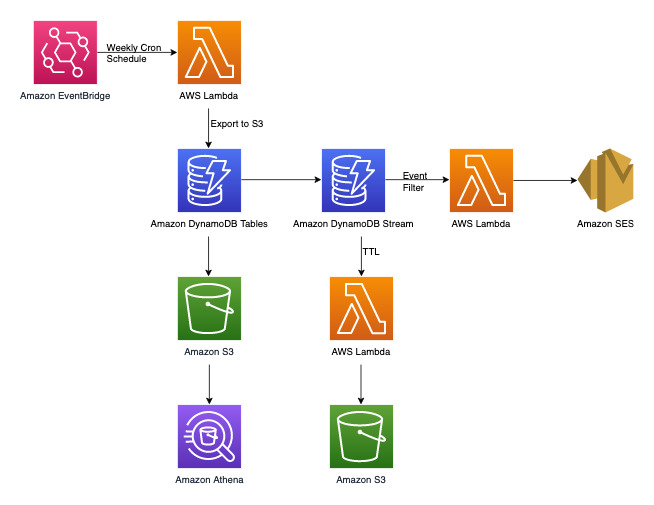
除了稍後將在「DynamoDB 資料建模」一節中討論的鍵值交易存取模式之外,還有三項非交易需求。上面的架構圖可分成以下三個工作流程:
1. 有新評論新增至投訴時傳送通知
1. 對每週資料執行分析查詢
1. 封存超過三年的資料
讓我們進一步深入探討上述每一項。
**有新評論新增至投訴時傳送通知**
我們可以使用下面的工作流程來達成此需求:
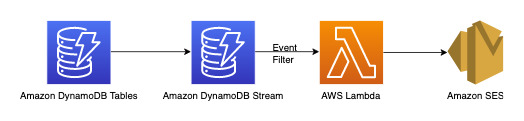
[DynamoDB Streams](Streams.md) 是一種變更資料擷取機制,用來記錄 DynamoDB 資料表上的所有寫入活動。您可以設定 Lambda 函式來觸發部分或全部變更。您可以在 Lambda 觸發程序上設定[事件篩選條件](https://docs.aws.amazon.com/lambda/latest/dg/invocation-eventfiltering.html),以篩選掉與使用案例無關的事件。在此範例中,我們只能在有新評論新增時使用篩選條件來觸發 Lambda,並傳送通知至可從 [AWS Secrets Manager](https://docs.aws.amazon.com/secretsmanager/latest/userguide/intro.html) 或任何其他憑證存放區提取的相關電子郵件 ID。
**對每週資料執行分析查詢**
DynamoDB 適合用於主要進行線上交易處理 (OLTP) 的工作負載。對於具有分析需求的其他 10-20% 存取模式,可以使用受管的[匯出至 Amazon S3](S3DataExport.HowItWorks.md) 功能將資料匯出到 S3,這樣做不會影響 DynamoDB 資料表上的即時流量。讓我們來了解下面這個工作流程:

[Amazon EventBridge](https://docs.aws.amazon.com/eventbridge/latest/userguide/eb-what-is) 可用於 AWS Lambda 按排程觸發 - 它可讓您設定 cron 表達式,以便 Lambda 調用定期進行。Lambda 可以調用 `ExportToS3` API 呼叫並將 DynamoDB 資料儲存在 S3 中。隨後 SQL 引擎 (如 [Amazon Athena](https://docs.aws.amazon.com/athena/latest/ug/what-is)) 就能存取此 S3 資料,以對 DynamoDB 資料執行分析查詢,而不會影響資料表上的即時交易工作負載。依嚴重性層級尋找投訴數目的 Athena 範例查詢如下所示:
```
SELECT Item.severity.S as "Severity", COUNT(Item) as "Count"
FROM "complaint_management"."data"
WHERE NOT Item.severity.S = ''
GROUP BY Item.severity.S ;
```
產生的 Athena 查詢結果如下:

**封存超過三年的資料**
您可以利用 DynamoDB [存留時間 (TTL)](TTL.md) 功能刪除 DynamoDB 資料表中過時的資料,無需額外費用 (但 2019.11.21 (目前) 版的全域資料表複本除外,其中複寫到其他區域的 TTL 刪除項目會耗用寫入容量)。此資料隨即出現,且可從 DynamoDB Streams 取用並封存至 Amazon S3。此需求的工作流程如下:

## 投訴管理系統實體關係圖
這是我們將用於投訴管理系統結構描述設計的實體關係圖 (ERD)。

## 投訴管理系統存取模式
這些是我們針對投訴管理結構描述設計考量的存取模式。
1. createComplaint
1. updateComplaint
1. updateSeveritybyComplaintID
1. getComplaintByComplaintID
1. addCommentByComplaintID
1. getAllCommentsByComplaintID
1. getLatestCommentByComplaintID
1. getAComplaintbyCustomerIDAndComplaintID
1. getAllComplaintsByCustomerID
1. escalateComplaintByComplaintID
1. getAllEscalatedComplaints
1. getEscalatedComplaintsByAgentID (從最新到最舊的順序)
1. getCommentsByAgentID (兩個日期之間)
## 投訴管理系統結構描述設計演變
由於這是投訴管理系統,因此大多數存取模式都以投訴作為主要實體。高基數的 `ComplaintID` 將可確保資料在基礎分割區中均勻分佈,同時也是我們確定的存取模式最常見的搜尋條件。因此,`ComplaintID` 是此資料集中良好的分割區索引鍵選擇。
**步驟 1:位址存取模式 1 (`createComplaint`)、2 (`updateComplaint`)、3 (`updateSeveritybyComplaintID`) 和 4 (`getComplaintByComplaintID`)**
我們可以使用稱為「中繼資料」(或「AA」) 的通用排序索引鍵來儲存投訴專屬資訊,例如 `CustomerID`、`State`、`Severity` 和 `CreationDate`。我們使用單一操作搭配 `PK=ComplaintID` 和 `SK=“metadata”` 來執行下列操作:
1. [https://docs.aws.amazon.com/amazondynamodb/latest/APIReference/API_PutItem.html](https://docs.aws.amazon.com/amazondynamodb/latest/APIReference/API_PutItem.html) 用來建立新的投訴
1. [https://docs.aws.amazon.com/amazondynamodb/latest/APIReference/API_UpdateItem.html](https://docs.aws.amazon.com/amazondynamodb/latest/APIReference/API_UpdateItem.html) 用來更新投訴中繼資料中的嚴重性或其他欄位
1. [https://docs.aws.amazon.com/amazondynamodb/latest/APIReference/API_GetItem.html](https://docs.aws.amazon.com/amazondynamodb/latest/APIReference/API_GetItem.html) 用來提取投訴的中繼資料

**步驟 2:位址存取模式 5 (`addCommentByComplaintID`)**
此存取模式須在投訴與投訴的評論之間採用一對多關係模型。我們將在這裡採用[垂直分割](data-modeling-blocks.md#data-modeling-blocks-vertical-partitioning)技術來使用排序索引鍵,並建立具有不同類型資料的項目集合。只要查看存取模式 6 (`getAllCommentsByComplaintID`) 和 7 (`getLatestCommentByComplaintID`),就會了解評論需依時間排序。我們也可以同時接收多個評論,如此就能使用[複合排序索引鍵](data-modeling-blocks.md#data-modeling-blocks-composite)技術將時間和 `CommentID` 附加到排序索引鍵屬性中。
其他處理這類可能發生的評論衝突的選項,包括增加時間戳記的精細度,或是加上一個累加數字作為尾碼,而不要使用 `Comment_ID`。在這種情況下,我們將在對應評論之項目的排序索引鍵值加上首碼「comm\#」,以實現範圍型操作。
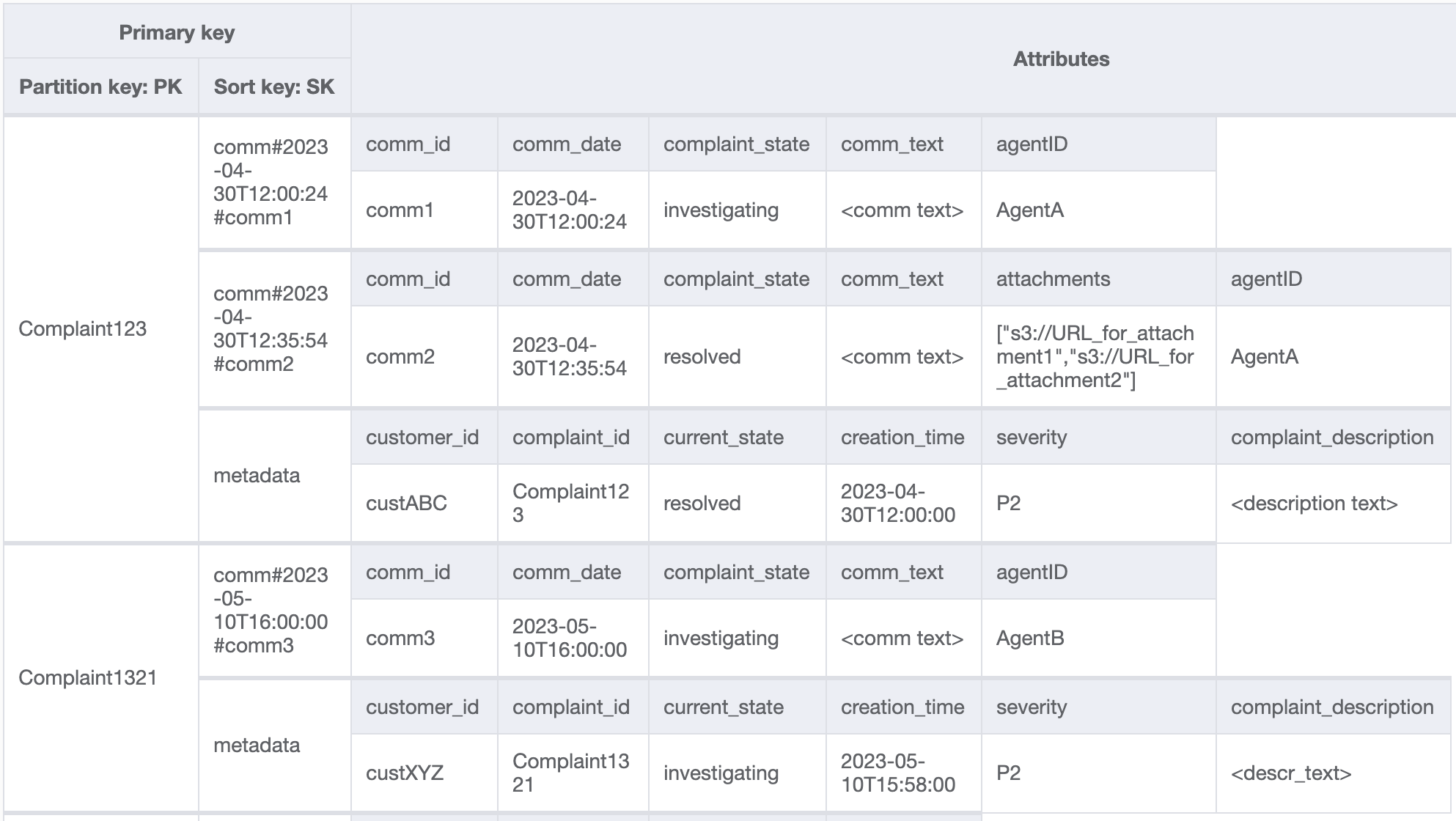
另外還需要確保投訴中繼資料中的 `currentState` 能反映新增新評論的狀態。新增評論可能表示,投訴已指派給客服人員或已解決等情況。為了在投訴中繼資料中綁定新增評論和更新目前狀態,我們將採用全有或全無的方式使用 [TransactWriteItems](https://docs.aws.amazon.com/amazondynamodb/latest/APIReference/API_TransactWriteItems.html) API。產生的資料表狀態現在看起來像這樣:

讓我們在資料表中新增更多資料,另外也新增 `ComplaintID` 作為有別於 `PK` 的另一個欄位,以便在 `ComplaintID` 需要其他索引時,讓模型能夠因應未來需要。另請注意,某些評論可能包含附件,我們會將這些附件儲存在 Amazon Simple Storage Service 中,並且只會在 DynamoDB 中維護其參考或 URL。最佳實務是盡可能保持交易資料庫精簡,以最佳化成本和效能。資料現在看起來像這樣:
**步驟 3:位址存取模式 6 (`getAllCommentsByComplaintID`) 和 7 (`getLatestCommentByComplaintID`)**
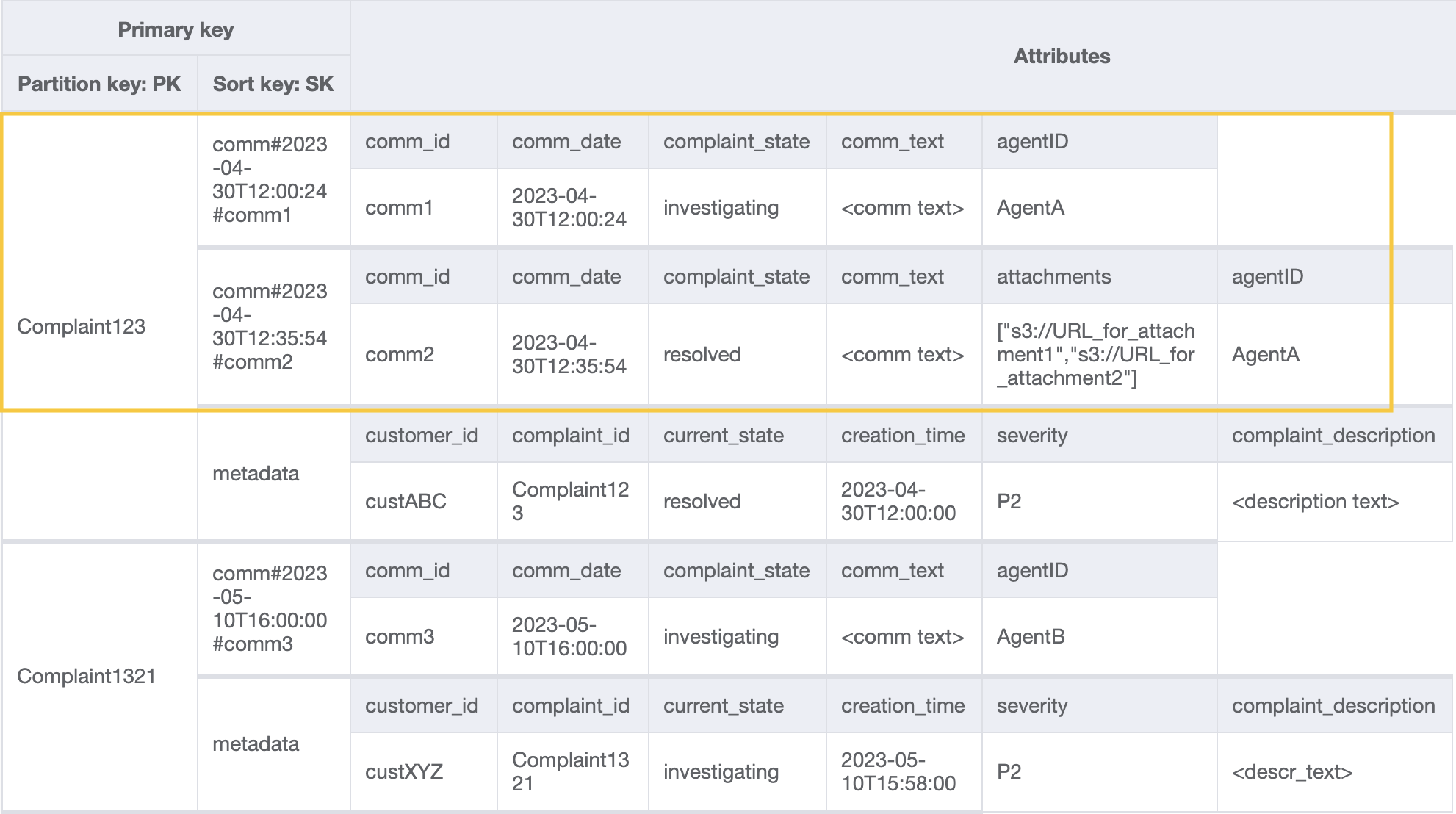
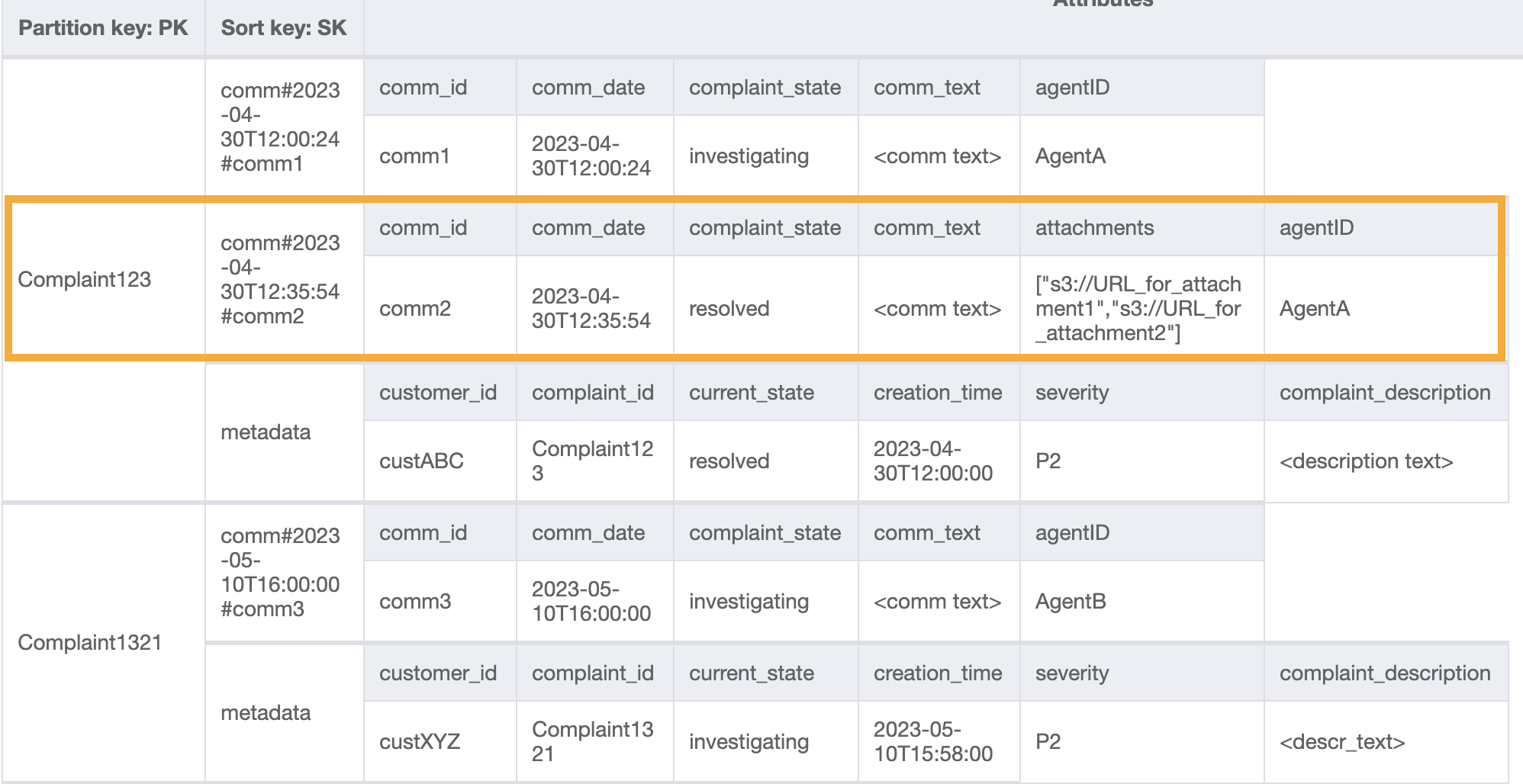
若要取得投訴的所有評論,我們可以在排序索引鍵上使用 [`query`](Query.md) 操作搭配 `begins_with` 條件。與其耗用額外的讀取容量來讀取中繼資料項目,隨後因篩選相關結果而造成額外負荷,倒不如使用項這樣的排序索引鍵條件幫助我們只讀取所要的內容。例如使用 `PK=Complaint123` 及 `SK` begins\_with `comm#` 進行查詢操作,會傳回下列內容並略過中繼資料項目:
既然我們在模式 7 (`getLatestCommentByComplaintID`) 中需要投訴的最新評論,那麼就使用兩個額外的查詢參數:
1. `ScanIndexForward` 應設定為 False,才能以遞減順序排序結果
1. `Limit` 應設定為 1,才能取得最新 (單獨一個) 評論
類似存取模式 6 (`getAllCommentsByComplaintID`),我們使用 `begins_with` `comm#` 作為排序索引鍵條件以略過中繼資料項目。現在,您可以使用查詢操作搭配 `PK=Complaint123` 和 `SK=begins_with comm#`、`ScanIndexForward=False`、`Limit` 1,對此設計執行存取模式 7。結果會傳回以下目標項目:
讓我們新增更多虛設資料到資料表中。

**步驟 4:位址存取模式 8 (`getAComplaintbyCustomerIDAndComplaintID`) 和 9 (`getAllComplaintsByCustomerID`)**
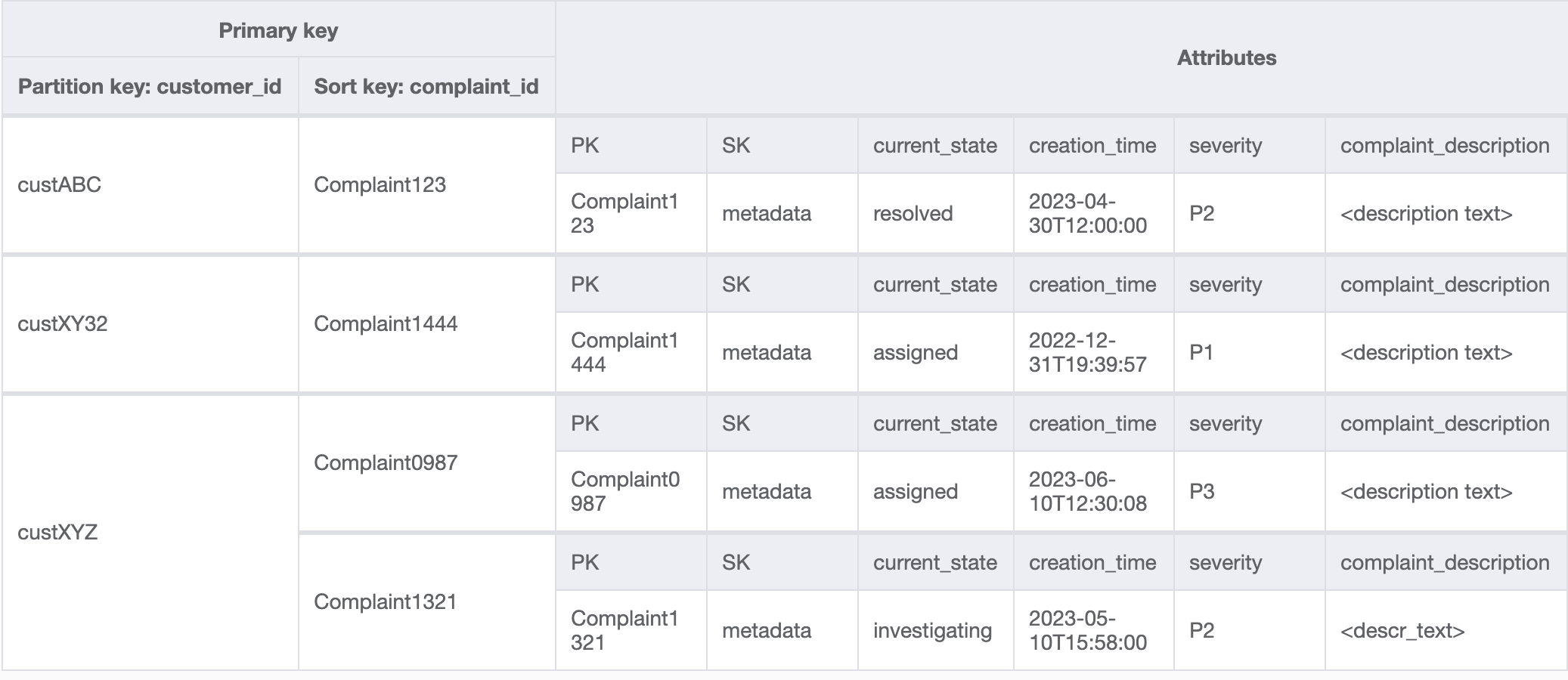
存取模式 8 (`getAComplaintbyCustomerIDAndComplaintID`) 和 9 (`getAllComplaintsByCustomerID`) 導入了新的搜尋條件:`CustomerID`。若要從現有資料表提取它,則須使用昂貴的 [https://docs.aws.amazon.com/amazondynamodb/latest/APIReference/API_Scan.html](https://docs.aws.amazon.com/amazondynamodb/latest/APIReference/API_Scan.html) 來讀取所有資料,然後篩選相關項目以找出所指的 `CustomerID`。我們只要建立[全域次要索引 (GSI)](GSI.md) 並搭配 `CustomerID` 作為分割區索引鍵,就能讓這項搜尋更有效率。務必記住客戶與投訴之間的一對多關係以及存取模式 9 (`getAllComplaintsByCustomerID`),`ComplaintID` 會是排序索引鍵的合適選擇。
GSI 中的資料如下所示:
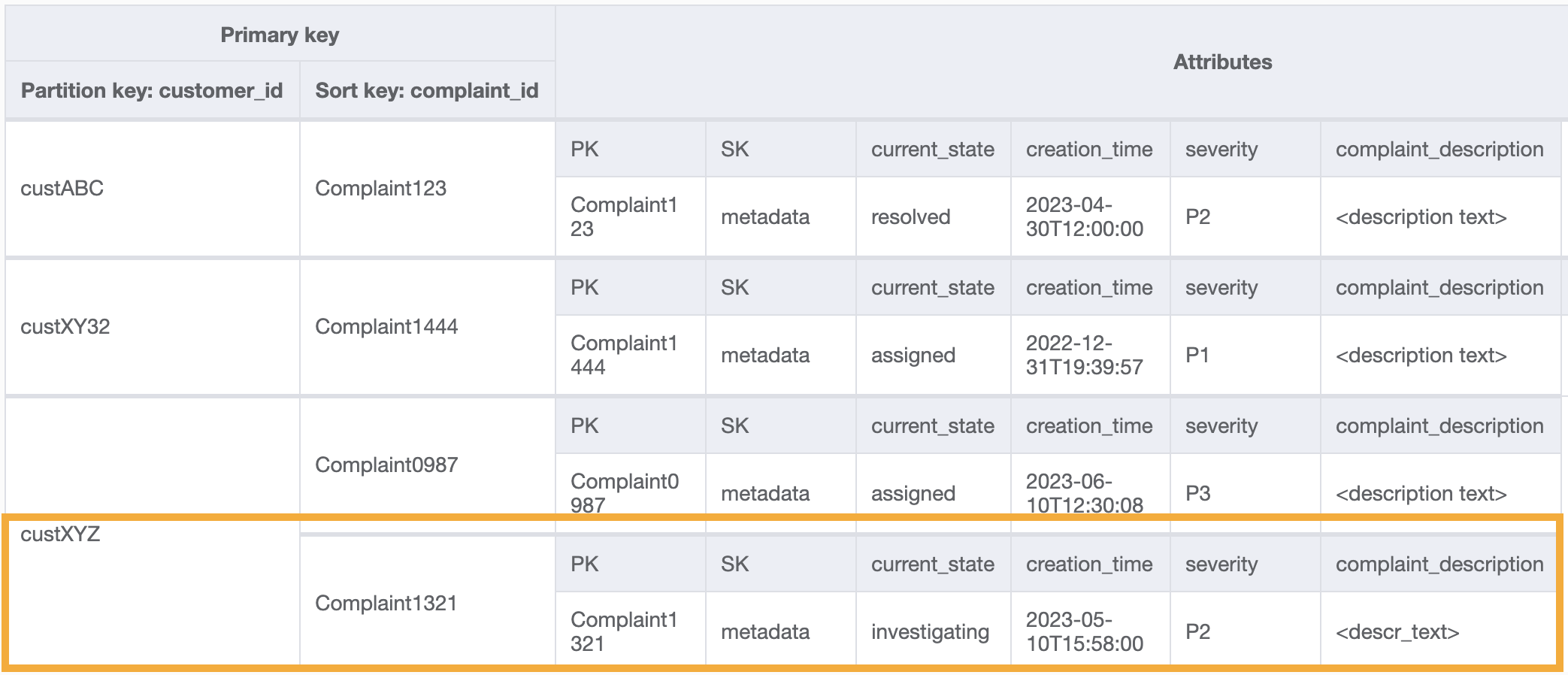
此 GSI 上存取模式 8 (`getAComplaintbyCustomerIDAndComplaintID`) 的範例查詢會是:`customer_id=custXYZ`、`sort key=Complaint1321`。結果會是:
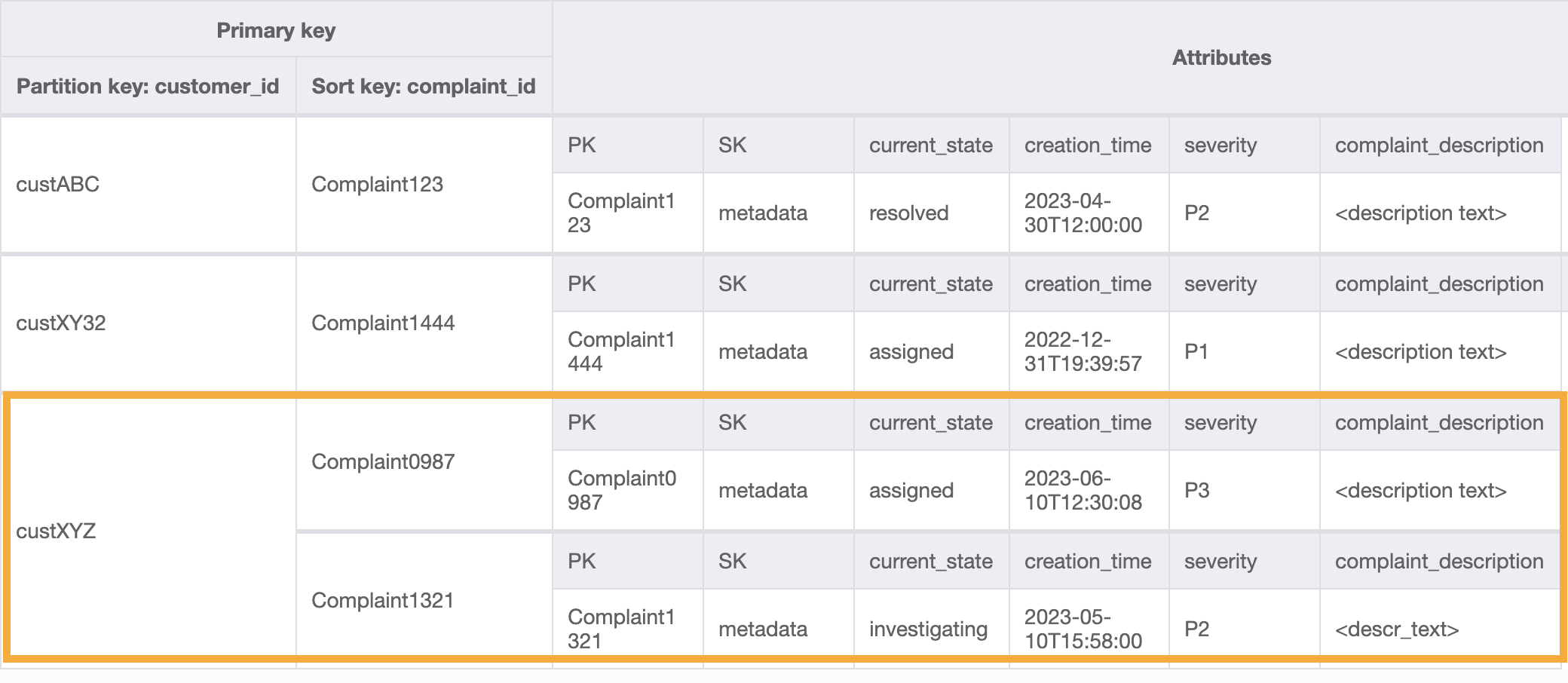
若要針對存取模式 9 (`getAllComplaintsByCustomerID`) 取得某一個客戶的所有投訴,GSI 上的查詢會是:`customer_id=custXYZ` 作為分割區索引鍵條件。結果會是:
**步驟 5:位址存取模式 10 (`escalateComplaintByComplaintID`)**
此存取將介紹呈報相關層面。若要呈報投訴,我們可以使用 `UpdateItem` 將 `escalated_to` 和 `escalation_time` 等屬性新增至現有投訴中繼資料項目中。DynamoDB 提供了靈活的結構描述設計,這表示非索引鍵屬性集可以合併在一起,也可以分散到不同的項目中。如需範例,請參閱下列內容:
`UpdateItem with PK=Complaint1444, SK=metadata`

**步驟 6:位址存取模式 11 (`getAllEscalatedComplaints`) 和 12 (`getEscalatedComplaintsByAgentID`)**
預計在整個資料集中,只有少數投訴會呈報。因此,在呈報相關屬性上建立索引將能實現高效率的查詢與符合成本效益的 GSI 儲存。我們可以利用[稀疏索引](data-modeling-blocks.md#data-modeling-blocks-sparse-index)技術來實現這個目標。具有分割區索引鍵 `escalated_to` 及排序索引鍵 `escalation_time` 的 GSI 如下所示:

若要針對存取模式 11 (`getAllEscalatedComplaints`) 取得所有呈報的投訴,只要掃描此 GSI 即可。請注意,由於 GSI 的大小,此掃描將會是高效能且具有成本效益。若要取得特定客服人員的 (存取模式 12 (`getEscalatedComplaintsByAgentID`)) 的已呈報投訴,分割區索引鍵會是 `escalated_to=agentID`,且我們會將 `ScanIndexForward` 設定為 `False`,以便從最新到最舊排序。
**步驟 7:位址存取模式 13 (`getCommentsByAgentID`)**
對於最後一個存取模式,我們需要以新的維度執行查詢:`AgentID`。另外還需要依時間進行排序來讀取兩個日期之間的評論,因此我們會建立一個 GSI,並以 `agent_id` 作為分割區索引鍵及 `comm_date` 作為排序索引鍵。此 GSI 中的資料如下所示:

此 GSI 的範例查詢會是 `partition key agentID=AgentA` 和 `sort key=comm_date between (2023-04-30T12:30:00, 2023-05-01T09:00:00)`,其結果為:

下表摘要整理了所有存取模式,以及結構描述設計處理這些模式的方式:
| 存取模式 | 基礎資料表/GSI/LSI | 作業 | 分割區索引鍵值 | 排序索引鍵值 | 其他條件/篩選條件 |
| --- | --- | --- | --- | --- | --- |
| createComplaint | 基礎資料表 | PutItem | PK=complaint\_id | SK=metadata | |
| updateComplaint | 基礎資料表 | UpdateItem | PK=complaint\_id | SK=metadata | |
| updateSeveritybyComplaintID | 基礎資料表 | UpdateItem | PK=complaint\_id | SK=metadata | |
| getComplaintByComplaintID | 基礎資料表 | GetItem | PK=complaint\_id | SK=metadata | |
| addCommentByComplaintID | 基礎資料表 | TransactWriteItems | PK=complaint\_id | SK=metadata, SK=comm\#comm\_date\#comm\_id | |
| getAllCommentsByComplaintID | 基礎資料表 | Query | PK=complaint\_id | SK begins\_with "comm\#" | |
| getLatestCommentByComplaintID | 基礎資料表 | Query | PK=complaint\_id | SK begins\_with "comm\#" | scan\_index\_forward=False, Limit 1 |
| getAComplaintbyCustomerIDAndComplaintID | Customer\_complaint\_GSI | Query | customer\_id=customer\_id | complaint\_id = complaint\_id | |
| getAllComplaintsByCustomerID | Customer\_complaint\_GSI | Query | customer\_id=customer\_id | N/A | |
| escalateComplaintByComplaintID | 基礎資料表 | UpdateItem | PK=complaint\_id | SK=metadata | |
| getAllEscalatedComplaints | Escalations\_GSI | Scan | N/A | N/A | |
| getEscalatedComplaintsByAgentID (從最新到最舊的順序) | Escalations\_GSI | Query | escalated\_to=agent\_id | N/A | scan\_index\_forward=False |
| getCommentsByAgentID (兩個日期之間) | Agents\_Comments\_GSI | Query | agent\_id=agent\_id | SK between (date1, date2) | |
## 投訴管理系統最終結構描述
以下是最終結構描述設計。若要將此結構描述設計下載為 JSON 檔案,請參閱 GitHub 上的 [DynamoDB 範例](https://github.com/aws-samples/aws-dynamodb-examples/blob/master/schema_design/SchemaExamples/ComplainManagement/ComplaintManagementSchema.json)。
**基礎資料表**

**Customer\_Complaint\_GSI**

**Escalations\_GSI**

**Agents\_Comments\_GSI**

## 使用 NoSQL Workbench 與此結構描述設計
您可以將此最終結構描述匯入 [NoSQL Workbench](workbench.md),這是為 DynamoDB 提供資料建模、資料視覺化,和查詢開發功能的視覺化工具,以進一步探索和編輯新專案。請依照下列步驟以開始使用:
1. 下載 NoSQL Workbench。如需詳細資訊,請參閱[下載 DynamoDB 專用 NoSQL Workbench](workbench.settingup.md)。
1. 下載上面列出的 JSON 結構描述檔案,該檔案已經是 NoSQL Workbench 模型格式。
1. 將 JSON 結構描述檔案匯入到 NoSQL Workbench。如需詳細資訊,請參閱[匯入現有的資料模型](workbench.Modeler.ImportExisting.md)。
1. 一旦您匯入到 NOSQL Workbench 後,便可以編輯資料模型。如需詳細資訊,請參閱[編輯現有的資料模型](workbench.Modeler.Edit.md)。