本文為英文版的機器翻譯版本,如內容有任何歧義或不一致之處,概以英文版為準。
DynamoDB 專用 CloudWatch Contributor Insights 入門
本節說明如何在不同模式下啟用和使用 Amazon CloudWatch Contributor Insights,以使用 Amazon DynamoDB 主控台或 AWS Command Line Interface () 滿足您的監控需求AWS CLI。
在下列範例中,您會用到 DynamoDB 入門教學課程中定義的 DynamoDB 資料表。
選擇 Contributor Insights 模式
在啟用 Contributor Insights 之前,您應該了解兩種可用的模式。檢閱模式比較,以選取最符合您特定需求的選項。
| 面向 | 存取和限流索引鍵模式 | 限流索引鍵模式 |
|---|---|---|
| 監視器 | 所有請求 (成功和限流) | 僅限流的請求 |
| 圖表 | 最常存取的項目 + 最常限流的項目 | 最常限流的項目 |
| 最適合 | 目標分析和最佳化 | 限流監控 |
| 使用時機 | 您需要完全了解存取模式。您正在執行短期分析或偵錯。 | 您的主要考量是識別和解決限流問題。您想要持續啟用 Contributor Insights 以提供即時限流警示。 |
使用 Contributor Insights (主控台)
主控台提供直覺式的方式來啟用 Contributor Insights,並為您的監控需求選取適當的模式。
在主控台中使用 Contributor Insights
登入 AWS 管理主控台 ,並在 https://https://console.aws.amazon.com/dynamodb/
開啟 DynamoDB 主控台。 -
在主控台左側的導覽窗格中,選擇 Tables (資料表)。
-
選擇
Music資料表。 -
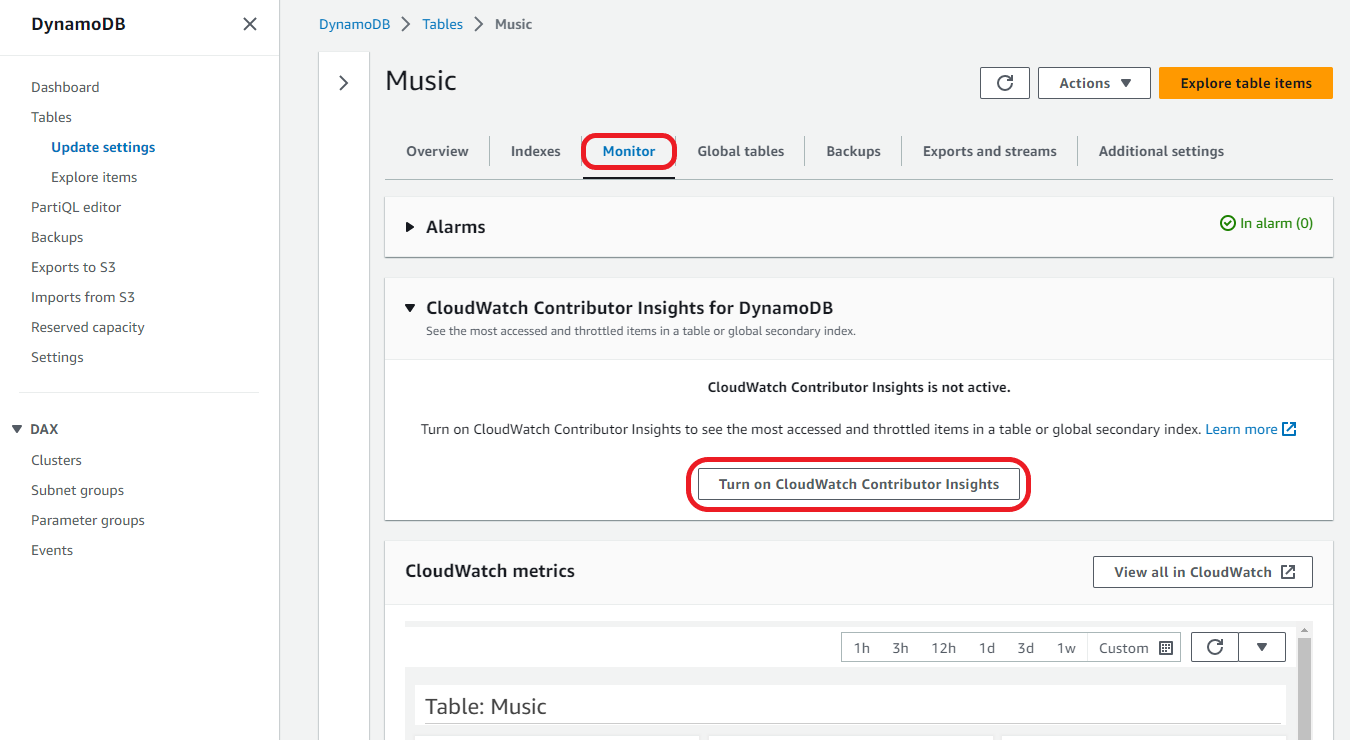
選擇 Monitor (監控) 索引標籤。
-
選擇開啟 CloudWatch Contributor Insights。
-
在管理 CloudWatch Contributor Insights 設定對話方塊中,將
Music基礎資料表和AlbumTitle-index全域次要索引切換為開啟。 -
將兩者的僅限流索引鍵模式開關保留在關閉位置,然後選擇儲存變更。
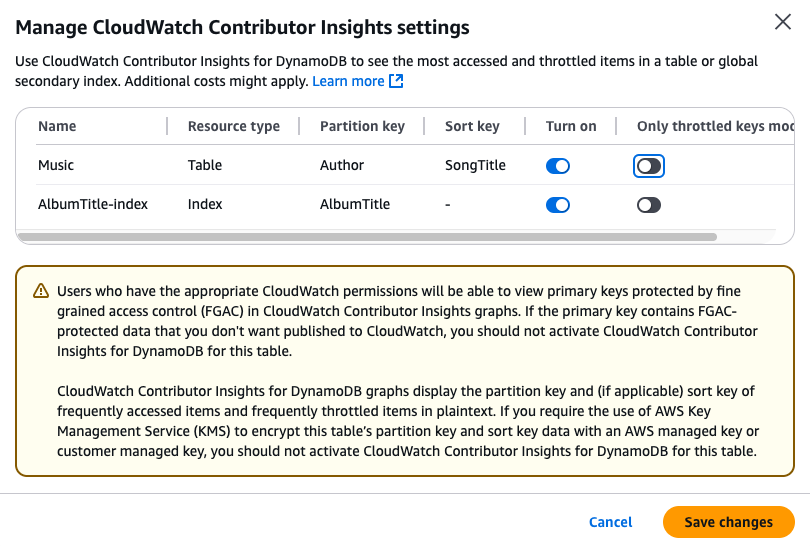
接著將啟用資料表和 GSI 的預設存取和限流索引鍵模式,提供存取和限流項目的監控。將僅限流索引鍵模式開關切換為開啟位置會啟用限流索引鍵模式。
如果操作失敗,請參閱《Amazon DynamoDB API 參考》中的 DescribeContributorInsights FailureException 找出可能的原因。
-
CloudWatch Contributor Insights 圖表現在可以在
Music資料表的監控索引標籤找到。由於已啟用存取和限流索引鍵模式,因此可以看到存取和限流項目圖表。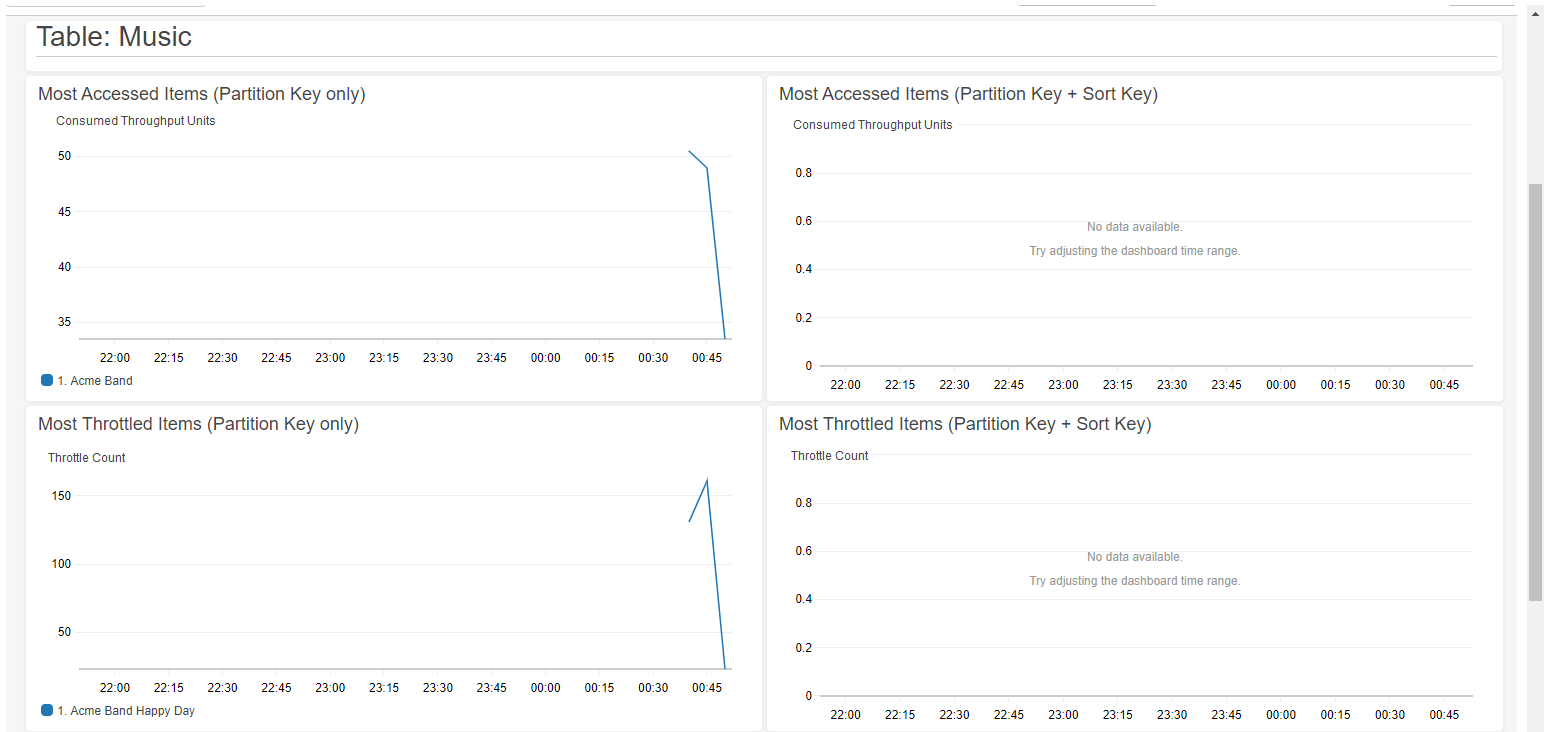
在模式之間切換
您可以隨時在模式之間切換,而無需停用 Contributor Insights。
切換 Contributor Insights 模式
-
在資料表的監控索引標籤上,選擇管理 CloudWatch Contributor Insights。
-
在管理 Contributor Insights 設定對話方塊中,針對每個基礎資料表或 GSI:
-
開啟或關閉僅限流索引鍵模式,以啟用限流索引鍵模式,或返回預設的存取和限流索引鍵模式。
-
切換為關閉,以停用資料表或 GSI 的 CloudWatch Contributor Insight。
-
-
選擇儲存變更。
完成後,圖形將反映新模式。
建立 CloudWatch 警示
請遵循下列步驟建立 CloudWatch 警示,並在任何分割區索引鍵耗用超過 50,000 個 ConsumedThroughputUnits 或遇到限流時收到通知。
-
登入 AWS 管理主控台 ,並在 https://https://console.aws.amazon.com/cloudwatch/
開啟 CloudWatch 主控台 -
在主控台左側的導覽窗格中,選擇 Contributor Insights。
-
根據您的模式和您要監控的內容,選擇適當的規則:
-
對於存取項目監控 (僅限存取和限流索引鍵模式):選擇 DynamoDBContributorInsights-PKC-Music
-
對於限流項目監控 (兩種模式):選擇 DynamoDBContributorInsights-PKT-Music
-
-
選擇 Actions (動作) 下拉式功能表。
-
選擇 View in metrics (在指標中檢視)。
-
選擇 Max Contributor Value (作者值上限)。
注意
只有
Max Contributor Value和Maximum會傳回有用的統計數字。此清單中的其他統計數字不會傳回有意義的值。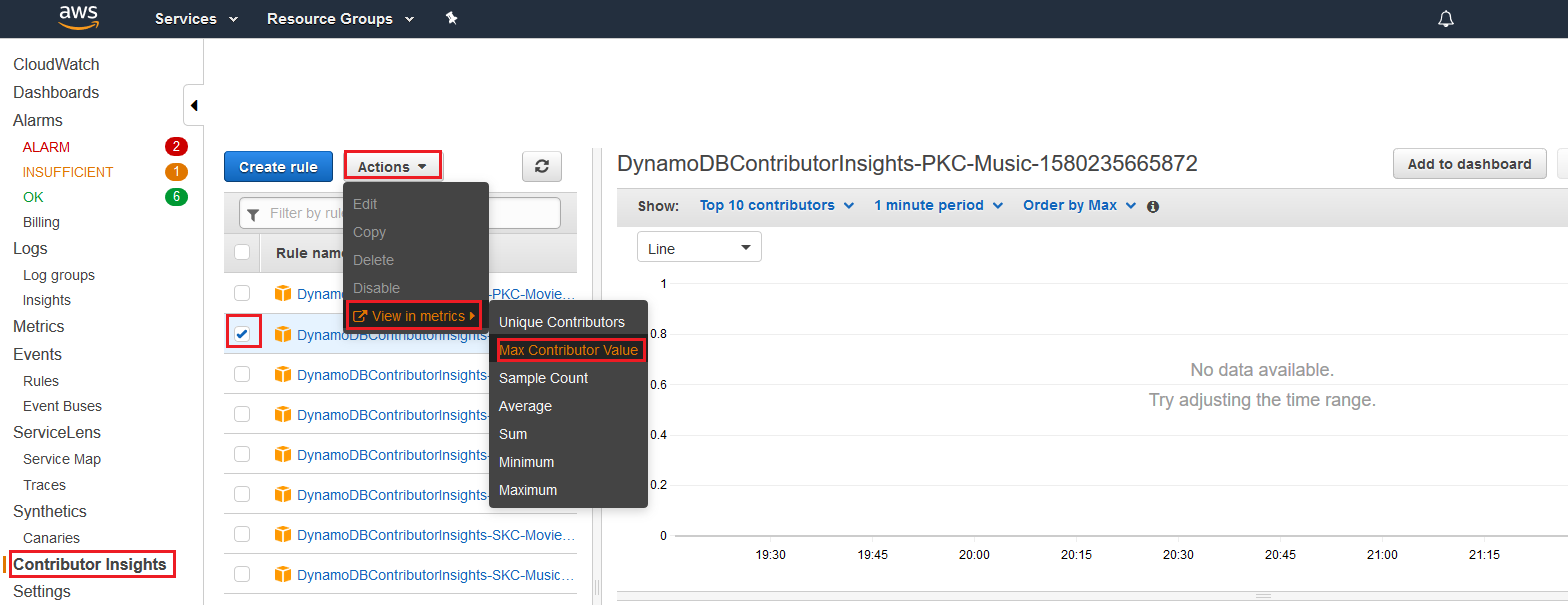
-
在 Actions (動作) 欄中,選擇 Create Alarm (建立警示)。
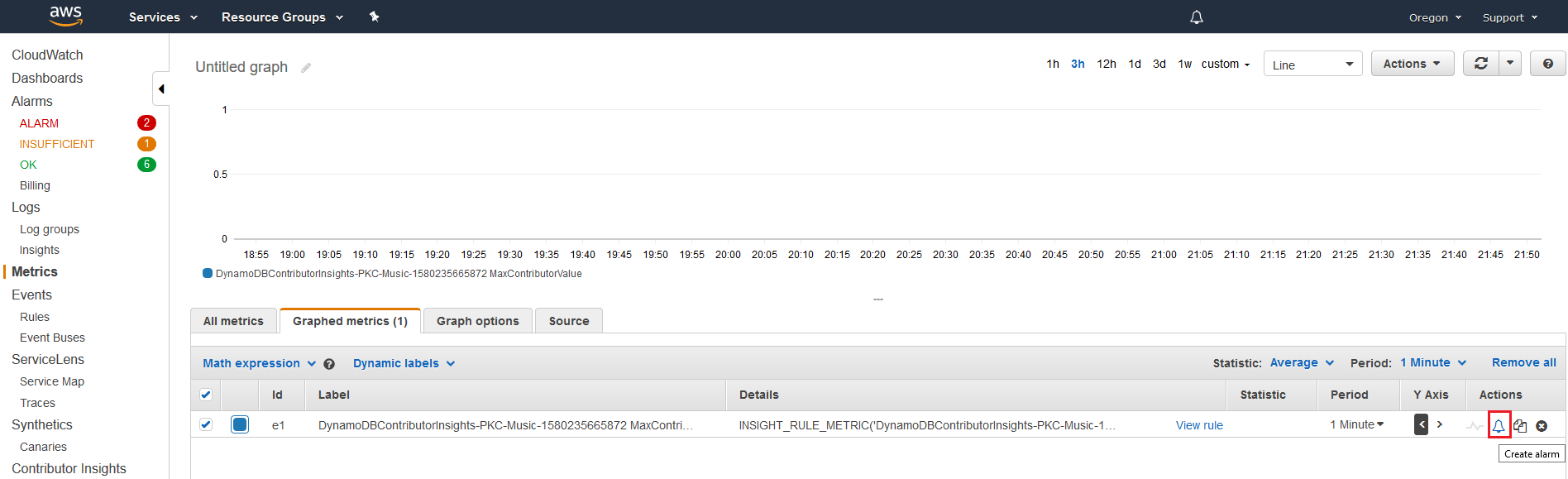
-
輸入適當的閾值並選擇下一步:
-
對於存取項目 (PKC 規則):在
ConsumedThroughputUnits輸入 50000 -
對於限流項目 (PKT 規則):在
ThrottleCount輸入 1,在有任何限流時收到警示
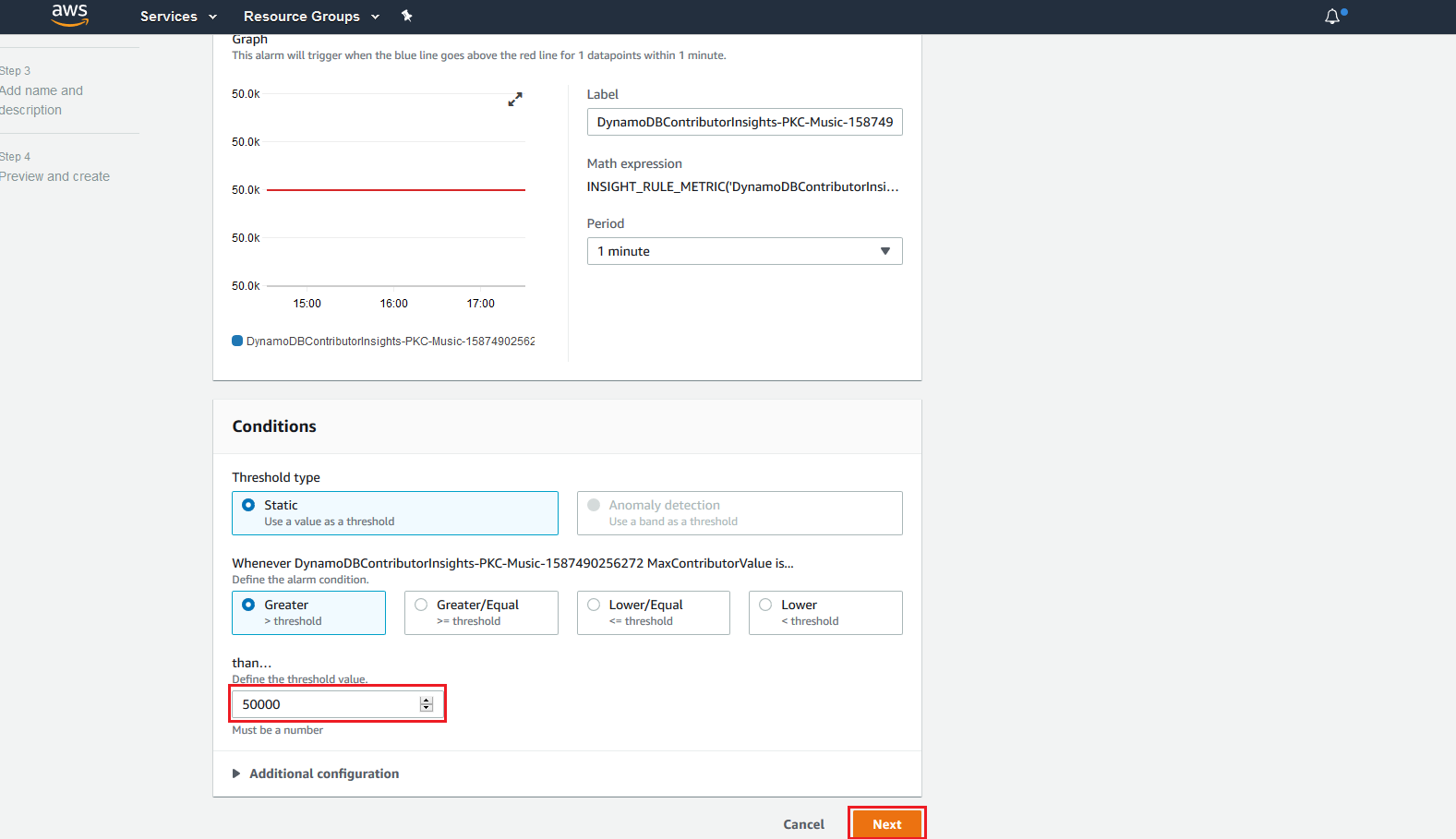
-
-
如需如何設定警示通知的詳細資訊,請參閱使用 Amazon CloudWatch 警示。
使用 Contributor Insights (AWS CLI)
AWS CLI 提供對 Contributor Insights 的程式設計存取,並完整支援這兩種模式。您可以在啟用 Contributor Insights 或稍後切換模式時指定模式。
預設模式的基本操作
使用 Contributor Insights 的預設設定
-
在具備存取和限流索引鍵模式的
Music基礎資料表上啟用 DynamoDB 專用 CloudWatch Contributor Insights。由於ACCESSED_AND_THROTTLED_KEYS為預設模式,因此您可以省略--contributor-insights-mode=ACCESSED_AND_THROTTLED_KEYS參數。aws dynamodb update-contributor-insights \ --table-name Music \ --contributor-insights-action=ENABLE -
在
AlbumTitle-index全域次要索引上啟用 DynamoDB 專用 Contributor Insights。aws dynamodb update-contributor-insights \ --table-name Music \ --index-name AlbumTitle-index \ --contributor-insights-action=ENABLE -
取得
Music資料表及其所有索引的狀態和規則。aws dynamodb describe-contributor-insights --table-name Music回應將包含顯示
ACCESSED_AND_THROTTLED_KEYS的ContributorInsightsMode欄位。 -
列出
Music資料表及其所有索引的狀態。aws dynamodb list-contributor-insights --table-name Music
啟用限流索引鍵模式
在限流索引鍵模式中啟用 Contributor Insights
-
在具備限流索引鍵模式的
Music基礎資料表上啟用 DynamoDB 專用 CloudWatch Contributor Insights。aws dynamodb update-contributor-insights \ --table-name Music \ --contributor-insights-action=ENABLE \ --contributor-insights-mode=THROTTLED_KEYS -
在
AlbumTitle-index全域次要索引的限流索引鍵模式中啟用 Contributor Insights。aws dynamodb update-contributor-insights \ --table-name Music \ --index-name AlbumTitle-index \ --contributor-insights-action=ENABLE \ --contributor-insights-mode=THROTTLED_KEYS -
透過描述 Contributor Insights 組態來驗證模式。
aws dynamodb describe-contributor-insights --table-name Music相較於預設模式,回應會將
ContributorInsightsMode顯示為THROTTLED_KEYS並顯示較少的規則。
在模式之間切換
切換 Contributor Insights 模式
-
從限流索引鍵模式切換為存取和限流索引鍵模式。
aws dynamodb update-contributor-insights \ --table-name Music \ --contributor-insights-action=ENABLE \ --contributor-insights-mode=ACCESSED_AND_THROTTLED_KEYS -
從存取和限流索引鍵模式切換為限流索引鍵模式。
aws dynamodb update-contributor-insights \ --table-name Music \ --contributor-insights-action=ENABLE \ --contributor-insights-mode=THROTTLED_KEYS -
在轉換期間檢查狀態。
aws dynamodb describe-contributor-insights --table-name Music在模式切換期間,會將
ContributorInsightsStatus顯示為ENABLING。完成後,將顯示為ENABLED的新模式。
管理 Contributor Insights
管理 Contributor Insights 設定
-
在
AlbumTitle-index全域次要索引上停用 DynamoDB 專用 CloudWatch Contributor Insights。aws dynamodb update-contributor-insights \ --table-name Music --index-name AlbumTitle-index \ --contributor-insights-action=DISABLE -
列出您帳戶中的所有 Contributor Insights 組態。
aws dynamodb list-contributor-insights將顯示已啟用 Contributor Insights 的所有資料表和索引,以及其模式。
-
取得特定組態的詳細資訊。
aws dynamodb describe-contributor-insights \
                    --table-name Music \
                    --index-name AlbumTitle-index
回應範例
以下是顯示模式之間差異的回應範例:
存取和限流索引鍵模式回應
{
    "TableName": "Music",
    "ContributorInsightsRuleList": [
        "DynamoDBContributorInsights-PKC-Music-1234567890123",
        "DynamoDBContributorInsights-PKT-Music-1234567890123",
        "DynamoDBContributorInsights-SKC-Music-1234567890123",
        "DynamoDBContributorInsights-SKT-Music-1234567890123"
    ],
    "ContributorInsightsStatus": "ENABLED",
    "ContributorInsightsMode": "ACCESSED_AND_THROTTLED_KEYS",
    "LastUpdateDateTime": "2024-01-15T10:30:00.000Z"
}
限流索引鍵模式回應
{
    "TableName": "Music",
    "ContributorInsightsRuleList": [
        "DynamoDBContributorInsights-PKT-Music-1234567890123",
        "DynamoDBContributorInsights-SKT-Music-1234567890123"
    ],
    "ContributorInsightsStatus": "ENABLED",
    "ContributorInsightsMode": "THROTTLED_KEYS",
    "LastUpdateDateTime": "2024-01-15T10:35:00.000Z"
}
請注意,限流索引鍵模式的規則較少 (僅 PKT 和 SKT),對應於更集中的監控。
