本文為英文版的機器翻譯版本,如內容有任何歧義或不一致之處,概以英文版為準。
在 DynamoDB 中使用全域次要索引寫入碎片,以進行選擇性資料表查詢。
當需要在特定時間範圍內查詢最新資料時,DynamoDB 對大多數讀取作業必須提供分割區索引鍵的設計,可能會造成挑戰。為解決此情境,可使用寫入碎片與全域次要索引 (GSI) 的組合,實作高效查詢模式。
此方法可高效率地擷取並分析時間敏感資料,無需執行完整資料表掃描,避免資源消耗與高成本。透過策略性設計資料表結構與索引,可建立支援時間導向資料擷取的彈性解決方案,同時維持最佳效能。
模式設計
使用 DynamoDB 時,可透過結合寫入碎片與全域次要索引的進階模式,在近期資料範圍內實現靈活且高效的查詢,以克服時間導向資料擷取挑戰。
資料表結構
分割區索引鍵 (PK):"Username"
GSI 結構
GSI 分割區索引鍵 (PK_GSI):"ShardNumber#"
GSI 排序索引鍵 (SK_GSI): ISO 8601 時間戳記 (例如 "2030-04-01T12:00:00Z")
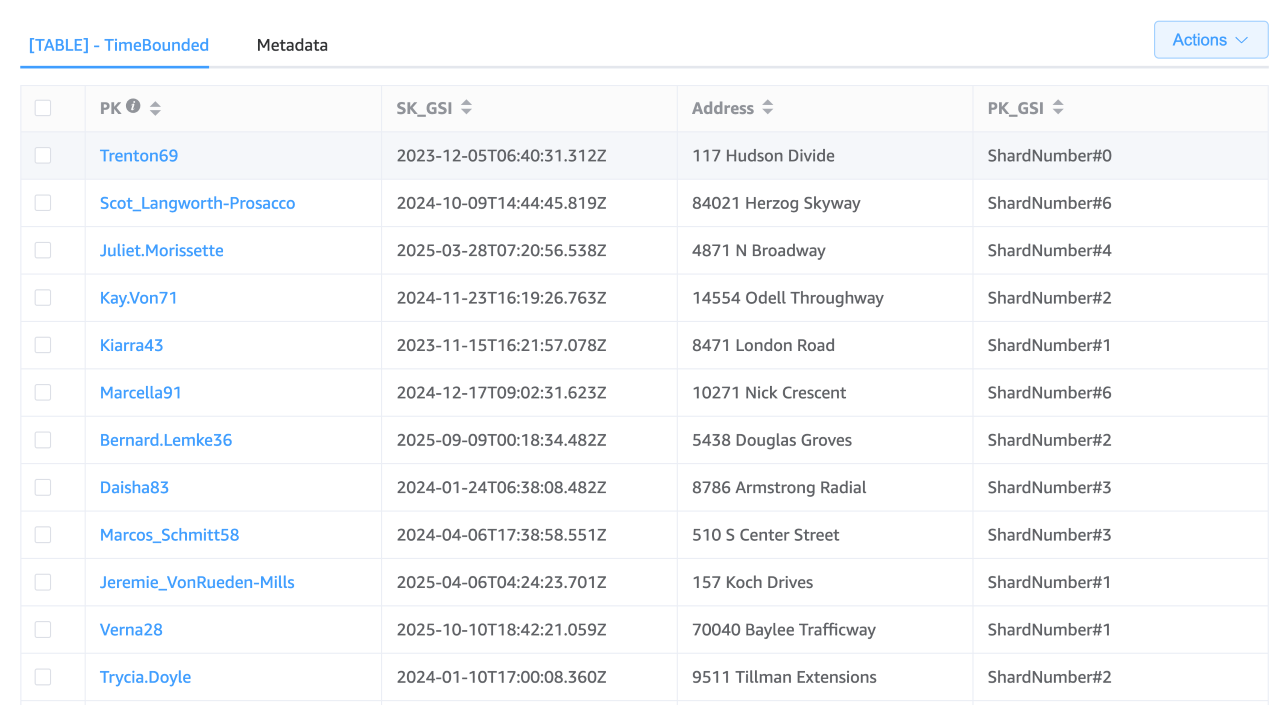
碎片策略
假設使用 10 個碎片,碎片編號可設定為 0 至 9。記錄活動時,需計算碎片編號 (例如:以使用者 ID 經雜湊函數運算後取碎片數量的模數),並將結果前置於 GSI 分割區索引鍵。此方法可將項目平均分佈至多個碎片,有效降低熱分割區風險。
查詢已分碎片的 GSI
在 DynamoDB 資料表中,若需在特定時間範圍內查詢分散於多個碎片的項目,必須採用與單一分割區查詢不同的方式。由於 DynamoDB 查詢操作一次僅支援單一分割區索引鍵,因此無法以單一查詢跨多個碎片。不過,可透過應用程式層邏輯執行多次查詢,每次針對特定碎片,並在彙總階段整合結果以達成目標。以下程序說明具體執行步驟。
查詢與彙總碎片
識別碎片策略中使用的碎片編號範圍。例如,若設有 10 個碎片,則編號範圍為 0–9。
針對每個碎片建構並執行查詢,以擷取目標時間範圍內的資料項目。可平行執行查詢以提升整體效能。查詢時,使用包含碎片編號的分割區索引鍵,並以時間範圍設定排序索引鍵。以下示範單一碎片的查詢範例:
aws dynamodb query \
    --table-name "YourTableName" \
    --index-name "YourIndexName" \
    --key-condition-expression "PK_GSI = :pk_val AND SK_GSI BETWEEN :start_date AND :end_date" \
    --expression-attribute-values '{
        ":pk_val": {"S": "ShardNumber#0"},
        ":start_date": {"S": "2024-04-01"},
        ":end_date": {"S": "2024-04-30"}
    }'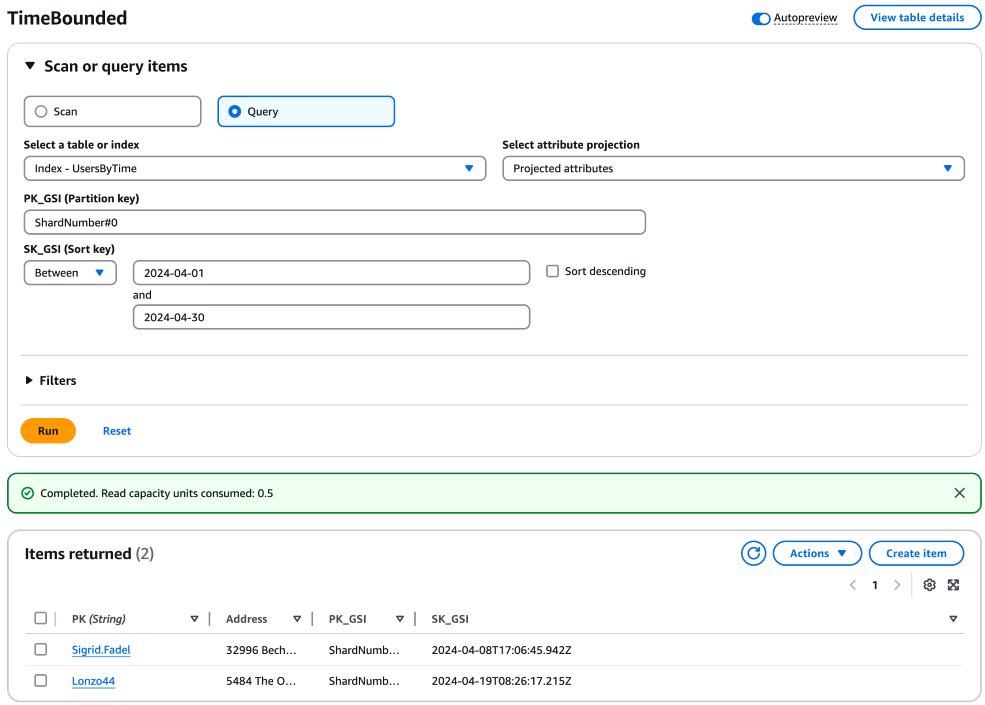
可為各碎片重複此查詢,並依序調整分割區索引鍵 (例如:"ShardNumber#1"、"ShardNumber#2" ... "ShardNumber#9")。
所有查詢完成後,彙總各碎片查詢結果。在應用程式程式碼中執行彙總,將各查詢結果合併成單一資料集,以呈現指定時間範圍內所有碎片項目。
平行查詢執行注意事項
每次查詢都會消耗資料表或索引的讀取容量單位。如果您使用的是佈建的輸送量,請確定您的資料表已佈建足夠的容量來處理大量的平行查詢。若您使用隨需容量,請留意可能產生的成本影響。
程式碼範例
若要使用 Python 在 DynamoDB 中跨碎片執行平行查詢,您可使用 boto3 函式庫,它是適用於 Python 的 Amazon Web Services SDK。此範例假設您已安裝 boto3 並使用適當的 AWS 登入資料進行設定。
下列 Python 程式碼示範如何在指定時間範圍內,跨多個碎片執行平行查詢。程式使用 concurrent.futures 模組以平行方式執行查詢,相較於循序執行可縮短整體執行時期。
import boto3
from concurrent.futures import ThreadPoolExecutor, as_completed

# Initialize a DynamoDB client
dynamodb = boto3.client('dynamodb')

# Define your table name and the total number of shards
table_name = 'YourTableName'
total_shards = 10  # Example: 10 shards numbered 0 to 9
time_start = "2030-03-15T09:00:00Z"
time_end = "2030-03-15T10:00:00Z"

def query_shard(shard_number):
    """
    Query items in a specific shard for the given time range.
    """
    response = dynamodb.query(
        TableName=table_name,
        IndexName='YourGSIName',  # Replace with your GSI name
        KeyConditionExpression="PK_GSI = :pk_val AND SK_GSI BETWEEN :date_start AND :date_end",
        ExpressionAttributeValues={
            ":pk_val": {"S": f"ShardNumber#{shard_number}"},
            ":date_start": {"S": time_start},
            ":date_end": {"S": time_end},
        }
    )
    return response['Items']

# Use ThreadPoolExecutor to query across shards in parallel
with ThreadPoolExecutor(max_workers=total_shards) as executor:
    # Submit a future for each shard query
    futures = {executor.submit(query_shard, shard_number): shard_number for shard_number in range(total_shards)}

    # Collect and aggregate results from all shards
    all_items = []
    for future in as_completed(futures):
        shard_number = futures[future]
        try:
            shard_items = future.result()
            all_items.extend(shard_items)
            print(f"Shard {shard_number} returned {len(shard_items)} items")
        except Exception as exc:
            print(f"Shard {shard_number} generated an exception: {exc}")

# Process the aggregated results (e.g., sorting, filtering) as needed
# For example, simply printing the count of all retrieved items
print(f"Total items retrieved from all shards: {len(all_items)}")
執行此程式碼前,請確保以 DynamoDB 設定中的實際資料表名稱與 GSI 名稱取代 YourTableName 和 YourGSIName。此外,請依您的具體需求調整 total_shards、time_start 和 time_end 變數。
此指令碼會查詢各碎片中指定時間範圍內的項目,並彙總結果。
