本文為英文版的機器翻譯版本,如內容有任何歧義或不一致之處,概以英文版為準。
建立自訂端點
使用 AWS 管理主控台 AWS CLI或 Amazon RDS API 建立自訂端點。
若要使用 建立自訂端點 AWS 管理主控台,請前往叢集詳細資訊頁面,然後在端點區段中選擇Create custom endpoint動作。選擇自訂端點的名稱,該名稱是您的使用者 ID 和區域的唯一。若要選取即使在叢集展開時仍保持相同的資料庫執行個體清單,請將核取方塊 Attach future instances added to this cluster (連線新增至此叢集的未來執行個體) 保持未選取。選擇該核取方塊時,自訂端點會在您將它們新增至叢集時動態新增任何新的執行個體。
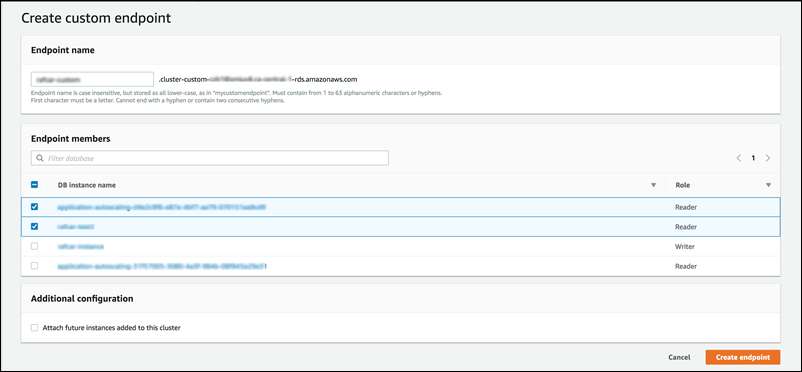
您無法在 AWS 管理主控台中選取自訂端點類型。您透過 建立的所有自訂端點 AWS 管理主控台 都有 類型ANY。
若要使用 建立自訂端點 AWS CLI,請執行 create-db-cluster-endpoint 命令。
下列命令會建立連線到特定叢集的自訂端點。一開始,端點會與叢集中的所有 Aurora 複本相關聯。後續命令會將它與叢集中特定的資料庫執行個體集相關聯。
對於 Linux、macOS 或 Unix:
aws rds create-db-cluster-endpoint --db-cluster-endpoint-identifier custom-endpoint-doc-sample \ --endpoint-type reader \ --db-cluster-identifiercluster_idaws rds modify-db-cluster-endpoint --db-cluster-endpoint-identifier custom-endpoint-doc-sample \ --static-membersinstance_name_1instance_name_2
在 Windows 中:
aws rds create-db-cluster-endpoint --db-cluster-endpoint-identifier custom-endpoint-doc-sample ^ --endpoint-type reader ^ --db-cluster-identifiercluster_idaws rds modify-db-cluster-endpoint --db-cluster-endpoint-identifier custom-endpoint-doc-sample ^ --static-membersinstance_name_1instance_name_2
若要使用 RDS API 建立自訂端點,請執行 CreateDBClusterEndpoint 操作。
