本文為英文版的機器翻譯版本,如內容有任何歧義或不一致之處,概以英文版為準。
使用 AD 安全群組進行 Aurora PostgreSQL 存取控制
從 Aurora PostgreSQL 14.10 和 15.5 版本,可以使用 AWS Directory Service for Microsoft Active Directory (AD) 安全群組來管理 Aurora PostgreSQL 存取控制。舊版 Aurora PostgreSQL 僅支援個別使用者使用 AD 的 Kerberos 型身分驗證。每個 AD 使用者都必須明確佈建至資料庫叢集才能存取。
您可以利用 AD 安全群組,如下所示,而不是根據業務需求將每個 AD 使用者明確佈建至資料庫叢集:
-
AD 使用者是 Active Directory 中各種 AD 安全群組的成員。這些不是由資料庫叢集管理員指定,而是根據業務需求,並由 AD 管理員處理。
-
資料庫叢集管理員會根據業務需求,在資料庫執行個體中建立資料庫角色。這些資料庫角色可能有不同的許可或權限。
-
資料庫叢集管理員會根據每個資料庫叢集,設定從 AD 安全群組到資料庫角色的對應。
-
資料庫使用者可以使用其 AD 憑證來存取資料庫叢集。存取權是以 AD 安全群組成員資格為基礎。AD 使用者會根據其 AD 群組成員資格自動取得或失去存取權。
先決條件
在設定 AD 安全群組的延伸之前,請確定您有下列項目:
-
為 PostgreSQL 資料庫叢集設定 Kerberos 身分驗證。如需詳細資訊,請參閱為 PostgreSQL 資料庫叢集設定 Kerberos 身分驗證。
注意
對於 AD 安全群組,在此設定程序中略過步驟 7:針對您的 Kerberos 主體建立 PostgreSQL 使用者。
重要
如果您在已啟用 Kerberos 身分驗證的 Aurora PostgreSQL 叢集上啟用 AD 安全群組,您可能會遇到身分驗證問題。當您將
pg_ad_mapping新增至shared_preload_libraries參數並重新啟動資料庫時,就會發生這種情況。使用叢集端點時,使用非具有rds_ad角色之資料庫使用者的 AD 使用者登入嘗試可能會失敗。這也可能會導致引擎當機。若要解決此問題,請予以停用,然後在叢集上重新啟用 Kerberos 身分驗證。現有執行個體需要此解決方法,但不會影響 2025 年 4 月之後建立的執行個體。 -
管理網域中的資料庫叢集 如需詳細資訊,請參閱管理網域中的資料庫叢集。
設定 pg_ad_mapping 延伸模組
Aurora PostgreSQL 現在提供 pg_ad_mapping 延伸模組來管理 Aurora PostgreSQL 叢集中 AD 安全群組和資料庫角色之間的對應。如需 pg_ad_mapping 所提供函數的詳細資訊,請參閱 使用 pg_ad_mapping 延伸模組中的函數。
若要在 Aurora PostgreSQL 資料庫叢集上設定 pg_ad_mapping 延伸模組,您會先針對 Aurora PostgreSQL 資料庫叢集,將 pg_ad_mapping 新增至自訂資料庫叢集參數群組上的共用程式庫。如需建立自訂資料庫叢集參數群組的相關資訊,請參閱 Amazon Aurora 的參數群組。接下來,您會安裝 pg_ad_mapping 延伸模組。本節中的程序展示做法。您可以使用 AWS 管理主控台 或 AWS CLI。
您必須具有做為 rds_superuser 角色的許可,才能執行所有這些任務。
下列步驟假設您的 Aurora PostgreSQL 資料庫叢集與自訂資料庫叢集參數群組相關聯。
若要設定 pg_ad_mapping 延伸模組
登入 AWS 管理主控台 並開啟位於 https://https://console.aws.amazon.com/rds/
的 Amazon RDS 主控台。 -
在導覽窗格中,選擇 Aurora PostgreSQL 資料庫叢集的寫入器執行個體。
-
針對您的 Aurora PostgreSQL 資料庫叢集的寫入器執行個體開啟組態索引標籤。在執行個體詳細資訊之間,尋找 Parameter group (參數群組) 連結。
-
選擇連結以開啟與 Aurora PostgreSQL 資料庫叢集相關聯的連結。
-
在 Parameters (參數) 搜尋欄位中,輸入
shared_pre以尋找shared_preload_libraries參數。 -
選擇 Edit parameters (編輯參數) 以存取屬性值。
-
在 Values (值) 欄位中,將
pg_ad_mapping新增至清單。使用逗號區隔值清單中的項目。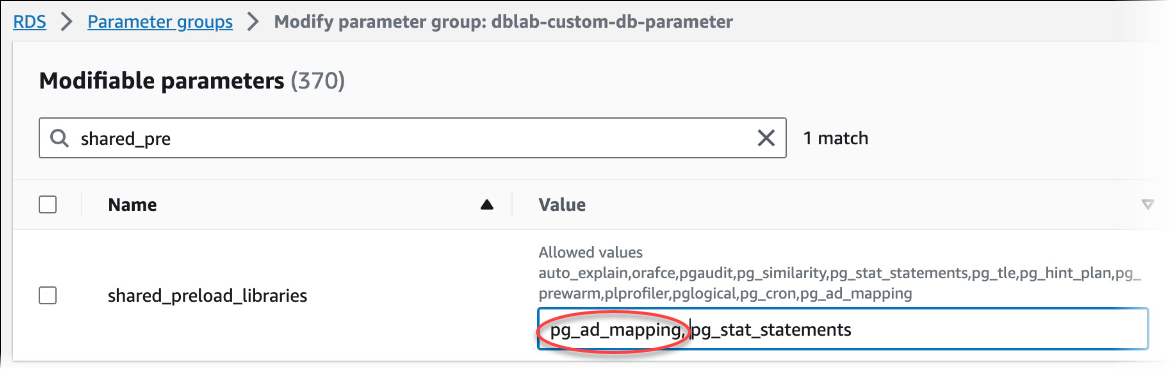
-
重新啟動 Aurora PostgreSQL 資料庫叢集的寫入器執行個體,以便您對
shared_preload_libraries參數所做的變更生效。 -
當執行個體可用時,請驗證
pg_ad_mapping是否已初始化。使用psql連線至 Aurora PostgreSQL 資料庫叢集的寫入器執行個體,然後執行下列命令。SHOW shared_preload_libraries;shared_preload_libraries -------------------------- rdsutils,pg_ad_mapping (1 row) -
在初始化
pg_ad_mapping之後,您現在可以建立延伸模組。您需要在初始化程式庫之後建立延伸模組,才能開始使用此延伸模組提供的函數。CREATE EXTENSION pg_ad_mapping; -
關閉
psql工作階段。labdb=>\q
若要設定 pg_ad_mapping
若要使用 設定 pg_ad_mapping AWS CLI,您可以呼叫 modify-db-parameter-group 操作,在自訂參數群組中新增此參數,如下列程序所示。
-
使用下列 AWS CLI 命令將
pg_ad_mapping新增至shared_preload_libraries參數。aws rds modify-db-parameter-group \ --db-parameter-group-namecustom-param-group-name\ --parameters "ParameterName=shared_preload_libraries,ParameterValue=pg_ad_mapping,ApplyMethod=pending-reboot" \ --regionaws-region -
使用以下 AWS CLI 命令重新啟動 Aurora PostgreSQL 資料庫叢集的寫入器執行個體,以便初始化 pg_ad_mapping。
aws rds reboot-db-instance \ --db-instance-identifierwriter-instance\ --regionaws-region -
當執行個體可用時,您可以驗證
pg_ad_mapping是否已初始化。使用psql連線至 Aurora PostgreSQL 資料庫叢集的寫入器執行個體,然後執行下列命令。SHOW shared_preload_libraries;shared_preload_libraries -------------------------- rdsutils,pg_ad_mapping (1 row)在初始化 pg_ad_mapping 之後,您現在可以建立延伸模組。
CREATE EXTENSION pg_ad_mapping; -
關閉
psql工作階段,以便您可以使用 AWS CLI。labdb=>\q
在 PowerShell 中擷取 Active Directory 群組 SID
安全識別符 (SID) 用於唯一識別安全主體或安全群組。每當在 Active Directory 中建立安全群組或帳戶時,就會指派 SID 給它。若要從作用中目錄擷取 AD 安全群組 SID,您可以從加入該 Active Directory 網域的 Windows 用戶端機器使用 Get-ADGroup cmdlet。身分參數會指定 Active Directory 群組名稱,以取得對應的 SID。
下列範例會傳回 AD 群組 adgroup1 的 SID。
C:\Users\Admin>Get-ADGroup -Identity adgroup1 | select SIDSID ----------------------------------------------- S-1-5-21-3168537779-1985441202-1799118680-1612
使用 AD 安全群組對應資料庫角色
您需要將資料庫中的 AD 安全群組明確佈建為 PostgreSQL 資料庫角色。屬於至少一個已佈建 AD 安全群組的 AD 使用者將可存取資料庫。您不應授予 rds_ad role AD 群組安全型資料庫角色。安全群組的 Kerberos 身分驗證將使用網域名稱尾碼觸發,例如 user1@example.com。此資料庫角色無法使用密碼或 IAM 身分驗證來存取資料庫。
注意
在資料庫中具有對應資料庫角色且 rds_ad 角色授予給他們的 AD 使用者,無法登入為 AD 安全群組的一部分。他們將以個別使用者身分透過資料庫角色來存取。
例如,accounts-group 是 AD 中的安全群組,您想要在 Aurora PostgreSQL 中將此安全群組佈建為 accounts-role。
| AD 安全群組 | PosgreSQL 資料庫角色 |
|---|---|
| accounts-group | accounts-role |
對應資料庫角色與 AD 安全群組時,您必須確保資料庫角色已設定 LOGIN 屬性,且具有所需登入資料庫的 CONNECT 權限。
postgres =>alter roleaccounts-rolelogin;ALTER ROLEpostgres =>grant connect on databaseaccounts-dbtoaccounts-role;
管理員現在可以繼續在 AD 安全群組和 PostgreSQL 資料庫角色之間建立對應。
admin=>select pgadmap_set_mapping('accounts-group','accounts-role',<SID>,<Weight>);
如需擷取 AD 安全群組 SID 的資訊,請參閱 在 PowerShell 中擷取 Active Directory 群組 SID。
在某些情況下,AD 使用者可能屬於多個群組,在這種情況下,AD 使用者會繼承以最高權重佈建的資料庫角色權限。如果這兩個角色具有相同的權重,AD 使用者將繼承對應於最近所新增對應的資料庫角色權限。建議是指定反映個別資料庫角色相對許可/權限的權重。資料庫角色的許可或權限越高,應該與對應項目相關聯的權重就越高。這將避免兩個具有相同權重的對應模棱兩可。
下表顯示從 AD 安全群組到 Aurora PostgreSQL 資料庫角色的範例對應。
| AD 安全群組 | PosgreSQL 資料庫角色 | Weight (粗細) |
|---|---|---|
| accounts-group | accounts-role | 7 |
| sales-group | sales-role | 10 |
| dev-group | dev-role | 7 |
在下列範例中,user1 會繼承 sales-role 的權限,因為它具有較高的權重,而 user2 會繼承 dev-role 的權限,因為此角色的對應是在 accounts-role 之後建立的,其權重與 accounts-role 相同。
| 使用者名稱 | 安全群組成員資格 |
|---|---|
| user1 | accounts-group sales-group |
| user2 | accounts-group dev-group |
用於建立、列出和清除對應的 psql 命令,如下所示。目前,無法修改單一對應項目。需要刪除現有項目,並重新建立對應。
admin=>select pgadmap_set_mapping('accounts-group', 'accounts-role', 'S-1-5-67-890', 7);admin=>select pgadmap_set_mapping('sales-group', 'sales-role', 'S-1-2-34-560', 10);admin=>select pgadmap_set_mapping('dev-group', 'dev-role', 'S-1-8-43-612', 7);admin=>select * from pgadmap_read_mapping();ad_sid | pg_role | weight | ad_grp -------------+----------------+--------+--------------- S-1-5-67-890 | accounts-role | 7 | accounts-group S-1-2-34-560 | sales-role | 10 | sales-group S-1-8-43-612 | dev-role | 7 | dev-group (3 rows)
AD 使用者身分記錄/稽核
使用下列命令來判斷目前或工作階段使用者繼承的資料庫角色:
postgres=>select session_user, current_user;session_user | current_user -------------+-------------- dev-role | dev-role (1 row)
若要判斷 AD 安全主體身分,請使用下列命令:
postgres=>select principal from pg_stat_gssapi where pid = pg_backend_pid();principal ------------------------- user1@example.com (1 row)
目前,AD 使用者身分不會顯示在稽核日誌中。您可以啟用 log_connections 參數來記錄資料庫工作階段的建立。如需詳細資訊,請參閱 log_connections。此輸出包含 AD 使用者身分,如下所示。與此輸出相關聯的後端 PID 可以協助將動作追溯至實際 AD 使用者。
pgrole1@postgres:[615]:LOG: connection authorized: user=pgrole1 database=postgres application_name=psql GSS (authenticated=yes, encrypted=yes, principal=Admin@EXAMPLE.COM)
限制
-
不支援稱為 Azure Active Directory 的 Microsoft Entra ID。
使用 pg_ad_mapping 延伸模組中的函數
提供的 pg_ad_mapping 延伸模組支援下列函數:
pgadmap_set_mapping
此函數會建立 AD 安全群組與具有相關聯權重的資料庫角色之間的對應。
語法
pgadmap_set_mapping(
ad_group,
db_role,
ad_group_sid,
weight)
引數
| 參數 | 說明 |
|---|---|
| ad_group | AD 群組名稱。值不能為 null 或空字串。 |
| db_role | 要對應至指定 AD 群組的資料庫角色。值不能為 null 或空字串。 |
| ad_group_sid | 用於唯一識別 AD 群組的安全識別符。值以 'S-1-' 開頭,且不能為 null 或空字串。如需詳細資訊,請參閱在 PowerShell 中擷取 Active Directory 群組 SID。 |
| Weight | 與資料庫角色相關聯的權重。當使用者是多個群組的成員時,具有最高權重的角色優先。權重的預設值為 1。 |
傳回類型
None
使用須知
此函數會將 AD 安全群組的新對應新增至資料庫角色。它只能由具有 rds_superuser 權限的使用者在資料庫叢集的主要資料庫執行個體上執行。
範例
postgres=>select pgadmap_set_mapping('accounts-group','accounts-role','S-1-2-33-12345-67890-12345-678',10);pgadmap_set_mapping (1 row)
pgadmap_read_mapping
此函數會列出 AD 安全群組與使用 pgadmap_set_mapping 函數所設定資料庫角色之間的對應。
語法
pgadmap_read_mapping()
引數
None
傳回類型
| 參數 | 說明 |
|---|---|
| ad_group_sid | 用於唯一識別 AD 群組的安全識別符。值以 'S-1-' 開頭,且不能為 null 或空字串。如需詳細資訊,請參閱 在 PowerShell 中擷取 Active Directory 群組 SID.accounts-role@example.com |
| db_role | 要對應至指定 AD 群組的資料庫角色。值不能為 null 或空字串。 |
| Weight | 與資料庫角色相關聯的權重。當使用者是多個群組的成員時,具有最高權重的角色優先。權重的預設值為 1。 |
| ad_group | AD 群組名稱。值不能為 null 或空字串。 |
使用須知
呼叫此函數,列出 AD 安全群組和資料庫角色之間的所有可用對應。
範例
postgres=>select * from pgadmap_read_mapping();ad_sid | pg_role | weight | ad_grp ------------------------------------+---------------+--------+------------------ S-1-2-33-12345-67890-12345-678 | accounts-role | 10 | accounts-group (1 row) (1 row)
pgadmap_reset_mapping
此函數會重設使用 pgadmap_set_mapping 函數設定的一或多個對應。
語法
pgadmap_reset_mapping(
ad_group_sid,
db_role,
weight)
引數
| 參數 | 說明 |
|---|---|
| ad_group_sid | 用於唯一識別 AD 群組的安全識別符。 |
| db_role | 要對應至指定 AD 群組的資料庫角色。 |
| Weight | 與資料庫角色相關聯的權重。 |
如果未提供引數,則會重設資料庫角色對應的所有 AD 群組。需要提供或不提供所有引數。
傳回類型
None
使用須知
呼叫此函數來刪除資料庫角色對應的特定 AD 群組,或重設所有對應。此函數只能由具有 rds_superuser 權限的使用者在資料庫叢集的主要資料庫執行個體上執行。
範例
postgres=>select * from pgadmap_read_mapping();ad_sid | pg_role | weight | ad_grp --------------------------------+--------------+-------------+------------------- S-1-2-33-12345-67890-12345-678 | accounts-role| 10 | accounts-group S-1-2-33-12345-67890-12345-666 | sales-role | 10 | sales-group (2 rows)postgres=>select pgadmap_reset_mapping('S-1-2-33-12345-67890-12345-678', 'accounts-role', 10);pgadmap_reset_mapping (1 row)postgres=>select * from pgadmap_read_mapping();ad_sid | pg_role | weight | ad_grp --------------------------------+--------------+-------------+--------------- S-1-2-33-12345-67890-12345-666 | sales-role | 10 | sales-group (1 row)postgres=>select pgadmap_reset_mapping();pgadmap_reset_mapping (1 row)postgres=>select * from pgadmap_read_mapping();ad_sid | pg_role | weight | ad_grp --------------------------------+--------------+-------------+-------------- (0 rows)
