本文為英文版的機器翻譯版本,如內容有任何歧義或不一致之處,概以英文版為準。
巢狀現有堆疊
使用 resource import 功能來在另一個現有堆疊中巢狀現有堆疊。巢狀堆疊是您進行宣告,並從其他範本參考的常見元件。透過這種方式,您可以避免在您的範本中複製和貼上相同的組態,簡化堆疊更新。如果您有一個常見元件的範本,您可以使用 AWS::CloudFormation::Stack 資源來從另一個範本中參考此範本。如需巢狀堆疊的詳細資訊,請參閱 運用巢狀堆疊,將範本分割成可重複使用的部分。
CloudFormation 僅支援使用 的一個巢狀層級resource import。這表示您無法將堆疊匯入子堆疊,或是匯入具有子系的堆疊。
若您是初次匯入,建議您先檢閱 手動將 AWS 資源匯入 CloudFormation 堆疊 主題中的簡介資訊。
巢狀堆疊匯入驗證
在巢狀堆疊匯入操作期間, CloudFormation 會執行下列驗證。
-
父堆疊範本中的巢狀
AWS::CloudFormation::Stack定義與實際的巢狀堆疊範本相符。 -
父堆疊範本中巢狀
AWS::CloudFormation::Stack定義的標籤與實際的巢狀堆疊資源相符。
使用 巢狀現有堆疊 AWS 管理主控台
-
將
AWS::CloudFormation::Stack資源新增到具備RetainDeletionPolicy 的父堆疊範本。在以下範例父堆疊範本中,MyNestedStack是匯入目標。JSON
{ "AWSTemplateFormatVersion" : "2010-09-09", "Resources" : { "ServiceTable":{ "Type":"AWS::DynamoDB::Table", "Properties":{ "TableName":"Service", "AttributeDefinitions":[ { "AttributeName":"key", "AttributeType":"S" } ], "KeySchema":[ { "AttributeName":"key", "KeyType":"HASH" } ], "ProvisionedThroughput":{ "ReadCapacityUnits":5, "WriteCapacityUnits":1 } } }, "MyNestedStack" : { "Type" : "AWS::CloudFormation::Stack", "DeletionPolicy": "Retain", "Properties" : { "TemplateURL" : "https://s3.amazonaws.com/cloudformation-templates-us-east-2/EC2ChooseAMI.template","Parameters" : { "InstanceType" : "t1.micro", "KeyName" : "mykey"} } } } }YAML
AWSTemplateFormatVersion: 2010-09-09 Resources: ServiceTable: Type: AWS::DynamoDB::Table Properties: TableName: Service AttributeDefinitions: - AttributeName: key AttributeType: S KeySchema: - AttributeName: key KeyType: HASH ProvisionedThroughput: ReadCapacityUnits: 5 WriteCapacityUnits: 1 MyNestedStack: Type: AWS::CloudFormation::Stack DeletionPolicy: Retain Properties: TemplateURL: >-https://s3.amazonaws.com/cloudformation-templates-us-east-2/EC2ChooseAMI.templateParameters: InstanceType: t1.micro KeyName: mykey -
開啟 CloudFormation 主控台。
-
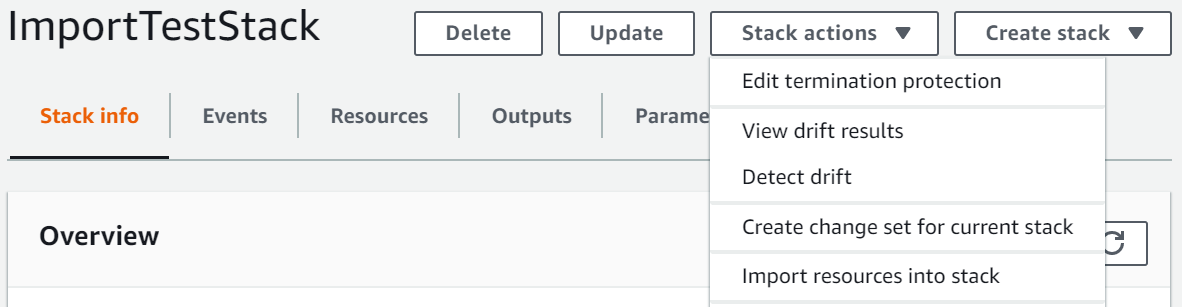
在 Stacks (堆疊) 頁面上,在選取父堆疊的情況下,選擇 Stack actions (堆疊動作),然後選擇 Import resources into stack (將資源匯入堆疊)。
-
請閱讀 Import overview (匯入概觀) 頁面,以取得您在此操作期間必須提供的項目清單。然後選擇下一步。
-
在 Specify template (指定範本) 頁面上,使用以下其中一種方法提供更新後的父範本,然後選擇 Next (下一步)。
-
選擇 Amazon S3 URL,然後在文字方塊中為您的範本指定 URL。
-
選擇 Upload a template file (上傳範本檔案),然後瀏覽您的範本。
-
-
在 Identify resources (識別資源) 頁面上,識別
AWS::CloudFormation::Stack資源。-
在 Identifer property (識別碼屬性) 下方,選擇資源識別碼類型。例如,
AWS::CloudFormation::Stack資源可以使用StackId屬性進行識別。 -
在識別碼值下方,輸入要匯入之堆疊的 ARN。例如
arn:aws:cloudformation:us-west-2:12345678910:stack/mystack/5b918d10-cd98-11ea-90d5-0a9cd3354c10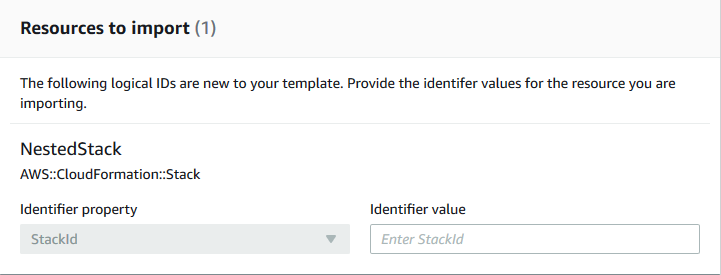
-
選擇下一步。
-
-
在 Specify stack details (識別堆疊詳細資訊) 頁面上,修改任何參數,然後選擇 Next (下一步)。這會自動建立變更集合。
重要
如果您修改了啟動建立、更新或刪除操作的現有參數,匯入操作便會失敗。
-
在 檢閱
MyParentStack頁面上,確認您正在匯入正確的資源,然後選擇匯入資源。這會自動執行在最後一個步驟中建立的變更集合。此時會將任何堆疊層級標籤套用到匯入的資源。 -
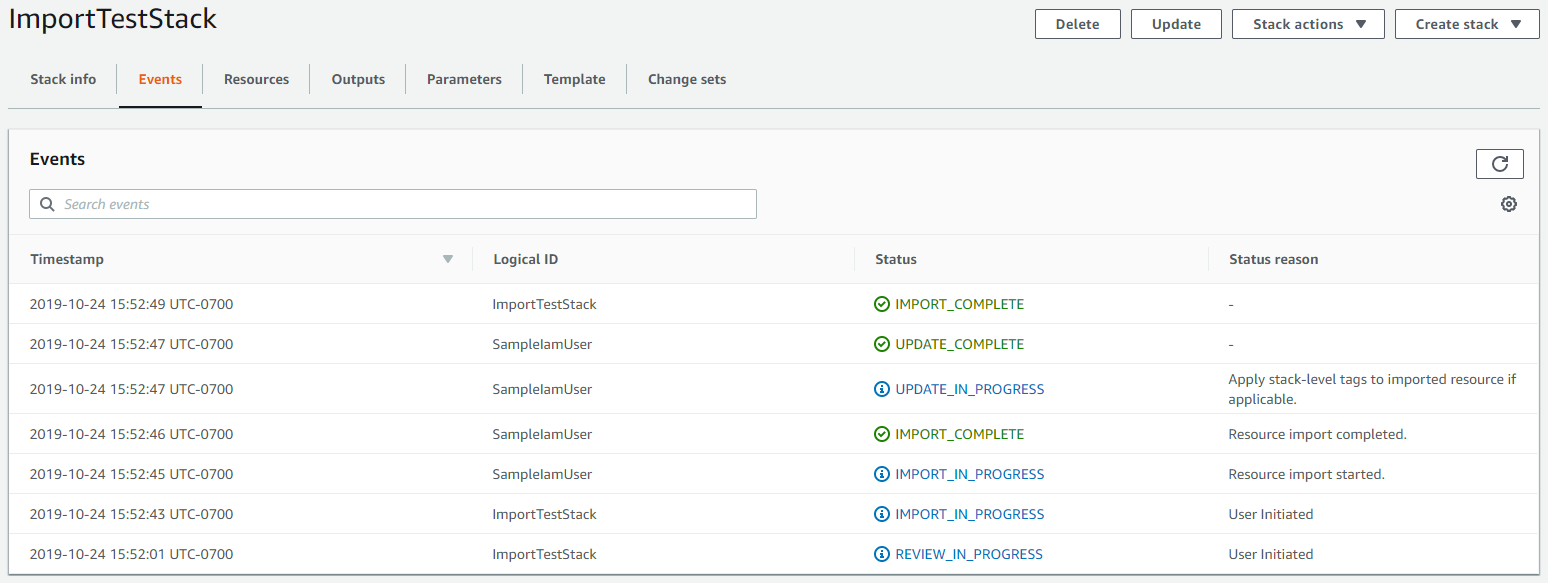
隨即會顯示父堆疊 Stack details (堆疊詳細資訊) 頁面的 Events (事件) 窗格。
注意
在此匯入操作後不需要在父堆疊上執行漂移偵測,因為
AWS::CloudFormation::Stack資源已由 CloudFormation進行管理。
使用 巢狀現有堆疊 AWS CLI
-
將
AWS::CloudFormation::Stack資源新增到具備RetainDeletionPolicy 的父堆疊範本。在以下範例父範本中,MyNestedStack是匯入目標。JSON
{ "AWSTemplateFormatVersion" : "2010-09-09", "Resources" : { "ServiceTable":{ "Type":"AWS::DynamoDB::Table", "Properties":{ "TableName":"Service", "AttributeDefinitions":[ { "AttributeName":"key", "AttributeType":"S" } ], "KeySchema":[ { "AttributeName":"key", "KeyType":"HASH" } ], "ProvisionedThroughput":{ "ReadCapacityUnits":5, "WriteCapacityUnits":1 } } }, "MyNestedStack" : { "Type" : "AWS::CloudFormation::Stack", "DeletionPolicy": "Retain", "Properties" : { "TemplateURL" : "https://s3.amazonaws.com/cloudformation-templates-us-east-2/EC2ChooseAMI.template","Parameters" : { "InstanceType" : "t1.micro", "KeyName" : "mykey"} } } } }YAML
AWSTemplateFormatVersion: 2010-09-09 Resources: ServiceTable: Type: AWS::DynamoDB::Table Properties: TableName: Service AttributeDefinitions: - AttributeName: key AttributeType: S KeySchema: - AttributeName: key KeyType: HASH ProvisionedThroughput: ReadCapacityUnits: 5 WriteCapacityUnits: 1MyNestedStack: Type: AWS::CloudFormation::Stack DeletionPolicy: Retain Properties: TemplateURL: >-https://s3.amazonaws.com/cloudformation-templates-us-east-2/EC2ChooseAMI.templateParameters: InstanceType: t1.micro KeyName: mykey -
按照下列範例撰寫 JSON 字串,並進行以下修改:
-
將
MyNestedStack取代為範本中所指定的目標資源邏輯 ID。 -
將
arn:aws:cloudformation:us-west-2:12345678910:stack/mystack/5b918d10-cd98-11ea-90d5-0a9cd3354c10取代為您要匯入之堆疊的 ARN。
[{"ResourceType":"AWS::CloudFormation::Stack","LogicalResourceId":"MyNestedStack","ResourceIdentifier":{"StackId":"arn:aws:cloudformation:us-east-2:123456789012:stack/mystack/5b918d10-cd98-11ea-90d5-0a9cd3354c10"}}]您也可以在組態檔案中指定參數。
例如,若要匯入
MyNestedStack,您可以建立名為ResourcesToImport.txt的檔案,並包含下列組態。JSON
[
  {
      "ResourceType":"AWS::CloudFormation::Stack",
      "LogicalResourceId":"MyNestedStack",
      "ResourceIdentifier": {
        "StackId":"arn:aws:cloudformation:us-west-2:12345678910:stack/mystack/5b918d10-cd98-11ea-90d5-0a9cd3354c10"
      }
  }
]
YAML
ResourceType: AWS::CloudFormation::Stack LogicalResourceId:MyNestedStackResourceIdentifier: StackId: >-arn:aws:cloudformation:us-west-2:12345678910:stack/mystack/5b918d10-cd98-11ea-90d5-0a9cd3354c10 -
-
要建立變更集,請使用下列 create-change-set 命令並取代預留位置文字。對於
--change-set-type選項,請指定值為IMPORT。對於--resources-to-import選項,請將範例 JSON 字串取代為您剛建立的實際 JSON 字串。aws cloudformation create-change-set \ --stack-nameMyParentStack--change-set-nameImportChangeSet\ --change-set-typeIMPORT\ --template-bodyfile://TemplateToImport.json\ --resources-to-import'[{"ResourceType":"AWS::CloudFormation::Stack","LogicalResourceId":"MyNestedStack","ResourceIdentifier":{"StackId":"arn:aws:cloudformation:us-west-2:12345678910:stack/mystack/5b918d10-cd98-11ea-90d5-0a9cd3354c10"}}]'注意
--resources-to-import不支援內嵌 YAML。JSON 字串中轉義引號的請求有所不同,這取決於您的終端。如需詳細資訊,請參閱《AWS Command Line Interface 使用者指南》中的在字串內使用引號。或者,您可以如下列範例所示,使用檔案 URL 做為
--resources-to-import選項的輸入。--resources-to-importfile://ResourcesToImport.txt如果成功,此命令傳回的下列範例輸出。
{ "Id": "arn:aws:cloudformation:us-west-2:12345678910:changeSet/ImportChangeSet/8ad75b3f-665f-46f6-a200-0b4727a9442e", "StackId": "arn:aws:cloudformation:us-west-2:12345678910:stack/MyParentStack/4e345b70-1281-11ef-b027-027366d8e82b" } -
檢閱變更集合,確認您正在匯入正確的堆疊。
aws cloudformation describe-change-set --change-set-nameImportChangeSet -
若要啟動變更集並將堆疊匯入來源父堆疊,請使用下列 execute-change-set 命令,並取代預留位置文字。此時會將任何堆疊層級標籤套用到匯入的資源。成功完成匯入操作
(IMPORT_COMPLETE)後,堆疊便已順利巢狀。aws cloudformation execute-change-set --change-set-nameImportChangeSet注意
在此匯入操作後不需要在父堆疊上執行漂移偵測,因為
AWS::CloudFormation::Stack資源已由 CloudFormation進行管理。
