本文属于机器翻译版本。若本译文内容与英语原文存在差异,则一律以英文原文为准。
# 使用自定义词汇表
创建自定义词汇表后,您可以将其包含在转录请求中;有关示例,请参阅以下各节。
您在请求中包含的自定义词汇表的语言必须与您为媒体指定的语言代码相匹配。如果语言不匹配,则您的自定义词汇表不会应用于您的转录,也不会出现任何警告或错误。
## 在批量转录中使用自定义词汇表
要将自定义词汇表用于批量转录,请查看以下示例:
### AWS 管理控制台
1. 登录到 [AWS 管理控制台](https://console.aws.amazon.com/transcribe/)。
1. 在导航窗格中,选择**转录作业**,然后选择**创建作业**(右上角)。这将打开**指定作业详细信息**页面。

为您的作业命名并指定您的输入媒体。(可选)包括任何其它字段,然后选择**下一步**。
1. 在**配置作业**页面底部的**自定义**面板中,打开**自定义词汇表**。

1. 从下拉菜单中选择您的自定义词汇表。
选择**创建作业**以运行您的转录作业。
### AWS CLI
此示例使用 [start-transcription-job](https://awscli.amazonaws.com/v2/documentation/api/latest/reference/transcribe/start-transcription-job.html) 命令和 `Settings` 参数及 `VocabularyName` 子参数。有关更多信息,请参阅[https://docs.aws.amazon.com/transcribe/latest/APIReference/API_StartTranscriptionJob.html](https://docs.aws.amazon.com/transcribe/latest/APIReference/API_StartTranscriptionJob.html)和[https://docs.aws.amazon.com/transcribe/latest/APIReference/API_Settings.html](https://docs.aws.amazon.com/transcribe/latest/APIReference/API_Settings.html)。
```
aws transcribe start-transcription-job \
--region {{us-west-2}} \
--transcription-job-name {{my-first-transcription-job}} \
--media MediaFileUri=s3://{{amzn-s3-demo-bucket}}/{{my-input-files}}/{{my-media-file}}.{{flac}} \
--output-bucket-name {{amzn-s3-demo-bucket}} \
--output-key {{my-output-files}}/ \
--language-code {{en-US}} \
--settings VocabularyName={{my-first-vocabulary}}
```
以下是另一个使用 [start-transcription-job](https://awscli.amazonaws.com/v2/documentation/api/latest/reference/transcribe/start-transcription-job.html) 命令的示例,以及一个为该作业包含自定义词汇表的请求正文。
```
aws transcribe start-transcription-job \
--region {{us-west-2}} \
--cli-input-json file://{{my-first-vocabulary-job}}.json
```
*my-first-vocabulary-job.json* 文件包含以下请求正文。
```
{
"TranscriptionJobName": "{{my-first-transcription-job}}",
"Media": {
"MediaFileUri": "s3://{{amzn-s3-demo-bucket}}/{{my-input-files}}/{{my-media-file}}.{{flac}}"
},
"OutputBucketName": "{{amzn-s3-demo-bucket}}",
"OutputKey": "{{my-output-files}}/",
"LanguageCode": "{{en-US}}",
"Settings": {
"VocabularyName": "{{my-first-vocabulary}}"
}
}
```
### 适用于 Python (Boto3) 的 AWS SDK
此示例使用 st [art\_transcription\_](https://boto3.amazonaws.com/v1/documentation/api/latest/reference/services/transcribe.html#TranscribeService.Client.start_transcription_job) job 方法的`Settings`参数来包含自定义词汇。 适用于 Python (Boto3) 的 AWS SDK 有关更多信息,请参阅[https://docs.aws.amazon.com/transcribe/latest/APIReference/API_StartTranscriptionJob.html](https://docs.aws.amazon.com/transcribe/latest/APIReference/API_StartTranscriptionJob.html)和[https://docs.aws.amazon.com/transcribe/latest/APIReference/API_Settings.html](https://docs.aws.amazon.com/transcribe/latest/APIReference/API_Settings.html)。
有关使用 AWS 软件开发工具包的其他示例,包括特定功能、场景和跨服务示例,请参阅本章。[使用 Amazon Transcribe 的代码示例 AWS 软件开发工具包](service_code_examples.md)
```
from __future__ import print_function
import time
import boto3
transcribe = boto3.client('transcribe', '{{us-west-2}}')
job_name = "{{my-first-transcription-job}}"
job_uri = "s3://{{amzn-s3-demo-bucket}}/{{my-input-files}}/{{my-media-file}}.{{flac}}"
transcribe.start_transcription_job(
TranscriptionJobName = job_name,
Media = {
'MediaFileUri': job_uri
},
OutputBucketName = '{{amzn-s3-demo-bucket}}',
OutputKey = '{{my-output-files}}/',
LanguageCode = '{{en-US}}',
Settings = {
'VocabularyName': '{{my-first-vocabulary}}'
}
)
while True:
status = transcribe.get_transcription_job(TranscriptionJobName = job_name)
if status['TranscriptionJob']['TranscriptionJobStatus'] in ['COMPLETED', 'FAILED']:
break
print("Not ready yet...")
time.sleep(5)
print(status)
```
## 在流式转录中使用自定义词汇表
要将自定义词汇表用于流式转录,请查看以下示例:
### AWS 管理控制台
1. 登录到 [AWS 管理控制台](https://console.aws.amazon.com/transcribe/)。
1. 在导航窗格中,选择**Real-time 转录。**向下滚动到**自定义**,如果该字段已最小化,则将其展开。
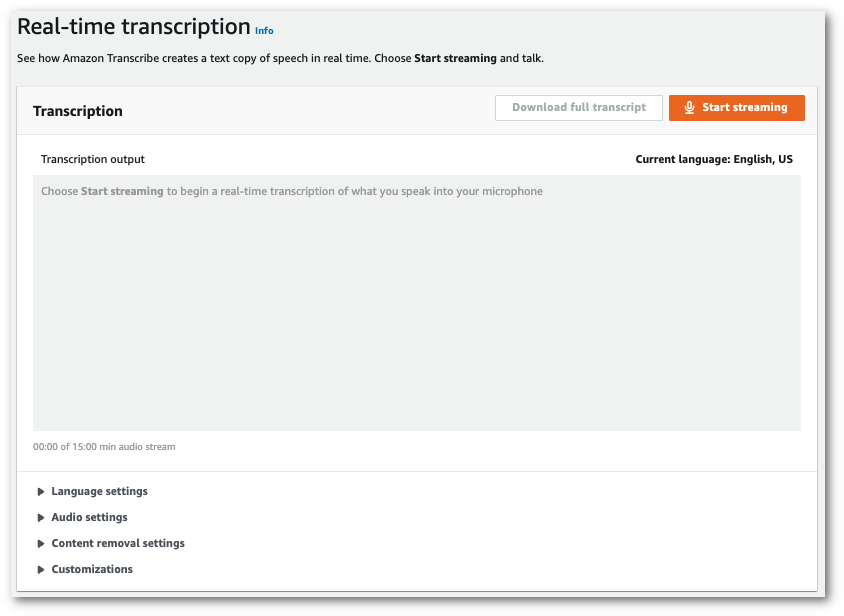
1. 打开**自定义词汇表**,然后从下拉菜单中选择一个自定义词汇表。

添加您希望应用于音频流的所有其它设置。
1. 您现在已准备就绪,可以转录音频流了。选择**开始流式转录**并开始讲话。要结束口述,请选择**停止流式转录**。
### HTTP/2 直播
此示例创建了一个包含您的自定义词汇表的 HTTP/2 请求。有关将 HTTP/2 直播与配合使用的更多信息 Amazon Transcribe,请参阅[设置直 HTTP/2 播](streaming-setting-up.md#streaming-http2)。有关特定于 Amazon Transcribe的参数和标题的更多详细信息,请参阅 [https://docs.aws.amazon.com/transcribe/latest/APIReference/API_streaming_StartStreamTranscription.html](https://docs.aws.amazon.com/transcribe/latest/APIReference/API_streaming_StartStreamTranscription.html)。
```
POST /stream-transcription HTTP/2
host: transcribestreaming.{{us-west-2}}.amazonaws.com
X-Amz-Target: com.amazonaws.transcribe.Transcribe.{{StartStreamTranscription}}
Content-Type: application/vnd.amazon.eventstream
X-Amz-Content-Sha256: {{string}}
X-Amz-Date: {{20220208}}T{{235959}}Z
Authorization: AWS4-HMAC-SHA256 Credential={{access-key}}/{{20220208}}/{{us-west-2}}/transcribe/aws4_request, SignedHeaders=content-type;host;x-amz-content-sha256;x-amz-date;x-amz-target;x-amz-security-token, Signature={{string}}
x-amzn-transcribe-language-code: {{en-US}}
x-amzn-transcribe-media-encoding: {{flac}}
x-amzn-transcribe-sample-rate: {{16000}}
x-amzn-transcribe-vocabulary-name: {{my-first-vocabulary}}
transfer-encoding: chunked
```
参数定义可在 [API 参考](https://docs.aws.amazon.com/transcribe/latest/APIReference/API_Reference.html)中找到;所有 AWS API 操作的通用参数列在[常用参数](https://docs.aws.amazon.com/transcribe/latest/APIReference/CommonParameters.html)部分中。
### WebSocket 直播
此示例创建了一个预签名 URL,用于将您的自定义词汇应用于 WebSocket直播。为了便于阅读,已增加了换行符。有关将 WebSocket直播与配合使用的更多信息 Amazon Transcribe,请参阅[设置直 WebSocket 播](streaming-setting-up.md#streaming-websocket)。有关参数的更多详细信息,请参阅 [https://docs.aws.amazon.com/transcribe/latest/APIReference/API_streaming_StartStreamTranscription.html](https://docs.aws.amazon.com/transcribe/latest/APIReference/API_streaming_StartStreamTranscription.html)。
```
GET wss://transcribestreaming.{{us-west-2}}.amazonaws.com:8443/stream-transcription-websocket?
&X-Amz-Algorithm=AWS4-HMAC-SHA256
&X-Amz-Credential={{AKIAIOSFODNN7EXAMPLE}}%2F{{20220208}}%2F{{us-west-2}}%2F{{transcribe}}%2Faws4_request
&X-Amz-Date={{20220208}}T{{235959}}Z
&X-Amz-Expires={{300}}
&X-Amz-Security-Token={{security-token}}
&X-Amz-Signature={{string}}
&X-Amz-SignedHeaders=content-type%3Bhost%3Bx-amz-date
&language-code={{en-US}}
&media-encoding={{flac}}
&sample-rate={{16000}}
&vocabulary-name={{my-first-vocabulary}}
```
参数定义可在 [API 参考](https://docs.aws.amazon.com/transcribe/latest/APIReference/API_Reference.html)中找到;所有 AWS API 操作的通用参数列在[常用参数](https://docs.aws.amazon.com/transcribe/latest/APIReference/CommonParameters.html)部分中。