本文属于机器翻译版本。若本译文内容与英语原文存在差异,则一律以英文原文为准。
Connect to MGN data and control planes over a private network
Dipin Jain 和 Mike Kuznetsov,Amazon Web Services
Summary
此模式说明了如何使用接口 VPC 终端节点连接到安全私有网络上的 AWS Transform MGN 数据平面和控制平面。
MGN 是一种高度自动化的移动(重新托管)解决方案,可简化、加快应用程序迁移并降低向其迁移的成本。 AWS它使公司能够重新托管大量物理、虚拟或云服务器,而不会出现兼容性问题、性能中断或长时间的割接窗口。MGN 可从以下网址获得。 AWS 管理控制台这样可以与其他 AWS 服务公司(例如 Amazon CloudWatch 和 AWS Identity and Access Management (IAM))进行无缝集成。 AWS CloudTrail
您可以使用 MGN 中的服务 Site-to-Site VPN 或 VPC 对等互连,通过私有连接从源数据中心连接到数据平面,即连接到用作目标 VPC 中数据复制暂存区域的子网。 AWS Direct Connect您也可以使用由提供支持的接口 VPC 终端节点通过私有网络连接 AWS PrivateLink 到 MGN 控制平面。
先决条件和限制
先决条件
暂存区域子网 — 在设置 MGN 之前,请创建一个子网,用作从源服务器复制到 AWS (即数据平面)的数据的暂存区域。首次访问 MGN 控制台时,必须在 “复制设置” 模板中指定此子网。您可以在“复制设置”模板中为特定源服务器覆盖此子网。尽管您可以使用自己的现有子网 AWS 账户,但我们建议您为此目的创建一个新的专用子网。
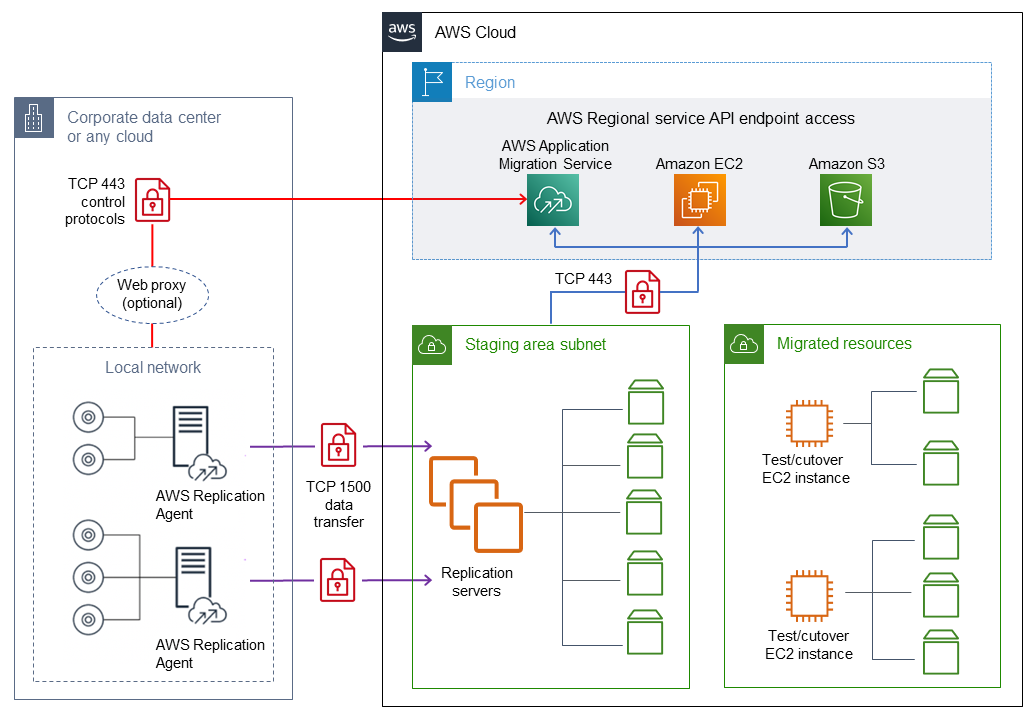
网络要求 — 由 MGN 在您的暂存区域子网中启动的复制服务器必须能够将数据发送到 MGN API 终端节点
https://mgn.<region>.amazonaws.com/,其中<region>是 AWS 区域 您要复制到的代码(例如)。https://mgn.us-east-1.amazonaws.com下载 MGN 软件需要亚马逊简单存储服务 (Amazon S3) Service 服务网址。AWS 复制代理安装程序应有权访问您在 MGN 中使用的亚马逊简单存储服务 (Amazon S3) 存储桶 URL。 AWS 区域
暂存区子网应有权访问 Amazon S3。
安装了 AWS Replication Agent 的源服务器必须能够将数据发送到暂存区域子网中的复制服务器和位于的 MGN API 端点。
https://mgn.<region>.amazonaws.com/
下表列出了所需端口。
来源 | 目标位置 | 端口: | 有关更多信息,请参阅 |
|---|---|---|---|
源数据中心 | Amazon S3 服务 URL | 443(TCP) | |
源数据中心 | AWS 区域 MGN 的特定控制台地址 | 443(TCP) | |
源数据中心 | 暂存区子网 | 1500 (TCP) | |
暂存区子网 | AWS 区域 MGN 的特定控制台地址 | 443(TCP) | |
暂存区子网 | Amazon S3 服务 URL | 443(TCP) | |
暂存区子网 | 子网的亚马逊弹性计算云 (Amazon EC2) 终端节点 AWS 区域 | 443(TCP) |
限制
MGN 目前并非在所有操作系统中 AWS 区域 都可用。
架构
下图展示了典型迁移的网络架构。有关此架构的更多信息,请参阅 MGN 文档以及 MGN 服务架构和网络架构视频
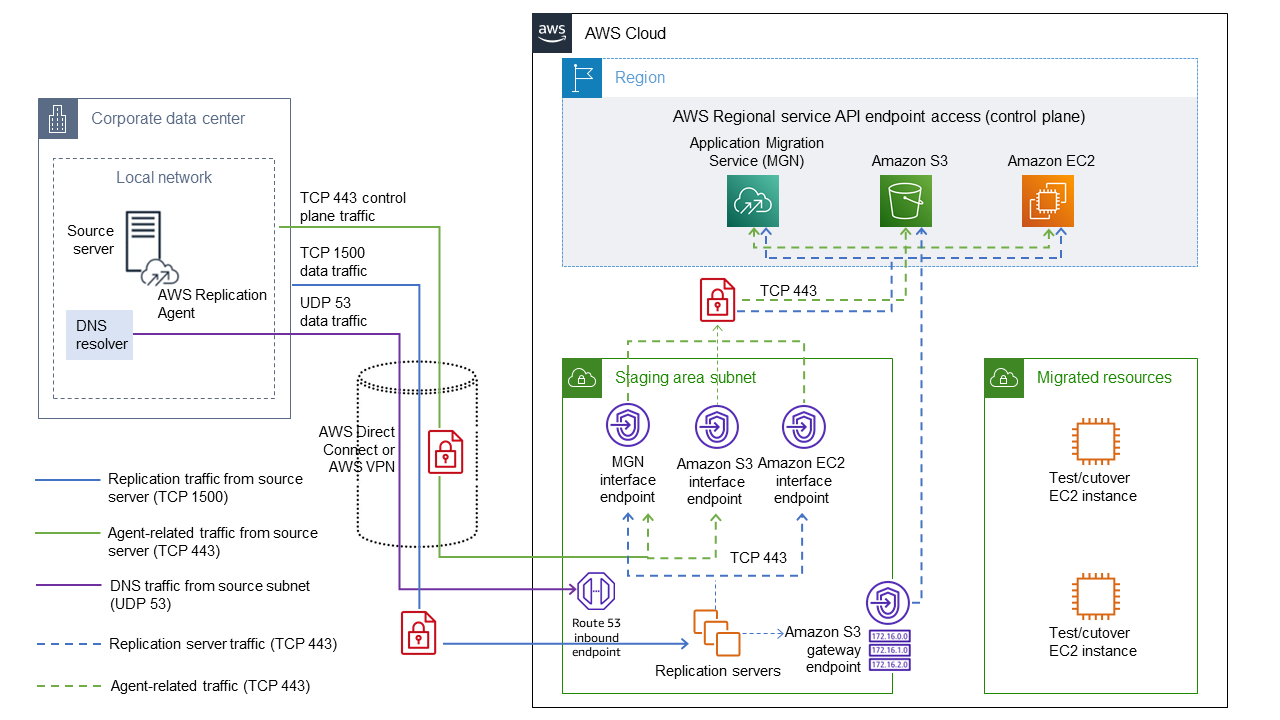
以下详细视图显示了暂存区域 VPC 中用于连接 Amazon S3 和 MGN 的接口 VPC 终端节点的配置。
工具
AWS Transform MGN简化、加快并降低在上重新托管应用程序的成本。 AWS
接口 VPC 终端节点使您 AWS PrivateLink 无需互联网网关、NAT 设备、VPN 连接或 AWS Direct Connect 连接即可连接到由其提供支持的服务。VPC 中的实例无需公有 IP 地址便可与 服务中的资源通信。VPC 和其他服务之间的通信不会离开 Amazon 网络。
操作说明
| Task | 说明 | 所需技能 |
|---|---|---|
为 MGN 配置接口终端节点。 | 源数据中心和暂存区域 VPC 通过您在目标暂存区域 VPC 中创建的接口终端节点私密连接到 MGN 控制平面。要创建端点:
有关更多信息,请参阅 Amazon VPC 文档中的 AWS 服务 使用接口 VPC 终端节点访问和。 | 迁移主管 |
配置 Amazon EC2 的接口端点。 | 暂存区 VPC 通过您在目标暂存区 VPC 中创建的接口端点私下连接到 Amazon EC2 API。若要创建端点,请按照上一篇文章中提供的说明进行操作。
| 迁移主管 |
配置 Amazon S3 的接口端点。 | 源数据中心和暂存区 VPC 通过您在目标暂存区 VPC 中创建的接口端点以私有方式连接到 Amazon S3 API。若要创建端点,请按照第一篇文章提供中的说明进行操作。
注意您使用接口端点是因为网关端点连接无法扩展到 VPC 之外。(有关详细信息,请参阅 AWS PrivateLink 文档。) | 迁移主管 |
配置 Amazon S3 网关端点。 | 在配置阶段,复制服务器必须连接到 S3 存储桶才能下载 AWS 复制服务器的软件更新。但是,Amazon S3 接口端点不支持私有 DNS 名称,并且无法向复制服务器提供 Amazon S3 端点 DNS 名称。 要缓解此问题,请在暂存区子网所属的 VPC 中创建一个 Amazon S3 网关端点,并使用相关路由更新暂存子网的路由表。有关更多信息,请参阅 AWS PrivateLink 文档中的创建网关终端节点。 | 云管理员 |
配置本地 DNS 以解析端点的私有 DNS 名称。 | MGN 和 Amazon EC2 的接口终端节点具有可以在 VPC 中解析的私有 DNS 名称。但是,您还需要配置本地服务器以解析这些接口端点的私有 DNS 名称。 配置这些服务器有多种方法。在这种模式中,我们通过将本地 DNS 查询转发到暂存区域 VPC 中的 Amazon Route 53 Resolver 入站终端节点来测试此功能。有关更多信息,请参阅 Route 53 文档中的解析 VPC 和您的网络之间的 DNS 查询。 | 迁移工程师 |
| Task | 说明 | 所需技能 |
|---|---|---|
使用安装 AWS 复制代理 AWS PrivateLink。 |
以下是 Linux 的示例:
与 MGN 建立连接并安装 AWS 复制代理后,按照 MGN 文档中的说明将源服务器迁移到目标 VPC 和子网。 | 迁移工程师 |
相关资源
MGN 文档
其他资源
使用 VPC 接口终端节点在多账户架构中重新托管您的应用程序(AWS 规范性指导指南) AWS
AWS Transform MGN — 技术简介
(AWS 培训和认证演练)
附加信息
对 Linux 服务器上的AWS 复制代理安装进行故障排除
如果您在 Amazon Linux 服务器上收到 gcc 错误,请配置软件包存储库并使用以下命令:
## sudo yum groupinstall "Development Tools"
