本文属于机器翻译版本。若本译文内容与英语原文存在差异,则一律以英文原文为准。
使用 DR Orchestrator Framework 自动执行跨区域故障转移和故障恢复
Jitendra Kumar、Pavithra Balasubramanian 和 Oliver Francis,Amazon Web Services
Summary
此模式描述了如何使用 DR Orchestrator Framework 来编排和自动执行容易出错的手动步骤,以便跨 Amazon Web Services(AWS)区域执行灾难恢复。该模式涵盖了以下数据库:
Amazon Relational Database Service(Amazon RDS)for MySQL、Amazon RDS for PostgreSQL 或 Amazon RDS for MariaDB
Amazon Aurora MySQL 兼容版本或 Amazon Aurora PostgreSQL 兼容版本(使用集中文件)
亚马逊 ElastiCache (Redis OSS)
为了演示 DR Orchestrator Framework 的功能,您需要创建两个数据库实例或集群。主节点在中 AWS 区域 us-east-1,次要在中us-west-2。要创建这些资源,您可以使用 aws-cross-region-dr-databases GitHub 存储库App-Stack文件夹中的 AWS CloudFormation 模板。
先决条件和限制
一般先决条件
引擎特定的先决条件
Amazon RDS 限制
Aurora 限制
功能可用性和支持因每个数据库引擎的特定版本以及 AWS 区域而异。有关跨区域复制的功能和区域可用性的更多信息,请参阅跨区域只读副本。
Aurora 全局数据库对支持的 Aurora 数据库实例类和最大数量有特定的配置要求 AWS 区域。有关更多信息,请参阅 Amazon Aurora 全局数据库的配置要求。
此解决方案已使用包含一个只读副本的主数据库实例进行了测试。如果要使用多个只读副本,请在生产环境中实施解决方案之前对其进行全面测试。
ElastiCache 限制
Amazon RDS 产品版本
Amazon RDS 支持以下引擎版本:
MySQL – Amazon RDS 支持运行以下版本 MySQL 的数据库实例:MySQL 8.0 和 MySQL 5.7
PostgreSQL – 有关 Amazon RDS for PostgreSQL 的可支持版本的信息,请参阅可用的 PostgreSQL 数据库版本。
MariaDB – Amazon RDS 支持运行以下版本 MariaDB 的数据库实例:
MariaDB 10.11
MariaDB 10.6
MariaDB 10.5
Aurora 产品版本
ElastiCache (Redis OSS) 产品版本
亚马逊 ElastiCache (Redis OSS)支持以下 Redis 版本:
Redis 7.1(加强版)
Redis 7.0(加强版)
Redis 6.2(加强版)
Redis 6.0(加强版)
Redis 5.0.6(加强版)
有关更多信息,请参阅支持的 ElastiCache (Redis OSS) 版本。
架构
Amazon RDS 架构
Amazon RDS 架构包括以下资源:
在主区域 (us-east-1) 中创建的主要 Amazon RDS 数据库实例,可供客户端 read/write 访问
在辅助区域(us-west-2)中创建的 Amazon RDS 只读副本,为客户端提供只读访问权限
DR Orchestrator Framework 同时部署在主要和辅助区域中
此图显示以下内容:
实例主集群和辅助实例之间的异步复制
客户端在主要区域中的读/写访问权限
客户端在辅助区域中的只读访问权限
Aurora 架构
Amazon Aurora 架构包括以下资源:
在主区域(us-east-1)中创建的主 Aurora 数据库集群,具有活动写入器端点
在辅助区域(us-west-2)中创建的 Aurora 数据库集群,具有非活动写入器端点
DR Orchestrator Framework 同时部署在主要和辅助区域中
此图显示以下内容:
主集群和辅助集群之间的异步复制
带有活跃写入器端点的主数据库集群
带有非活跃写入器端点的辅助数据库集群
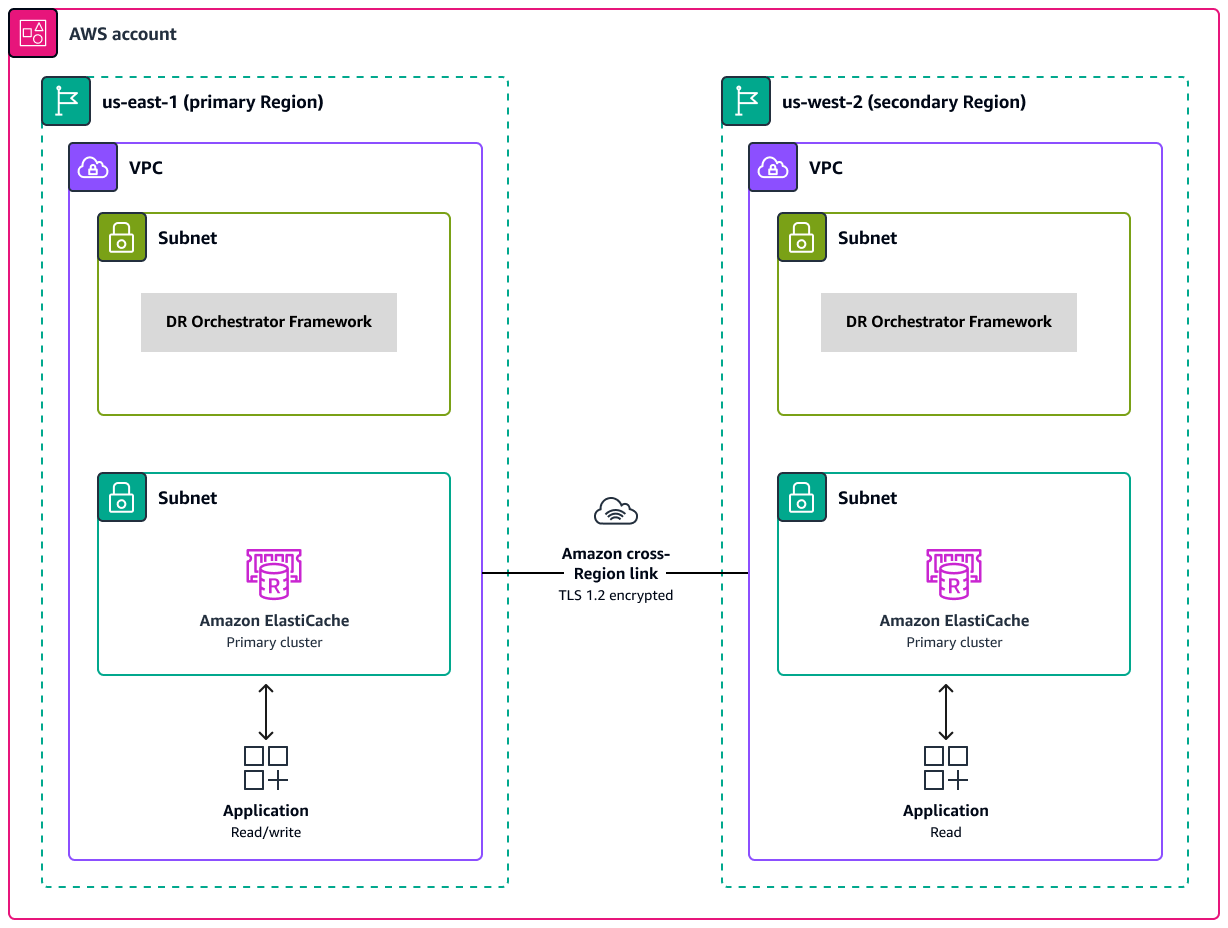
ElastiCache (Redis OSS) 架构
亚马逊 ElastiCache (Redis OSS)架构包括以下资源:
由两个集群创建的 ElastiCache (Redis OSS)全球数据存储:
主区域(us-east-1)中的主集群
辅助集群位于辅助区域(us-west-2)中。
两个集群之间使用 TLS 1.2 加密实现的 Amazon 跨区域链接
DR Orchestrator Framework 同时部署在主要和辅助区域中
自动化和扩展
DR Orchestrator Framework 具有可扩展性,并行支持多个 AWS 数据库的故障转移或故障恢复。
您可以使用以下负载代码对账户中的多个 AWS 数据库进行故障切换。在此示例中,三个 AWS 数据库(两个全球数据库,例如兼容 Aurora MySQL 或兼容 Aurora PostgreSQL 的数据库,以及一个 Amazon RDS for MySQL 实例)故障转移到灾难恢复区域:
{
  "StatePayload": [
    {
      "layer": 1,
      "resources": [
        {
          "resourceType": "PlannedFailoverAurora",
          "resourceName": "Switchover (planned failover) of Amazon Aurora global databases (MySQL)",
          "parameters": {
            "GlobalClusterIdentifier": "!Import dr-globaldb-cluster-mysql-global-identifier",
            "DBClusterIdentifier": "!Import dr-globaldb-cluster-mysql-cluster-identifier"
          }
        },
        {
          "resourceType": "PlannedFailoverAurora",
          "resourceName": "Switchover (planned failover) of Amazon Aurora global databases (PostgreSQL)",
          "parameters": {
            "GlobalClusterIdentifier": "!Import dr-globaldb-cluster-postgres-global-identifier",
            "DBClusterIdentifier": "!Import dr-globaldb-cluster-postgres-cluster-identifier"
          }
        },
        {
          "resourceType": "PromoteRDSReadReplica",
          "resourceName": "Promote RDS for MySQL Read Replica",
          "parameters": {
            "RDSInstanceIdentifier": "!Import rds-mysql-instance-identifier",
            "TargetClusterIdentifier": "!Import rds-mysql-instance-global-arn"
          }
        }
      ]
    }
  ]
}
AWS 服务
代码存储库
此模式的代码可在上的 aws-cross-region-dr GitHub-databases 存储库中找到。
操作说明
| Task | 说明 | 所需技能 |
|---|
克隆 GitHub 存储库。 | 要克隆存储库,请运行以下命令: git clone https://github.com/aws-samples/aws-cross-region-dr-databases.git
| AWS DevOps,AWS 管理员 |
将 Lambda 函数代码打包到 .zip 文件存档中。 | 为 Lambda 函数创建存档文件以包含 DR Orchestrator Framework 依赖项: cd <YOUR-LOCAL-GIT-FOLDER>/DR-Orchestration-artifacts
bash scripts/deploy-orchestrator-sh.sh
| AWS 管理员 |
创建 S3 存储桶。 | 需要使用 S3 存储桶来存储 DR Orchestrator Framework 以及您的最新配置。创建两个 S3 存储桶,一个位于主区域(us-east-1)中,一个在辅助区域(us-west-2)中: 将 xxxxxx 替换为随机值以使存储桶名称保持唯一。 | AWS 管理员 |
创建子网和安全组。 | 在主区域(us-east-1)和辅助区域(us-west-2)中,为在您的 VPC 中部署 Lambda 函数创建两个子网和一个安全组: subnet-XXXXXXX
subnet-YYYYYYY
sg-XXXXXXXXXXXX
| AWS 管理员 |
更新 DR Orchestrator 参数文件。 | 在 <YOUR-LOCAL-GIT-FOLDER>/DR-Orchestration-artifacts/cloudformation 文件夹中,更新以下 DR Orchestrator 参数文件: 使用以下参数值,将 x 和 y 替换为资源名称: [
{
"ParameterKey": "TemplateStoreS3BucketName",
"ParameterValue": "dr-orchestrator-xxxxxx-us-east-1"
},
{
"ParameterKey": "TemplateVPCId",
"ParameterValue": "vpc-xxxxxx"
},
{
"ParameterKey": "TemplateLambdaSubnetID1",
"ParameterValue": "subnet-xxxxxx"
},
{
"ParameterKey": "TemplateLambdaSubnetID2",
"ParameterValue": "subnet-yyyyyy"
},
{
"ParameterKey": "TemplateLambdaSecurityGroupID",
"ParameterValue": "sg-xxxxxxxxxx"
}
]
| AWS 管理员 |
将 DR Orchestrator Framework 代码上传到 S3 存储桶。 | S3 存储桶中的代码比本地目录中的代码更安全。将 DR-Orchestration-artifacts 目录(包括所有文件和子文件夹)上传到 S3 存储桶。 要上传代码,请执行以下操作: 登录到 AWS Management Console。 导航到 Amazon S3 控制台。 选择 dr-orchestrator-xxxxxx-us-east-1 bucket。 选择上传,然后选择添加文件夹。 选择 DR-Orchestration-artifacts 文件夹。 选择上传。 选择 dr-orchestrator-xxxxxx-us-west-2 存储桶。 重复步骤 4–7。
| AWS 管理员 |
在主要区域中部署 DR Orchestrator Framework。 | 要在主要区域(us-east-1)中部署 DR Orchestrator Framework,请运行以下命令: cd <YOUR-LOCAL-GIT-FOLDER>/DR-Orchestration-artifacts/cloudformation
aws cloudformation deploy \
--region us-east-1 \
--stack-name dr-orchestrator \
--template-file Orchestrator-Deployer.yaml \
--parameter-overrides file://Orchestrator-Deployer-parameters-us-east-1.json \
--capabilities CAPABILITY_AUTO_EXPAND CAPABILITY_NAMED_IAM CAPABILITY_IAM \
--disable-rollback
| AWS 管理员 |
在辅助区域中部署 DR Orchestrator Framework。 | 在辅助区域(us-west-2)中,运行以下命令: cd <YOUR-LOCAL-GIT-FOLDER>/DR-Orchestration-artifacts/cloudformation
aws cloudformation deploy \
--region us-west-2 \
--stack-name dr-orchestrator \
--template-file Orchestrator-Deployer.yaml \
--parameter-overrides file://Orchestrator-Deployer-parameters-us-west-2.json \
--capabilities CAPABILITY_AUTO_EXPAND CAPABILITY_NAMED_IAM CAPABILITY_IAM \
--disable-rollback
| AWS 管理员 |
验证部署。 | 如果 CloudFormation 命令成功运行,它将返回以下输出: Successfully created/updated stack - dr-orchestrator
或者,您可以导航到 CloudFormation 控制台并验证dr-orchestrator堆栈的状态。 | AWS 管理员 |
| Task | 说明 | 所需技能 |
|---|
创建数据库子网和安全组。 | 在您的 VPC 中,在主区域(us-east-1)和辅助区域(us-west-2)中为数据库实例或全局数据库创建两个子网和一个安全组: subnet-XXXXXX
subnet-XXXXXX
sg-XXXXXXXXXX
| AWS 管理员 |
更新主数据库实例或集群的参数文件。 | 在 <YOUR LOCAL GIT FOLDER>/App-Stack 文件夹中,更新主要区域的参数文件。 Amazon RDS 在 RDS-MySQL-parameter-us-east-1.json 文件中,使用您创建的资源的名称更新 SubnetIds 和 DBSecurityGroup: {
"Parameters": {
"SubnetIds": "subnet-xxxxxx,subnet-xxxxxx",
"DBSecurityGroup": "sg-xxxxxxxxxx",
"MySqlGlobalIdentifier":"rds-mysql-instance",
"InitialDatabaseName": "mysqldb",
"DBPortNumber": "3789",
"PrimaryRegion": "us-east-1",
"SecondaryRegion": "us-west-2",
"KMSKeyAliasName": "rds/rds-mysql-instance-KmsKeyId"
}
}
Amazon Aurora 在 Aurora-MySQL-parameter-us-east-1.json 文件中,使用您创建的资源的名称更新 SubnetIds 和 DBSecurityGroup: {
"Parameters": {
"SubnetIds": "subnet1-xxxxxx,subnet2-xxxxxx",
"DBSecurityGroup": "sg-xxxxxxxxxx",
"GlobalClusterIdentifier":"dr-globaldb-cluster-mysql",
"DBClusterName":"dbcluster-01",
"SourceDBClusterName":"dbcluster-02",
"DBPortNumber": "3787",
"DBInstanceClass":"db.r5.large",
"InitialDatabaseName": "sampledb",
"PrimaryRegion": "us-east-1",
"SecondaryRegion": "us-west-2",
"KMSKeyAliasName": "rds/dr-globaldb-cluster-mysql-KmsKeyId"
}
}
亚马逊 ElastiCache (Redis OSS) 在 ElastiCache-parameter-us-east-1.json 文件中,使用您创建的资源的名称更新 SubnetIds 和 DBSecurityGroup。 {
"Parameters": {
"CacheNodeType": "cache.m5.large",
"DBSecurityGroup": "sg-xxxxxxxxxx",
"SubnetIds": "subnet-xxxxxx,subnet-xxxxxx",
"EngineVersion": "5.0.6",
"GlobalReplicationGroupIdSuffix": "demo-redis-global-datastore",
"NumReplicas": "1",
"NumShards": "1",
"ReplicationGroupId": "demo-redis-cluster",
"DBPortNumber": "3788",
"TransitEncryption": "true",
"KMSKeyAliasName": "elasticache/demo-redis-global-datastore-KmsKeyId",
"PrimaryRegion": "us-east-1",
"SecondaryRegion": "us-west-2"
}
}
| AWS 管理员 |
在主要区域中部署数据库实例或集群。 | 要在主区域(us-east-1)中部署您的实例或集群,请根据您的数据库引擎运行以下命令。 Amazon RDS cd <YOUR-LOCAL-GIT-FOLDER>/App-Stack
aws cloudformation deploy \
--region us-east-1 \
--stack-name rds-mysql-app-stack \
--template-file RDS-MySQL-Primary.yaml \
--parameter-overrides file://RDS-MySQL-parameter-us-east-1.json \
--capabilities CAPABILITY_AUTO_EXPAND CAPABILITY_NAMED_IAM CAPABILITY_IAM \
--disable-rollback
Amazon Aurora cd <YOUR-LOCAL-GIT-FOLDER>/App-Stack
aws cloudformation deploy \
--region us-east-1 \
--stack-name aurora-mysql-app-stack \
--template-file Aurora-MySQL-Primary.yaml \
--parameter-overrides file://Aurora-MySQL-parameter-us-east-1.json \
--capabilities CAPABILITY_AUTO_EXPAND CAPABILITY_NAMED_IAM CAPABILITY_IAM \
--disable-rollback
亚马逊 ElastiCache (Redis OSS) cd <YOUR-LOCAL-GIT-FOLDER>/App-Stack
aws cloudformation deploy \
--region us-east-1 --stack-name elasticache-ds-app-stack \
--template-file ElastiCache-Primary.yaml \
--parameter-overrides file://ElastiCache-parameter-us-east-1.json \
--capabilities CAPABILITY_AUTO_EXPAND CAPABILITY_NAMED_IAM CAPABILITY_IAM \
--disable-rollback
验证 CloudFormation 资源是否成功部署。 | AWS 管理员 |
更新辅助数据库实例或集群的参数文件。 | 在 <YOUR LOCAL GIT FOLDER>/App-Stack 文件夹中,更新辅助区域的参数文件。 Amazon RDS 在 RDS-MySQL-parameter-us-west-2.json 文件中,使用您创建的资源的名称更新 SubnetIDs 和 DBSecurityGroup。PrimaryRegionKMSKeyArn使用MySQLKmsKeyId从主数据库实例 CloudFormation 堆栈的 O ut puts 部分中获取的值更新: {
"Parameters": {
"SubnetIds": "subnet-aaaaaaaaa,subnet-bbbbbbbbb",
"DBSecurityGroup": "sg-cccccccccc",
"MySqlGlobalIdentifier":"rds-mysql-instance",
"InitialDatabaseName": "mysqldb",
"DBPortNumber": "3789",
"PrimaryRegion": "us-east-1",
"SecondaryRegion": "us-west-2",
"KMSKeyAliasName": "rds/rds-mysql-instance-KmsKeyId",
"PrimaryRegionKMSKeyArn":"arn:aws:kms:us-east-1:xxxxxxxxx:key/mrk-xxxxxxxxxxxxxxxxxxxxx"
}
}
Amazon Aurora 在 Aurora-MySQL-parameter-us-west-2.json 文件中,使用您创建的资源的名称更新 SubnetIDs 和 DBSecurityGroup。PrimaryRegionKMSKeyArn使用AuroraKmsKeyId从主数据库实例 CloudFormation 堆栈的 O ut puts 部分中获取的值更新: {
"Parameters": {
"SubnetIds": "subnet1-aaaaaaaaa,subnet2-bbbbbbbbb",
"DBSecurityGroup": "sg-cccccccccc",
"GlobalClusterIdentifier":"dr-globaldb-cluster-mysql",
"DBClusterName":"dbcluster-01",
"SourceDBClusterName":"dbcluster-02",
"DBPortNumber": "3787",
"DBInstanceClass":"db.r5.large",
"InitialDatabaseName": "sampledb",
"PrimaryRegion": "us-east-1",
"SecondaryRegion": "us-west-2",
"KMSKeyAliasName": "rds/dr-globaldb-cluster-mysql-KmsKeyId"
}
}
亚马逊 ElastiCache (Redis OSS) 在 ElastiCache-parameter-us-west-2.json 文件中,使用您创建的资源的名称更新 SubnetIDs 和 DBSecurityGroup。PrimaryRegionKMSKeyArn使用ElastiCacheKmsKeyId从主数据库实例 CloudFormation 堆栈的 O ut puts 部分中获取的值更新: {
"Parameters": {
"CacheNodeType": "cache.m5.large",
"DBSecurityGroup": "sg-cccccccccc",
"SubnetIds": "subnet-aaaaaaaaa,subnet-bbbbbbbbb",
"EngineVersion": "5.0.6",
"GlobalReplicationGroupIdSuffix": "demo-redis-global-datastore",
"NumReplicas": "1",
"NumShards": "1",
"ReplicationGroupId": "demo-redis-cluster",
"DBPortNumber": "3788",
"TransitEncryption": "true",
"KMSKeyAliasName": "elasticache/demo-redis-global-datastore-KmsKeyId",
"PrimaryRegion": "us-east-1",
"SecondaryRegion": "us-west-2"
}
}
| AWS 管理员 |
在辅助区域中部署数据库实例或集群。 | 根据您的数据库引擎运行以下命令。 Amazon RDS cd <YOUR-LOCAL-GIT-FOLDER>/App-Stack
aws cloudformation deploy \
--region us-west-2 \
--stack-name rds-mysql-app-stack \
--template-file RDS-MySQL-DR.yaml \
--parameter-overrides file://RDS-MySQL-parameter-us-west-2.json \
--capabilities CAPABILITY_AUTO_EXPAND CAPABILITY_NAMED_IAM CAPABILITY_IAM \
--disable-rollback
Amazon Aurora cd <YOUR-LOCAL-GIT-FOLDER>/App-Stack
aws cloudformation deploy \
--region us-west-2 \
--stack-name aurora-mysql-app-stack \
--template-file Aurora-MySQL-DR.yaml \
--parameter-overrides file://Aurora-MySQL-parameter-us-west-2.json \
--capabilities CAPABILITY_AUTO_EXPAND CAPABILITY_NAMED_IAM CAPABILITY_IAM \
--disable-rollback
亚马逊 ElastiCache (Redis OSS) cd <YOUR-LOCAL-GIT-FOLDER>/App-Stack
aws cloudformation deploy \
--region us-west-2 \
--stack-name elasticache-ds-app-stack \
--template-file ElastiCache-DR.yaml \
--parameter-overrides file://ElastiCache-parameter-us-west-2.json \
--capabilities CAPABILITY_AUTO_EXPAND CAPABILITY_NAMED_IAM CAPABILITY_IAM \
--disable-rollback
验证 CloudFormation 资源是否成功部署。 | AWS 管理员 |
相关资源