View a markdown version of this page

入门:创建 Amazon EventBridge 事件总线规则 - Amazon EventBridge

本文属于机器翻译版本。若本译文内容与英语原文存在差异,则一律以英文原文为准。

入门:创建 Amazon EventBridge 事件总线规则

为了熟悉 EventBridge 规则及其功能,我们将使用 CloudFormation 模板来设置事件总线规则和相关组件,包括事件源、事件模式和目标。然后,我们可以探讨如何运用规则来筛选所需事件。

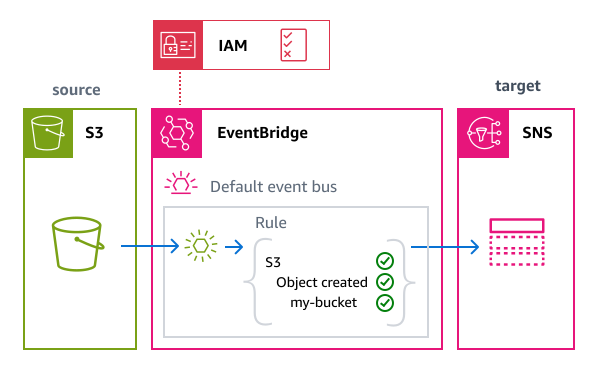
该模板将在默认事件总线上创建规则。此规则使用事件模式筛选来自特定 Amazon S3 存储桶的事件,并将匹配事件发送到指定目标,即 Amazon SNS 主题。每次在存储桶中创建对象时,该规则都会向主题发送通知,然后该主题会向您指定的电子邮件地址发送一封电子邮件。

部署的资源包括:

  • 启用 EventBridge 通知的 Amazon S3 存储桶,可充当事件源。

  • Amazon SNS 主题与电子邮件订阅,作为通知的目标。

  • 一个执行角色,授予 EventBridge 发布到 Amazon SNS 主题所需的权限。

  • 规则本身,其中:

    • 定义仅匹配特定 Amazon S3 存储桶中的 Object Created 事件的事件模式。

    • 将 Amazon SNS 主题指定为向其发送匹配事件的 EventBridge 目标。

有关模板的具体技术细节,请参阅模板详细信息

Amazon S3 事件将与规则的事件模式进行匹配,如果匹配则发送到 SNS 主题。

开始前的准备工作

要在中接收 Amazon S3 事件 EventBridge,必须在 Amazon S3 EventBridge 中启用。本主题假设 EventBridge 已启用。有关更多信息,请参阅 Amazon S3 用户指南 EventBridge中的启用

使用创建规则 CloudFormation

要创建规则及其关联资源,我们将创建一个 CloudFormation 模板并使用它来创建一个包含示例规则的堆栈,包括源和目标。

重要

如果您通过此模板创建堆栈,则需为使用的 Amazon 资源支付相应费用。

首先,创建 CloudFormation 模板。

  1. 模板 部分中,单击 JSONYAML 选项卡上的复制图标,以复制模板内容。

  2. 将模板内容粘贴到新文件中。

  3. 将该文件保存在本地。

接下来,使用您保存的模板来配置堆 CloudFormation 栈。

使用 CloudFormation (控制台)创建堆栈
  1. 打开 CloudFormation 控制台,网址为https://console.aws.amazon.com/cloudformation/

  2. 堆栈页面,从创建堆栈菜单中选择(采用新资源(标准))

  3. 指定模板:

    1. 先决条件下,选择选择现有模板

    2. 指定模板下,选择上传模板文件

    3. 选择选择文件,导航到模板文件并将其选中。

    4. 选择下一步

  4. 指定堆栈详细信息:

    1. 输入堆栈名称。

    2. 对于 BucketName,请输入全球唯一的存储桶名称。Amazon S3 存储桶名称在所有 AWS 账户中必须是唯一的。

    3. 对于SNSTopicDisplayName、“SNSTopic名称” 和 RuleName,请接受默认值或输入自己的值。

    4. 对于 EmailAddress,请输入您想要接收通知的有效电子邮件地址。

    5. 选择下一步

  5. 配置堆栈选项:

    1. 堆栈故障选项下,选择删除所有新创建的资源

      注意

      如果选择此选项,即使堆栈创建失败,您可能也不会因为删除策略规定保留资源而向资源付费。有关更多信息,请参阅《CloudFormation 用户指南》中的 DeletionPolicy 属性

    2. 接受其他所有默认值。

    3. 在 “能力” 下,选中复选框以确认 CloudFormation 可能会在您的账户中创建 IAM 资源。

    4. 选择下一步

  6. 查看堆栈详细信息并选择提交

使用 CloudFormation (AWS CLI) 创建堆栈

您也可以使用 AWS CLI 来创建堆栈。

  • 使用 create-stack 命令。

    • 接受默认模板参数值,指定堆栈名称、电子邮件地址和存储桶名称。使用 template-body 参数传递模板内容,或使用 template-url 指定 URL 位置。

      aws cloudformation create-stack \ --stack-name eventbridge-rule-tutorial \ --template-body template-contents \ --parameters \ ParameterKey=EmailAddress,ParameterValue=your.email@example.com \ ParameterKey=BucketName,ParameterValue=my-unique-bucket-name \ --capabilities CAPABILITY_IAM
    • 覆盖一个或多个模板参数的默认值。例如:

      aws cloudformation create-stack \ --stack-name eventbridge-rule-tutorial \ ----template-body template-contents \ --parameters \ ParameterKey=EmailAddress,ParameterValue=your.email@example.com \ ParameterKey=BucketName,ParameterValue=my-custom-bucket-name \ ParameterKey=RuleName,ParameterValue=my-custom-rule-name \ --capabilities CAPABILITY_IAM

CloudFormation 创建堆栈。一旦堆栈创建完成之后,堆栈资源就即可投入使用。可使用堆栈详细信息页面上的资源选项卡来查看账户中预置的资源。

堆栈创建完成后,系统会向您提供的地址发送订阅确认电子邮件。要接收通知,您必须确认此订阅。

探索规则功能

创建规则后,您可以使用 EventBridge 控制台观察规则的运行情况并测试事件的传输。

  1. https://console.aws.amazon.com/events/家打开 EventBridge 控制台? #/规则

  2. 选择您创建的规则。

    在规则详细信息页面上,规则详细信息部分显示有关规则的信息,包括其事件模式和目标。

检查事件模式

在测试规则操作之前,我们先检查一下事件模式。该模式用于控制哪些事件会被发送到目标。该规则仅会将符合模式标准的事件发送到目标。在本例中,我们仅想要 Amazon S3 在特定存储桶中创建对象时生成的事件。

  • 在规则详细信息页面的事件模式下,您可以看到该事件模式仅选择满足以下条件的事件:

    • 来源为 Amazon S3 服务(aws.s3

    • 详细信息类型为 Object Created

    • 存储桶名称与我们创建的存储桶的名称相匹配

    { "source": ["aws.s3"], "detail-type": ["Object Created"], "detail": { "bucket": { "name": ["eventbridge-rule-example-source"] } } }

通过规则发送事件

接下来,我们将在事件源中生成事件,以测试规则匹配和传送功能是否正常运行。为此,我们将向指定为事件源的 S3 存储桶上传一个对象。

  1. 打开 Amazon S3 控制台,网址为 https://console.aws.amazon.com/s3/

  2. 存储桶列表中,选择您使用模板创建的存储桶。

  3. 选择上传

  4. 上传测试文件以生成 Object Created 事件:

    1. 选择添加文件从您的计算机中选择一个文件。

    2. 选择上传

  5. 稍等片刻,等待事件处理完毕 EventBridge 并发送通知。

  6. 请查看您的电子邮件以获取有关对象创建事件的通知。该电子邮件将包含有关 S3 事件的详细信息,包括存储桶名称和对象键。

查看规则指标

您可以查看规则的指标,以确认事件正被正确处理。

  1. EventBridge 控制台中,选择您的规则。

  2. 选择指标选项卡。

  3. 您可以查看以下指标,例如:

    • 调用次数:规则被触发的次数。

    • TriggeredRules:由匹配事件触发的规则数量。

清理:删除资源

最后一步,我们将删除该堆栈及其包含的资源。

重要

只要堆栈存在,您就需要为堆栈中包含的 Amazon 资源付费。

  1. 打开 CloudFormation 控制台,网址为https://console.aws.amazon.com/cloudformation/

  2. 堆栈页面上,选择根据该模板创建的堆栈,选择删除,然后确认删除

    CloudFormation 启动删除堆栈及其包含的所有资源。

CloudFormation 模板详情

此模板会在您的账户中创建资源并授予相应权限。

资源

本教程的 CloudFormation 模板将在您的账户中创建以下资源:

重要

如果您通过此模板创建堆栈,则需为使用的 Amazon 资源支付相应费用。

  • AWS::S3::Bucket:用作规则事件源的 Amazon S3 存储桶,已启用 EventBridge 通知。

  • AWS::SNS::Topic:作为规则匹配事件目标的 Amazon SNS 主题。

  • AWS::SNS::Subscription:对 SNS 主题的电子邮件订阅。

  • AWS::IAM::Role:授予 EventBridge 服务权限和 Lambda 清理功能的 IAM 执行角色。

  • AWS::Events::Rule:连接 Amazon S3 存储桶事件与 Amazon SNS 主题的规则。

  • AWS::Lambda::Function:一个 Lambda 函数,可在删除堆栈时清空 Amazon S3 存储桶,从而可以完全删除所有资源。

Permissions

该模板包含一个代表执行角色的 AWS::IAM::Role 资源。此角色向 EventBridge 服务 (events.amazonaws.com) 授予您账户中的以下权限。

通过托管式策略 AmazonSNSFullAccess 授予以下权限:

  • 对所有 Amazon SNS 资源和操作的完全访问权限

CloudFormation 模板

将以下 YAML 代码另存为单独文件,用作本教程的 CloudFormation 模板。

YAML
AWSTemplateFormatVersion: '2010-09-09' Description: '[AWSDocs] EventBridge: event-bus-rule-get-started' Parameters: BucketName: Type: String Description: Name of the S3 bucket (must be globally unique) SNSTopicDisplayName: Type: String Description: Display name for the SNS topic Default: eventbridge-rule-example-target SNSTopicName: Type: String Description: Name for the SNS topic Default: eventbridge-rule-example-target RuleName: Type: String Description: Name for the EventBridge rule Default: eventbridge-rule-example EmailAddress: Type: String Description: Email address to receive notifications AllowedPattern: '^[a-zA-Z0-9._%+-]+@[a-zA-Z0-9.-]+[a-zA-Z0-9-]*(\\.[a-zA-Z0-9-]+)*$' Resources: # S3 Bucket with notifications enabled S3Bucket: Type: AWS::S3::Bucket Properties: BucketName: !Ref BucketName NotificationConfiguration: EventBridgeConfiguration: EventBridgeEnabled: true # Lambda function to empty the S3 bucket before deletion EmptyBucketFunction: Type: AWS::Lambda::Function Properties: Runtime: python3.12 Handler: index.handler Timeout: 60 Role: !GetAtt EmptyBucketRole.Arn Code: ZipFile: | import boto3 import cfnresponse def handler(event, context): bucket = event['ResourceProperties']['BucketName'] if event['RequestType'] == 'Delete': s3 = boto3.resource('s3') bucket_resource = s3.Bucket(bucket) bucket_resource.objects.all().delete() cfnresponse.send(event, context, cfnresponse.SUCCESS, {}) # IAM Role for the bucket cleanup Lambda function EmptyBucketRole: Type: AWS::IAM::Role Properties: AssumeRolePolicyDocument: Version: '2012-10-17' Statement: - Effect: Allow Principal: Service: lambda.amazonaws.com Action: sts:AssumeRole ManagedPolicyArns: - arn:aws:iam::aws:policy/service-role/AWSLambdaBasicExecutionRole Policies: - PolicyName: EmptyBucketPolicy PolicyDocument: Version: '2012-10-17' Statement: - Effect: Allow Action: - s3:DeleteObject - s3:ListBucket Resource: - !Sub arn:aws:s3:::${BucketName} - !Sub arn:aws:s3:::${BucketName}/* # Custom resource to trigger bucket cleanup on stack deletion EmptyBucketOnDelete: Type: Custom::EmptyBucket Properties: ServiceToken: !GetAtt EmptyBucketFunction.Arn BucketName: !Ref S3Bucket # SNS Topic for email notifications SNSTopic: Type: AWS::SNS::Topic Properties: DisplayName: !Ref SNSTopicDisplayName TopicName: !Ref SNSTopicName # SNS Subscription for email SNSSubscription: Type: AWS::SNS::Subscription Properties: Protocol: email Endpoint: !Ref EmailAddress TopicArn: !Ref SNSTopic # EventBridge Rule to match S3 object creation events and send them to the SNS topic EventBridgeRule: Type: AWS::Events::Rule Properties: Name: !Ref RuleName Description: "Rule to detect S3 object creation and send email notification" EventPattern: source: - aws.s3 detail-type: - "Object Created" detail: bucket: name: - !Ref BucketName State: ENABLED Targets: - Id: SendToSNS Arn: !Ref SNSTopic RoleArn: !GetAtt EventBridgeRole.Arn # IAM Role for EventBridge to publish to SNS EventBridgeRole: Type: AWS::IAM::Role Properties: AssumeRolePolicyDocument: Version: '2012-10-17' Statement: - Effect: Allow Principal: Service: events.amazonaws.com Action: sts:AssumeRole ManagedPolicyArns: - arn:aws:iam::aws:policy/AmazonSNSFullAccess Outputs: BucketName: Description: Name of the S3 bucket Value: !Ref S3Bucket SNSTopicARN: Description: ARN of the SNS topic Value: !Ref SNSTopic EmailSubscription: Description: Email address for notifications Value: !Ref EmailAddress
JSON
{ "AWSTemplateFormatVersion": "2010-09-09", "Description": "[AWSDocs] EventBridge: event-bus-rule-get-started", "Parameters": { "BucketName": { "Type": "String", "Description": "Name of the S3 bucket (must be globally unique)" }, "SNSTopicDisplayName": { "Type": "String", "Description": "Display name for the SNS topic", "Default": "eventbridge-rule-example-target" }, "SNSTopicName": { "Type": "String", "Description": "Name for the SNS topic", "Default": "eventbridge-rule-example-target" }, "RuleName": { "Type": "String", "Description": "Name for the EventBridge rule", "Default": "eventbridge-rule-example" }, "EmailAddress": { "Type": "String", "Description": "Email address to receive notifications", "AllowedPattern": "^[a-zA-Z0-9._%+-]+@[a-zA-Z0-9.-]+[a-zA-Z0-9-]*(\\.[a-zA-Z0-9-]+)*$" } }, "Resources": { "S3Bucket": { "Type": "AWS::S3::Bucket", "Properties": { "BucketName": { "Ref": "BucketName" }, "NotificationConfiguration": { "EventBridgeConfiguration": { "EventBridgeEnabled": true } } } }, "EmptyBucketFunction": { "Type": "AWS::Lambda::Function", "Properties": { "Runtime": "python3.12", "Handler": "index.handler", "Timeout": 60, "Role": { "Fn::GetAtt": ["EmptyBucketRole", "Arn"] }, "Code": { "ZipFile": "import boto3\nimport cfnresponse\ndef handler(event, context):\n bucket = event['ResourceProperties']['BucketName']\n if event['RequestType'] == 'Delete':\n s3 = boto3.resource('s3')\n bucket_resource = s3.Bucket(bucket)\n bucket_resource.objects.all().delete()\n cfnresponse.send(event, context, cfnresponse.SUCCESS, {})" } } }, "EmptyBucketRole": { "Type": "AWS::IAM::Role", "Properties": { "AssumeRolePolicyDocument": { "Version": "2012-10-17", "Statement": [ { "Effect": "Allow", "Principal": { "Service": "lambda.amazonaws.com" }, "Action": "sts:AssumeRole" } ] }, "ManagedPolicyArns": [ "arn:aws:iam::aws:policy/service-role/AWSLambdaBasicExecutionRole" ], "Policies": [ { "PolicyName": "EmptyBucketPolicy", "PolicyDocument": { "Version": "2012-10-17", "Statement": [ { "Effect": "Allow", "Action": ["s3:DeleteObject", "s3:ListBucket"], "Resource": [ {"Fn::Sub": "arn:aws:s3:::${BucketName}"}, {"Fn::Sub": "arn:aws:s3:::${BucketName}/*"} ] } ] } } ] } }, "EmptyBucketOnDelete": { "Type": "Custom::EmptyBucket", "Properties": { "ServiceToken": { "Fn::GetAtt": ["EmptyBucketFunction", "Arn"] }, "BucketName": { "Ref": "S3Bucket" } } }, "SNSTopic": { "Type": "AWS::SNS::Topic", "Properties": { "DisplayName": { "Ref": "SNSTopicDisplayName" }, "TopicName": { "Ref": "SNSTopicName" } } }, "SNSSubscription": { "Type": "AWS::SNS::Subscription", "Properties": { "Protocol": "email", "Endpoint": { "Ref": "EmailAddress" }, "TopicArn": { "Ref": "SNSTopic" } } }, "EventBridgeRule": { "Type": "AWS::Events::Rule", "Properties": { "Name": { "Ref": "RuleName" }, "Description": "Rule to detect S3 object creation and send email notification", "EventPattern": { "source": [ "aws.s3" ], "detail-type": [ "Object Created" ], "detail": { "bucket": { "name": [ { "Ref": "BucketName" } ] } } }, "State": "ENABLED", "Targets": [ { "Id": "SendToSNS", "Arn": { "Ref": "SNSTopic" }, "RoleArn": { "Fn::GetAtt": [ "EventBridgeRole", "Arn" ] } } ] } }, "EventBridgeRole": { "Type": "AWS::IAM::Role", "Properties": { "AssumeRolePolicyDocument": { "Version": "2012-10-17", "Statement": [ { "Effect": "Allow", "Principal": { "Service": "events.amazonaws.com" }, "Action": "sts:AssumeRole" } ] }, "ManagedPolicyArns": [ "arn:aws:iam::aws:policy/AmazonSNSFullAccess" ] } } }, "Outputs": { "BucketName": { "Description": "Name of the S3 bucket", "Value": { "Ref": "S3Bucket" } }, "SNSTopicARN": { "Description": "ARN of the SNS topic", "Value": { "Ref": "SNSTopic" } }, "EmailSubscription": { "Description": "Email address for notifications", "Value": { "Ref": "EmailAddress" } } } }