这是 AWS CDK v2 开发者指南。旧版 CDK v1 于 2022 年 6 月 1 日进入维护阶段,并于 2023 年 6 月 1 日终止支持。
本文属于机器翻译版本。若本译文内容与英语原文存在差异,则一律以英文原文为准。
自定义 CDK 堆栈合成
通过修改默认合成器、使用其他可用的内置合成器或创建自己的合成器,您可以自定义 AWS 云开发工具包 (AWS CDK) 堆栈合成。
AWS CDK 包括以下可用于自定义合成行为的内置合成器:
-
DefaultStackSynthesizer – 如果您未指定合成器,则会自动使用此合成器。它支持跨账户部署,也支持使用 CDK 管线构造进行部署。它的引导合约需要一个具有已知名称的现有 Amazon S3 存储桶、一个具有已知名称的现有 Amazon ECR 存储库以及五个具有已知名称的现有 IAM 角色。默认的引导模板可满足这些要求。
-
CliCredentialsStackSynthesizer – 该合成器的引导合约需要一个现有的 Amazon S3 存储桶和一个现有的 Amazon ECR 存储库。它不需要任何 IAM 角色。要执行部署,此合成器依赖于 CDK CLI 用户的权限,建议想要限制 IAM 部署凭证的组织使用。此合成器不支持跨账户部署或 CDK 管线。
-
LegacyStackSynthesizer:此合成器会模拟 CDK v1 的合成行为。它的引导程序合同要求使用任意名称的现有 Amazon S3 存储桶,并期望将资产的位置作为 CloudFormation 堆栈参数传入。如果使用此合成器,则必须使用 CDK CLI 执行部署。
如果这些内置合成器都不适合您的使用案例,则可以将自己的合成器编写为实现 IStackSynthesizer 的类,或查看 Construct Hub 中的合成器。
自定义 DefaultStackSynthesizer
DefaultStackSynthesizer 是 AWS CDK 的默认合成器。它旨在允许跨账户部署 CDK 应用程序,以及从 CI/CD 系统部署 CDK 应用程序,该系统不显式支持 AWS CDK,但支持常规 CloudFormation 部署,例如 AWS CodePipeline。此合成器是大多数用例的最佳选择。
DefaultStackSynthesizer 引导合约
DefaultStackSynthesizer 需要以下引导程序合约。这些是在引导过程中必须创建的资源:
| 引导资源 |
描述 |
默认的预期资源名称 |
用途 |
|
Amazon S3 存储桶
|
暂存存储桶
|
cdk-hnb659fds-assets-<ACCOUNT>-<REGION>
|
存储文件资产。
|
|
Amazon ECR 存储库
|
暂存存储库
|
cdk-hnb659fds-container-assets-<ACCOUNT>-<REGION>
|
存储和管理 Docker 映像资产。
|
|
IAM 角色
|
部署角色
|
cdk-hnb659fds-deploy-role-<ACCOUNT>-<REGION>
|
由 CDK CLI 以及可能的 CodePipeline 代入其他角色并启动 AWS CloudFormation 部署。
此角色的信任策略会控制谁可以在此 AWS 环境中使用 AWS CDK 进行部署。
|
|
IAM 角色
|
AWS CloudFormation 执行角色
|
cdk-hnb659fds-cfn-exec-role-<ACCOUNT>-<REGION>
|
AWS CloudFormation 使用此角色执行部署。
此角色的策略会控制 CDK 部署可以执行的操作。
|
|
IAM 角色
|
查找角色
|
cdk-hnb659fds-lookup-role-<ACCOUNT>-<REGION>
|
当 CDK CLI 需要执行环境上下文查找时,将使用此角色。
此角色的信任策略会控制谁可以在环境中查找信息。
|
|
IAM 角色
|
文件发布角色
|
cdk-hnb659fds-file-publishing-role-<ACCOUNT>-<REGION>
|
此角色可用于将资产上传到 Amazon S3 暂存存储桶。它是从部署角色中代入的。
|
|
IAM 角色
|
映像发布角色
|
cdk-hnb659fds-image-publishing-role-<ACCOUNT>-<REGION>
|
此角色可用于将 Docker 映像上传到 Amazon ECR 暂存存储库。它是从部署角色中代入的。
|
|
SSM 参数
|
引导版本参数
|
/cdk-bootstrap/hnb659fds/<version>
|
引导模板的版本。引导模板和 CDK CLI 使用它验证要求。
|
自定义 CDK 堆栈合成的一种方法是修改 DefaultStackSynthesizer。您可以使用 Stack 实例的 synthesizer 属性为单个 CDK 堆栈自定义此合成器。您也可以使用 App 实例的 defaultStackSynthesizer 属性为 CDK 应用程序中的所有堆栈修改 DefaultStackSynthesizer。
更改限定符
限定符将添加到引导过程中创建的资源的名称中。默认情况下,此值为 hnb659fds。在引导过程中修改限定符时,需要自定义 CDK 堆栈合成以使用相同的限定符。
要更改限定符,请配置 DefaultStackSynthesizer 的 qualifier 属性,或在 CDK 项目的 cdk.json 文件中将限定符配置为上下文键。
以下是配置 DefaultStackSynthesizer 的 qualifier 属性的示例:
例
- TypeScript
-
new MyStack(this, 'MyStack', {
  synthesizer: new DefaultStackSynthesizer({
    qualifier: 'MYQUALIFIER',
  }),
});
- JavaScript
-
new MyStack(this, 'MyStack', {
  synthesizer: new DefaultStackSynthesizer({
    qualifier: 'MYQUALIFIER',
  }),
})
- Python
-
MyStack(self, "MyStack",
    synthesizer=DefaultStackSynthesizer(
        qualifier="MYQUALIFIER"
))
- Java
-
new MyStack(app, "MyStack", StackProps.builder()
  .synthesizer(DefaultStackSynthesizer.Builder.create()
    .qualifier("MYQUALIFIER")
    .build())
  .build();
)
- C#
-
new MyStack(app, "MyStack", new StackProps
{
    Synthesizer = new DefaultStackSynthesizer(new DefaultStackSynthesizerProps
    {
        Qualifier = "MYQUALIFIER"
    })
});
- Go
-
func NewMyStack(scope constructs.Construct, id string, props *MyStackProps) awscdk.Stack {
	var sprops awscdk.StackProps
	if props != nil {
		sprops = props.StackProps
	}
	stack := awscdk.NewStack(scope, &id, &sprops)

	synth := awscdk.NewDefaultStackSynthesizer(&awscdk.DefaultStackSynthesizerProps{
		Qualifier: jsii.String("MYQUALIFIER"),
	})

	stack.SetSynthesizer(synth)

	return stack
}
下面是在 cdk.json 中将限定符配置为上下文键的示例:
{
  "app": "...",
  "context": {
    "@aws-cdk/core:bootstrapQualifier": "MYQUALIFIER"
  }
}
更改资源名称
所有其他 DefaultStackSynthesizer 属性都与引导模板中的资源名称相关。只有在修改了引导模板并更改了资源名称或命名方案时,才需要提供这些属性中的任何一个。
所有属性都接受特殊占位符 ${Qualifier}、${AWS::Partition}、${AWS::AccountId} 和 ${AWS::Region}。这些占位符将分别替换为 qualifier 参数和 AWS 分区的值、账户 ID 和堆栈环境的 AWS 区域值。
以下示例显示了最常用的 DefaultStackSynthesizer 属性及其默认值,和实例化合成器的步骤一样。有关完整列表,请参阅 DefaultStackSynthesizerProps。
例
- TypeScript
-
new DefaultStackSynthesizer({
  // Name of the S3 bucket for file assets
  fileAssetsBucketName: 'cdk-${Qualifier}-assets-${AWS::AccountId}-${AWS::Region}',
  bucketPrefix: '',

  // Name of the ECR repository for Docker image assets
  imageAssetsRepositoryName: 'cdk-${Qualifier}-container-assets-${AWS::AccountId}-${AWS::Region}',
  dockerTagPrefix: '',

  // ARN of the role assumed by the CLI and Pipeline to deploy here
  deployRoleArn: 'arn:${AWS::Partition}:iam::${AWS::AccountId}:role/cdk-${Qualifier}-deploy-role-${AWS::AccountId}-${AWS::Region}',
  deployRoleExternalId: '',

  // ARN of the role used for file asset publishing (assumed from the CLI role)
  fileAssetPublishingRoleArn: 'arn:${AWS::Partition}:iam::${AWS::AccountId}:role/cdk-${Qualifier}-file-publishing-role-${AWS::AccountId}-${AWS::Region}',
  fileAssetPublishingExternalId: '',

  // ARN of the role used for Docker asset publishing (assumed from the CLI role)
  imageAssetPublishingRoleArn: 'arn:${AWS::Partition}:iam::${AWS::AccountId}:role/cdk-${Qualifier}-image-publishing-role-${AWS::AccountId}-${AWS::Region}',
  imageAssetPublishingExternalId: '',

  // ARN of the role passed to CloudFormation to execute the deployments
  cloudFormationExecutionRole: 'arn:${AWS::Partition}:iam::${AWS::AccountId}:role/cdk-${Qualifier}-cfn-exec-role-${AWS::AccountId}-${AWS::Region}',

  // ARN of the role used to look up context information in an environment
  lookupRoleArn: 'arn:${AWS::Partition}:iam::${AWS::AccountId}:role/cdk-${Qualifier}-lookup-role-${AWS::AccountId}-${AWS::Region}',
  lookupRoleExternalId: '',

  // Name of the SSM parameter which describes the bootstrap stack version number
  bootstrapStackVersionSsmParameter: '/cdk-bootstrap/${Qualifier}/version',

  // Add a rule to every template which verifies the required bootstrap stack version
  generateBootstrapVersionRule: true,

})
- JavaScript
-
new DefaultStackSynthesizer({
  // Name of the S3 bucket for file assets
  fileAssetsBucketName: 'cdk-${Qualifier}-assets-${AWS::AccountId}-${AWS::Region}',
  bucketPrefix: '',

  // Name of the ECR repository for Docker image assets
  imageAssetsRepositoryName: 'cdk-${Qualifier}-container-assets-${AWS::AccountId}-${AWS::Region}',
  dockerTagPrefix: '',

  // ARN of the role assumed by the CLI and Pipeline to deploy here
  deployRoleArn: 'arn:${AWS::Partition}:iam::${AWS::AccountId}:role/cdk-${Qualifier}-deploy-role-${AWS::AccountId}-${AWS::Region}',
  deployRoleExternalId: '',

  // ARN of the role used for file asset publishing (assumed from the CLI role)
  fileAssetPublishingRoleArn: 'arn:${AWS::Partition}:iam::${AWS::AccountId}:role/cdk-${Qualifier}-file-publishing-role-${AWS::AccountId}-${AWS::Region}',
  fileAssetPublishingExternalId: '',

  // ARN of the role used for Docker asset publishing (assumed from the CLI role)
  imageAssetPublishingRoleArn: 'arn:${AWS::Partition}:iam::${AWS::AccountId}:role/cdk-${Qualifier}-image-publishing-role-${AWS::AccountId}-${AWS::Region}',
  imageAssetPublishingExternalId: '',

  // ARN of the role passed to CloudFormation to execute the deployments
  cloudFormationExecutionRole: 'arn:${AWS::Partition}:iam::${AWS::AccountId}:role/cdk-${Qualifier}-cfn-exec-role-${AWS::AccountId}-${AWS::Region}',

  // ARN of the role used to look up context information in an environment
  lookupRoleArn: 'arn:${AWS::Partition}:iam::${AWS::AccountId}:role/cdk-${Qualifier}-lookup-role-${AWS::AccountId}-${AWS::Region}',
  lookupRoleExternalId: '',

  // Name of the SSM parameter which describes the bootstrap stack version number
  bootstrapStackVersionSsmParameter: '/cdk-bootstrap/${Qualifier}/version',

  // Add a rule to every template which verifies the required bootstrap stack version
  generateBootstrapVersionRule: true,
})
- Python
-
DefaultStackSynthesizer(
  # Name of the S3 bucket for file assets
  file_assets_bucket_name="cdk-${Qualifier}-assets-${AWS::AccountId}-${AWS::Region}",
  bucket_prefix="",

  # Name of the ECR repository for Docker image assets
  image_assets_repository_name="cdk-${Qualifier}-container-assets-${AWS::AccountId}-${AWS::Region}",
  docker_tag_prefix="",

  # ARN of the role assumed by the CLI and Pipeline to deploy here
  deploy_role_arn="arn:${AWS::Partition}:iam::${AWS::AccountId}:role/cdk-${Qualifier}-deploy-role-${AWS::AccountId}-${AWS::Region}",
  deploy_role_external_id="",

  # ARN of the role used for file asset publishing (assumed from the CLI role)
  file_asset_publishing_role_arn="arn:${AWS::Partition}:iam::${AWS::AccountId}:role/cdk-${Qualifier}-file-publishing-role-${AWS::AccountId}-${AWS::Region}",
  file_asset_publishing_external_id="",

  # ARN of the role used for Docker asset publishing (assumed from the CLI role)
  image_asset_publishing_role_arn="arn:${AWS::Partition}:iam::${AWS::AccountId}:role/cdk-${Qualifier}-image-publishing-role-${AWS::AccountId}-${AWS::Region}",
  image_asset_publishing_external_id="",

  # ARN of the role passed to CloudFormation to execute the deployments
  cloud_formation_execution_role="arn:${AWS::Partition}:iam::${AWS::AccountId}:role/cdk-${Qualifier}-cfn-exec-role-${AWS::AccountId}-${AWS::Region}",

  # ARN of the role used to look up context information in an environment
  lookup_role_arn="arn:${AWS::Partition}:iam::${AWS::AccountId}:role/cdk-${Qualifier}-lookup-role-${AWS::AccountId}-${AWS::Region}",
  lookup_role_external_id="",

  # Name of the SSM parameter which describes the bootstrap stack version number
  bootstrap_stack_version_ssm_parameter="/cdk-bootstrap/${Qualifier}/version",

  # Add a rule to every template which verifies the required bootstrap stack version
  generate_bootstrap_version_rule=True,
)
- Java
-
DefaultStackSynthesizer.Builder.create()
  // Name of the S3 bucket for file assets
  .fileAssetsBucketName("cdk-${Qualifier}-assets-${AWS::AccountId}-${AWS::Region}")
  .bucketPrefix('')

  // Name of the ECR repository for Docker image assets
  .imageAssetsRepositoryName("cdk-${Qualifier}-container-assets-${AWS::AccountId}-${AWS::Region}")
  .dockerTagPrefix('')

  // ARN of the role assumed by the CLI and Pipeline to deploy here
  .deployRoleArn("arn:${AWS::Partition}:iam::${AWS::AccountId}:role/cdk-${Qualifier}-deploy-role-${AWS::AccountId}-${AWS::Region}")
  .deployRoleExternalId("")

  // ARN of the role used for file asset publishing (assumed from the CLI role)
  .fileAssetPublishingRoleArn("arn:${AWS::Partition}:iam::${AWS::AccountId}:role/cdk-${Qualifier}-file-publishing-role-${AWS::AccountId}-${AWS::Region}")
  .fileAssetPublishingExternalId("")

  // ARN of the role used for Docker asset publishing (assumed from the CLI role)
  .imageAssetPublishingRoleArn("arn:${AWS::Partition}:iam::${AWS::AccountId}:role/cdk-${Qualifier}-image-publishing-role-${AWS::AccountId}-${AWS::Region}")
  .imageAssetPublishingExternalId("")

  // ARN of the role passed to CloudFormation to execute the deployments
  .cloudFormationExecutionRole("arn:${AWS::Partition}:iam::${AWS::AccountId}:role/cdk-${Qualifier}-cfn-exec-role-${AWS::AccountId}-${AWS::Region}")

  .lookupRoleArn("arn:${AWS::Partition}:iam::${AWS::AccountId}:role/cdk-${Qualifier}-lookup-role-${AWS::AccountId}-${AWS::Region}")
  .lookupRoleExternalId("")

  // Name of the SSM parameter which describes the bootstrap stack version number
  .bootstrapStackVersionSsmParameter("/cdk-bootstrap/${Qualifier}/version")

  // Add a rule to every template which verifies the required bootstrap stack version
  .generateBootstrapVersionRule(true)
.build()
- C#
-
new DefaultStackSynthesizer(new DefaultStackSynthesizerProps
{
    // Name of the S3 bucket for file assets
    FileAssetsBucketName = "cdk-${Qualifier}-assets-${AWS::AccountId}-${AWS::Region}",
    BucketPrefix = "",

    // Name of the ECR repository for Docker image assets
    ImageAssetsRepositoryName = "cdk-${Qualifier}-container-assets-${AWS::AccountId}-${AWS::Region}",
    DockerTagPrefix = "",

    // ARN of the role assumed by the CLI and Pipeline to deploy here
    DeployRoleArn = "arn:${AWS::Partition}:iam::${AWS::AccountId}:role/cdk-${Qualifier}-deploy-role-${AWS::AccountId}-${AWS::Region}",
    DeployRoleExternalId = "",

    // ARN of the role used for file asset publishing (assumed from the CLI role)
    FileAssetPublishingRoleArn = "arn:${AWS::Partition}:iam::${AWS::AccountId}:role/cdk-${Qualifier}-file-publishing-role-${AWS::AccountId}-${AWS::Region}",
    FileAssetPublishingExternalId = "",

    // ARN of the role used for Docker asset publishing (assumed from the CLI role)
    ImageAssetPublishingRoleArn = "arn:${AWS::Partition}:iam::${AWS::AccountId}:role/cdk-${Qualifier}-image-publishing-role-${AWS::AccountId}-${AWS::Region}",
    ImageAssetPublishingExternalId = "",

    // ARN of the role passed to CloudFormation to execute the deployments
    CloudFormationExecutionRole = "arn:${AWS::Partition}:iam::${AWS::AccountId}:role/cdk-${Qualifier}-cfn-exec-role-${AWS::AccountId}-${AWS::Region}",

    LookupRoleArn = "arn:${AWS::Partition}:iam::${AWS::AccountId}:role/cdk-${Qualifier}-lookup-role-${AWS::AccountId}-${AWS::Region}",
    LookupRoleExternalId = "",

    // Name of the SSM parameter which describes the bootstrap stack version number
    BootstrapStackVersionSsmParameter = "/cdk-bootstrap/${Qualifier}/version",

    // Add a rule to every template which verifies the required bootstrap stack version
    GenerateBootstrapVersionRule = true,
})
使用 CliCredentialsStackSynthesizer
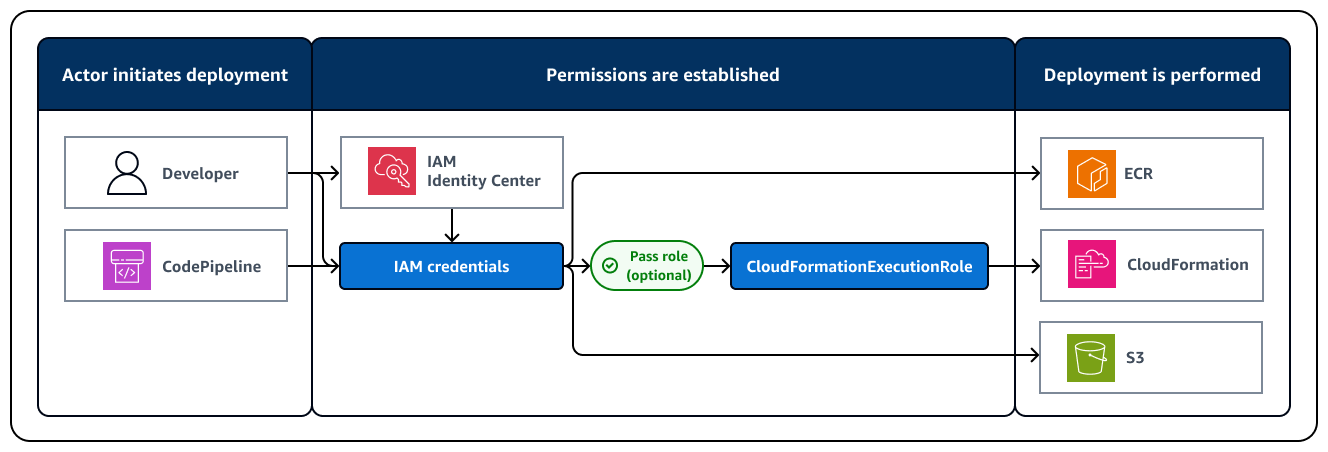
要修改在 CDK 部署过程中用于提供权限的安全凭证,您可以使用 CliCredentialsStackSynthesizer 自定义合成。此合成器使用在引导过程中创建的默认 AWS 资源存储资产,例如 Amazon S3 存储桶和 Amazon ECR 存储库。它不使用 CDK 在引导过程中创建的默认 IAM 角色,而是使用启动部署的角色的安全凭证。因此,角色的安全凭证必须具有有效的权限才能执行所有部署操作。下图说明了使用此合成器时的部署过程:
使用 CliCredentialsStackSynthesizer 时:
-
默认情况下,CloudFormation 使用角色的权限在账户中执行 API 调用。因此,当前身份必须具有对 CloudFormation 堆栈中的 AWS 资源进行必要更改的权限,以及执行必要 CloudFormation 操作的权限,例如 CreateStack 或 UpdateStack。部署能力将仅限于角色的权限。
-
资产发布和 CloudFormation 部署将使用当前 IAM 身份完成。此身份必须具有足够的权限才能向资产存储桶和存储库读取和写入数据。
-
使用当前 IAM 身份执行查找,此操作受其策略的约束。
使用此合成器时,您可以使用单独的 CloudFormation 执行角色,方法是使用带有任何 CDK CLI 命令的 --role-arn 选项来指定该角色。
CliCredentialsStackSynthesizer 引导合约
CliCredentialsStackSynthesizer 需要以下引导程序合约。这些是在引导过程中必须创建的资源:
| 引导资源 |
描述 |
默认的预期资源名称 |
用途 |
|
Amazon S3 存储桶
|
暂存存储桶
|
cdk-hnb659fds-assets-<ACCOUNT>-<REGION>
|
存储文件资产。
|
|
Amazon ECR 存储库
|
暂存存储库
|
cdk-hnb659fds-container-assets-<ACCOUNT>-<REGION>
|
存储和管理 Docker 映像资产。
|
资源名称中的 hnb659fds 字符串称为限定符。它的默认值没有特殊意义。您可以在一个环境中拥有多个引导资源的副本,只要它们有不同的限定符即可。拥有多个副本对于将同一环境中不同应用程序的资产分割开来非常有用。
您可以部署默认引导模板以满足 CliCredentialsStackSynthesizer 的引导合约。默认的引导模板将创建 IAM 角色,但此合成器不会使用它们。您也可以自定义引导模板以删除 IAM 角色。
修改 CliCredentialsStackSynthesizer
如果您在引导过程中更改了限定符或任何默认的引导资源名称,则必须修改合成器以使用相同的名称。您可以修改应用中单个堆栈或所有堆栈的合成器。以下是示例:
例
- TypeScript
-
new MyStack(this, 'MyStack', {
  synthesizer: new CliCredentialsStackSynthesizer({
    qualifier: 'MYQUALIFIER',
  }),
});
- JavaScript
-
new MyStack(this, 'MyStack', {
  synthesizer: new CliCredentialsStackSynthesizer({
    qualifier: 'MYQUALIFIER',
  }),
})
- Python
-
MyStack(self, "MyStack",
    synthesizer=CliCredentialsStackSynthesizer(
        qualifier="MYQUALIFIER"
))
- Java
-
new MyStack(app, "MyStack", StackProps.builder()
  .synthesizer(CliCredentialsStackSynthesizer.Builder.create()
    .qualifier("MYQUALIFIER")
    .build())
  .build();
)
- C#
-
new MyStack(app, "MyStack", new StackProps
{
    Synthesizer = new CliCredentialsStackSynthesizer(new CliCredentialsStackSynthesizerProps
    {
        Qualifier = "MYQUALIFIER"
    })
});
以下示例显示了最常用的 CliCredentialsStackSynthesizer 属性及其默认值。有关完整列表,请参阅 CliCredentialsStackSynthesizerProps。
例
- TypeScript
-
new CliCredentialsStackSynthesizer({
  // Value for '${Qualifier}' in the resource names
  qualifier: 'hnb659fds',

  // Name of the S3 bucket for file assets
  fileAssetsBucketName: 'cdk-${Qualifier}-assets-${AWS::AccountId}-${AWS::Region}',
  bucketPrefix: '',

  // Name of the ECR repository for Docker image assets
  imageAssetsRepositoryName: 'cdk-${Qualifier}-container-assets-${AWS::AccountId}-${AWS::Region}',
  dockerTagPrefix: '',
})
- JavaScript
-
new CliCredentialsStackSynthesizer({
  // Value for '${Qualifier}' in the resource names
  qualifier: 'hnb659fds',

  // Name of the S3 bucket for file assets
  fileAssetsBucketName: 'cdk-${Qualifier}-assets-${AWS::AccountId}-${AWS::Region}',
  bucketPrefix: '',

  // Name of the ECR repository for Docker image assets
  imageAssetsRepositoryName: 'cdk-${Qualifier}-container-assets-${AWS::AccountId}-${AWS::Region}',
  dockerTagPrefix: '',
})
- Python
-
CliCredentialsStackSynthesizer(
  # Value for '${Qualifier}' in the resource names
  qualifier="hnb659fds",

  # Name of the S3 bucket for file assets
  file_assets_bucket_name="cdk-${Qualifier}-assets-${AWS::AccountId}-${AWS::Region}",
  bucket_prefix="",

  # Name of the ECR repository for Docker image assets
  image_assets_repository_name="cdk-${Qualifier}-container-assets-${AWS::AccountId}-${AWS::Region}",
  docker_tag_prefix="",
)
- Java
-
CliCredentialsStackSynthesizer.Builder.create()
  // Value for '${Qualifier}' in the resource names
  .qualifier("hnb659fds")

  // Name of the S3 bucket for file assets
  .fileAssetsBucketName("cdk-${Qualifier}-assets-${AWS::AccountId}-${AWS::Region}")
  .bucketPrefix('')

  // Name of the ECR repository for Docker image assets
  .imageAssetsRepositoryName("cdk-${Qualifier}-container-assets-${AWS::AccountId}-${AWS::Region}")
  .dockerTagPrefix('')
.build()
- C#
-
new CliCredentialsStackSynthesizer(new CliCredentialsStackSynthesizerProps
{

    // Value for '${Qualifier}' in the resource names
    Qualifier = "hnb659fds",

    // Name of the S3 bucket for file assets
    FileAssetsBucketName = "cdk-${Qualifier}-assets-${AWS::AccountId}-${AWS::Region}",
    BucketPrefix = "",

    // Name of the ECR repository for Docker image assets
    ImageAssetsRepositoryName = "cdk-${Qualifier}-container-assets-${AWS::AccountId}-${AWS::Region}",
    DockerTagPrefix = "",
})
使用 LegacyStackSynthesizer
LegacyStackSynthesizer 会模拟 CDK v1 部署的行为。执行部署的角色的安全凭证将用于建立权限。文件资产将上传到必须使用名为 CDKToolkit 的 AWS CloudFormation 堆栈创建的存储桶。CDK CLI 将创建一个名为 aws-cdk/assets 的非托管 Amazon ECR 存储库来存储 Docker 映像资产。您将负责清理和管理此存储库。使用 LegacyStackSynthesizer 合成的堆栈只能使用 CDK CLI 进行部署。
如果要从 CDK v1 迁移到 CDK v2,并且无法重新引导环境,则可以使用 LegacyStackSynthesizer。对于新项目,我们不建议使用 LegacyStackSynthesizer。
LegacyStackSynthesizer 引导合约
LegacyStackSynthesizer 需要以下引导程序合约。这些是在引导过程中必须创建的资源:
| 引导资源 |
描述 |
默认的预期资源名称 |
用途 |
|
Amazon S3 存储桶
|
暂存存储桶
|
cdk-hnb659fds-assets-<ACCOUNT>-<REGION>
|
存储文件资产。
|
|
CloudFormation 输出
|
存储桶名称输出
|
堆栈:CDKToolkit
输出名称:BucketName
|
描述暂存存储桶名称的 CloudFormation 输出
|
LegacyStackSynthesizer 不假定存在具有固定名称的 Amazon S3存储桶。相反,合成的 CloudFormation 模板将包含每个文件资产的三个 CloudFormation 参数。这些参数将存储每个文件资产的 Amazon S3 存储桶名称、Amazon S3 存储桶对象键和构件哈希值。
Docker 映像资产将发布到名为 aws-cdk/assets 的 Amazon ECR 存储库中。可以按资产更改此名称。如果存储库不存在,将会进行创建。
必须存在默认名称为 CDKToolkit 的 CloudFormation 堆栈。此堆栈必须有一个名为 BucketName 的 CloudFormation 导出,该导出指代暂存存储桶。
默认的引导模板可满足 LegacyStackSynthesizer 引导合约。但是,仅使用引导模板的引导资源中的 Amazon S3 存储桶。您可以自定义引导模板以删除 Amazon ECR、IAM 和 SSM 引导资源。
LegacyStackSynthesizer 部署过程
使用此合成器时,将在部署过程中执行以下过程:
-
CDK CLI 会查找您的环境中名为 CDKToolkit 的 CloudFormation 堆栈。CDK CLI 会从这个堆栈中读取名为 BucketName 的 CloudFormation 输出。您可以使用 cdk deploy 的 --toolkit-stack-name 选项指定不同的堆栈名称。
-
启动部署的角色的安全凭证将用于为部署建立权限。因此,角色必须具有足够的权限才能执行所有部署操作。这包括读取和写入 Amazon S3 暂存存储桶、创建和写入 Amazon ECR 存储库、启动和监控 AWS CloudFormation 部署以及执行部署所需的任何 API 调用。
-
如有必要,如果权限有效,则文件资产将发布到 Amazon S3 暂存存储桶。
-
如有必要,且权限有效,则 Docker 映像资产将发布到以该资产的 repositoryName 属性命名的存储库中。如果您不提供存储库名称,则默认值为 'aws-cdk/assets'。
-
如果权限有效,则执行 AWS CloudFormation 部署。Amazon S3 暂存存储桶的位置和键将作为 CloudFormation 参数传递。