本文属于机器翻译版本。若本译文内容与英语原文存在差异,则一律以英文原文为准。
Hello AHS:运行您的第一个模拟哈密顿模拟
本节提供了有关运行第一个模拟哈密顿模拟的信息。
交互式旋转链
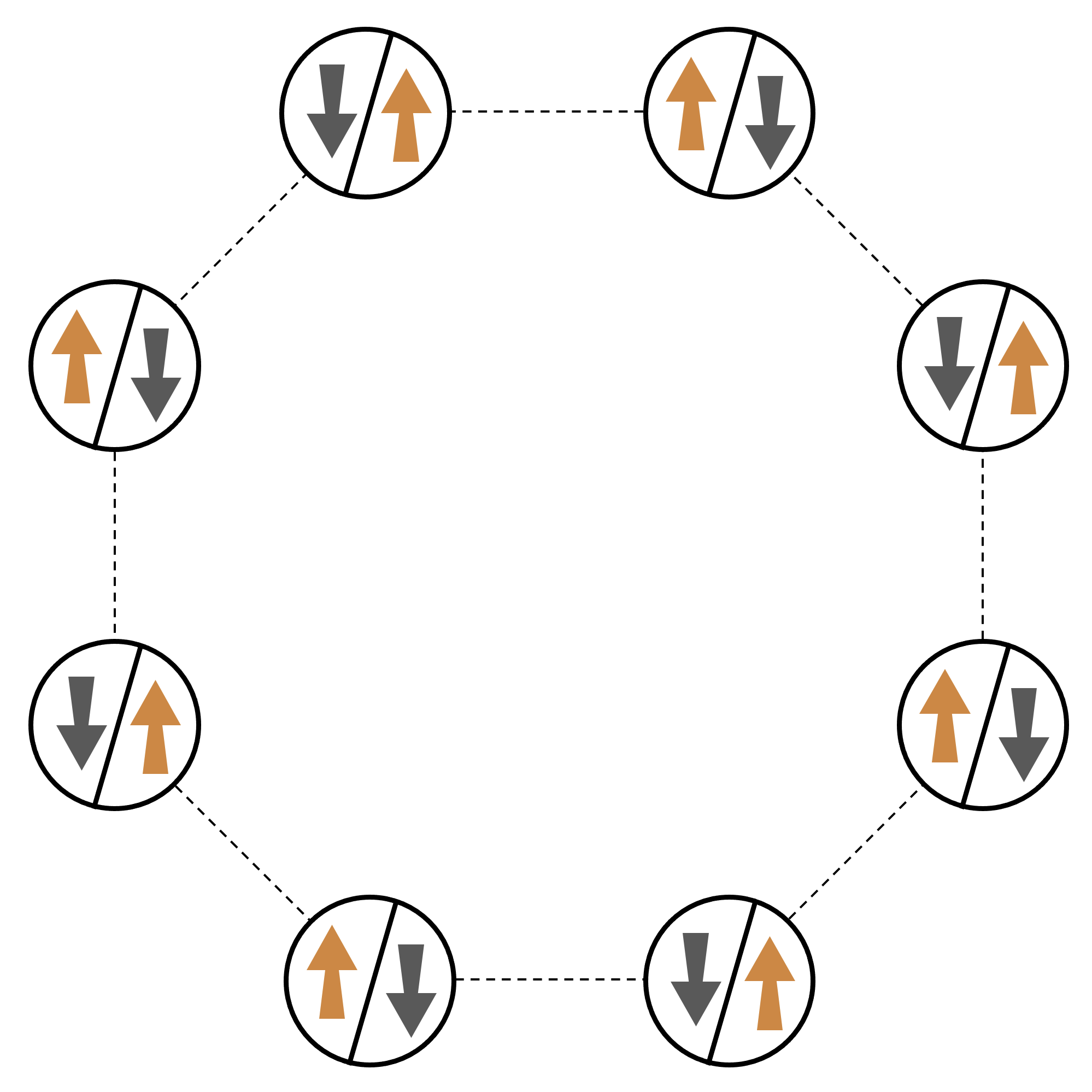
举一个由许多相互作用粒子组成的系统的典型示例,让我们考虑一个由八个旋转组成的环(每个旋转都可以处于“向上”∣↑⟩ 和“向下”∣↓⟩ 的状态)。尽管规模很小,但该模型系统已经表现出自然存在的磁性材料的一些有趣现象。在此例中,我们将展示如何准备一个所谓的反铁磁阶数,即连续的自旋指向相反的方向。
排列
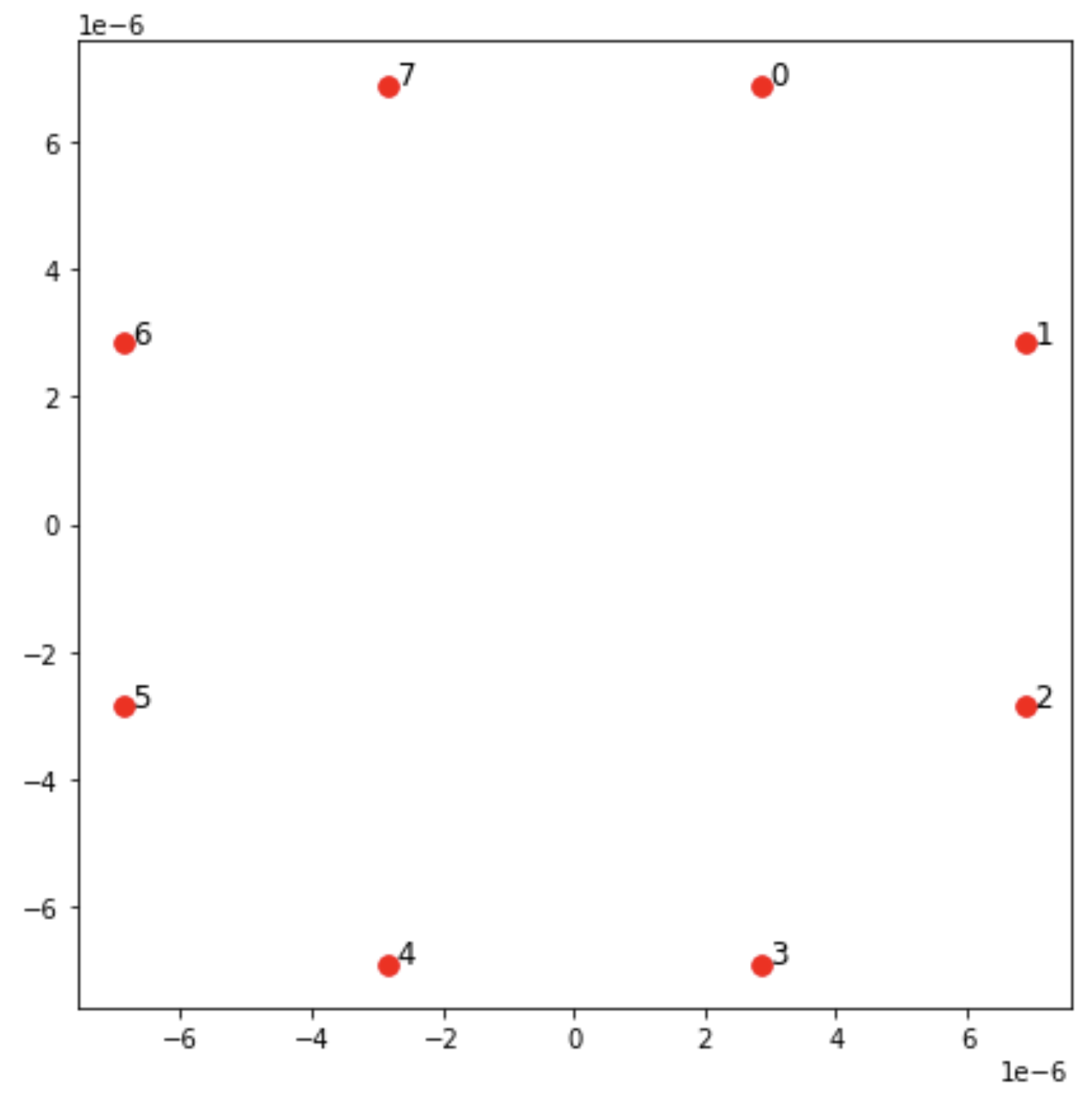
我们将使用一个中性原子来代表每次自旋,“向上”和“向下”自旋态将分别以激发的里德伯格态和原子的基态编码。首先,创建二维排列。我们可以用以下代码对上面的旋转圈进行编程。
先决条件:您需要 pip 安装 Braket SDKpip install
matplotlib 单独安装 matplotlib。
from braket.ahs.atom_arrangement import AtomArrangement
import numpy as np
import matplotlib.pyplot as plt  # Required for plotting

a = 5.7e-6  # Nearest-neighbor separation (in meters)

register = AtomArrangement()
register.add(np.array([0.5, 0.5 + 1/np.sqrt(2)]) * a)
register.add(np.array([0.5 + 1/np.sqrt(2), 0.5]) * a)
register.add(np.array([0.5 + 1/np.sqrt(2), - 0.5]) * a)
register.add(np.array([0.5, - 0.5 - 1/np.sqrt(2)]) * a)
register.add(np.array([-0.5, - 0.5 - 1/np.sqrt(2)]) * a)
register.add(np.array([-0.5 - 1/np.sqrt(2), - 0.5]) * a)
register.add(np.array([-0.5 - 1/np.sqrt(2), 0.5]) * a)
register.add(np.array([-0.5, 0.5 + 1/np.sqrt(2)]) * a)
我们还可以绘制散点图,
fig, ax = plt.subplots(1, 1, figsize=(7, 7))
xs, ys = [register.coordinate_list(dim) for dim in (0, 1)]
ax.plot(xs, ys, 'r.', ms=15)

for idx, (x, y) in enumerate(zip(xs, ys)):
    ax.text(x, y, f" {idx}", fontsize=12)

plt.show()  # This will show the plot below in an ipython or jupyter session
相互作用
为准备反铁磁相,我们需要诱导相邻自旋之间的相互作用。为此,我们使用了 van der Waals 相互作用

其中:nj=∣↑j⟩⟨↑j∣ 是一个运算符,仅当自旋 j 处于“向上”状态时才取值 1,否则取值 0。强度为 Vj,k=C6/(dj,k)6,其中:C6 是固定系数,dj,k 是自旋 j 和 k 之间的欧几里得距离。这个相互作用项的直接影响是,任何自旋 j 和自旋 k 都是“向上”状态的能量都会升高(按量 Vj,k)。通过精心设计 AHS 程序的其余部分,这种相互作用可防止相邻的旋转都处于“向上”状态,这种效果通常被称为“Rydberg 阻塞”。
驱动场
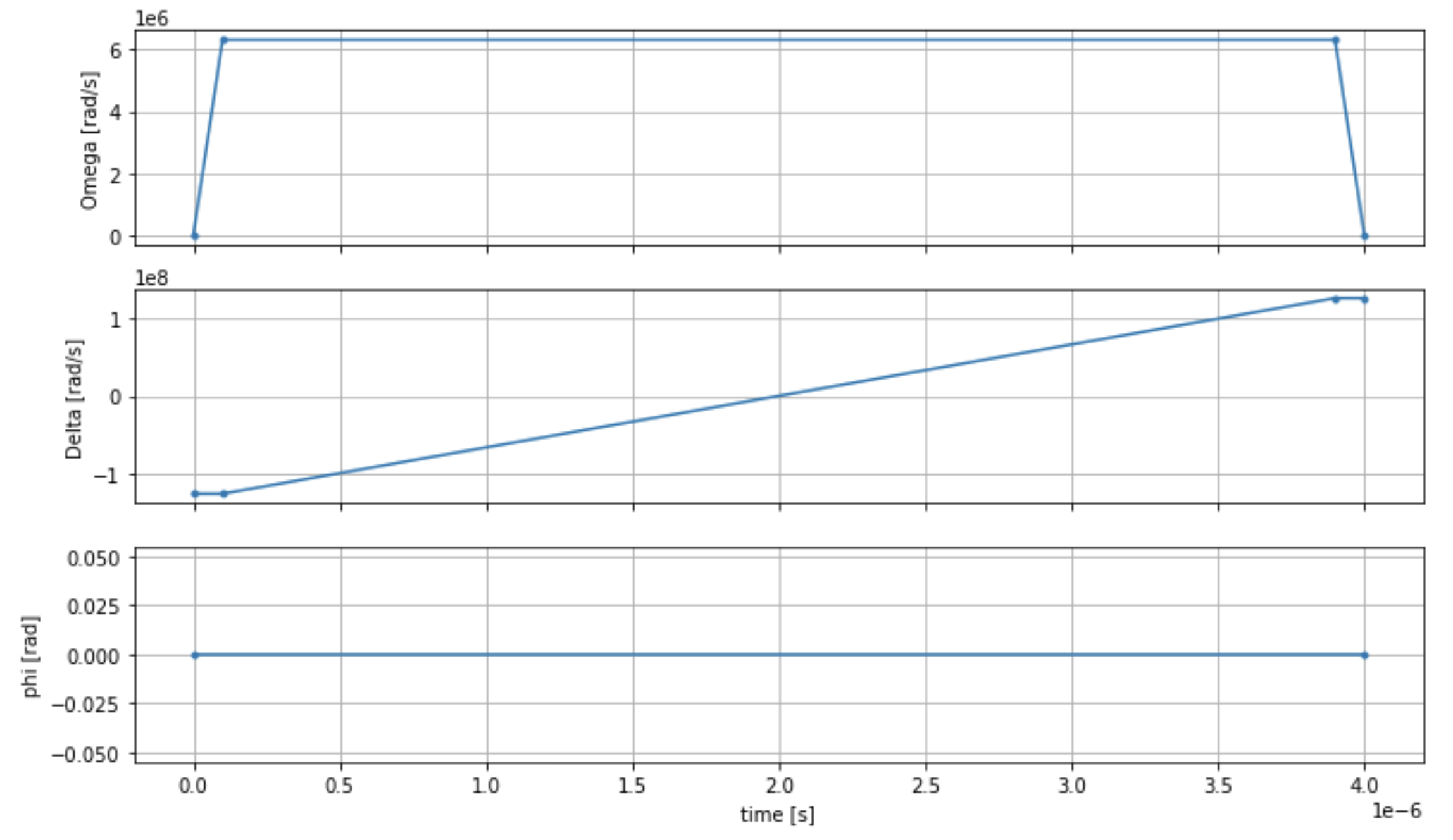
AHS 程序开始时,所有旋转(默认情况下)都以“向下”状态开始,它们处于所谓的铁磁阶段。着眼于准备反铁磁相位的目标,我们指定了一个时变相干驱动场,该驱动场可以平稳地将自旋从这种状态过渡到多体状态,首选为“向上”状态。相应的哈密顿量可以写成

其中 Ω(t)、(t)、Δ(t) 是时变全局振幅(又名 Rabi 频率
为了对从铁磁相向到反铁磁相的平滑过渡进行编程,我们使用以下代码指定驱动场。
from braket.timings.time_series import TimeSeries
from braket.ahs.driving_field import DrivingField

# Smooth transition from "down" to "up" state
time_max = 4e-6  # seconds
time_ramp = 1e-7  # seconds
omega_max = 6300000.0  # rad / sec
delta_start = -5 * omega_max
delta_end = 5 * omega_max

omega = TimeSeries()
omega.put(0.0, 0.0)
omega.put(time_ramp, omega_max)
omega.put(time_max - time_ramp, omega_max)
omega.put(time_max, 0.0)

delta = TimeSeries()
delta.put(0.0, delta_start)
delta.put(time_ramp, delta_start)
delta.put(time_max - time_ramp, delta_end)
delta.put(time_max, delta_end)

phi = TimeSeries().put(0.0, 0.0).put(time_max, 0.0)

drive = DrivingField(
   amplitude=omega,
   phase=phi,
   detuning=delta
)
我们可以使用以下脚本可视化驱动场的时间序列。
fig, axes = plt.subplots(3, 1, figsize=(12, 7), sharex=True)

ax = axes[0]
time_series = drive.amplitude.time_series
ax.plot(time_series.times(), time_series.values(), '.-')
ax.grid()
ax.set_ylabel('Omega [rad/s]')

ax = axes[1]
time_series = drive.detuning.time_series
ax.plot(time_series.times(), time_series.values(), '.-')
ax.grid()
ax.set_ylabel('Delta [rad/s]')

ax = axes[2]
time_series = drive.phase.time_series
# Note: time series of phase is understood as a piecewise constant function
ax.step(time_series.times(), time_series.values(), '.-', where='post')
ax.set_ylabel('phi [rad]')
ax.grid()
ax.set_xlabel('time [s]')

plt.show()  # This will show the plot below in an ipython or jupyter session
AHS 程序
寄存器、驱动场(以及隐式的范德华相互作用)构成了模拟哈密顿模拟程序 ahs_program。
from braket.ahs.analog_hamiltonian_simulation import AnalogHamiltonianSimulation

ahs_program = AnalogHamiltonianSimulation(
   register=register,
   hamiltonian=drive
)
在本地模拟器上运行
由于此示例很小(少于 15 次旋转),因此在 AHS-compatible QPU 上运行之前,我们可以在 Braket SDK 附带的本地 AHS 模拟器上运行它。由于本地模拟器可免费使用 Braket SDK,因而这是确保我们的代码能够正确执行的最佳实践。
在这里,我们可以将拍摄次数设置为较大的值(比如 100 万),因为本地模拟器会跟踪量子态的时间演变并从最终状态中抽取样本;因此,可以增加拍摄次数,而总运行时仅略有增加。
from braket.devices import LocalSimulator

device = LocalSimulator("braket_ahs")

result_simulator = device.run(
   ahs_program,
   shots=1_000_000
).result()  # Takes about 5 seconds
分析模拟器结果
我们可以使用以下函数汇总拍摄结果,该函数可以推断每次旋转的状态(可以是“d”代表“向下”,“u”表示“向上”,“e“代表空场地),并计算每种配置在拍摄中发生的次数。
from collections import Counter


def get_counts(result):
    """Aggregate state counts from AHS shot results

    A count of strings (of length = # of spins) are returned, where
    each character denotes the state of a spin (site):
      e: empty site
      u: up state spin
      d: down state spin

    Args:
      result (braket.tasks.analog_hamiltonian_simulation_quantum_task_result.AnalogHamiltonianSimulationQuantumTaskResult)

    Returns
       dict: number of times each state configuration is measured

    """
    state_counts = Counter()
    states = ['e', 'u', 'd']
    for shot in result.measurements:
        pre = shot.pre_sequence
        post = shot.post_sequence
        state_idx = np.array(pre) * (1 + np.array(post))
        state = "".join(map(lambda s_idx: states[s_idx], state_idx))
        state_counts.update((state,))
    return dict(state_counts)


counts_simulator = get_counts(result_simulator)  # Takes about 5 seconds
print(counts_simulator)
*[Output]*
{'dddddddd': 5, 'dddddddu': 12, 'ddddddud': 15, ...}
在这里,counts 是一本字典,它计算了拍摄中观察到的每种状态配置的次数。我们还可以使用以下代码实现它们的可视化。
from collections import Counter


def has_neighboring_up_states(state):
    if 'uu' in state:
        return True
    if state[0] == 'u' and state[-1] == 'u':
        return True
    return False


def number_of_up_states(state):
    return Counter(state)['u']


def plot_counts(counts):
    non_blockaded = []
    blockaded = []
    for state, count in counts.items():
        if not has_neighboring_up_states(state):
            collection = non_blockaded
        else:
            collection = blockaded
        collection.append((state, count, number_of_up_states(state)))

    blockaded.sort(key=lambda _: _[1], reverse=True)
    non_blockaded.sort(key=lambda _: _[1], reverse=True)

    for configurations, name in zip((non_blockaded,
                                     blockaded),
                                    ('no neighboring "up" states',
                                     'some neighboring "up" states')):
        plt.figure(figsize=(14, 3))
        plt.bar(range(len(configurations)), [item[1] for item in configurations])
        plt.xticks(range(len(configurations)))
        plt.gca().set_xticklabels([item[0] for item in configurations], rotation=90)
        plt.ylabel('shots')
        plt.grid(axis='y')
        plt.title(f'{name} configurations')
        plt.show()


plot_counts(counts_simulator)
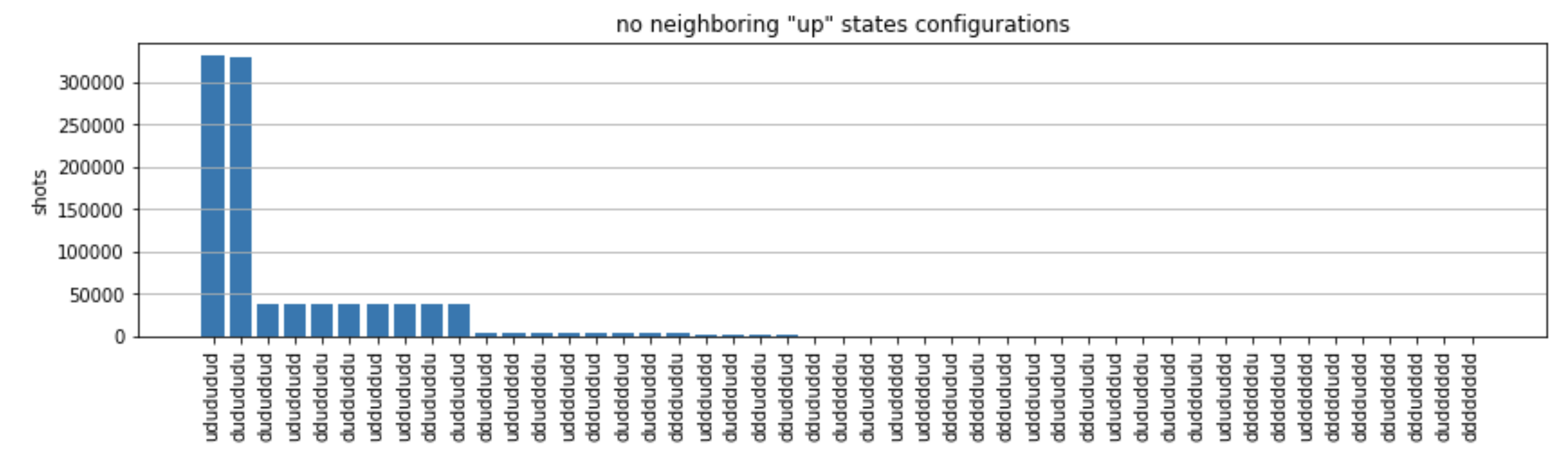
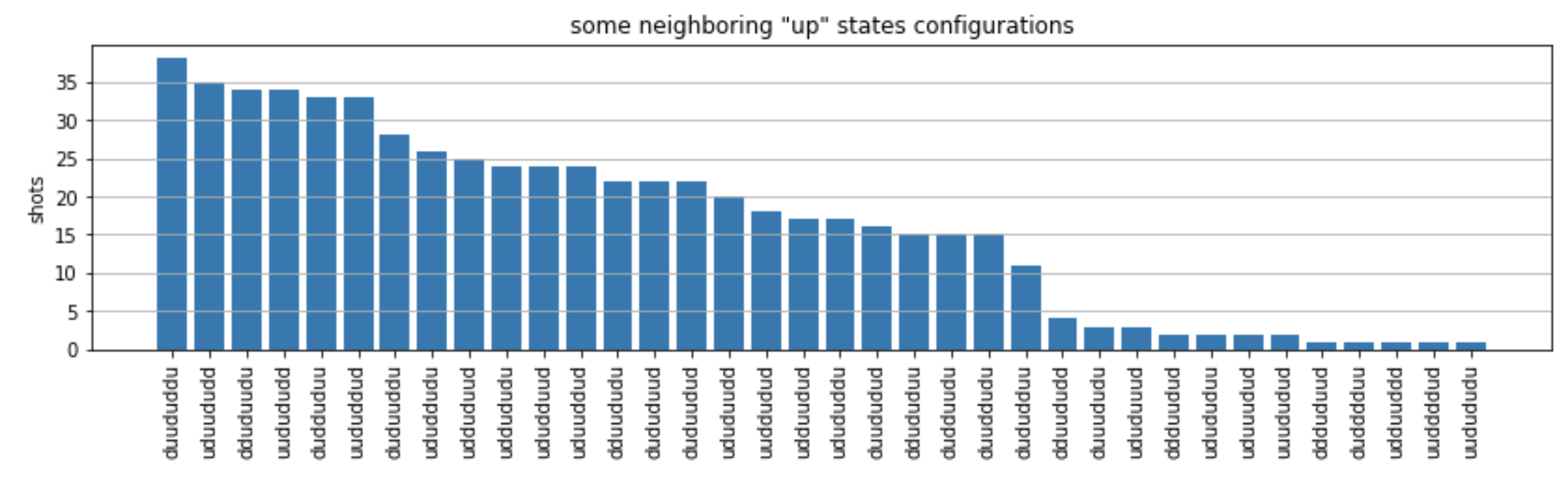
从图中,我们可以读出以下观测结果,以验证我们成功制备了反铁磁相。
-
通常,非阻塞状态(没有两个相邻的旋转处于“向上”状态)比至少有一对相邻旋转都处于“向上”状态的状态更为常见。
-
通常,除非配置被阻止,否则会优先选择激励更多“向上”状态。
-
最常见的状态确实是完美的反铁磁态
"dudududu"和"udududud"。 -
第二种常见的状态是只有 3 个“向上”激励,连续间隔为 1、2、2 的状态。这表明范德华的相互作用也会对最近的邻居产生影响(尽管该影响要小得多)。
Run QuEra ning on 的 Aquila QPU
先决条件:除了 pip 安装 Braket SDK
注意
如果您使用的是 Braket 托管的 Notebook 实例,则该实例预装了 Braket SDK。
安装所有依赖项后,我们就可以连接到 Aquila QPU 了。
from braket.aws import AwsDevice

aquila_qpu = AwsDevice("arn:aws:braket:us-east-1::device/qpu/quera/Aquila")
为了使我们的 AHS 程序适合 QuEra 机器,我们需要对所有值进行四舍五入,以符合 Aquila QPU 规定的精度水平。(这些要求受名称中带有“分辨率”的设备参数的约束。我们可以通过在 Notebook 中执行 aquila_qpu.properties.dict() 来看到它们。有关 Aquila 功能和要求的更多详细信息,请参阅 Aquila Notebook 简介discretize 方法来做到这一点。
discretized_ahs_program = ahs_program.discretize(aquila_qpu)
现在,我们可以在 Aquila QPU 上运行该程序(目前只运行 100 次拍摄)。
注意
在 Aquila 处理器上运行此程序将产生一定的成本。Amazon Braket SDK 包含一个成本追踪器
task = aquila_qpu.run(discretized_ahs_program, shots=100)

metadata = task.metadata()
task_arn = metadata['quantumTaskArn']
task_status = metadata['status']

print(f"ARN: {task_arn}")
print(f"status: {task_status}")
*[Output]*
ARN: arn:aws:braket:us-east-1:123456789012:quantum-task/12345678-90ab-cdef-1234-567890abcdef
status: CREATED
由于量子任务的运行时差异很大(取决于可用窗口和 QPU 利用率),因此记下量子任务 ARN 是个好主意,这样我们就可以在后续时间使用以下代码片段检查其状态了。
# Optionally, in a new python session
from braket.aws import AwsQuantumTask

SAVED_TASK_ARN = "arn:aws:braket:us-east-1:123456789012:quantum-task/12345678-90ab-cdef-1234-567890abcdef"

task = AwsQuantumTask(arn=SAVED_TASK_ARN)
metadata = task.metadata()
task_arn = metadata['quantumTaskArn']
task_status = metadata['status']

print(f"ARN: {task_arn}")
print(f"status: {task_status}")
*[Output]*
ARN: arn:aws:braket:us-east-1:123456789012:quantum-task/12345678-90ab-cdef-1234-567890abcdef
status: COMPLETED
状态为“已完成”(也可以从 Amazon Braket 控制台
result_aquila = task.result()
分析结果
我们可以使用与以前相同的 get_counts 函数计算计数。
counts_aquila = get_counts(result_aquila)
   print(counts_aquila)
*[Output]*
{'dddududd': 2, 'dudududu': 18, 'ddududud': 4, ...}
然后,用 plot_counts 绘制函数:
plot_counts(counts_aquila)
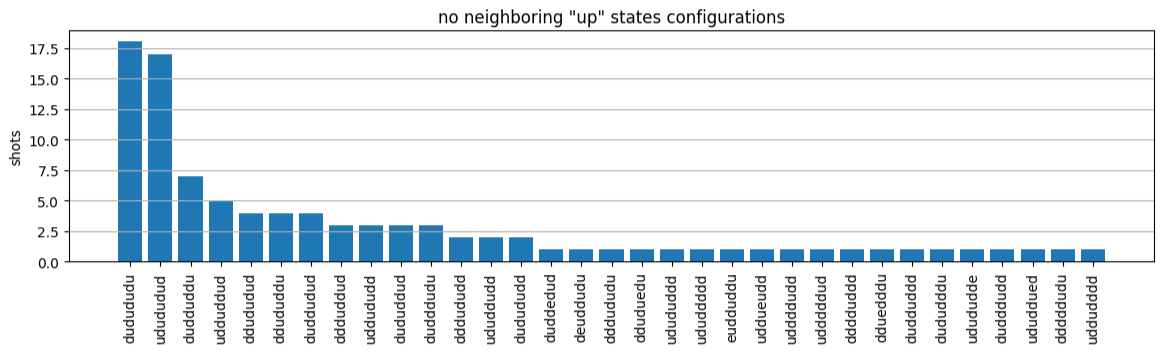
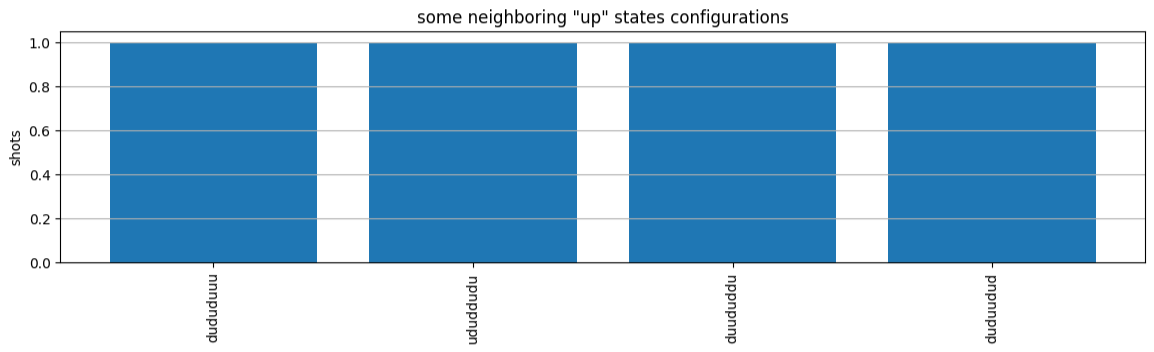
请注意,一小部分拍摄的场地为空(标为“e”)。这是由于 Aquila QPU 的每个原子制备存在 1%-2% 的缺陷。除此之外,由于拍摄次数少,结果在预期的统计波动范围内与模拟相符。
后续步骤
恭喜!您现在已经使用本地 AHS 模拟器和 Aquila QPU 在 Amazon Braket 上运行了第一个 AHS 工作负载。
要了解有关 Rydberg 物理学、模拟哈密顿模拟和 Aquila 设备的更多信息,请参阅我们的示例 Notebook。
