View a markdown version of this page

One-time 洞察报告 - Amazon Bedrock AgentCore

One-time 洞察报告

用于StartBatchEvaluation对代理的会话进行按需分析见解。当您想要调查部署后的代理行为、故障高峰或定期进行手动检查时,这非常有用。

开始分析

AgentCore CLI
agentcore run insights --runtime MyAgent --insights Builtin.Insight.FailureAnalysis --lookback-days 7 --json

默认情况下,CLI 是异步的,它会打印任务 ID 并退出。用于--wait在任务完成之前进行封锁:

agentcore run insights --runtime MyAgent --insights Builtin.Insight.FailureAnalysis --lookback-days 7 --wait --json

如果您已经部署了在线评估配置,则可以继承其设置:

agentcore run insights --online-eval-config-arn <arn> --json
Interactive
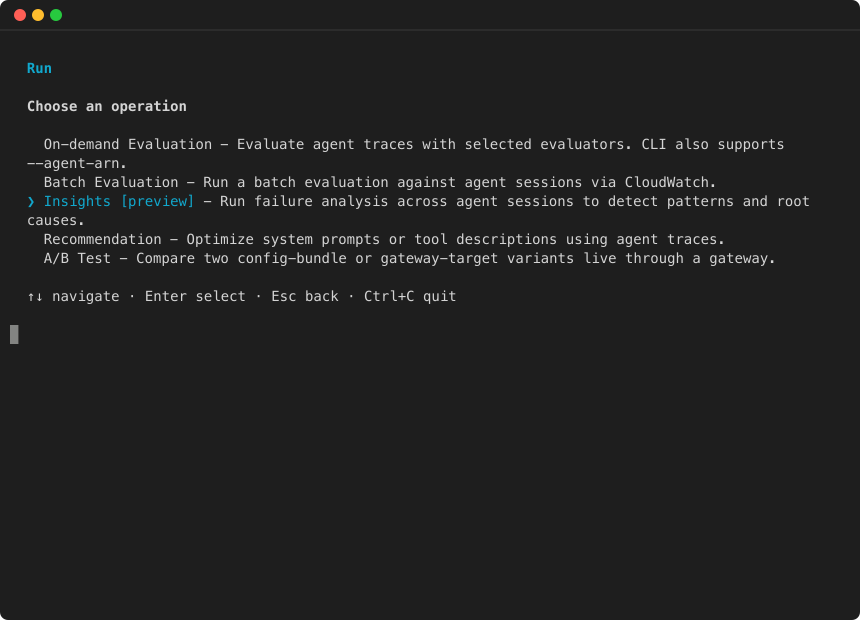
  1. 运行打开 agentcore TUI,然后选择运行并选择 Insights

    “运行” 菜单:选择 “见解”
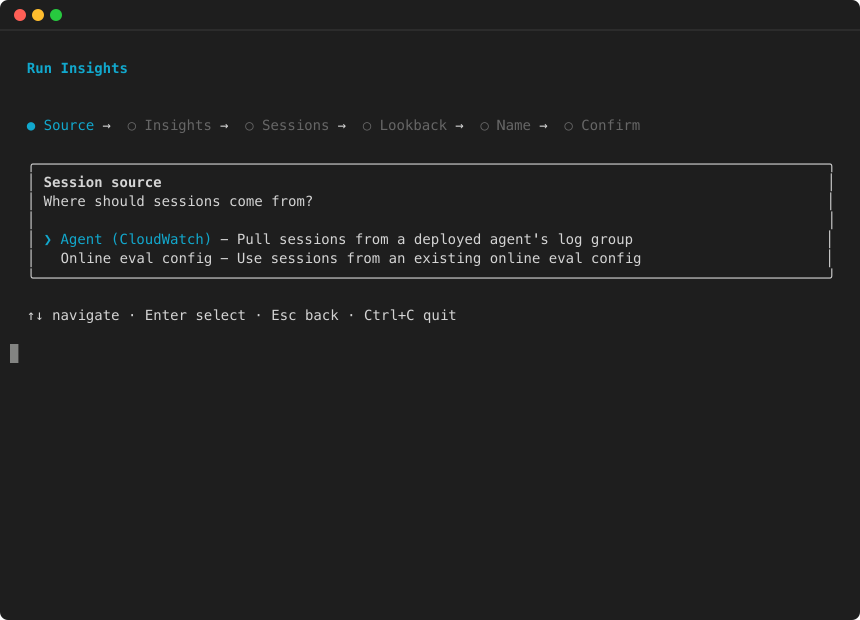
  2. 选择会话来源:

    运行 Insights 向导:选择会话来源
  3. 选择要运行的见解:

    运行见解向导:选择见解

    继续完成剩余的向导步骤(会话、回顾期、名称)并进行确认。

AWS SDK (boto3)
import boto3 import uuid client = boto3.client("bedrock-agentcore", region_name="us-west-2") response = client.start_batch_evaluation( batchEvaluationName=f"insights-run-{uuid.uuid4().hex[:8]}", insights=[ {"insightId": "Builtin.Insight.FailureAnalysis"}, {"insightId": "Builtin.Insight.UserIntent"}, ], dataSourceConfig={ "cloudWatchLogs": { "serviceNames": ["MyAgent.DEFAULT"], "logGroupNames": [ "/aws/bedrock-agentcore/runtimes/MyAgent-abc123-DEFAULT" ], } }, # Optional: narrow to a specific time range filterConfig={ "timeRange": { "startTime": "2026-05-27T00:00:00Z", "endTime": "2026-06-03T00:00:00Z", }, # Or analyze specific sessions by ID "sessionIds": ["session-001", "session-002", "session-003"] }, clientToken=str(uuid.uuid4()), ) batch_eval_id = response["batchEvaluationId"] print(f"Started: {batch_eval_id}")

您也可以:

  • 通过添加,将分析范围缩小到特定的时间范围 filterConfig.timeRange

  • 使用按 ID 分析特定会话 filterConfig.sessionIds

轮询结果

AgentCore CLI

列出所有洞察职位:

agentcore view insights --json

查看特定任务的详细信息:

agentcore view insights <id> --json
AWS SDK (boto3)
import time while True: result = client.get_batch_evaluation(batchEvaluationId=batch_eval_id) status = result["status"] print(f"Status: {status}") if status in ("COMPLETED", "COMPLETED_WITH_ERRORS", "FAILED", "STOPPED"): break time.sleep(30)

查看失败分析结果

if "failureAnalysisResult" in result: for category in result["failureAnalysisResult"]["failures"]: print(f"\nCategory: {category['name']} ({category['affectedSessionCount']} sessions)") for sub in category.get("subCategories", []): print(f" Subcategory: {sub['name']} ({sub['affectedSessionCount']} sessions)") for rc in sub.get("rootCauses", []): print(f" Root cause: {rc['name']}") print(f" Recommendation: {rc['recommendation']}") print(f" Affected sessions: {rc['affectedSessionCount']}")
字段 Type 说明

failures[].name

字符串

失败类别名称(例如,“执行错误”、“幻觉”)。

failures[].affectedSessionCount

整数

受此类别影响的会话数量。

failures[].subCategories[].name

字符串

子类别名称(例如,“速率限制”、“工具架构违规”)。

failures[].subCategories[].affectedSessionCount

整数

受此子类别影响的会话数。

failures[].subCategories[].rootCauses[].name

字符串

根本原因群集名称。

failures[].subCategories[].rootCauses[].recommendation

字符串

针对此根本原因的建议修复方法。

failures[].subCategories[].rootCauses[].affectedSessionCount

整数

受此根本原因影响的会话数。

failures[].subCategories[].rootCauses[].affectedSessions

列表

此集群中的会话,每个会话都有sessionId

用户意图结果

userIntentResult字段包含群集用户意图:

if "userIntentResult" in result: for cluster in result["userIntentResult"]["userIntents"]: print(f" {cluster['name']} ({cluster['affectedSessionCount']} sessions)") print(f" {cluster['description']}")
字段 Type 说明

userIntents[].clusterId

整数

集群标识符。

userIntents[].name

字符串

描述共同意图的集群名称。

userIntents[].description

字符串

意图模式的详细描述。

userIntents[].affectedSessionCount

整数

有此意图的会话数。

userIntents[].affectedSessions

列表

此集群中的会话,每个会话都带有sessionIduserMessages

执行摘要结果

executionSummaryResult字段包含群集执行模式:

字段 Type 说明

executionSummaries[].clusterId

整数

集群标识符。

executionSummaries[].name

字符串

描述执行模式的集群名称。

executionSummaries[].description

字符串

图案的详细描述。

executionSummaries[].affectedSessionCount

整数

使用此模式的会话数。

executionSummaries[].affectedSessions

列表

此集群中的会话,每个会话都有sessionIdapproachTaken、和finalOutcome

解析结果

  • 从@@ 失效分析开始:重点关注最高的类别affectedSessionCount。这些是最具影响力的问题。

  • 深入研究根本原因:在每个子类别中,根本原因群集会告诉你究竟出了什么问题以及如何解决问题。每个集群都包含一个recommendation字段。

  • 使用用户意图来确定优先级:带有用户意图集群的 Cross-reference 故障类别。影响最常见用户意图的故障应该是最高优先级。

  • 跟踪执行模式:执行摘要揭示您的代理是如何处理问题的,这对于了解失败是否源于代理的策略还是 tool/environment 问题很有用。

验证规则

  • insights并且evaluators是相互排斥的 — 提供一个或另一个,而不是两者兼而有之。

  • 每个请求最多 10 个见解。

  • dataSourceConfig是必填项,并且必须包含至少一个日志组和一个服务名称。

  • 如果使用onlineEvaluationConfigSource,请不要提供insightsevaluators(配置是继承的)。

  • 如果filterConfig.timeRange已指定,则startTime必须早于endTime

  • 时间戳必须是有效的 ISO 8601 格式。

  • 每个账户一次只能激活一个批量评估。

  • 每次分析最多可分析 500 个会话。