本文属于机器翻译版本。若本译文内容与英语原文存在差异,则一律以英文原文为准。
使用 AWS AppSync 私人 APIs
如果您使用亚马逊虚拟私有云(亚马逊 VPC),则可以创建只能从 VPC 访问的 AWS AppSync 私 APIs有云。 APIs 通过使用私有 API,您可以限制对内部应用程序的 API 访问并连接到 GraphQL 和实时终端节点,而不会公开暴露数据。
要在您的 VPC 和 AWS AppSync 服务之间建立私有连接,您必须创建接口 VPC 终端节点。接口端点由提供支持 AWS PrivateLink
AWS AppSync AWS PrivateLink 支持数据平面和控制平面操作:
-
数据平面端点 (
com.amazonaws.{region}.appsync-api):提供对 GraphQL 的私有访问权限,并提供实时访问权限, APIs 用于查询、变更和订阅。 -
控制平面端点 (
com.amazonaws.{region}.appsync):提供对 AWS AppSync 管理操作的私有访问权限,例如创建 APIs、更新架构和配置数据源。
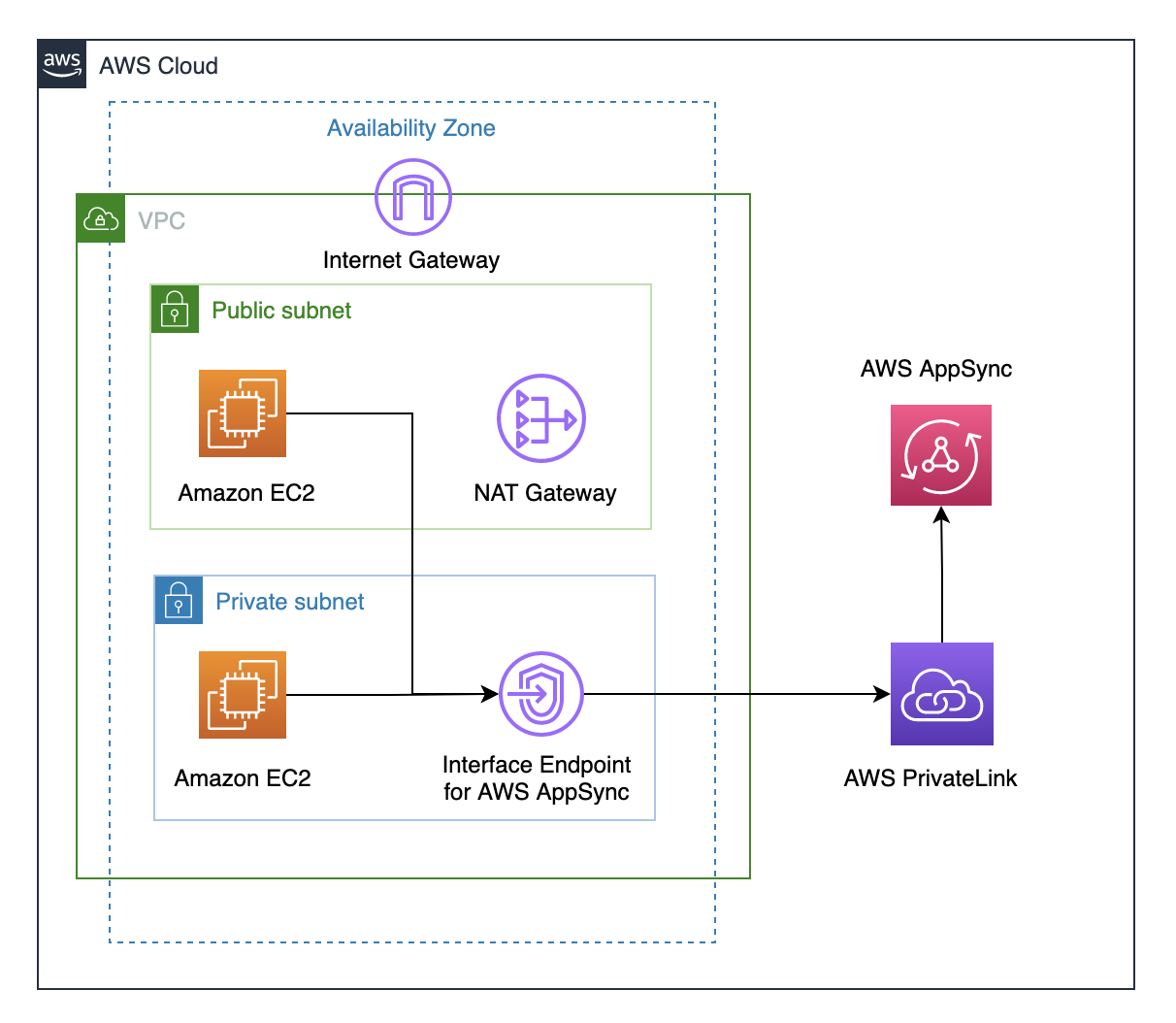
在启用私有 API 功能之前,需要考虑一些其他因素:
-
为启用私 AWS AppSync 有 DNS 功能的 VPC 接口终端节点设置将阻止 VPC 中的资源 APIs 使用 AWS AppSync 生成的 API URL 调用其他 AWS AppSync 公用资源。这是因为对公共 API 的请求是通过接口端点进行路由的,而公共 APIs端点是不允许的。要 APIs 在这种情况下调用 public,建议在 public 上配置自定义域名 APIs,然后 VPC 中的资源可以使用这些域名来调用公共 API。
-
您的 AWS AppSync 私有 APIs 网络只能在您的 VPC 上使用。只有当您的浏览器的网络配置可以将流量路由到您的 VPC(例如,通过 VPN 或通过 VPN 进行连接 Direct Connect)时, AWS AppSync 控制台查询编辑器才能访问您的 API。
-
使用的 VPC 接口终端节点 AWS AppSync,您可以访问同一 AWS 账户和区域中的任何私有 API。要进一步限制对 Private 的访问权限 APIs,可以考虑以下选项:
-
确保只有所需的管理员才能为创建 VPC 终端节点接口 AWS AppSync。
-
使用 VPC 终端节点自定义策略来限制 APIs 可以从 VPC 中的资源调用哪些策略。
-
对于 VPC 中的资源,我们建议您使用 IAM 授权进行调用, AWS AppSync APIs 方法是确保将限定范围的角色分配给资源。 APIs
-
-
在创建或使用限制 IAM 主体的策略时,您必须将方法的
authorizationType设置为AWS_IAM或NONE。
创建 AWS AppSync 私有 APIs
以下步骤向您展示了如何在 AWS AppSync 服务 APIs 中创建 Private。
警告
您只能在创建 API 期间启用私有 API 功能。 AWS AppSync API 或 AWS AppSync 私有 API 创建后,无法对其进行修改。
-
登录 AWS 管理控制台 并打开AppSync 控制台
。 -
在控制面板中,选择创建 API。
-
-
选择从头开始设计 API,然后选择下一步。
-
在私有 API 部分中,选择使用私有 API 功能。
-
配置其余选项,检查您的 API 的数据,然后选择创建。
在使用 AWS AppSync 私有 API 之前,必须在 VPC AWS AppSync 中为配置接口终端节点。请注意,私有 API 和 VPC 必须位于同一个 AWS 账户和区域中。
为创建接口端点 AWS AppSync
您可以创建用于 AWS AppSync 使用 Amazon VPC 控制台或 AWS Command Line Interface (AWS CLI) 的接口终端节点。根据您的使用案例,您可能需要创建一个或两个端点类型:
-
数据平面终端节点:需要 APIs 从您的 VPC 访问私有网络
-
控制平面终端节点:需要使用 AWS CLI 或管理您的 VPC 中的 AWS AppSync 资源 SDKs
有关更多信息,请参阅《Amazon VPC User Guide》中的 Creating an interface endpoint。
注意
请务必选择正确的 VPC 终端节点服务;有两个用于 AppSync:com.amazonaws.{region}.appsync-api是私有必需com.amazonaws.{region}.appsync的, APIs 而用于 API 管理。
要使用私有 DNS 选项,您必须设置 VPC 的 enableDnsHostnames 和 enableDnsSupportattributes 值。有关更多信息,请参阅《Amazon VPC 用户指南》中的查看和更新 VPC 的 DNS 支持。如果您为接口终端节点启用私有 DNS 功能,则可以使用其默认公有 DNS 终端节点向 AWS AppSync API GraphQL 和实时终端节点发出请求,格式如下:
https://{api_url_identifier}.appsync-api.{region}.amazonaws.com/graphql
对于控制平面操作,您可以使用标准 AWS AppSync 服务端点:
https://appsync.{region}.amazonaws.com
有关服务终端节点的更多信息,请参阅 AWS General Reference 中的 Service endpoints and quotas。
有关与服务接口终端节点的交互的更多信息,请参阅《Amazon VPC 用户指南》中的使用接口 VPC 端点访问服务。
有关使用创建和配置终端节点的信息 AWS CloudFormation,请参阅《AWS CloudFormation 用户指南》中的AWS:: EC2:: VPCEndpoint 资源。
高级 示例
如果您为接口终端节点启用私有 DNS 功能,则可以使用其默认公有 DNS 终端节点向 AWS AppSync API GraphQL 和实时终端节点发出请求,格式如下:
https://{api_url_identifier}.appsync-api.{region}.amazonaws.com/graphql
在使用接口 VPC 终端节点公有 DNS 主机名时,调用 API 的基本 URL 将采用以下格式:
https://{vpc_endpoint_id}-{endpoint_dns_identifier}.appsync-api.{region}.vpce.amazonaws.com/graphql
如果已在可用区中部署终端节点,您也可以使用可用区特定的 DNS 主机名:
https://{vpc_endpoint_id}-{endpoint_dns_identifier}-{az_id}.appsync-api.{region}.vpce.amazonaws.com/graphql.
使用 VPC 终端节点公有 DNS 名称需要将 AWS AppSync API 终端节点主机名作为Host或作为 x-appsync-domain标头传递给请求。这些示例使用在启动示例架构指南中创建的 TodoAPI:
curl https://{vpc_endpoint_id}-{endpoint_dns_identifier}.appsync-api.{region}.vpce.amazonaws.com/graphql \
-H "Content-Type:application/graphql" \
-H "x-api-key:da2-{xxxxxxxxxxxxxxxxxxxxxxxxxx}" \
-H "Host:{api_url_identifier}.appsync-api.{region}.amazonaws.com" \
-d '{"query":"mutation add($createtodoinput: CreateTodoInput!) {\n createTodo(input: $createtodoinput) {\n id\n name\n where\n when\n description\n }\n}","variables":{"createtodoinput":{"name":"My first GraphQL task","when":"Friday Night","where":"Day 1","description":"Learn more about GraphQL"}}}'
在以下示例中,我们使用在启动示例架构指南中生成的 Todo 应用程序。为了测试示例 Todo API,我们将使用私有 DNS 调用该 API。您可以使用所选的任何命令行工具;该示例使用 curl{ }中的值替换为 AWS 账户中的相应值。
测试变更操作 - createTodo 请求
curl https://{api_url_identifier}.appsync-api.{region}.amazonaws.com/graphql \
-H "Content-Type:application/graphql" \
-H "x-api-key:da2-{xxxxxxxxxxxxxxxxxxxxxxxxxx}" \
-d '{"query":"mutation add($createtodoinput: CreateTodoInput!) {\n createTodo(input: $createtodoinput) {\n id\n name\n where\n when\n description\n }\n}","variables":{"createtodoinput":{"name":"My first GraphQL task","when":"Friday Night","where":"Day 1","description":"Learn more about GraphQL"}}}'
测试变更操作 - createTodo 响应
{
    "data": {
        "createTodo": {
            "id": "<todo-id>",
            "name": "My first GraphQL task",
            "where": "Day 1",
            "when": "Friday Night",
            "description": "Learn more about GraphQL"
        }
    }
}
测试查询操作 - listTodos 请求
curl https://{api_url_identifier}.appsync-api.{region}.amazonaws.com/graphql \
-H "Content-Type:application/graphql" \
-H "x-api-key:da2-{xxxxxxxxxxxxxxxxxxxxxxxxxx}" \
-d '{"query":"query ListTodos {\n listTodos {\n items {\n description\n id\n name\n when\n where\n }\n }\n}\n","variables":{"createtodoinput":{"name":"My first GraphQL task","when":"Friday Night","where":"Day 1","description":"Learn more about GraphQL"}}}'
测试查询操作 - listTodos 请求
{
  "data": {
    "listTodos": {
      "items": [
        {
          "description": "Learn more about GraphQL",
          "id": "<todo-id>",
          "name": "My first GraphQL task",
          "when": "Friday night",
          "where": "Day 1"
        }
      ]
    }
  }
}
测试订阅操作 - 订阅 createTodo 变更
要在中设置 GraphQL 订阅 AWS AppSync,请参阅构建实时 WebSocket 客户端。在 VPC 中的 Amazon EC2 实例中,您可以使用 wscAPI
KEY 进行授权。
$ header=`echo '{"host":"{api_url_identifier}.appsync-api.{region}.amazonaws.com","x-api-key":"da2-{xxxxxxxxxxxxxxxxxxxxxxxxxx}"}' | base64 | tr -d '\n'`
$ wscat -p 13 -s graphql-ws -c  "wss://{api_url_identifier}.appsync-realtime-api.us-west-2.amazonaws.com/graphql?header=$header&payload=e30="
Connected (press CTRL+C to quit)
> {"type": "connection_init"}
< {"type":"connection_ack","payload":{"connectionTimeoutMs":300000}}
< {"type":"ka"}
> {"id":"f7a49717","payload":{"data":"{\"query\":\"subscription onCreateTodo {onCreateTodo {description id name where when}}\",\"variables\":{}}","extensions":{"authorization":{"x-api-key":"da2-{xxxxxxxxxxxxxxxxxxxxxxxxxx}","host":"{api_url_identifier}.appsync-api.{region}.amazonaws.com"}}},"type":"start"}
< {"id":"f7a49717","type":"start_ack"}
或者,使用 VPC 终端节点域名,同时确保在 wscat 命令中指定 Host 标头以建立 WebSocket 连接:
$ header=`echo '{"host":"{api_url_identifier}.appsync-api.{region}.amazonaws.com","x-api-key":"da2-{xxxxxxxxxxxxxxxxxxxxxxxxxx}"}' | base64 | tr -d '\n'`
$ wscat -p 13 -s graphql-ws -c  "wss://{vpc_endpoint_id}-{endpoint_dns_identifier}.appsync-api.{region}.vpce.amazonaws.com/graphql?header=$header&payload=e30=" --header Host:{api_url_identifier}.appsync-realtime-api.us-west-2.amazonaws.com
Connected (press CTRL+C to quit)
> {"type": "connection_init"}
< {"type":"connection_ack","payload":{"connectionTimeoutMs":300000}}
< {"type":"ka"}
> {"id":"f7a49717","payload":{"data":"{\"query\":\"subscription onCreateTodo {onCreateTodo {description id priority title}}\",\"variables\":{}}","extensions":{"authorization":{"x-api-key":"da2-{xxxxxxxxxxxxxxxxxxxxxxxxxx}","host":"{api_url_identifier}.appsync-api.{region}.amazonaws.com"}}},"type":"start"}
< {"id":"f7a49717","type":"start_ack"}
运行下面的变更代码:
curl https://{api_url_identifier}.appsync-api.{region}.amazonaws.com/graphql \
-H "Content-Type:application/graphql" \
-H "x-api-key:da2-{xxxxxxxxxxxxxxxxxxxxxxxxxx}" \
-d '{"query":"mutation add($createtodoinput: CreateTodoInput!) {\n createTodo(input: $createtodoinput) {\n id\n name\n where\n when\n description\n }\n}","variables":{"createtodoinput":{"name":"My first GraphQL task","when":"Friday Night","where":"Day 1","description":"Learn more about GraphQL"}}}'
然后,将触发订阅并显示消息通知,如下所示:
< {"id":"f7a49717","type":"data","payload":{"data":{"onCreateTodo":{"description":"Go to the shops","id":"169ce516-b7e8-4a6a-88c1-ab840184359f","priority":5,"title":"Go to the shops"}}}}
控制面板示例
配置控制平面 VPC 终端节点后,您可以使用 AWS CLI 或管理您的 VPC 内部的 AWS AppSync 资源 SDKs。下面是常见控制面板操作的示例:
使用创建 API AWS CLI
aws appsync create-graphql-api \
  --name "MyPrivateAPI" \
  --authentication-type API_KEY \
  --visibility PRIVATE
更新架构
aws appsync start-schema-creation \
  --api-id {api-id} \
  --definition file://schema.graphql
创建数据源
aws appsync create-data-source \
  --api-id {api-id} \
  --name "MyDataSource" \
  --type AWS_LAMBDA \
  --lambda-config lambdaFunctionArn=arn:aws:lambda:{region}:{account}:function:MyFunction
使用已启用私有 DNS 的控制面板端点时,这些命令会自动通过您的 VPC 端点进行路由。如果未启用私有 DNS,则可以指定端点 URL:
aws appsync create-graphql-api \
  --endpoint-url https://{vpc_endpoint_id}-{endpoint_dns_identifier}.appsync.{region}.vpce.amazonaws.com \
  --name "MyPrivateAPI" \
  --authentication-type API_KEY \
  --visibility PRIVATE
使用 IAM 策略限制创建公有 API
AWS AppSync 支持用于私有的 IAM Condition语句 APIs。该visibility字段可以包含在appsync:CreateGraphqlApi操作的 IAM 策略声明中,以控制哪些 IAM 角色和用户可以创建私有和公有角色 APIs。这样,IAM 管理员就能够定义仅允许用户创建私有 GraphQL API 的 IAM 策略。尝试创建公有 API 的用户将收到“未经授权”消息。
例如,IAM 管理员可以创建以下 IAM 策略声明以允许创建 Private APIs:
{
    "Sid": "AllowPrivateAppSyncApis",
    "Effect": "Allow",
    "Action": "appsync:CreateGraphqlApi",
    "Resource": "*",
    "Condition": {
        "ForAnyValue:StringEquals": {
            "appsync:Visibility": "PRIVATE"
        }
    }
}
IAM 管理员还可以添加以下服务控制策略,以阻止 AWS 组织中 AWS AppSync APIs 除私有之外的所有用户进行创建 APIs:
{
    "Sid": "BlockNonPrivateAppSyncApis",
    "Effect": "Deny",
    "Action": "appsync:CreateGraphqlApi",
    "Resource": "*",
    "Condition": {
        "ForAnyValue:StringNotEquals": {
            "appsync:Visibility": "PRIVATE"
        }
    }
}
VPC PrivateLink 支持
VPC 私有链路支持在中提供。 AWS AppSync PrivateLink 允许您在没有任何流量离开 AWS 网络的情况下使用 AWS 服务并与之交互。
AWS AppSync AWS PrivateLink 支持数据平面和控制平面操作。
-
VPCE 端点(
appsync.<region>.vpce.amazonaws.com):提供对数据面板和控制面板操作的 VPC 访问权限,如下所示:-
appsync 用于控制面板操作
-
appsync-api 用于数据面板操作
-
