本文属于机器翻译版本。若本译文内容与英语原文存在差异,则一律以英文原文为准。
Q Developer 的 MCP 管理
Pro-tier 使用 IAM Identity Center 作为登录方法的客户可以控制其组织内用户的 MCP 访问权限。默认情况下,您的用户可以在其 Q 客户端中使用任何 MCP 服务器。作为管理员,您可以完全禁止用户使用 MCP 服务器,也可以指定允许您的用户使用的 MCP 服务器的经过审查的列表。
您可以使用 MCP on/off 切换开关和 MCP 注册表来控制这些限制。MCP 切换和注册表属性是 Q Developer 配置文件的一部分,可以在组织级别或账户级别定义,账户级别的配置文件取代组织级别的配置文件。您可以为组织指定默认 MCP 策略,然后为特定账户改写该策略;例如,为组织禁用 MCP,但为某些团队(帐户)开启允许名单。
注意
切换设置和注册表设置都是在客户端强制执行的。请注意,最终用户可能会规避它。
为您的组织禁用 MCP
要为您的账户或组织禁用 MCP,请执行以下操作:
-
打开 Kiro 控制台。
-
选择设置。
选择 Q 开发者选项卡。
-
将模型上下文协议 (MCP) 切换为关闭。
为您的组织指定 MCP 允许名单
要控制您的用户可以访问哪些 MCP 服务器,请创建包含允许服务器的 JSON 文件,通过 HTTPS 提供该文件,然后将 URL 添加到您的 Q Developer 个人资料中。问:使用此配置文件的开发者客户端仅允许用户访问您的允许列表中的 MCP 服务器。
指定 MCP 注册表 URL
打开 Kiro 控制台。
选择设置。
选择 Q 开发者选项卡。
确保模型上下文协议 (MCP) 已开启。
在 “MCP 注册表 URL” 字段中,选择 “编辑”。
输入包含列入许可名单的 MCP 服务器的 MCP 注册表 JSON 文件的 URL。
选择保存。
根据我们的数据加密政策,MCP 注册表 URL 在传输过程中和静态时都经过加密。
MCP 注册表文件格式
注册表 JSON 文件的格式是 MCP 注册表标准
以下示例显示了一个同时包含远程 (HTTP) 和本地 (stdio) MCP 服务器定义的 MCP 注册表文件。
{
  "servers": [
    {
      "server": {
        "name": "my-remote-server",
        "title": "My server",
        "description": "My server description",
        "version": "1.0.0",
        "remotes": [
          {
            "type": "streamable-http",
            "url": "https://acme.com/my-server",
            "headers": [
              {
                "name": "X-My-Header",
                "value": "SomeValue"
              }
            ]
          }
        ]
      }
    },
    {
      "server": {
        "name": "my-local-server",
        "title": "My server",
        "description": "My server description",
        "version": "1.0.0",
        "packages": [
          {
            "registryType": "npm",
            "registryBaseUrl": "https://npm.acme.com",
            "identifier": "@acme/my-server",
            "transport": {
              "type": "stdio"
            },
            "runtimeArguments": [
              {
                "type": "positional",
                "value": "-q"
              }
            ],
            "packageArguments": [
              {
                "type": "positional",
                "value": "start"
              }
            ],
            "environmentVariables": [
              {
                "name": "ENV_VAR",
                "value": "ENV_VAR_VALUE"
              }
            ]
          }
        ]
      }
    }
  ]
}
下表列出了注册表 JSON 文件的属性。除非另有说明,否则所有属性均为必填项。有关完整的 JSON 架构,请参阅注册表架构部分。
嵌套属性从其父项缩进出现。例如,“标题” 是 “远程” 的子属性,“名称” 和 “值” 是 “标题” 的子属性。
| 属性 | 说明 | 可选? | 示例值 |
|---|---|---|---|
|
常用属性 |
|||
|
name |
服务器名称。在给定的注册表文件中必须是唯一的。 |
“aws-ccapi-mcp” |
|
|
删除实例快照 |
Human-readable 服务器名称。 |
是 |
“AWS CC API” |
|
描述 |
服务器的描述。 |
“通过自然语言管理 AWS 基础设施。” |
|
|
版本 |
服务器的版本。强烈建议使用语义版本控制 (x.y.z)。 |
“1.0.2” |
|
|
远程 (HTTP) 服务器属性 |
|||
|
遥控器 |
只有一个用于指定远程端点的条目的数组。 |
- |
|
|
type |
必须是 “streamable-http” 或 “sse” 之一。 |
“streamable-http” |
|
|
url |
MCP 服务器端点网址。 |
"https://mcp.figma.com/mcp" |
|
|
headers |
要包含在每个请求中的 HTTP 标头数组。 |
是 |
- |
|
name |
HTTP 标头名称。 |
“授权” |
|
|
值 |
HTTP 标头值。 |
“Bearer mf_9。 B5f-4.1JqM” |
|
|
本地 (stdio) 服务器属性 |
|||
|
软件包 |
只有一个条目包含 MCP 服务器定义的数组。 |
- |
|
|
注册表类型 |
必须是 “npm”、“pypi” 或 “oci” 之一。 以下软件包运行器用于下载和运行 MCP 服务器软件包:
客户端计算机必须预先安装相应的软件包运行器。 |
“npm” |
|
|
注册表 BaseUrl |
Package 注册表 URL。 |
是 |
"https://npm.acme.com" |
|
identifier |
服务器包标识符。 |
“@ acme/my 服务器” |
|
|
传输 |
只有一个属性的对象,即 “类型”。 |
- |
|
|
type |
必须是 “stdio”。 |
“工作室” |
|
|
运行时参数 |
提供给运行时(即 npx、uvx 或 docker)的参数数组。 |
是 |
- |
|
type |
必须是 “定位”。 |
“位置” |
|
|
值 |
运行时参数值。 |
“-q” |
|
|
Packagaraments |
提供给 MCP 服务器的参数数组。 |
是 |
- |
|
type |
必须是 “定位”。 |
“位置” |
|
|
值 |
Package 参数值。 |
“开始” |
|
|
环境变量 |
启动服务器之前要设置的环境变量数组。 |
是 |
- |
|
name |
环境变量名称。 |
“日志级别” |
|
|
值 |
环境变量值。 |
“信息” |
提供 MCP 注册表文件
使用任何 Web 服务器(例如 Amazon S3、Apache 或 nginx)通过 HTTPS 提供 MCP 注册表 JSON 文件。此 URL 必须可供用户计算机上的 Q Developer 客户端访问,但可以是公司网络的私有网址。
HTTPS 端点必须具有由可信证书颁发机构签署的有效 SSL 证书。 Self-signed 不支持证书。
Q 开发人员在启动时每隔 24 小时提取一次 MCP 注册表。在定期同步期间,如果本地安装的 MCP 服务器已不在注册表中,Q Developer 会终止该服务器并阻止用户将其添加回去。如果本地安装的服务器与注册表中的服务器版本不同,Q Developer 将使用注册表中定义的版本重新启动服务器。
Q 开发者插件
当用户启动 Q Developer 时,它会检查配置文件中是否定义了注册表 URL。如果是,它将检索该网址上的注册表 JSON,并强制用户只能使用注册表中定义的 MCP 服务器。当用户添加 MCP 服务器时,Q Developer 会显示注册表中的服务器列表。
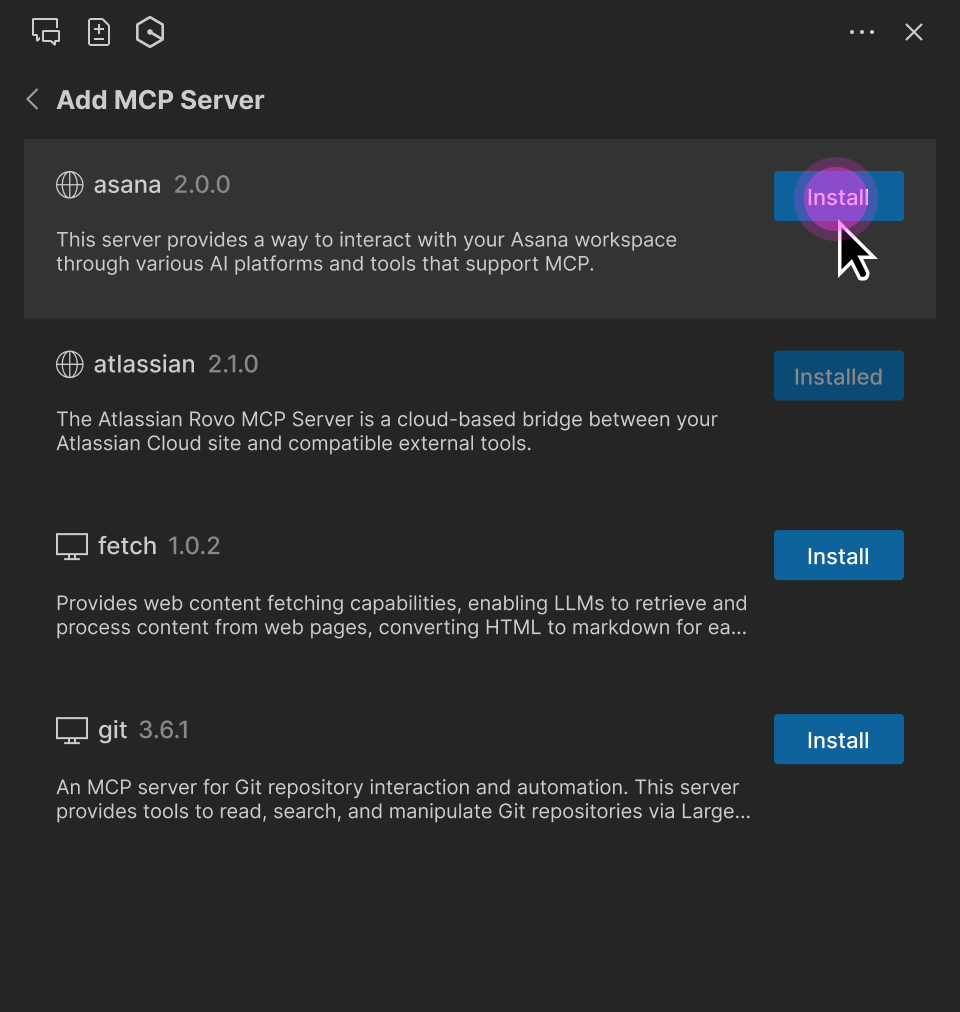
注册表 MCP 服务器参数(URL、包标识符、runtimeArguments 等)是只读的。但是,用户可以:
调整 MCP 工具权限(“要求运行”、“始终运行” 或 “拒绝”)。
选择 MCP 服务器作用域(全局或工作区)。
更改请求超时。
为本地 MCP 服务器指定其他环境变量。
为远程 MCP 服务器指定其他 HTTP 标头。
注意
User-specified 环境变量或 HTTP 标头会覆盖注册表定义。这允许用户指定特定于其设置的属性,例如身份验证密钥或本地文件夹路径。
MCP 注册表 JSON 架构
以下 JSON 架构定义了 Q Developer 支持的 MCP 注册表文件格式。您可以使用此架构来验证您创建的任何注册表文件。
{
  "$schema": "https://json-schema.org/draft-07/schema",
  "properties": {
    "servers": {
      "type": "array",
      "items": {
        "type": "object",
        "properties": {
          "server": {
            "$ref": "#/definitions/ServerDetail"
          }
        },
        "required": [
          "server"
        ]
      }
    }
  },
  "definitions": {
    "ServerDetail": {
      "properties": {
        "name": {
          "description": "Server name. Must be unique within a given registry file.",
          "example": "weather-mcp",
          "maxLength": 200,
          "minLength": 3,
          "pattern": "^[a-zA-Z0-9._-]+$",
          "type": "string"
        },
        "title": {
          "description": "Optional human-readable title or display name for the MCP server. MCP subregistries or clients MAY choose to use this for display purposes.",
          "example": "Weather API",
          "maxLength": 100,
          "minLength": 1,
          "type": "string"
        },
        "description": {
          "description": "Clear human-readable explanation of server functionality. Should focus on capabilities, not implementation details.",
          "example": "MCP server providing weather data and forecasts via OpenWeatherMap API",
          "maxLength": 100,
          "minLength": 1,
          "type": "string"
        },
        "version": {
          "description": "Version string for this server. SHOULD follow semantic versioning (e.g., '1.0.2', '2.1.0-alpha'). Equivalent of Implementation.version in MCP specification. Non-semantic versions are allowed but may not sort predictably. Version ranges are rejected (e.g., '^1.2.3', '~1.2.3', '\u003e=1.2.3', '1.x', '1.*').",
          "example": "1.0.2",
          "maxLength": 255,
          "type": "string"
        },
        "packages": {
          "items": {
            "$ref": "#/definitions/Package"
          },
          "type": "array",
          "minItems": 0,
          "maxItems": 1
        },
        "remotes": {
          "items": {
            "anyOf": [
              {
                "$ref": "#/definitions/StreamableHttpTransport"
              },
              {
                "$ref": "#/definitions/SseTransport"
              }
            ]
          },
          "type": "array",
          "minItems": 0,
          "maxItems": 1
        }
      },
      "required": [
        "name",
        "description",
        "version"
      ],
      "type": "object"
    },
    "Package": {
      "properties": {
        "registryType": {
          "description": "Registry type indicating how to download packages (e.g., 'npm', 'pypi', 'oci')",
          "enum": [
            "npm",
            "pypi",
            "oci"
          ],
          "type": "string"
        },
        "registryBaseUrl": {
          "description": "Base URL of the package registry",
          "examples": [
            "https://registry.npmjs.org",
            "https://pypi.org",
            "https://docker.io"
          ],
          "format": "uri",
          "type": "string"
        },
        "identifier": {
          "description": "Package identifier - either a package name (for registries) or URL (for direct downloads)",
          "examples": [
            "@modelcontextprotocol/server-brave-search",
            "https://github.com/example/releases/download/v1.0.0/package.mcpb"
          ],
          "type": "string"
        },
        "transport": {
          "anyOf": [
            {
              "$ref": "#/definitions/StdioTransport"
            },
            {
              "$ref": "#/definitions/StreamableHttpTransport"
            },
            {
              "$ref": "#/definitions/SseTransport"
            }
          ],
          "description": "Transport protocol configuration for the package"
        },

        "runtimeArguments": {
          "description": "A list of arguments to be passed to the package's runtime command (such as docker or npx).",
          "items": {
            "$ref": "#/definitions/PositionalArgument"
          },
          "type": "array"
        },
        "packageArguments": {
          "description": "A list of arguments to be passed to the package's binary.",
          "items": {
            "$ref": "#/definitions/PositionalArgument"
          },
          "type": "array"
        },
        "environmentVariables": {
          "description": "A mapping of environment variables to be set when running the package.",
          "items": {
            "$ref": "#/definitions/KeyValueInput"
          },
          "type": "array"
        }
      },
      "required": [
        "registryType",
        "identifier",
        "transport"
      ],
      "type": "object"
    },
    "StdioTransport": {
      "properties": {
        "type": {
          "description": "Transport type",
          "enum": [
            "stdio"
          ],
          "example": "stdio",
          "type": "string"
        }
      },
      "required": [
        "type"
      ],
      "type": "object"
    },
    "StreamableHttpTransport": {
      "properties": {
        "type": {
          "description": "Transport type",
          "enum": [
            "streamable-http"
          ],
          "example": "streamable-http",
          "type": "string"
        },
        "url": {
          "description": "URL template for the streamable-http transport. Variables in {curly_braces} reference argument valueHints, argument names, or environment variable names. After variable substitution, this should produce a valid URI.",
          "example": "https://api.example.com/mcp",
          "type": "string"
        },
        "headers": {
          "description": "HTTP headers to include",
          "items": {
            "$ref": "#/definitions/KeyValueInput"
          },
          "type": "array"
        }
      },
      "required": [
        "type",
        "url"
      ],
      "type": "object"
    },
    "SseTransport": {
      "properties": {
        "type": {
          "description": "Transport type",
          "enum": [
            "sse"
          ],
          "example": "sse",
          "type": "string"
        },
        "url": {
          "description": "Server-Sent Events endpoint URL",
          "example": "https://mcp-fs.example.com/sse",
          "format": "uri",
          "type": "string"
        },
        "headers": {
          "description": "HTTP headers to include",
          "items": {
            "$ref": "#/definitions/KeyValueInput"
          },
          "type": "array"
        }
      },
      "required": [
        "type",
        "url"
      ],
      "type": "object"
    },
    "PositionalArgument": {
      "properties": {
        "type": {
          "enum": [
            "positional"
          ],
          "example": "positional",
          "type": "string"
        },
        "value": {
          "description": "The value for the input.",
          "type": "string"
        }
      },
      "required": [
        "type",
        "value"
      ],
      "type": "object"
    },
    "KeyValueInput": {
      "properties": {
        "name": {
          "description": "Name of the header or environment variable.",
          "example": "SOME_VARIABLE",
          "type": "string"
        },
        "value": {
          "description": "The value for the input.",
          "type": "string"
        }
      },
      "required": [
        "name"
      ],
      "type": "object"
    }
  },
  "required": [
    "servers"
  ],
  "type": "object"
}
