Availability Zones
An Availability Zone
Amazon WorkSpaces Applications requires only one subnet for a fleet to
launch in. The best practice is to configure a minimum of two
Availability Zones, one subnet per unique Availability Zone. To
optimize fleet auto scaling, use more than two Availability Zones.
Scaling horizontally has the added benefit of adding IP space in
subnets for growth, which is covered in the following Subnet
sizing section of this document. The
AWS Management Console
Subnet sizing
Dedicate subnets to WorkSpaces Applications fleets to allow for flexibility in routing policies, and Network Access Control List. Stacks will likely have separate resource requirements. For example, WorkSpaces Applications Stacks can have isolation requirements giving way to separate rule sets. When several Amazon WorkSpaces Applications fleets use the same subnets, ensure the sum of all fleets’ Maximum Capacity doesn’t exceed the total number of IP addresses available.
If the maximum capacity for all fleets in the same subnet could, or has, exceeded the total number of IP addresses available, migrate fleets to dedicated subnets. This prevents automatic scaling events from exhausting allocated IP space. If the total capacity for a fleet exceeds the allocated IP space of the subnets assigned, use the API, or AWS CLI “update fleet” to assign more subnets. For more information, refer to Amazon VPC quotas, and how to increase them.
It is a best practice to scale out the number of subnets, sizing subnets accordingly while reserving capacity to grow in your VPC. Additionally, ensure that WorkSpaces Applications fleet maximums do not exceed the total IP space allocated by subnets. For every subnet in AWS, five IP addresses are reserved when calculating the total amount of IP space. Using more than two subnets and scaling horizontally offers several benefits, such as:
-
Greater resilience from an Availability Zone failure
-
Greater throughput when automatic scaling fleet instances
-
More efficient usage of private IP addresses, avoiding IP burn
When sizing subnets for Amazon WorkSpaces Applications, consider the total
number of subnets, and the expected peak concurrency during peak
utilization. This can be monitored using (InUseCapacity) plus
reserved capacity (AvailableCapacity) for a fleet. In Amazon
WorkSpaces Applications, the sum of consumed and available-to-be-consumed
WorkSpaces Applications fleet instances is labeled ActualCapacity. To
properly size total IP space, forecast the required ActualCapacity, and divide by the number of
subnets, minus one subnet for resilience, assigned to the fleet.
For example, if the anticipated maximum number of fleet instances at peak is 1000, and the business requirement is to be resilient in one Availability Zone failure, 3 x/23 subnets satisfy the technical and business requirements.
-
/23 = 512 Hosts — 5 Reserved = 507 fleet instances per subnet
-
3 subnets — 1 subnet = 2 subnets
-
2 subnets x 507 fleet instance per subnet = 1,014 fleet instances at peak
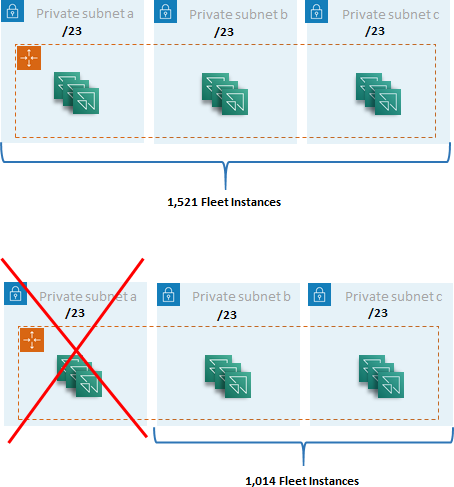
Subnet sizing example
While 2 x /22 subnets would also satisfy resiliency, consider the following:
-
Instead of 1,536 IP addresses being reserved, using two AZs results in 2,048 IP addresses being reserved, wasting IP addresses that could go to other functions.
-
If one AZ becomes inaccessible, the ability to scale out fleet instances is limited by the throughput of an AZ. This can extend the duration of
PendingCapacity.
Subnet routing
It is a best practice to create private subnets for WorkSpaces Applications instances, routing to the public internet through a centralized VPC for outbound traffic. Inbound traffic for the WorkSpaces Applications session streaming is handled through Amazon WorkSpaces Applications service via Streaming Gateways: you do not need to configure public subnets for this.
Intra-Region connectivity
For WorkSpaces Applications fleet instances joined to an Active Directory Domain, configure Active Directory Domain Controllers in a Shared Services VPC in each AWS Region. Sources for Active Directory can be either Amazon EC2-based Domain Controllers or AWS Microsoft Managed AD. Routing between the shared services and WorkSpaces Applications VPCs can be either through a VPC peering connection or a transit gateway. Although transit gateways solve the complexity of routing at scale, there are a number of reasons why VPC peering is preferable in most settings:
-
VPC peering is a direct connection between the two VPCs (no extra hop).
-
There is no hourly charge, just the standard data transfer rate between Availability Zones.
-
There is no limit on bandwidth.
-
Support for accessing Security Groups between VPCs.
This is especially true if WorkSpaces Applications instances connect to application infrastructure and/or file servers with large datasets in a shared service VPC. By optimizing the path to these commonly accessed resources, VPC peering connection is preferred, even in designs where all other VPC and internet routing are performed via transit gateway.
Outbound internet traffic
While routing directly to shared services is mostly optimized
through a peering connection, outbound traffic for WorkSpaces Applications
can be designed by
creating a single internet exit point from multiple VPCs using AWS Transit Gateway
Once all outbound internet traffic is centralized into a
singular VPC, NAT gateways or NAT instances are a common design
choice. To determine which is best for your organization, view
the administration guide for
comparing
NAT gateways and NAT instances.
AWS Network Firewall
On-premises
When connectivity to on-premises resources is required,
especially for WorkSpaces Applications instances joined to Active
Directory, establish a highly
resilient
connection through AWS Direct Connect
