# Language identification with streaming transcriptions
Streaming language identification can identify the dominant language spoken in your media stream. Amazon Transcribe requires a minimum of one second of speech to identify the language.
If your stream contains only one language, you can enable single-language identification, which identifies the dominant language spoken in your media file and creates your transcript using only this language.
If your stream contains more than one language, you can enable multi-language identification, which identifies all languages spoken in your stream and creates your transcript using each identified language. Note that a multi-lingual transcript is produced. You can use other services, such as Amazon Transcribe, to translate your transcript.
To use streaming language identification, you must provide at least two language codes, and you can select only one language dialect per language per stream. This means that you cannot select `en-US` and `en-AU` as language options for the same transcription.
You also have the option to select a preferred language from the set of language codes you provide. Adding a preferred language can speed up the language identification process, which is helpful for short audio clips.
**Important**
If none of the language codes you provide match the language, or languages, identified in your audio, Amazon Transcribe selects the closest language match from your specified language codes. It then produces a transcript in that language. For example, if your media is in US English (`en-US`) and you provide Amazon Transcribe with the language codes `zh-CN`, `fr-FR`, and `de-DE`, Amazon Transcribe is likely to match your media to German (`de-DE`) and produce a German-language transcription. Mismatching language codes and spoken languages can result in an inaccurate transcript, so we recommend caution when including language codes.
If your media contains two channels, Amazon Transcribe can identify the dominant language spoken in each channel. In this case, set the [https://docs.aws.amazon.com/transcribe/latest/APIReference/API_Settings.html#transcribe-Type-Settings-ChannelIdentification](https://docs.aws.amazon.com/transcribe/latest/APIReference/API_Settings.html#transcribe-Type-Settings-ChannelIdentification) parameter to `true` and each channel is transcribed separately. Note that the default for this parameter is `false`. If you don't change it, only the first channel is transcribed and only one language is identified.
Streaming language identification can't be combined with custom language models or redaction. If combining language identification with other features, you are limited to the languages supported with those features, and also with streaming transcriptions. Refer to [Supported languages](supported-languages.md).
**Note**
PCM and FLAC are the only supported audio formats for streaming language identification. For multi-language identification, only PCM is supported.
## Identifying languages in multi-language audio
Multi-language identification is intended for multi-lingual streams, and provides you with a transcript that reflects all supported languages spoken in your stream. This means that if speakers change languages mid-conversation, or if each participant is speaking a different language, your transcription output detects and transcribes each language correctly.
For example, if your stream contains a bilingual speaker who is alternating between US English (`en-US`) and Hindi (`hi-IN`), multi-language identification can identify and transcribe spoken US English as `en-US` and spoken Hindi as `hi-IN`. This differs from single-language identification, where only one dominant language is used to create a transcript. In this case, any spoken language that is not the dominant language is transcribed incorrectly.
**Note**
Redaction and custom language models are not currently supported with multi-language identification.
## Using language identification with streaming media
You can use automatic language identification in a streaming transcription using the **AWS Management Console**, **HTTP/2**, or **WebSockets**; see the following for examples:
### AWS Management Console
1. Sign in to the [AWS Management Console](https://console.aws.amazon.com/transcribe/).
1. In the navigation pane, choose **Real-time transcription**. Scroll down to **Language settings** and expand this field if it is minimized.

1. Select **Automatic language identification** or **Automatic multiple languages identification**.

1. Provide a minimum of two language codes for your transcription. Note that you can provide only one dialect per language. For example, you cannot select both `en-US` and `en-GB` as language options for the same transcription.

1. (Optional) From the subset of languages you selected in the previous step, you can choose a preferred language for your transcript.
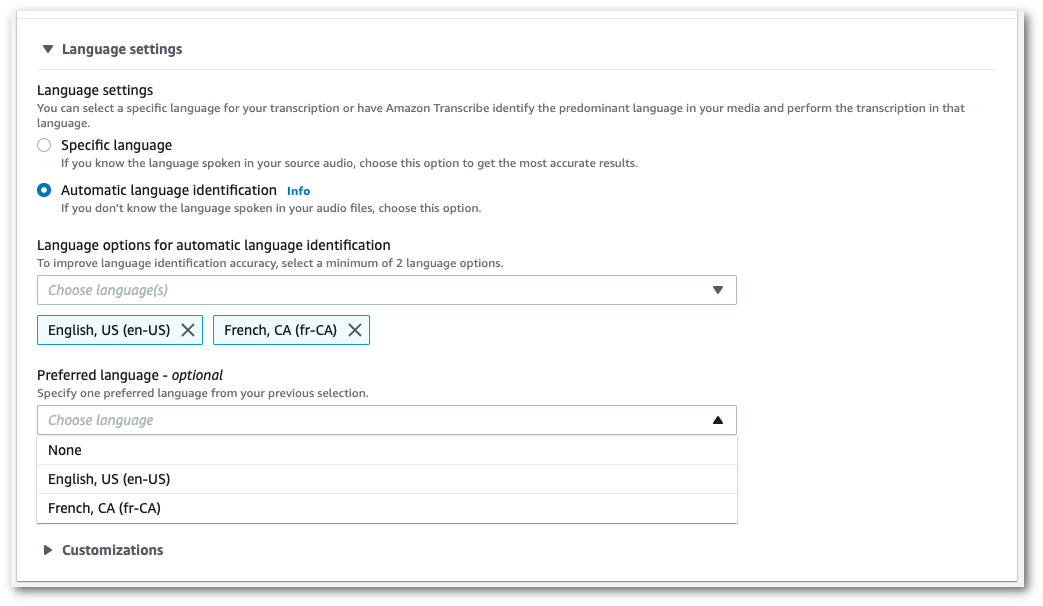
1. You're now ready to transcribe your stream. Select **Start streaming** and begin speaking. To end your dictation, select **Stop streaming**.
### HTTP/2 stream
This example creates an HTTP/2 request with language identification enabled. For more information on using HTTP/2 streaming with Amazon Transcribe, see [Setting up an HTTP/2 stream](streaming-setting-up.md#streaming-http2). For more detail on parameters and headers specific to Amazon Transcribe, see [https://docs.aws.amazon.com/transcribe/latest/APIReference/API_streaming_StartStreamTranscription.html](https://docs.aws.amazon.com/transcribe/latest/APIReference/API_streaming_StartStreamTranscription.html).
```
POST /stream-transcription HTTP/2
host: transcribestreaming.{{us-west-2}}.amazonaws.com
X-Amz-Target: com.amazonaws.transcribe.Transcribe.{{StartStreamTranscription}}
Content-Type: application/vnd.amazon.eventstream
X-Amz-Content-Sha256: {{string}}
X-Amz-Date: {{20220208}}T{{235959}}Z
Authorization: AWS4-HMAC-SHA256 Credential={{access-key}}/{{20220208}}/{{us-west-2}}/transcribe/aws4_request, SignedHeaders=content-type;host;x-amz-content-sha256;x-amz-date;x-amz-target;x-amz-security-token, Signature={{string}}
x-amzn-transcribe-media-encoding: {{flac}}
x-amzn-transcribe-sample-rate: {{16000}}
x-amzn-transcribe-identify-language: true
x-amzn-transcribe-language-options: {{en-US}},{{de-DE}}
x-amzn-transcribe-preferred-language: {{en-US}}
transfer-encoding: chunked
```
This example creates an HTTP/2 request with multiple languages identification enabled. For more information on using HTTP/2 streaming with Amazon Transcribe, see [Setting up an HTTP/2 stream](streaming-setting-up.md#streaming-http2). For more detail on parameters and headers specific to Amazon Transcribe, see [https://docs.aws.amazon.com/transcribe/latest/APIReference/API_streaming_StartStreamTranscription.html](https://docs.aws.amazon.com/transcribe/latest/APIReference/API_streaming_StartStreamTranscription.html).
```
POST /stream-transcription HTTP/2
host: transcribestreaming.{{us-west-2}}.amazonaws.com
X-Amz-Target: com.amazonaws.transcribe.Transcribe.{{StartStreamTranscription}}
Content-Type: application/vnd.amazon.eventstream
X-Amz-Content-Sha256: {{string}}
X-Amz-Date: {{20220208}}T{{235959}}Z
Authorization: AWS4-HMAC-SHA256 Credential={{access-key}}/{{20220208}}/{{us-west-2}}/transcribe/aws4_request, SignedHeaders=content-type;host;x-amz-content-sha256;x-amz-date;x-amz-target;x-amz-security-token, Signature={{string}}
x-amzn-transcribe-media-encoding: {{flac}}
x-amzn-transcribe-sample-rate: {{16000}}
x-amzn-transcribe-identify-multiple-languages: true
x-amzn-transcribe-language-options: {{en-US}},{{de-DE}}
x-amzn-transcribe-preferred-language: {{en-US}}
transfer-encoding: chunked
```
If you use `identify-language` or `identify-multiple-languages` in your request, you must also include `language-options`. You cannot use both `language-code` and `identify-language` in the same request.
Parameter definitions can be found in the [API Reference](https://docs.aws.amazon.com/transcribe/latest/APIReference/API_Reference.html); parameters common to all AWS API operations are listed in the [Common Parameters](https://docs.aws.amazon.com/transcribe/latest/APIReference/CommonParameters.html) section.
### WebSocket stream
This example creates a presigned URL that uses language identification in a WebSocket stream. Line breaks have been added for readability. For more information on using WebSocket streams with Amazon Transcribe, see [Setting up a WebSocket stream](streaming-setting-up.md#streaming-websocket). For more detail on parameters, see [https://docs.aws.amazon.com/transcribe/latest/APIReference/API_streaming_StartStreamTranscription.html](https://docs.aws.amazon.com/transcribe/latest/APIReference/API_streaming_StartStreamTranscription.html).
```
GET wss://transcribestreaming.{{us-west-2}}.amazonaws.com:8443/stream-transcription-websocket?
&X-Amz-Algorithm=AWS4-HMAC-SHA256
&X-Amz-Credential={{AKIAIOSFODNN7EXAMPLE}}%2F{{20220208}}%2F{{us-west-2}}%2F{{transcribe}}%2Faws4_request
&X-Amz-Date={{20220208}}T{{235959}}Z
&X-Amz-Expires={{300}}
&X-Amz-Security-Token={{security-token}}
&X-Amz-Signature={{string}}
&X-Amz-SignedHeaders=content-type%3Bhost%3Bx-amz-date
&media-encoding={{flac}}
&sample-rate={{16000}}
&identify-language=true
&language-options={{en-US,de-DE}}
&preferred-language={{en-US}}
```
This example creates a presigned URL that uses multiple languages identification in a WebSocket stream. Line breaks have been added for readability. For more information on using WebSocket streams with Amazon Transcribe, see [Setting up a WebSocket stream](streaming-setting-up.md#streaming-websocket). For more detail on parameters, see [https://docs.aws.amazon.com/transcribe/latest/APIReference/API_streaming_StartStreamTranscription.html](https://docs.aws.amazon.com/transcribe/latest/APIReference/API_streaming_StartStreamTranscription.html).
```
GET wss://transcribestreaming.{{us-west-2}}.amazonaws.com:8443/stream-transcription-websocket?
&X-Amz-Algorithm=AWS4-HMAC-SHA256
&X-Amz-Credential={{AKIAIOSFODNN7EXAMPLE}}%2F{{20220208}}%2F{{us-west-2}}%2F{{transcribe}}%2Faws4_request
&X-Amz-Date={{20220208}}T{{235959}}Z
&X-Amz-Expires={{300}}
&X-Amz-Security-Token={{security-token}}
&X-Amz-Signature={{string}}
&X-Amz-SignedHeaders=content-type%3Bhost%3Bx-amz-date
&media-encoding={{flac}}
&sample-rate={{16000}}
&identify-multiple-languages=true
&language-options={{en-US,de-DE}}
&preferred-language={{en-US}}
```
If you use `identify-language` or `identify-multiple-languages` in your request, you must also include `language-options`. You cannot use both `language-code` and `identify-language` in the same request.
Parameter definitions can be found in the [API Reference](https://docs.aws.amazon.com/transcribe/latest/APIReference/API_Reference.html); parameters common to all AWS API operations are listed in the [Common Parameters](https://docs.aws.amazon.com/transcribe/latest/APIReference/CommonParameters.html) section.