Secret event notifications
Secrets Manager publishes events to Amazon EventBridge when staging labels change on your secrets. You can create EventBridge rules that match these events and route them to targets to build event-driven workflows.
How EventBridge routes Secrets Manager events
The following describes how EventBridge works with Secrets Manager events.
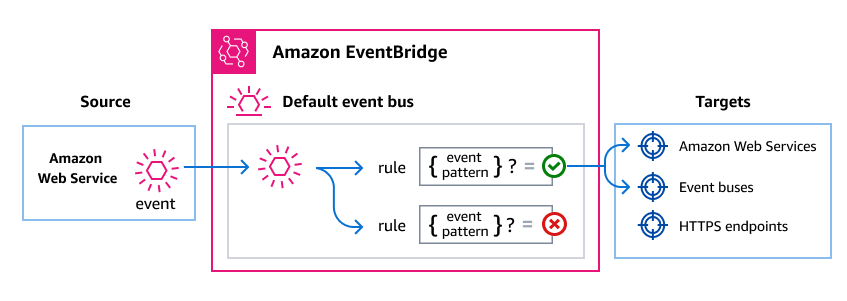
As with many AWS services, Secrets Manager generates and sends events to the EventBridge default event bus. An event bus is a router that receives events and routes them to the destinations, or targets, that you specify. Targets can include other AWS services, custom applications, and SaaS partner applications.
EventBridge routes events according to rules you create on the event bus. For each rule, you specify a filter, or event pattern, to select only the events you want. Whenever an event is sent to the event bus, EventBridge compares it against each rule. If the event matches the rule, EventBridge routes the event to the specified targets.
The following diagram shows how EventBridge routes Secrets Manager events from the default event bus to the targets that you specify.
For more information, see Creating rules in the EventBridge User Guide.
Secrets Manager events
Secrets Manager publishes a Secret Label Updated event to the default EventBridge event
bus whenever a staging label changes, except for AWSPENDING and AWSPREVIOUS. This
includes custom labels. Events are enabled by default for all secrets. To consume these
events, you create EventBridge rules that match them and route them to a target. For the full
list of services you can use as targets, see EventBridge targets in the
EventBridge User Guide.
Secrets Manager doesn't publish events for metadata changes such as tags, description, rotation configuration, or resource policy updates.
| Event detail type | Description |
|---|---|
|
Secrets Manager moved a staging label to a new version of a secret. |
Event structure
All events from AWS services contain two types of data:
A common set of fields containing metadata about the event, such as the AWS service that is the source of the event, the time the event was generated, the account and region in which the event took place, and others. For definitions of these general fields, see Event structure in the Amazon EventBridge Events Reference.
-
A
detailfield that contains data specific to that particular service event.
Creating event patterns that match Secrets Manager events
Event patterns are filters where you specify what data the events you want to select should contain.
Each event pattern is a JSON object that contains:
-
A
sourceattribute that identifies the service sending the event. For Secrets Manager events, the source isaws.secretsmanager. -
(Optional): A
detail-typeattribute that contains an array of the event names to match. -
(Optional): A
detailattribute containing any other event data on which to match.
The following event pattern matches events when the AWSCURRENT label moves to a new
version, which indicates the active secret value has changed:
{
  "source": ["aws.secretsmanager"],
  "detail-type": ["Secret Label Updated"],
  "detail": {
    "labelUpdated": ["AWSCURRENT"]
  }
}
The following event pattern matches label changes only for secrets whose names start
with MyTestSecret:
{
  "source": ["aws.secretsmanager"],
  "detail-type": ["Secret Label Updated"],
  "detail": {
    "name": [{"prefix": "MyTestSecret"}]
  }
}
The following event pattern combines filters to match only when AWSCURRENT changes
on secrets with names starting with prod/:
{
  "source": ["aws.secretsmanager"],
  "detail-type": ["Secret Label Updated"],
  "detail": {
    "name": [{"prefix": "prod/"}],
    "labelUpdated": ["AWSCURRENT"]
  }
}
If you use custom staging labels in your workflows, you can match events for those
labels. The following example matches when a label named MyLabel is
moved:
{
  "source": ["aws.secretsmanager"],
  "detail-type": ["Secret Label Updated"],
  "detail": {
    "labelUpdated": ["MyLabel"]
  }
}
For more information about writing event patterns, see Event patterns in the EventBridge User Guide.
Creating the event pattern is a step in the larger process of creating the rule. For more information, see Creating rules in the EventBridge User Guide.
