AWS Cloud WAN
AWS Cloud WAN
Connecting to RISE from on-premises using AWS Cloud WAN in your AWS account
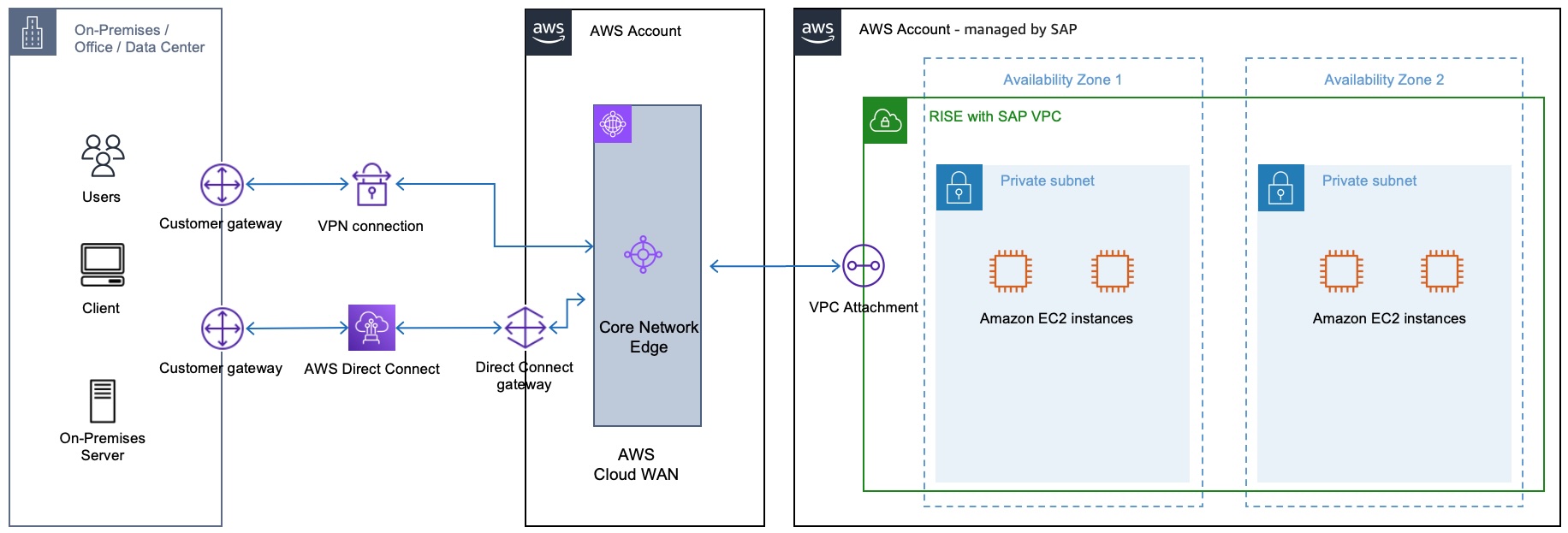
To establish a connection with RISE Environment (AWS account managed by SAP), create and share AWS Cloud WAN via AWS Resource Access Manager (RAM) in your AWS account. Afterwards, SAP will accept the shared Cloud WAN and create an VPC attachment to enable traffic flow through an entry in route table. As AWS Cloud WAN resides in your AWS account, you can retain control over traffic routing.
Here is high level step-by-step guide to create Cloud WAN global:
-
In AWS Network Manager, create a global network and associated core network.
-
Create a Core Network Policy (CNP) that defines segments, Autonomous System Number (ASN) range, AWS Regions and tags to be used to attach to segments.
-
Apply the network policy.
-
Share the core network using the resource access manager with SAP ECS that manages RISE with SAP Account.
-
Create and tag attachments.
-
Update routes in your attached VPCs to include the core network.
You can find out more details from these documentations:
-
Attaching AWS Site-to-Site VPN (S2S VPN) to AWS Cloud WAN – Create a Site-to-Site VPN connection with Target Gateway Type set to Not Associated. You can create an AWS S2S VPN attachment for AWS Cloud WAN under Site-to-Site VPN connections from the Amazon VPC console. After the AWS S2S VPN is created, you can attach it to AWS Cloud WAN core network. For more information, see How Site-to-Site VPN connection can be created for AWS Cloud WAN.
-
Attaching AWS Direct Connect gateway with AWS Cloud WAN – Create a Direct Connect gateway with a transit virtual interface and attach Cloud WAN to Direct Connect gateway which exist in your AWS Account. For more information, see AWS Cloud WAN attachment to a Direct Connect gateway
. For detailed steps to create the transit virtual interface for Direct Connect Gateway, you can refer to AWS documentation - Create a transit virtual interface to the AWS Direct Connect gateway.
You can estimate the costs of deploying AWS Cloud WAN from the pricing documentation
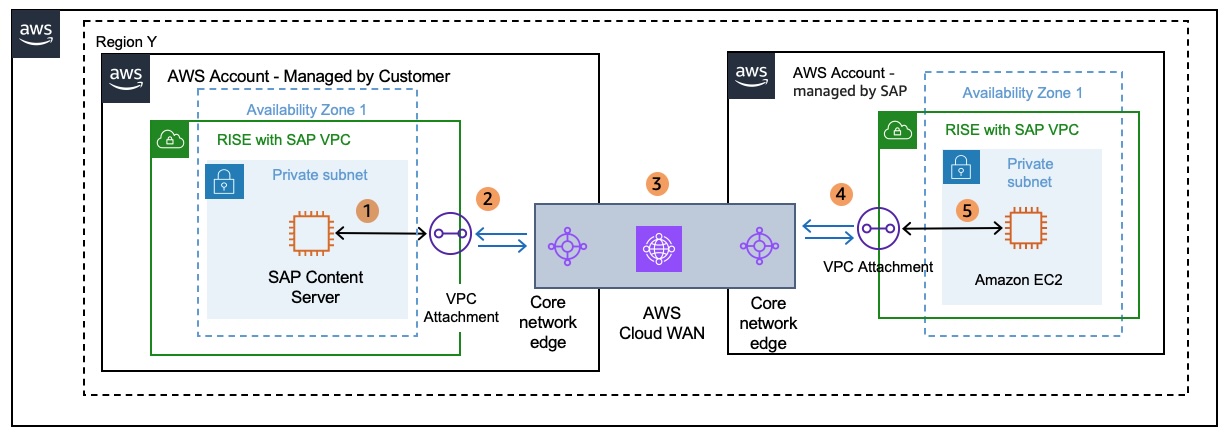
Scenario A. AWS Cloud WAN connecting two VPCs in same Region
|
Pricing example – AWS Cloud WAN connecting two VPCs in same Regions NoteCost between AWS Regions vary. For more information, see Amazon EC2 pricing Data Transfer 100GB of data sent from a VPC in Region X in the AWS account – managed by SAP via Cloud WAN that resides in the AWS account – managed by customer ending at a VPC managed by customer. 100GB * USD 0.02 per GB = USD 2 (Cloud WAN data processing) (Billed to AWS account – managed by SAP) Apart from data processing there would be VPC attachment cost to AWS account – managed by SAP. Cloud WAN pricing For example, SAP VPC is in Region US East (N. Virginia). You pay USD 0.065 per hour for VPC attachments in the US East (N. Virginia) Region. USD 0.065 * 730 = USD 47.45 (Monthly fixed cost billed to AWS account , managed by SAP) Hence the total cost = USD 49.45 Data processing and VPC Attachment costs are charged to the VPC owner who sends the traffic to AWS Cloud WAN. Because the sending VPC resides in the AWS account – managed by SAP and the cost for data transfer is included in the RISE subscription, the AWS account – managed by Customer will not incur data transfer and attachment cost for this example. The AWS account - managed by customer will only be billed for the price Cloud WAN per VPC attachment per hour. Data out of an AZ will always go via Cloud WAN endpoint in that AZ to reach other VPC, so there is no cross AZ Data Transfer costs. |
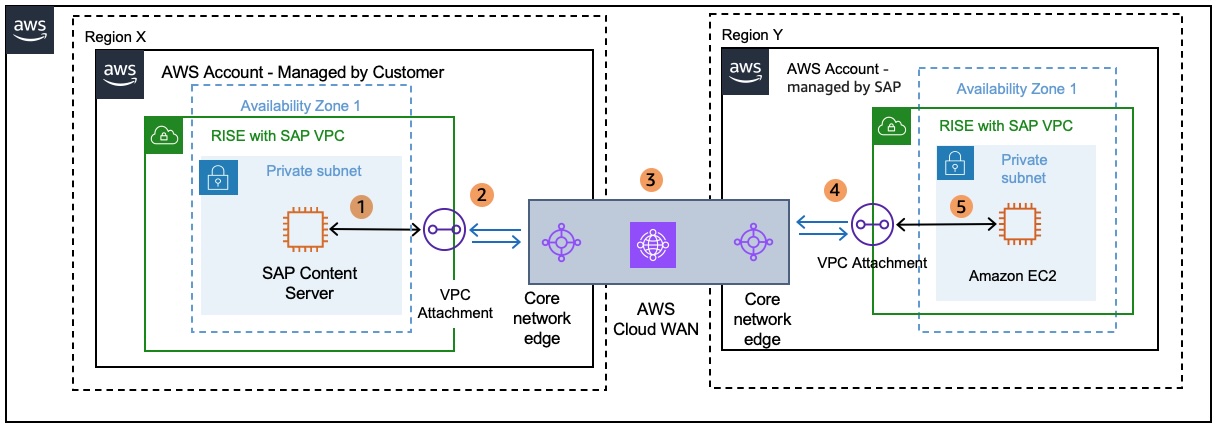
Scenario B. AWS Cloud WAN connecting two VPCs in different Regions
|
Pricing example – AWS Cloud WAN connecting two VPCs in different Regions NoteCost between AWS Regions vary. For more information, see Amazon EC2 pricing Data Transfer 100GB of data sent from a VPC in region Y in the AWS account - managed by Customer via AWS Cloud WAN to AWS Account - managed by SAP in different region X. 100GB * USD 0.02 per GB = USD 2 (Cloud WAN data processing) + 100GB * (USD 0.01–USD 0.138 per GB) = USD 1–USD 13.8 (Region out) = USD 3–USD 15.8 (Total - billed to AWS account – managed by Customer) Data processing is charged to the VPC owner who sends the traffic to Cloud WAN. As the sending VPC is residing in the AWS account – managed by customer all data transfer costs for this example are billed to the AWS account – managed by Customer. In addition, the AWS account – managed by Customer will be billed for the price per VPC attachment per hour in region Y. VPC attachment charges in Region X would be charged to AWS account – managed by SAP and the charges are included in the RISE subscription. |
