# Example: Drawing bounding boxes around face covers
The following examples shows you how to draw bounding boxes around face covers detected on persons. For an example that uses AWS Lambda and Amazon DynamoDB, see the [AWS Documentation SDK examples GitHub repository](https://github.com/awsdocs/aws-doc-sdk-examples/tree/master/javav2/usecases/creating_lambda_ppe).
To detect face covers you use the [DetectProtectiveEquipment](https://docs.aws.amazon.com/rekognition/latest/APIReference/API_DetectProtectiveEquipment.html) non-storage API operation. The image is loaded from the local file system. You provide the input image to `DetectProtectiveEquipment` as an image byte array (base64-encoded image bytes). For more information, see [Working with images](images.md).
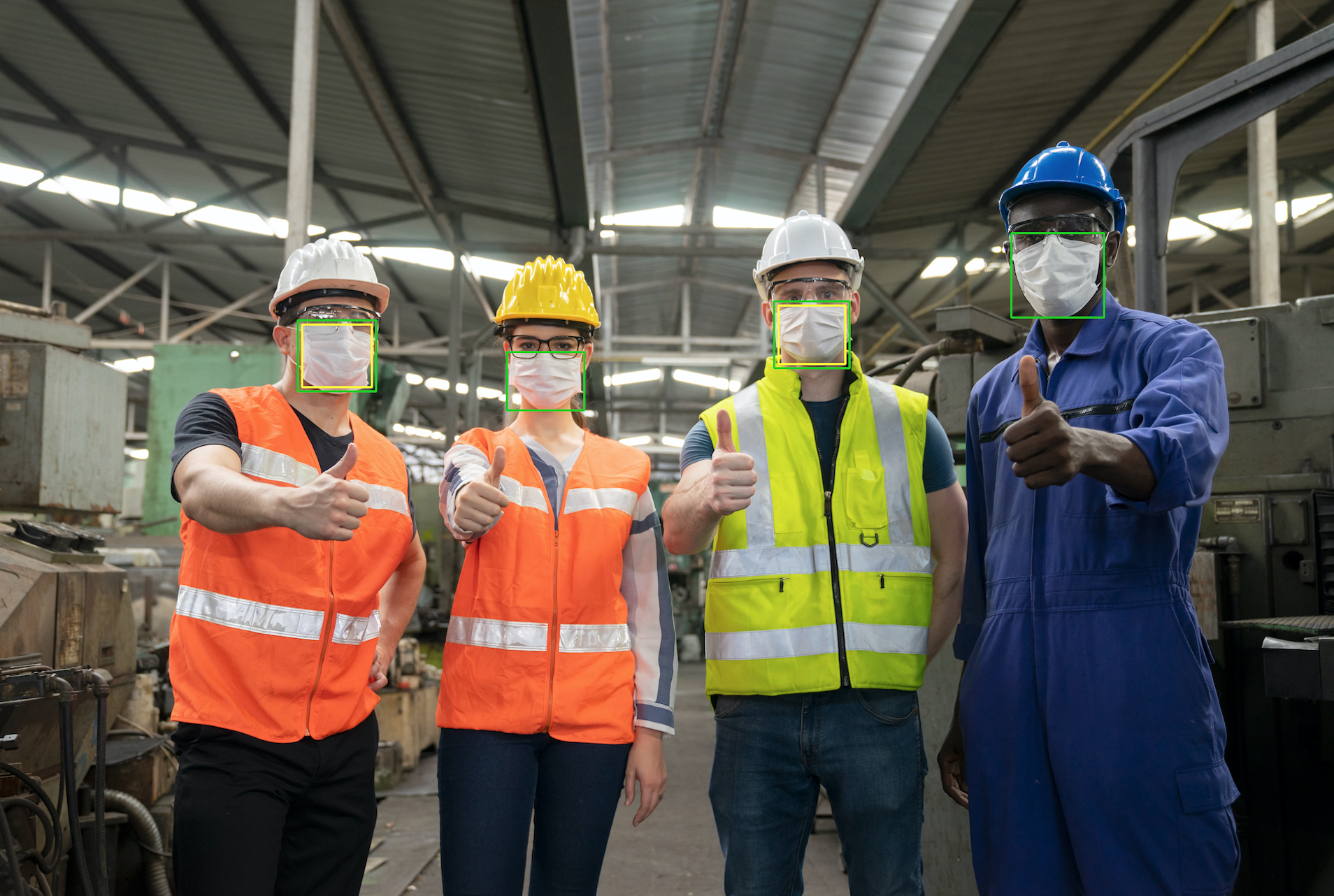
The example displays a bounding box around detected face covers. The bounding box is green if the face cover fully covers the body part. Otherwise a red bounding box is displayed. As a warning, a yellow bounding box is displayed within the face cover bounding box, if the detection confidence is lower than the specified confidence value. If a face cover is not detected, a red bounding box is drawn around the person.
The image output is similar to the following.
**To display bounding boxes on detected face covers**
1. If you haven't already:
1. Create or update a user with `AmazonRekognitionFullAccess` permissions. For more information, see [Step 1: Set up an AWS account and create a User](setting-up.md#setting-up-iam).
1. Install and configure the AWS CLI and the AWS SDKs. For more information, see [Step 2: Set up the AWS CLI and AWS SDKs](setup-awscli-sdk.md).
1. Use the following examples to call the `DetectProtectiveEquipment` operation. For information about displaying bounding boxes in an image, see [Displaying bounding boxes](images-displaying-bounding-boxes.md).
------
#### [ Java ]
In the function `main`, change the following:
+ The value of `photo` to path and file name of a local image file (PNG or JPEG).
+ The value of `confidence` to the desired confidence level (50-100).
```
//Loads images, detects faces and draws bounding boxes.Determines exif orientation, if necessary.
package com.amazonaws.samples;
import java.awt.*;
import java.awt.image.BufferedImage;
import java.util.List;
import javax.imageio.ImageIO;
import javax.swing.*;
import java.io.ByteArrayInputStream;
import java.io.ByteArrayOutputStream;
import java.io.File;
import java.io.FileInputStream;
import java.io.InputStream;
import java.nio.ByteBuffer;
import com.amazonaws.util.IOUtils;
import com.amazonaws.client.builder.AwsClientBuilder;
import com.amazonaws.services.rekognition.AmazonRekognition;
import com.amazonaws.services.rekognition.AmazonRekognitionClientBuilder;
import com.amazonaws.services.rekognition.model.BoundingBox;
import com.amazonaws.services.rekognition.model.DetectProtectiveEquipmentRequest;
import com.amazonaws.services.rekognition.model.DetectProtectiveEquipmentResult;
import com.amazonaws.services.rekognition.model.EquipmentDetection;
import com.amazonaws.services.rekognition.model.Image;
import com.amazonaws.services.rekognition.model.ProtectiveEquipmentBodyPart;
import com.amazonaws.services.rekognition.model.ProtectiveEquipmentPerson;
// Calls DetectFaces and displays a bounding box around each detected image.
public class PPEBoundingBox extends JPanel {
private static final long serialVersionUID = 1L;
BufferedImage image;
static int scale;
DetectProtectiveEquipmentResult result;
float confidence=80;
public PPEBoundingBox(DetectProtectiveEquipmentResult ppeResult, BufferedImage bufImage, float requiredConfidence) throws Exception {
super();
scale = 2; // increase to shrink image size.
result = ppeResult;
image = bufImage;
confidence=requiredConfidence;
}
// Draws the bounding box around the detected faces.
public void paintComponent(Graphics g) {
float left = 0;
float top = 0;
int height = image.getHeight(this);
int width = image.getWidth(this);
int offset=20;
Graphics2D g2d = (Graphics2D) g; // Create a Java2D version of g.
// Draw the image.
g2d.drawImage(image, 0, 0, width / scale, height / scale, this);
g2d.setColor(new Color(0, 212, 0));
// Iterate through detected persons and display bounding boxes.
List persons = result.getPersons();
for (ProtectiveEquipmentPerson person: persons) {
BoundingBox boxPerson = person.getBoundingBox();
left = width * boxPerson.getLeft();
top = height * boxPerson.getTop();
Boolean foundMask=false;
List bodyParts=person.getBodyParts();
if (bodyParts.isEmpty()==false)
{
//body parts detected
for (ProtectiveEquipmentBodyPart bodyPart: bodyParts) {
List equipmentDetections=bodyPart.getEquipmentDetections();
for (EquipmentDetection item: equipmentDetections) {
if (item.getType().contentEquals("FACE_COVER"))
{
// Draw green or red bounding box depending on mask coverage.
foundMask=true;
BoundingBox box =item.getBoundingBox();
left = width * box.getLeft();
top = height * box.getTop();
Color maskColor=new Color( 0, 212, 0);
if (item.getCoversBodyPart().getValue()==false) {
// red bounding box
maskColor=new Color( 255, 0, 0);
}
g2d.setColor(maskColor);
g2d.drawRect(Math.round(left / scale), Math.round(top / scale),
Math.round((width * box.getWidth()) / scale), Math.round((height * box.getHeight())) / scale);
// Check confidence is > supplied confidence.
if (item.getCoversBodyPart().getConfidence()< confidence)
{
// Draw a yellow bounding box inside face mask bounding box
maskColor=new Color( 255, 255, 0);
g2d.setColor(maskColor);
g2d.drawRect(Math.round((left + offset) / scale),
Math.round((top + offset) / scale),
Math.round((width * box.getWidth())- (offset * 2 ))/ scale,
Math.round((height * box.getHeight()) -( offset* 2)) / scale);
}
}
}
}
}
// Didn't find a mask, so draw person bounding box red
if (foundMask==false) {
left = width * boxPerson.getLeft();
top = height * boxPerson.getTop();
g2d.setColor(new Color(255, 0, 0));
g2d.drawRect(Math.round(left / scale), Math.round(top / scale),
Math.round(((width) * boxPerson.getWidth()) / scale), Math.round((height * boxPerson.getHeight())) / scale);
}
}
}
public static void main(String arg[]) throws Exception {
String photo = "photo";
float confidence =80;
int height = 0;
int width = 0;
BufferedImage image = null;
ByteBuffer imageBytes;
// Get image bytes for call to DetectProtectiveEquipment
try (InputStream inputStream = new FileInputStream(new File(photo))) {
imageBytes = ByteBuffer.wrap(IOUtils.toByteArray(inputStream));
}
//Get image for display
InputStream imageBytesStream;
imageBytesStream = new ByteArrayInputStream(imageBytes.array());
ByteArrayOutputStream baos = new ByteArrayOutputStream();
image=ImageIO.read(imageBytesStream);
ImageIO.write(image, "jpg", baos);
width = image.getWidth();
height = image.getHeight();
//Get Rekognition client
AmazonRekognition rekognitionClient = AmazonRekognitionClientBuilder.defaultClient();
// Call DetectProtectiveEquipment
DetectProtectiveEquipmentRequest request = new DetectProtectiveEquipmentRequest()
.withImage(new Image()
.withBytes(imageBytes));
DetectProtectiveEquipmentResult result = rekognitionClient.detectProtectiveEquipment(request);
// Create frame and panel.
JFrame frame = new JFrame("Detect PPE");
frame.setDefaultCloseOperation(JFrame.EXIT_ON_CLOSE);
PPEBoundingBox panel = new PPEBoundingBox(result, image, confidence);
panel.setPreferredSize(new Dimension(image.getWidth() / scale, image.getHeight() / scale));
frame.setContentPane(panel);
frame.pack();
frame.setVisible(true);
}
}
```
------
#### [ Java V2 ]
This code is taken from the AWS Documentation SDK examples GitHub repository. See the full example [here](https://github.com/awsdocs/aws-doc-sdk-examples/blob/master/javav2/example_code/rekognition/src/main/java/com/example/rekognition/PPEBoundingBoxFrame.java).
```
import java.awt.*;
import java.awt.image.BufferedImage;
import java.io.*;
import java.util.List;
import javax.imageio.ImageIO;
import javax.swing.*;
import software.amazon.awssdk.auth.credentials.ProfileCredentialsProvider;
import software.amazon.awssdk.core.ResponseBytes;
import software.amazon.awssdk.core.SdkBytes;
import software.amazon.awssdk.regions.Region;
import software.amazon.awssdk.services.rekognition.model.BoundingBox;
import software.amazon.awssdk.services.rekognition.model.DetectProtectiveEquipmentRequest;
import software.amazon.awssdk.services.rekognition.model.EquipmentDetection;
import software.amazon.awssdk.services.rekognition.model.ProtectiveEquipmentBodyPart;
import software.amazon.awssdk.services.rekognition.model.ProtectiveEquipmentPerson;
import software.amazon.awssdk.services.rekognition.model.ProtectiveEquipmentSummarizationAttributes;
import software.amazon.awssdk.services.rekognition.model.Image;
import software.amazon.awssdk.services.rekognition.model.RekognitionException;
import software.amazon.awssdk.services.s3.S3Client;
import software.amazon.awssdk.services.rekognition.RekognitionClient;
import software.amazon.awssdk.services.s3.model.GetObjectRequest;
import software.amazon.awssdk.services.s3.model.GetObjectResponse;
import software.amazon.awssdk.services.s3.model.S3Exception;
import software.amazon.awssdk.services.rekognition.model.DetectProtectiveEquipmentResponse;
//snippet-end:[rekognition.java2.display_mask.import]
/**
* Before running this Java V2 code example, set up your development environment, including your credentials.
*
* For more information, see the following documentation topic:
*
* https://docs.aws.amazon.com/sdk-for-java/latest/developer-guide/get-started.html
*/
public class PPEBoundingBoxFrame extends JPanel {
DetectProtectiveEquipmentResponse result;
static BufferedImage image;
static int scale;
float confidence;
public static void main(String[] args) throws Exception {
final String usage = "\n" +
"Usage: " +
" \n\n" +
"Where:\n" +
" sourceImage - The name of the image in an Amazon S3 bucket that shows a person wearing a mask (for example, masks.png). \n\n" +
" bucketName - The name of the Amazon S3 bucket (for example, amzn-s3-demo-bucket). \n\n";
if (args.length != 2) {
System.out.println(usage);
System.exit(1);
}
String sourceImage = args[0];
String bucketName = args[1];
Region region = Region.US_EAST_1;
S3Client s3 = S3Client.builder()
.region(region)
.credentialsProvider(ProfileCredentialsProvider.create("profile-name"))
.build();
RekognitionClient rekClient = RekognitionClient.builder()
.region(region)
.credentialsProvider(ProfileCredentialsProvider.create("profile-name"))
.build();
displayGear(s3, rekClient, sourceImage, bucketName);
s3.close();
rekClient.close();
}
// snippet-start:[rekognition.java2.display_mask.main]
public static void displayGear(S3Client s3,
RekognitionClient rekClient,
String sourceImage,
String bucketName) {
float confidence = 80;
byte[] data = getObjectBytes(s3, bucketName, sourceImage);
InputStream is = new ByteArrayInputStream(data);
try {
ProtectiveEquipmentSummarizationAttributes summarizationAttributes = ProtectiveEquipmentSummarizationAttributes.builder()
.minConfidence(70F)
.requiredEquipmentTypesWithStrings("FACE_COVER")
.build();
SdkBytes sourceBytes = SdkBytes.fromInputStream(is);
image = ImageIO.read(sourceBytes.asInputStream());
// Create an Image object for the source image.
software.amazon.awssdk.services.rekognition.model.Image souImage = Image.builder()
.bytes(sourceBytes)
.build();
DetectProtectiveEquipmentRequest request = DetectProtectiveEquipmentRequest.builder()
.image(souImage)
.summarizationAttributes(summarizationAttributes)
.build();
DetectProtectiveEquipmentResponse result = rekClient.detectProtectiveEquipment(request);
JFrame frame = new JFrame("Detect PPE");
frame.setDefaultCloseOperation(JFrame.EXIT_ON_CLOSE);
PPEBoundingBoxFrame panel = new PPEBoundingBoxFrame(result, image, confidence);
panel.setPreferredSize(new Dimension(image.getWidth() / scale, image.getHeight() / scale));
frame.setContentPane(panel);
frame.pack();
frame.setVisible(true);
} catch (RekognitionException e) {
e.printStackTrace();
System.exit(1);
} catch (Exception e) {
e.printStackTrace();
}
}
public static byte[] getObjectBytes (S3Client s3, String bucketName, String keyName) {
try {
GetObjectRequest objectRequest = GetObjectRequest
.builder()
.key(keyName)
.bucket(bucketName)
.build();
ResponseBytes objectBytes = s3.getObjectAsBytes(objectRequest);
return objectBytes.asByteArray();
} catch (S3Exception e) {
System.err.println(e.awsErrorDetails().errorMessage());
System.exit(1);
}
return null;
}
public PPEBoundingBoxFrame(DetectProtectiveEquipmentResponse ppeResult, BufferedImage bufImage, float requiredConfidence) {
super();
scale = 1; // increase to shrink image size.
result = ppeResult;
image = bufImage;
confidence=requiredConfidence;
}
// Draws the bounding box around the detected masks.
public void paintComponent(Graphics g) {
float left = 0;
float top = 0;
int height = image.getHeight(this);
int width = image.getWidth(this);
int offset=20;
Graphics2D g2d = (Graphics2D) g; // Create a Java2D version of g.
// Draw the image.
g2d.drawImage(image, 0, 0, width / scale, height / scale, this);
g2d.setColor(new Color(0, 212, 0));
// Iterate through detected persons and display bounding boxes.
List persons = result.persons();
for (ProtectiveEquipmentPerson person: persons) {
List bodyParts=person.bodyParts();
if (!bodyParts.isEmpty()){
for (ProtectiveEquipmentBodyPart bodyPart: bodyParts) {
List equipmentDetections=bodyPart.equipmentDetections();
for (EquipmentDetection item: equipmentDetections) {
String myType = item.type().toString();
if (myType.compareTo("FACE_COVER") ==0) {
// Draw green bounding box depending on mask coverage.
BoundingBox box =item.boundingBox();
left = width * box.left();
top = height * box.top();
Color maskColor=new Color( 0, 212, 0);
if (item.coversBodyPart().equals(false)) {
// red bounding box.
maskColor=new Color( 255, 0, 0);
}
g2d.setColor(maskColor);
g2d.drawRect(Math.round(left / scale), Math.round(top / scale),
Math.round((width * box.width()) / scale), Math.round((height * box.height())) / scale);
// Check confidence is > supplied confidence.
if (item.coversBodyPart().confidence() < confidence) {
// Draw a yellow bounding box inside face mask bounding box.
maskColor=new Color( 255, 255, 0);
g2d.setColor(maskColor);
g2d.drawRect(Math.round((left + offset) / scale),
Math.round((top + offset) / scale),
Math.round((width * box.width())- (offset * 2 ))/ scale,
Math.round((height * box.height()) -( offset* 2)) / scale);
}
}
}
}
}
}
}
// snippet-end:[rekognition.java2.display_mask.main]
}
```
------
#### [ Python ]
In the function `main`, change the following:
+ The value of `photo` to path and file name of a local image file (PNG or JPEG).
+ The value of `confidence` to the desired confidence level (50-100).
+ Replace the value of `profile_name` in the line that creates the Rekognition session with the name of your developer profile.
```
#Copyright 2020 Amazon.com, Inc. or its affiliates. All Rights Reserved.
#PDX-License-Identifier: MIT-0 (For details, see https://github.com/awsdocs/amazon-rekognition-developer-guide/blob/master/LICENSE-SAMPLECODE.)
import boto3
import io
from PIL import Image, ImageDraw, ExifTags, ImageColor
def detect_ppe(photo, confidence):
fill_green='#00d400'
fill_red='#ff0000'
fill_yellow='#ffff00'
line_width=3
#open image and get image data from stream.
image = Image.open(open(photo,'rb'))
stream = io.BytesIO()
image.save(stream, format=image.format)
image_binary = stream.getvalue()
imgWidth, imgHeight = image.size
draw = ImageDraw.Draw(image)
client=boto3.client('rekognition')
response = client.detect_protective_equipment(Image={'Bytes': image_binary})
for person in response['Persons']:
found_mask=False
for body_part in person['BodyParts']:
ppe_items = body_part['EquipmentDetections']
for ppe_item in ppe_items:
#found a mask
if ppe_item['Type'] == 'FACE_COVER':
fill_color=fill_green
found_mask=True
# check if mask covers face
if ppe_item['CoversBodyPart']['Value'] == False:
fill_color=fill='#ff0000'
# draw bounding box around mask
box = ppe_item['BoundingBox']
left = imgWidth * box['Left']
top = imgHeight * box['Top']
width = imgWidth * box['Width']
height = imgHeight * box['Height']
points = (
(left,top),
(left + width, top),
(left + width, top + height),
(left , top + height),
(left, top)
)
draw.line(points, fill=fill_color, width=line_width)
# Check if confidence is lower than supplied value
if ppe_item['CoversBodyPart']['Confidence'] < confidence:
#draw warning yellow bounding box within face mask bounding box
offset=line_width+ line_width
points = (
(left+offset,top + offset),
(left + width-offset, top+offset),
((left) + (width-offset), (top-offset) + (height)),
(left+ offset , (top) + (height -offset)),
(left + offset, top + offset)
)
draw.line(points, fill=fill_yellow, width=line_width)
if found_mask==False:
# no face mask found so draw red bounding box around body
box = person['BoundingBox']
left = imgWidth * box['Left']
top = imgHeight * box['Top']
width = imgWidth * box['Width']
height = imgHeight * box['Height']
points = (
(left,top),
(left + width, top),
(left + width, top + height),
(left , top + height),
(left, top)
)
draw.line(points, fill=fill_red, width=line_width)
image.show()
def main():
photo='photo'
confidence=80
detect_ppe(photo, confidence)
if __name__ == "__main__":
main()
```
------
#### [ CLI ]
In the following CLI example change the value of the arguments listed below:
+ The value of `photo` to path and file name of a local image file (PNG or JPEG).
+ The value of `confidence` to the desired confidence level (50-100).
+ Replace the value of `profile_name` in the line that creates the Rekognition session with the name of your developer profile.
```
aws rekognition detect-protective-equipment --image "{"S3Object":{"Bucket":"amzn-s3-demo-bucket","Name":"image-name"}}" --profile profile-name \
--summarization-attributes "{"MinConfidence":MinConfidenceNumber,"RequiredEquipmentTypes":["FACE_COVER"]}"
```
If you are accessing the CLI on a Windows device, use double quotes instead of single quotes and escape the inner double quotes by backslash (i.e. \\) to address any parser errors you may encounter. For an example, see the following:
```
aws rekognition detect-protective-equipment --image "{\"S3Object\":{\"Bucket\":\"amzn-s3-demo-bucket\",\"Name\":\"image-name\"}}" \
--profile profile-name --summarization-attributes "{\"MinConfidence\":MinConfidenceNumber,\"RequiredEquipmentTypes\":[\"FACE_COVER\"]}"
```
------