Amazon delivering browser-based applications
An increasing number of applications are being delivered to users using a web browser. What was once an exceptional use case for an infrequently used application is now a mainstream delivery mechanism for a vast array of applications being used within AWS customer organizations.
It can be challenging to deliver web-based applications securely, efficiently, and at a low cost. Amazon WorkSpaces Secure Browser provides this capability in the form of a low cost, fully managed, Linux-based service designed to facilitate secure browser access to customers' internal websites and software as a service (SaaS) applications from existing web browsers. This is achieved without the administrative burden of appliances, managing infrastructure, specialized client software, or VPN connections.
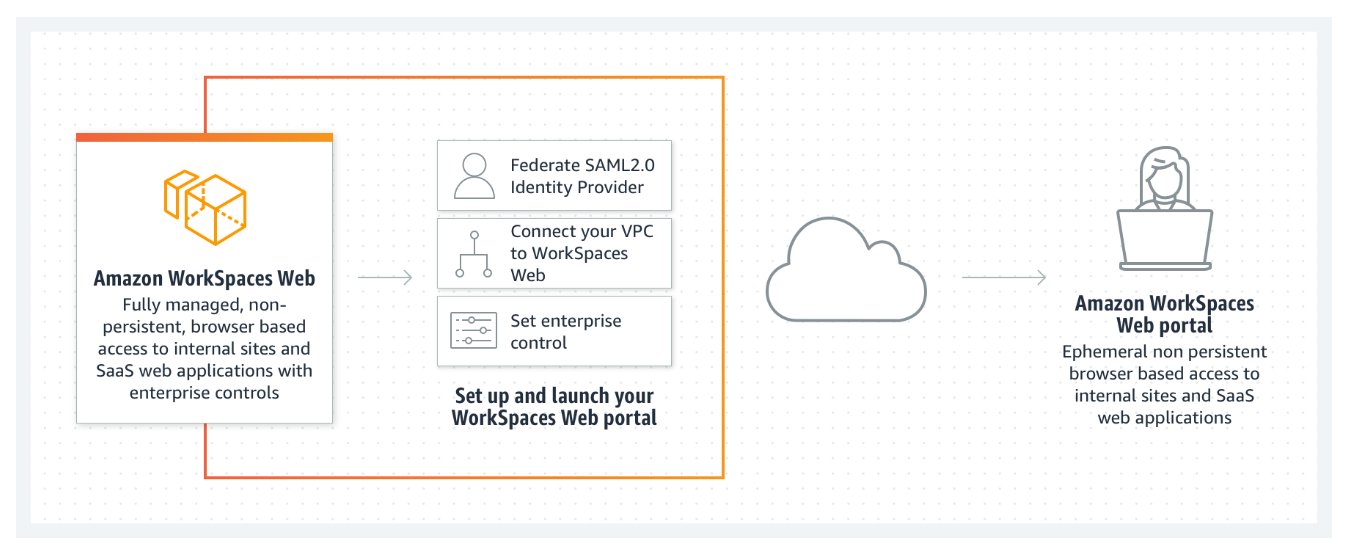

Amazon WorkSpaces Secure Browser is underpinned by a non-persistent system delivering a Chromium-based browser to users each time they authenticate and access the service. This verifies that each user is using an updated browser that is secure and has access to the resources that the user needs to fulfill their role. At the end of a user's session, they disconnect from the browser, and their browser session is terminated, avoiding sharing of data that may be cached within their browser.
The service automatically scales to satisfy the demand from users across a working day and week, and it is a cost-efficient service for delivering secure web applications to users. This is due to both the use of resources only when required by users and the managed service, which removes the need for organizations to operate and maintain a system that delivers a browser to users.
WorkSpaces Secure Browser provides compatibility with a broad range of web sites due to the use of a standard web browser. This compatibility verifies that web sites do not need to be re-developed to support WorkSpaces Secure Browser.
While WorkSpaces Secure Browser uses Chromium web browsers running on AWS resources with connectivity to customer VPCs, you should also provide connectivity to the web sites that require user access permissions. To do so, use the AWS networking service portfolio to provide connectivity to an organization's required intranet or internet web sites.
Users access WorkSpaces Secure Browser by authenticating against a SAML 2.0-compatible identity provider of the customer's choosing. Once authenticated, the user launches a WorkSpaces Secure Browser session and initiates the streaming of pixels to the user's endpoint device. The user's endpoint device must be a supported device running a browser and could be either BYOD or device owned and supplied by the user's employer.
Common WorkSpaces Secure Browser deployment scenarios
Several example problem solutions are presented here that our typical customers encounter with providing access to web applications. You can benefit by understanding how other customers implement WorkSpaces Secure Browser workloads to solve browser-based issues.
Scenario 1: Isolate access to specific browse applications
User scenario: We need to isolate the client component of a browser-based application so that users can access it from anywhere, remove possibilities of data leakage, and avoid the need and cost of delivering this on a full desktop.
WorkSpaces Secure Browser is a fully managed service that provides a resilient and scalable system to access web-based services. AWS manages the browser instances, Chrome policies can be used to secure the browser, and network controls, such as security groups, can be used to limit traffic flow. You can also configure WorkSpaces Secure Browser to obfuscate sensitive data such as credit card or social security numbers to assist with accommodating compliance initiatives such as PCI.
Scenario 2: Provide simplified access to web applications
User scenario: We have several workers who need a simple process to access their time sheets and other scheduling tools. These tools are all web-based, and the users will have no access to a computer due to the challenging nature of their work environment.
WorkSpaces Secure Browser can be accessed from a thin client device and provides a kiosk mode experience which only provides them with access to a limited application set. The thin client device can quickly be deployed, secured, and installed in areas where it may be challenging to install traditional computers.
Scenario 3: Provide safe access to external websites
User scenario: We would like to provide some users with the ability to access a wider range of external web sites from some devices but are concerned about the propagation of viruses or malware inside of our organization.
WorkSpaces Secure Browser is hosted by AWS in a secure environment, and each user's browsing instance is destroyed at the end of their session. Standard Chrome policies can be used to lock down each browser instance, and you can fully isolate the browsing environment and optionally have network traffic pass through a web proxy to further limit access to untrusted external sites. This solution significantly reduces the possibility of external browsing activities from compromising your production networks.
