**Esta página destina-se somente a clientes atuais do serviço Amazon Glacier que usam cofres e a API REST original de 2012.**
Se você estiver procurando soluções de armazenamento de arquivos do Amazon Glacier, recomendamos usar as classes de armazenamento do Amazon S3, S3 Glacier Instant Retrieval, S3 Glacier Flexible Retrieval e S3 Glacier Deep Archive. Para saber mais sobre essas opções de armazenamento, consulte [Classes de armazenamento do Amazon Glacier](https://aws.amazon.com/s3/storage-classes/glacier/).
O Amazon Glacier (serviço autônomo original baseado em cofre) não está mais aceitando novos clientes. O Amazon Glacier é um serviço independente com suas próprias APIs que armazena dados em cofres e é diferente das classes de armazenamento do Amazon S3 e Amazon S3 Glacier. Seus dados existentes permanecerão seguros e acessíveis no Amazon Glacier indefinidamente. Nenhuma migração é necessária. Para armazenamento de arquivamento de baixo custo e longo prazo, AWS recomenda as classes de armazenamento [Amazon S3 Glacier](https://aws.amazon.com/s3/storage-classes/glacier/), que oferecem uma experiência superior ao cliente com APIs baseadas em bucket do S3, disponibilidade Região da AWS total, custos mais baixos e integração de serviços. AWS Se você quiser recursos aprimorados, considere migrar para as classes de armazenamento do Amazon S3 Glacier usando nossas [Orientações de soluções da AWS para transferir dados dos cofres do Amazon Glacier para as classes de armazenamento do Amazon S3 Glacier](https://aws.amazon.com/solutions/guidance/data-transfer-from-amazon-s3-glacier-vaults-to-amazon-s3/).
As traduções são geradas por tradução automática. Em caso de conflito entre o conteúdo da tradução e da versão original em inglês, a versão em inglês prevalecerá.
# Computar somas de verificação
Ao fazer upload de um arquivo, você deve incluir os cabeçalhos `x-amz-sha256-tree-hash` e `x-amz-content-sha256`. O cabeçalho `x-amz-sha256-tree-hash` é uma soma de verificação da carga útil no corpo de solicitação. Este tópico descreve como calcular o cabeçalho `x-amz-sha256-tree-hash`. O cabeçalho `x-amz-content-sha256` é um hash de toda a carga útil e é obrigatório para a autorização. Para obter mais informações, consulte [Cálculo da assinatura de exemplo para Streaming API](amazon-glacier-signing-requests.md#example-signature-calculation-streaming).
A carga útil da solicitação pode ser:
+ **Todo o arquivo—** Ao carregar um arquivo em uma única solicitação usando a Upload Archive API, você envia todo o arquivo no corpo da solicitação. Nesse caso, você deve incluir a soma de verificação de todo o arquivo.
+ **Parte do arquivo—** Ao carregar um arquivo em partes usando a multipart upload API, você envia somente uma parte do arquivo no corpo da solicitação. Nesse caso, você inclui a soma de verificação da parte do arquivo. E, depois de fazer upload de todas as partes, você enviará uma solicitação Complete Multipart Upload, que deve incluir a soma de verificação de todo o arquivo.
A soma de verificação da carga útil é um hash de árvore SHA-256. Ele se chama hash de árvore porque, no processo de computação da soma de verificação, você computa uma árvore de valores de hash SHA-256. O valor do hash na raiz é a soma de verificação de todo o arquivo.
**nota**
Esta seção descreve uma maneira de computar o hash de árvore SHA-256. Porém, você pode usar qualquer procedimento, desde que ele produza o mesmo resultado.
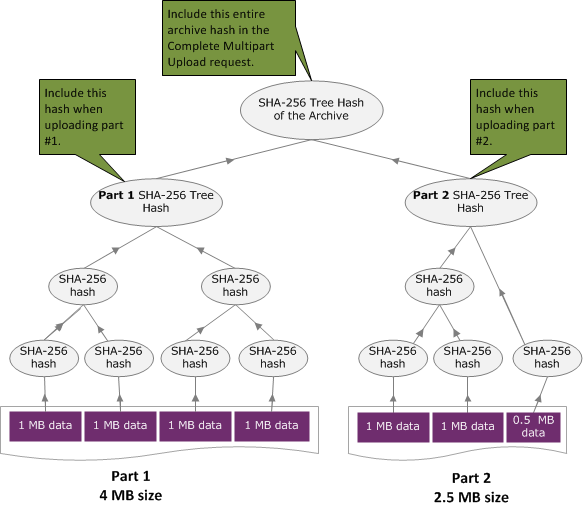
Você computa o hash de árvore SHA-256 da seguinte maneira:
1. Para cada bloco de 1 MB de dados de carga útil, compute o hash SHA-256. O último bloco de dados pode ser menor que 1 MB. Por exemplo, se estiver fazendo upload de um arquivo de 3,2 MB, você computará os valores de hash SHA-256 para cada um dos três primeiros blocos de 1 MB de dados e, em seguida, computará o hash SHA-256 do 0,2 MB de dados restantes. Esses valores de hash formam os nós folha da árvore.
1. Compile o próximo nível da árvore.
1. Concatene dois valores de hash do nó filho consecutivos e compute o hash SHA-256 dos valores de hash concatenados. Essa concatenação e a geração do hash SHA-256 produzem um nó pai para os dois nós filho.
1. Quando restar somente um nó filho, promova esse valor de hash para o próximo nível na árvore.
1. Repita a etapa 2 até a árvore resultante ter uma raiz. A raiz da árvore fornece um hash de todo o arquivo, e uma raiz da subárvore apropriada fornece o hash para a parte em um multipart upload.
**Topics**
+ [Exemplo do hash de árvore 1: fazer upload de um arquivo em uma única solicitação](#checksum-calculations-upload-archive-in-single-payload)
+ [Exemplo do hash de árvore 2: fazer upload de um arquivo usando um multipart upload](#checksum-calculations-upload-archive-using-mpu)
+ [Computar o hash de árvore de um arquivo](#checksum-calculations-examples)
+ [Receber somas de verificação durante o download de dados](checksum-calculations-range.md)
## Exemplo do hash de árvore 1: fazer upload de um arquivo em uma única solicitação
Quando você faz upload de um arquivo em uma única solicitação usando a Upload Archive API (consulte [Upload Archive (POST archive)](api-archive-post.md)), a carga útil da solicitação inclui todo o arquivo. Dessa forma, você deve incluir o hash de árvore de todo o arquivo no cabeçalho de solicitação `x-amz-sha256-tree-hash`. Suponhamos que você queira fazer upload de um arquivo de 6,5 MB. O diagrama a seguir ilustra o processo de criação do hash SHA-256 do arquivo. Você lê o arquivo e computa o hash SHA-256 de cada bloco de 1 MB. Você também computa o hash do 0,5 MB de dados restante e, em seguida, compila a árvore conforme descrito no procedimento anterior.

## Exemplo do hash de árvore 2: fazer upload de um arquivo usando um multipart upload
O processo de computar o hash de árvore durante o upload de um arquivo usando-se multipart upload é o mesmo do upload do arquivo em uma única solicitação. A única diferença é que, em um multipart upload, você faz upload somente de uma parte do arquivo em cada solicitação (usando a API [Upload Part (PUT uploadID)](api-upload-part.md)) e, assim, fornece a soma de verificação somente da parte no cabeçalho da solicitação `x-amz-sha256-tree-hash`. No entanto, depois de fazer upload de todas as partes, você deverá enviar a solicitação Complete Multipart Upload (consulte [Complete Multipart Upload (POST uploadID)](api-multipart-complete-upload.md)) com um hash de árvore de todo o arquivo no cabeçalho da solicitação `x-amz-sha256-tree-hash`.
## Computar o hash de árvore de um arquivo
Os algoritmos mostrados aqui são selecionados para fins de demonstração. Você pode otimizar o código conforme necessário para o cenário de implementação. Se estiver usando um SDK da Amazon para programar em função do Amazon Glacier, o cálculo do hash de árvore será feito para você, e bastará fornecer a referência do arquivo.
**Example 1: exemplo do Java**
O exemplo a seguir mostra como calcular o hash da SHA256 árvore de um arquivo usando Java. Você pode executar esse exemplo fornecendo um local de arquivo como um argumento ou usar o método `TreeHashExample.computeSHA256TreeHash` diretamente do código.
```
import java.io.File;
import java.io.FileInputStream;
import java.io.IOException;
import java.security.MessageDigest;
import java.security.NoSuchAlgorithmException;
public class TreeHashExample {
static final int ONE_MB = 1024 * 1024;
/**
* Compute the Hex representation of the SHA-256 tree hash for the specified
* File
*
* @param args
* args[0]: a file to compute a SHA-256 tree hash for
*/
public static void main(String[] args) {
if (args.length < 1) {
System.err.println("Missing required filename argument");
System.exit(-1);
}
File inputFile = new File(args[0]);
try {
byte[] treeHash = computeSHA256TreeHash(inputFile);
System.out.printf("SHA-256 Tree Hash = %s\n", toHex(treeHash));
} catch (IOException ioe) {
System.err.format("Exception when reading from file %s: %s", inputFile,
ioe.getMessage());
System.exit(-1);
} catch (NoSuchAlgorithmException nsae) {
System.err.format("Cannot locate MessageDigest algorithm for SHA-256: %s",
nsae.getMessage());
System.exit(-1);
}
}
/**
* Computes the SHA-256 tree hash for the given file
*
* @param inputFile
* a File to compute the SHA-256 tree hash for
* @return a byte[] containing the SHA-256 tree hash
* @throws IOException
* Thrown if there's an issue reading the input file
* @throws NoSuchAlgorithmException
*/
public static byte[] computeSHA256TreeHash(File inputFile) throws IOException,
NoSuchAlgorithmException {
byte[][] chunkSHA256Hashes = getChunkSHA256Hashes(inputFile);
return computeSHA256TreeHash(chunkSHA256Hashes);
}
/**
* Computes a SHA256 checksum for each 1 MB chunk of the input file. This
* includes the checksum for the last chunk even if it is smaller than 1 MB.
*
* @param file
* A file to compute checksums on
* @return a byte[][] containing the checksums of each 1 MB chunk
* @throws IOException
* Thrown if there's an IOException when reading the file
* @throws NoSuchAlgorithmException
* Thrown if SHA-256 MessageDigest can't be found
*/
public static byte[][] getChunkSHA256Hashes(File file) throws IOException,
NoSuchAlgorithmException {
MessageDigest md = MessageDigest.getInstance("SHA-256");
long numChunks = file.length() / ONE_MB;
if (file.length() % ONE_MB > 0) {
numChunks++;
}
if (numChunks == 0) {
return new byte[][] { md.digest() };
}
byte[][] chunkSHA256Hashes = new byte[(int) numChunks][];
FileInputStream fileStream = null;
try {
fileStream = new FileInputStream(file);
byte[] buff = new byte[ONE_MB];
int bytesRead;
int idx = 0;
int offset = 0;
while ((bytesRead = fileStream.read(buff, offset, ONE_MB)) > 0) {
md.reset();
md.update(buff, 0, bytesRead);
chunkSHA256Hashes[idx++] = md.digest();
offset += bytesRead;
}
return chunkSHA256Hashes;
} finally {
if (fileStream != null) {
try {
fileStream.close();
} catch (IOException ioe) {
System.err.printf("Exception while closing %s.\n %s", file.getName(),
ioe.getMessage());
}
}
}
}
/**
* Computes the SHA-256 tree hash for the passed array of 1 MB chunk
* checksums.
*
* This method uses a pair of arrays to iteratively compute the tree hash
* level by level. Each iteration takes two adjacent elements from the
* previous level source array, computes the SHA-256 hash on their
* concatenated value and places the result in the next level's destination
* array. At the end of an iteration, the destination array becomes the
* source array for the next level.
*
* @param chunkSHA256Hashes
* An array of SHA-256 checksums
* @return A byte[] containing the SHA-256 tree hash for the input chunks
* @throws NoSuchAlgorithmException
* Thrown if SHA-256 MessageDigest can't be found
*/
public static byte[] computeSHA256TreeHash(byte[][] chunkSHA256Hashes)
throws NoSuchAlgorithmException {
MessageDigest md = MessageDigest.getInstance("SHA-256");
byte[][] prevLvlHashes = chunkSHA256Hashes;
while (prevLvlHashes.length > 1) {
int len = prevLvlHashes.length / 2;
if (prevLvlHashes.length % 2 != 0) {
len++;
}
byte[][] currLvlHashes = new byte[len][];
int j = 0;
for (int i = 0; i < prevLvlHashes.length; i = i + 2, j++) {
// If there are at least two elements remaining
if (prevLvlHashes.length - i > 1) {
// Calculate a digest of the concatenated nodes
md.reset();
md.update(prevLvlHashes[i]);
md.update(prevLvlHashes[i + 1]);
currLvlHashes[j] = md.digest();
} else { // Take care of remaining odd chunk
currLvlHashes[j] = prevLvlHashes[i];
}
}
prevLvlHashes = currLvlHashes;
}
return prevLvlHashes[0];
}
/**
* Returns the hexadecimal representation of the input byte array
*
* @param data
* a byte[] to convert to Hex characters
* @return A String containing Hex characters
*/
public static String toHex(byte[] data) {
StringBuilder sb = new StringBuilder(data.length * 2);
for (int i = 0; i < data.length; i++) {
String hex = Integer.toHexString(data[i] & 0xFF);
if (hex.length() == 1) {
// Append leading zero.
sb.append("0");
}
sb.append(hex);
}
return sb.toString().toLowerCase();
}
}
```
**Example 2: exemplo do C\# .NET**
O exemplo a seguir mostra como calcular o hash da SHA256 árvore de um arquivo. Você pode executar esse exemplo fornecendo um local de arquivo como um argumento.
```
using System;
using System.IO;
using System.Security.Cryptography;
namespace ExampleTreeHash
{
class Program
{
static int ONE_MB = 1024 * 1024;
/**
* Compute the Hex representation of the SHA-256 tree hash for the
* specified file
*
* @param args
* args[0]: a file to compute a SHA-256 tree hash for
*/
public static void Main(string[] args)
{
if (args.Length < 1)
{
Console.WriteLine("Missing required filename argument");
Environment.Exit(-1);
}
FileStream inputFile = File.Open(args[0], FileMode.Open, FileAccess.Read);
try
{
byte[] treeHash = ComputeSHA256TreeHash(inputFile);
Console.WriteLine("SHA-256 Tree Hash = {0}", BitConverter.ToString(treeHash).Replace("-", "").ToLower());
Console.ReadLine();
Environment.Exit(-1);
}
catch (IOException ioe)
{
Console.WriteLine("Exception when reading from file {0}: {1}",
inputFile, ioe.Message);
Console.ReadLine();
Environment.Exit(-1);
}
catch (Exception e)
{
Console.WriteLine("Cannot locate MessageDigest algorithm for SHA-256: {0}",
e.Message);
Console.WriteLine(e.GetType());
Console.ReadLine();
Environment.Exit(-1);
}
Console.ReadLine();
}
/**
* Computes the SHA-256 tree hash for the given file
*
* @param inputFile
* A file to compute the SHA-256 tree hash for
* @return a byte[] containing the SHA-256 tree hash
*/
public static byte[] ComputeSHA256TreeHash(FileStream inputFile)
{
byte[][] chunkSHA256Hashes = GetChunkSHA256Hashes(inputFile);
return ComputeSHA256TreeHash(chunkSHA256Hashes);
}
/**
* Computes a SHA256 checksum for each 1 MB chunk of the input file. This
* includes the checksum for the last chunk even if it is smaller than 1 MB.
*
* @param file
* A file to compute checksums on
* @return a byte[][] containing the checksums of each 1MB chunk
*/
public static byte[][] GetChunkSHA256Hashes(FileStream file)
{
long numChunks = file.Length / ONE_MB;
if (file.Length % ONE_MB > 0)
{
numChunks++;
}
if (numChunks == 0)
{
return new byte[][] { CalculateSHA256Hash(null, 0) };
}
byte[][] chunkSHA256Hashes = new byte[(int)numChunks][];
try
{
byte[] buff = new byte[ONE_MB];
int bytesRead;
int idx = 0;
while ((bytesRead = file.Read(buff, 0, ONE_MB)) > 0)
{
chunkSHA256Hashes[idx++] = CalculateSHA256Hash(buff, bytesRead);
}
return chunkSHA256Hashes;
}
finally
{
if (file != null)
{
try
{
file.Close();
}
catch (IOException ioe)
{
throw ioe;
}
}
}
}
/**
* Computes the SHA-256 tree hash for the passed array of 1MB chunk
* checksums.
*
* This method uses a pair of arrays to iteratively compute the tree hash
* level by level. Each iteration takes two adjacent elements from the
* previous level source array, computes the SHA-256 hash on their
* concatenated value and places the result in the next level's destination
* array. At the end of an iteration, the destination array becomes the
* source array for the next level.
*
* @param chunkSHA256Hashes
* An array of SHA-256 checksums
* @return A byte[] containing the SHA-256 tree hash for the input chunks
*/
public static byte[] ComputeSHA256TreeHash(byte[][] chunkSHA256Hashes)
{
byte[][] prevLvlHashes = chunkSHA256Hashes;
while (prevLvlHashes.GetLength(0) > 1)
{
int len = prevLvlHashes.GetLength(0) / 2;
if (prevLvlHashes.GetLength(0) % 2 != 0)
{
len++;
}
byte[][] currLvlHashes = new byte[len][];
int j = 0;
for (int i = 0; i < prevLvlHashes.GetLength(0); i = i + 2, j++)
{
// If there are at least two elements remaining
if (prevLvlHashes.GetLength(0) - i > 1)
{
// Calculate a digest of the concatenated nodes
byte[] firstPart = prevLvlHashes[i];
byte[] secondPart = prevLvlHashes[i + 1];
byte[] concatenation = new byte[firstPart.Length + secondPart.Length];
System.Buffer.BlockCopy(firstPart, 0, concatenation, 0, firstPart.Length);
System.Buffer.BlockCopy(secondPart, 0, concatenation, firstPart.Length, secondPart.Length);
currLvlHashes[j] = CalculateSHA256Hash(concatenation, concatenation.Length);
}
else
{ // Take care of remaining odd chunk
currLvlHashes[j] = prevLvlHashes[i];
}
}
prevLvlHashes = currLvlHashes;
}
return prevLvlHashes[0];
}
public static byte[] CalculateSHA256Hash(byte[] inputBytes, int count)
{
SHA256 sha256 = System.Security.Cryptography.SHA256.Create();
byte[] hash = sha256.ComputeHash(inputBytes, 0, count);
return hash;
}
}
}
```