Amazon S3 Encryption Client concepts
Note
This documentation describes the Amazon S3 Encryption Client version 3.x and newer, which is an independent library. For information about previous versions of the Amazon S3 Encryption Client, see the AWS SDK Developer Guide for your programming language.
This topic introduces the concepts and terminology used in the Amazon S3 Encryption Client. It's designed to help you understand how the Amazon S3 Encryption Client works and the terms we use to describe it.
Topics
Envelope encryption
The security of your encrypted object depends in part on protecting the data key that can decrypt it. One accepted best practice for protecting the data key is to encrypt it. To do this, you need another encryption key, known as a key-encryption key or wrapping key. The practice of using a wrapping key to encrypt data keys is known as envelope encryption.
- Protecting data keys
-
The Amazon S3 Encryption Client encrypts each object with a unique data key. Then it encrypts the data key under the wrapping key you specify. It stores the encrypted data key with the encrypted object that the
PutObjectrequest uploads to Amazon S3.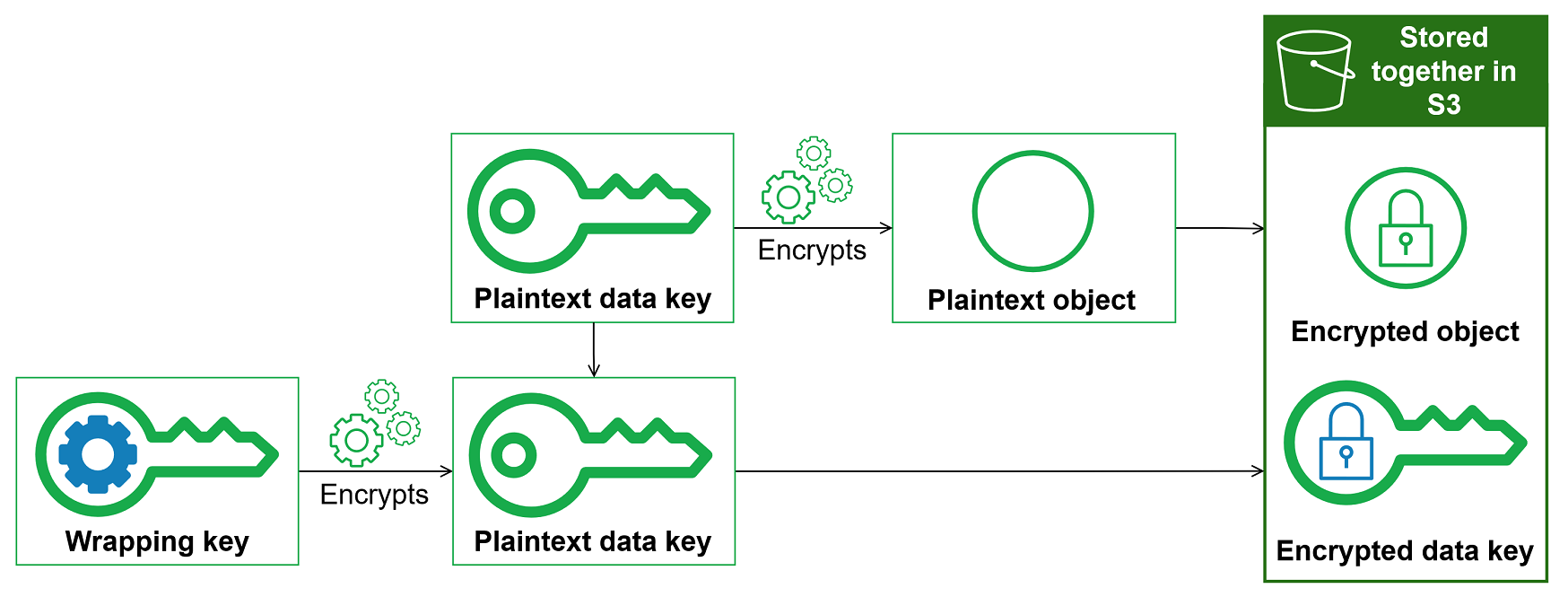
- Combining the strengths of multiple algorithms
-
To encrypt your object, by default, the Amazon S3 Encryption Client uses a sophisticated algorithm suite with AES-GCM symmetric encryption. To encrypt the data key, you can specify a symmetric or asymmetric encryption algorithm appropriate to your wrapping key.
In general, symmetric key encryption algorithms are faster and produce smaller ciphertexts than asymmetric or public key encryption. But public key algorithms provide inherent separation of roles and easier key management. To combine the strengths of each, you can encrypt your object with symmetric key encryption, and then encrypt the data key with public key encryption.
Data key
A data key is an encryption key that the Amazon S3 Encryption Client uses to encrypt your object. Each data key is a byte array that conforms to the requirements for cryptographic keys. The Amazon S3 Encryption Client uses a unique data key to encrypt each object.
You don't need to specify, generate, implement, extend, protect or use data keys. The Amazon S3 Encryption Client does that work for you.
To protect your data keys, the Amazon S3 Encryption Client encrypts them under a key-encryption key known as a wrapping
key. When you call PutObject, the
Amazon S3 Encryption Client uses your plaintext data key to encrypt your object, then removes it from memory
as soon as possible. The Amazon S3 Encryption Client encrypts the data key with the wrapping key you provide.
Then the Amazon S3 Encryption Client stores the encrypted data key with the encrypted object that the
PutObject request uploads to Amazon S3. For more information, see How the Amazon S3 Encryption Client works.
Wrapping key
A wrapping key is a key-encryption key that the Amazon S3 Encryption Client uses to encrypt the data key that encrypts your object. You specify the wrapping key that is used to protect your data keys when you instantiate your Amazon S3 Encryption Client. Version 3.x of the Amazon S3 Encryption Client uses the wrapping key you specify and one of the fully supported wrapping algorithms to encrypt and decrypt data keys.

The Amazon S3 Encryption Client supports several commonly used wrapping keys, such as symmetric AWS KMS keys, Raw AES-GCM (Advanced Encryption Standard/Galois Counter Mode) keys, and Raw RSA keys.
Note
Version 3.x of the Amazon S3 Encryption Client for Go and the Amazon S3 Encryption Client for Python do not support Raw AES-GCM or Raw RSA wrapping keys.
When you use envelope encryption, you need to protect your wrapping keys from unauthorized access. You can do this in any of the following ways:
-
Use a web service designed for this purpose, such as AWS Key Management Service (AWS KMS)
. -
Use a hardware security module (HSM)
such as those offered by AWS CloudHSM . -
Use other key management tools and services.
If you don't have a key management system, we recommend AWS KMS. The Amazon S3 Encryption Client integrates with AWS KMS to help you protect and use your wrapping keys.
Keyrings
To specify the wrapping keys you use for encryption and decryption, you use a keyring You can use the keyrings that the Amazon S3 Encryption Client provides or design your own implementations. The Amazon S3 Encryption Client provides keyrings that are compatible with each other subject to language constraints.
A keyring generates, encrypts, and decrypts data keys. When you define a keyring, you can specify the wrapping keys that encrypt your data keys. Most keyrings specify at least one wrapping key or a service that provides and protects wrapping keys. You can also define a keyring with no wrapping keys or a more complex keyring with additional configuration options.
For details about specifying wrapping keys, see the examples topic of your programming language.
Supported encryption algorithms
An algorithm suite is a collection of cryptographic algorithms and related values. Cryptographic systems use the algorithm implementation to generate the ciphertext message.
To encrypt each Amazon S3 object, the Amazon S3 Encryption Client uses a unique 256-bit symmetric data encryption key and an Advanced Encryption Standard (AES) with Galois/Counter Mode (GCM) algorithm suite. This algorithm suite uses AES-GCM for authenticated encryption with a 12-byte initialization vector, and a 16-byte AES-GCM authentication tag. It does not support a key derivation function.
For information on legacy encryption algorithms, see Supported encryption algorithms.
Cryptographic materials manager
The cryptographic materials manager (CMM) assembles the cryptographic materials that are used to encrypt and decrypt data. The cryptographic materials include plaintext and encrypted data keys, and an optional message signing key. You never interact with the CMM directly. The encryption and decryption methods handle it for you.
You can use the default CMM that the Amazon S3 Encryption Client provides or write a custom CMM. You can specify a CMM, but it's not required. When you specify a keyring, the Amazon S3 Encryption Client creates a default CMM for you. The default CMM gets the encryption or decryption materials from the keyring that you specify. This might involve a call to a cryptographic service, such as AWS Key Management Service(AWS KMS).
Because the CMM acts as a liaison between the Amazon S3 Encryption Client and a keyring, it is an ideal point for customization and extension, such as support for policy enforcement and caching.
Encryption context
If you use a symmetric AWS KMS key as your wrapping key, you can include an encryption context in all requests to encrypt data. Using an encryption context is optional, but it is a cryptographic best practice that we recommend.
An encryption context is a set of name-value pairs that contain arbitrary, non-secret additional authenticated data. The encryption context can contain any data you choose, but it typically consists of data that is useful in logging and tracking, such as data about the file type, purpose, or ownership. When you encrypt data, the encryption context is cryptographically bound to the encrypted data so that the same encryption context is required to decrypt the data. The Amazon S3 Encryption Client stores the encryption context in plaintext in the metadata of the encrypted object that it uploads to Amazon S3. The Amazon S3 Encryption Client also uses the encryption context to provide additional authenticated data (AAD) in your AWS KMS calls.
Note
We strongly recommend using only US-ASCII characters in your encryption contexts. Including non-US-ASCII characters can result in availability and compatibility errors.
The following example demonstrates how to specify an encryption context in your cryptographic operations.
-
Specify a KMS key as your wrapping key by instantiating your client with the
kmsKeyIdbuilder parameter.// v4 class v4KMSKeyExample { public static void main(String[] args) { S3Client v4Client = S3EncryptionClient.builderV4() .kmsKeyId(kmsKeyId) .build(); } } -
Use the
overrideConfigurationbuilder parameter to specify the encryption context within yourPutObjectrequest.// v4 class v4EncryptExample { public static void main(String[] args) { s3Client.putObject(PutObjectRequest.builder() .bucket(bucket) .key(objectKey) .overrideConfiguration(withAdditionalConfiguration(encryptionContext)) .build(), RequestBody.fromString(objectContent)); } } -
Include the same encryption context in your
GetObjectrequest.// v4 class v4DecryptExample { public static void main(String[] args) { ResponseBytes<GetObjectResponse> objectResponse = s3Client.getObjectAsBytes(builder -> builder .bucket(bucket) .key(objectKey) .overrideConfiguration(withAdditionalConfiguration(encryptionContext))); String output = objectResponse.asUtf8String(); } }
Instruction files
An instruction file is a separate Amazon S3 object that stores encryption metadata for an encrypted object. When you encrypt an object using the Amazon S3 Encryption Client, the client needs to store metadata about the encryption operation, including the encrypted data key, the encryption algorithm used, and other cryptographic information required to decrypt the object.
The Amazon S3 Encryption Client supports two methods for storing this encryption metadata:
- Object metadata storage (default)
-
Encryption metadata is stored in the object's metadata headers. This is the most common and convenient method as all encryption information is stored with the object itself. When you retrieve the encrypted object, the Amazon S3 Encryption Client reads the encryption metadata from the object's headers and uses it to decrypt the object.
- Instruction file storage
-
Encryption metadata is stored in a separate Amazon S3 object called an instruction file. The instruction file has the same key as the encrypted object with the suffix
.instructionappended. For example, if your encrypted object has the keymydata.txt, the instruction file will have the keymydata.txt.instruction.
When to use each storage method:
-
Use object metadata storage for most scenarios. It simplifies object management since encryption metadata travels with the object. This is the default storage method and is recommended unless you have specific requirements that necessitate instruction files.
-
Use instruction file storage when object metadata size is a concern or when you need to separate encryption metadata from the encrypted object. Note that using instruction files requires managing two Amazon S3 objects (the encrypted object and its instruction file) instead of one. When you delete an encrypted object that uses instruction file storage, you must also delete the instruction file separately.
Key commitment
The Amazon S3 Encryption Client supports key commitment (sometimes known as robustness), a security property that guarantees that each ciphertext can be decrypted only to a single plaintext. To do this, key commitment guarantees that only the data key that encrypted your object will be used to decrypt it.
Most modern symmetric ciphers (including AES) encrypt a plaintext under a single secret key, such as the unique data key that the Amazon S3 Encryption Client uses to encrypt each plaintext object. Decrypting this data with the same data key returns a plaintext that is identical to the original. Decrypting with a different key will usually fail. However, it's possible to decrypt a ciphertext under two different keys. In rare cases, it is feasible to find a key that can decrypt a few bytes of ciphertext into a different, but still intelligible, plaintext.
The Amazon S3 Encryption Client always encrypts each plaintext object under one unique data key. It might encrypt that data key under multiple wrapping keys but the wrapping keys always encrypt the same data key.
Typically, the Amazon S3 Encryption Client only supports one data key per object. However, this data key can be changed over time. Some Amazon S3 Encryption Client implementations support the use of multiple data keys for a single object when using instruction files with custom suffixes. For example, if one user decrypts the encrypted object with the default instruction file, it returns 0x0 (false) while another user decrypting with a custom instruction file for the same encrypted object gets 0x1 (true).
For objects encrypted using the default Object Metadata storage (not instruction files), it is not possible to change the encrypted data key associated with the object without changing the object. Object Metadata in S3 is immutable, so changing the metadata is equivalent to changing the object itself.
To prevent this scenario, the Amazon S3 Encryption Client supports key commitment when encrypting and decrypting. When the Amazon S3 Encryption Client encrypts an object with key commitment, it cryptographically binds the unique data key that produced the ciphertext to the key commitment string, a non-secret data key identifier. Then it stores the key commitment string in the metadata of the encrypted object. When it decrypts a message with key commitment, the Amazon S3 Encryption Client verifies that the data key is the one and only key for that encrypted message. If data key verification fails, the decrypt operation fails.
Support for key commitment is introduced in the latest minor versions of 3.x for Java, Go, .NET, 2.x for Ruby, PHP, and C++. These languages can decrypt objects with key commitment, but won't encrypt with key commitment. You can use this version to fully deploy the ability to decrypt ciphertext with key commitment.
The latest major version of all supported languages include full support for key commitment. By default, it encrypts and decrypts only with key commitment. This is an ideal configuration for applications that don't need to decrypt ciphertext encrypted by earlier versions of the Amazon S3 Encryption Client.
Although encrypting and decrypting with key commitment is a best practice, we let you decide when it's used, and let you adjust the pace at which you adopt it. The Amazon S3 Encryption Client supports a commitment policy that sets the default algorithm suite and limits the algorithm suites that may be used. This policy determines whether your data is encrypted and decrypted with key commitment.
Key commitment results in a slightly larger (+ 56 bytes) encrypted message and takes more time to process. If your application is very sensitive to size or performance, you might choose to opt out of key commitment. But do so only if you must.
For more information about migrating to the latest version, including their key commitment features, see the migration guide for your programming language.
Commitment policy
A commitment policy is a configuration setting that determines whether your application encrypts and decrypts with key commitment.
Commitment policy has three values:
| Value | Encrypts with key commitment | Encrypts without key commitment | Decrypts with key commitment | Decrypts without key commitment |
|---|---|---|---|---|
ForbidEncryptAllowDecrypt |
never | always | yes | yes |
RequireEncryptAllowDecrypt |
always | never | yes | yes |
RequireEncryptRequireDecrypt |
always | never | yes | never |
The commitment policy setting is introduced in minor versions of supported languages. It's valid in all supported programming languages.
ForbidEncryptAllowDecrypt-
This policy decrypts with or without key commitment, but it won't encrypt with key commitment. This value is designed to prepare all hosts running your application to decrypt with key commitment before they ever encounter a ciphertext encrypted with key commitment.
RequireEncryptAllowDecrypt-
This policy always encrypts with key commitment. It can decrypt with or without key commitment. This value lets you start encrypting with key commitment, but still decrypt ciphertexts without key commitment.
RequireEncryptRequireDecrypt-
This policy encrypts and decrypts only with key commitment. Use this value when you are certain that all of your ciphertexts are encrypted with key commitment.
The commitment policy setting determines which algorithm suites you can use. If you specify an algorithm suite that conflicts with your commitment policy, the Amazon S3 Encryption Client returns an error.
The Amazon S3 Encryption Client supports encryption using key commitment in major version 4.x for Java, Go, Python, and .NET, and major version 3.x for Ruby, PHP, and C++.
For help setting your commitment policy, see the migration guide for your programming language.
