Deploying perimeter services in individual Application accounts
| Influence the future of the AWS Security Reference Architecture (AWS SRA) by taking a short survey |
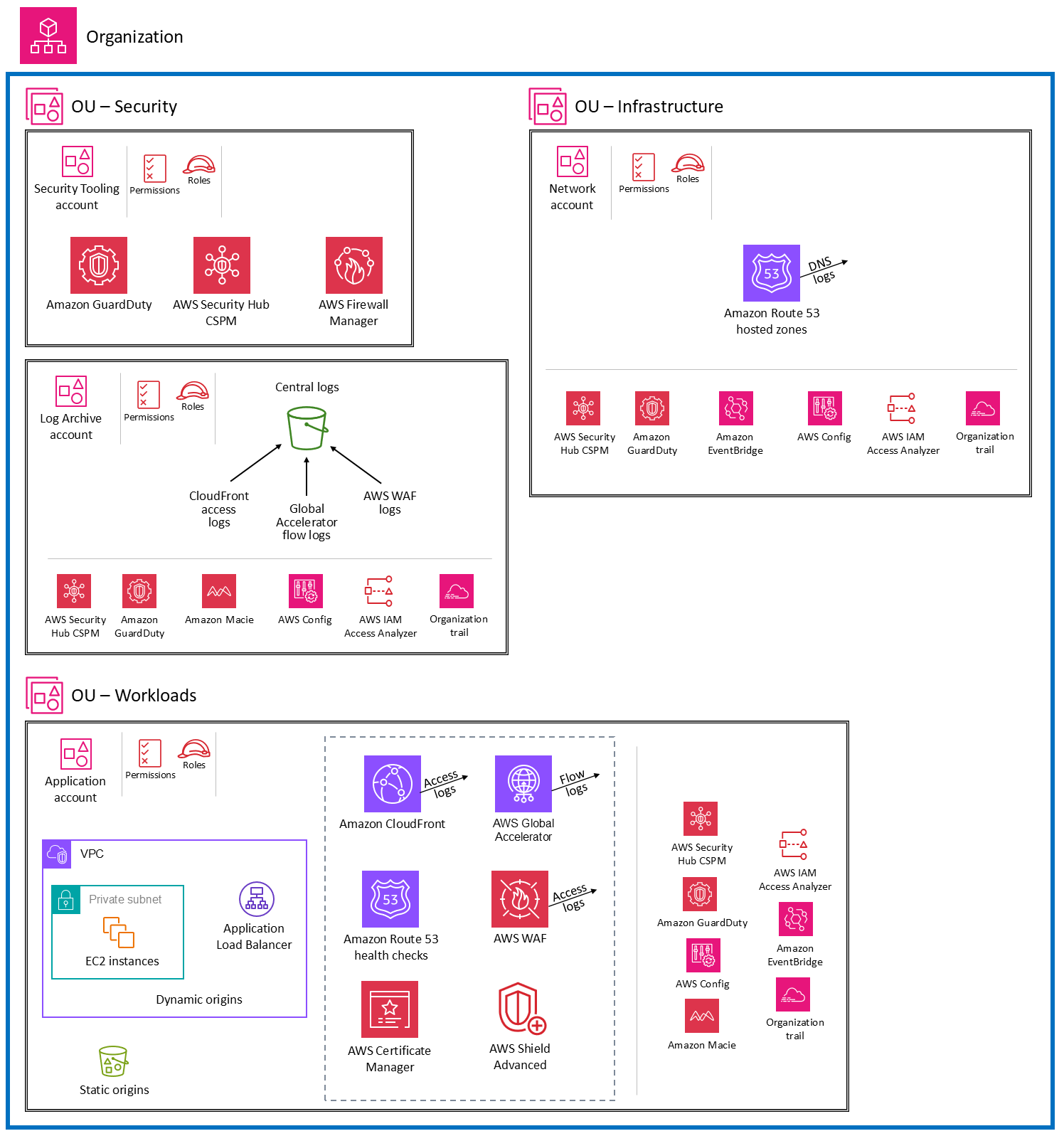
The following diagram illustrates the architecture pattern where the perimeter services are deployed and managed independently in individual Application accounts.
There are several benefits of deploying the perimeter services into Application accounts:
-
This design provides the autonomy for individual workload accounts to customize service configurations based on their needs. This approach removes the dependency on a specialized team to implement changes to resources in a shared account, and enables developers in each team to manage configurations independently.
-
Each account has its own service quotas, so application owners don't have to work within the quotas of a shared account.
-
This design helps contain the impact of malicious activity by limiting it to a particular account and preventing the attack from spreading to other workloads.
-
It removes the risks of change, because the scope of impact is limited to just the workload in question. You can also use AWS Identity and Access Management (IAM) to limit the teams that can implement changes, so there's a logical separation between workload teams and the central networking team.
-
By decentralizing the implementation of network ingress and egress, but having common logical controls (by using services such as AWS Firewall Manager) you can tune network controls to specific workloads while continuing to meet a minimum standard of control objectives.
The following sections dive into each service and discuss architectural considerations.
Amazon CloudFront
In this deployment architecture, Amazon CloudFront
The dynamic and static origins are located in the same Application account, and CloudFront distributions have account-level access to these origins. Logs from CloudFront distributions are stored locally in each Application account. Logs can be replicated to the Log Archive account to support compliance and regulatory needs.
AWS WAF
In this deployment architecture, AWS WAF
In addition to the rules enforced by Firewall Manager, each application owner can add AWS WAF rules that are relevant to their application security to the web ACL. This allows for flexibility in each Application account while still retaining overall control in the Security Tooling account.
Use the Firewall Manager logging option to centralize logs and send them to an S3 bucket in the Security Tooling account. Each application team is provided access to review the AWS WAF dashboards for their application. You can set up the dashboard by using a service such as Amazon Quick Sight. If any false positives are identified or other updates to the AWS WAF rules are needed, you can add application-level AWS WAF rules to the web ACL that's deployed by Firewall Manager. The logs are replicated to the Log Archive account and archived for security investigations.
AWS Global Accelerator
AWS Global Accelerator
Global Accelerator doesn't currently support cross-account origins. Therefore, it is deployed into the same account as the origin endpoint. Deploy the accelerators in each Application account and add them as protected resources for AWS Shield Advanced in the same account. Shield Advanced mitigations will allow only valid traffic to reach the Global Accelerator listener endpoints.
AWS Shield Advanced and Amazon Route 53 health checks
To configure AWS Shield Advanced to help protect your CloudFront distributions, you need to subscribe each Application account to Shield Advanced. You should configure features such as access to the Shield Response Team (SRT) and proactive engagement at the account level, because they should be configured in the same account as the resource. Use Firewall Manager with auto-remediation to add your CloudFront distributions as protected resources, and apply the policy to each account. Route 53 health checks for each CloudFront distribution should be deployed in the same account and associated with the resource.
Amazon Route 53 zones and ACM
When you use services such as CloudFront
CloudFront access logs, Global Accelerator flow logs, and AWS WAF logs
In this pattern, we configure CloudFront access logs and Global Accelerator flow logs in S3 buckets in individual Application accounts. Developers who want to analyze the logs for performance tuning or false positive reduction will have direct access to these logs without having to request access to a central log archive. Locally stored logs can also support regional compliance requirements such as data residency or PII obfuscation.
Full AWS WAF logs are stored in the S3 buckets in the Log Archive account by using Firewall Manager logging. Application teams can view logs by using dashboards that are set up by using a service such as Amazon Quick Sight. In addition, each application team has access to the sampled AWS WAF logs from their own account for quick debugging.
We recommend that you replicate logs to a centralized data lake that's located in the Log Archive account. Aggregating the logs in a centralized data lake gives you a comprehensive view of all the traffic to your AWS WAF resources and distributions. This helps security teams centrally analyze and respond to global security threat patterns.
Design considerations
-
This pattern shifts the responsibility of network and security administration to account owners and developers, which could add overhead to the development process.
-
There can be inconsistencies in decision-making. You should establish effective communications, templates, and training to make sure that the services are configured correctly and follow security recommendations.
-
There is a dependency on automation and clear expectations on the baseline security controls combined with the application-specific controls.
-
Use services such as Firewall Manager and AWS Config to make sure that the deployed architecture is compliant with security best practices. In addition, configure AWS CloudTrail monitoring to detect any misconfigurations.
-
Aggregating logs and metrics in a central place for analysis might introduce complexities.
