Migrate data from an on-premises Oracle database to Aurora PostgreSQL
Michelle Deng and Shunan Xiang, Amazon Web Services
Summary
This pattern provides guidance for data migration from an on-premises Oracle database to Amazon Aurora PostgreSQL-Compatible Edition. It targets an online data migration strategy with a minimal amount of downtime for multi-terabyte Oracle databases that contain large tables with high data manipulation language (DML) activities. An Oracle Active Data Guard standby database is used as the source to offload data migration from the primary database. The replication from the Oracle primary database to standby can be suspended during the full load to avoid ORA-01555 errors.
Table columns in primary keys (PKs) or foreign keys (FKs), with data type NUMBER, are commonly used to store integers in Oracle. We recommend that you convert these to INT or BIGINT in PostgreSQL for better performance. You can use the AWS Schema Conversion Tool (AWS SCT) to change the default data type mapping for PK and FK columns. (For more information, see the AWS blog post Convert the NUMBER data type from Oracle to PostgreSQL
You can also use this pattern to migrate an on-premises Oracle database to Amazon Relational Database Service (Amazon RDS) for PostgreSQL, or an Oracle database that's hosted on Amazon Elastic Compute Cloud (Amazon EC2) to either Amazon RDS for PostgreSQL or Aurora PostgreSQL-Compatible.
Prerequisites and limitations
Prerequisites
An active AWS account
An Oracle source database in an on-premises data center with Active Data Guard standby configured
AWS Direct Connect configured between the on-premises data center and the AWS Cloud
Familiarity with using an Oracle database as a source for AWS DMS
Familiarity with using a PostgreSQL database as a target for AWS DMS
Limitations
Amazon Aurora database clusters can be created with up to 128 TiB of storage. Amazon RDS for PostgreSQL database instances can be created with up to 64 TiB of storage. For the latest storage information, see Amazon Aurora storage and reliability and Amazon RDS DB instance storage in the AWS documentation.
Product versions
AWS DMS supports all Oracle database editions for versions 10.2 and later (for versions 10.x), 11g and up to 12.2, 18c, and 19c. For the latest list of supported versions, see Using an Oracle Database as a Source for AWS DMS in the AWS documentation.
Architecture
Source technology stack
On-premises Oracle databases with Oracle Active Data Guard standby configured
Target technology stack
Aurora PostgreSQL-Compatible
Data migration architecture
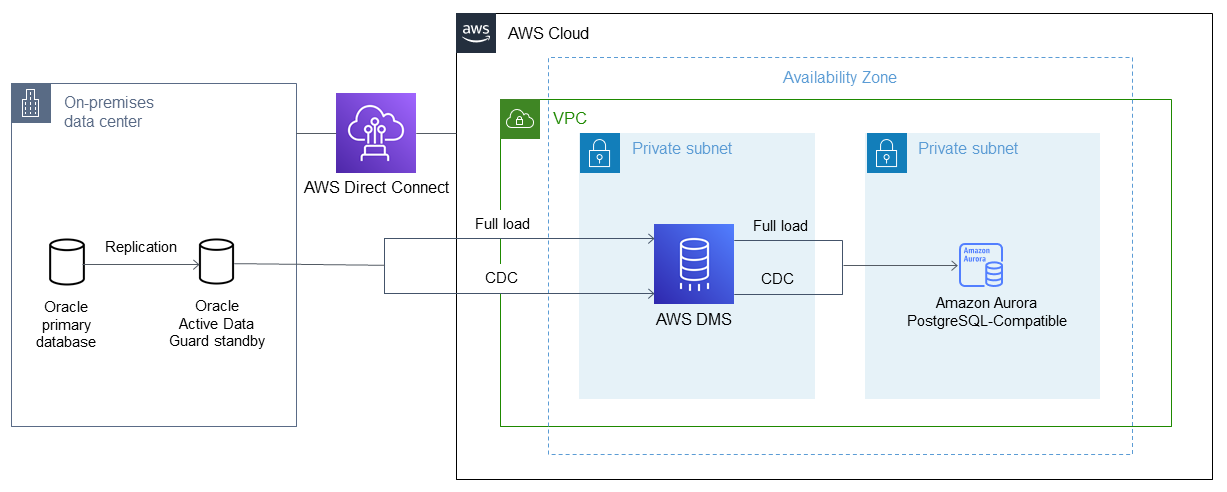
Tools
AWS DMS - AWS Database Migration Service (AWS DMS) supports several source and target databases. See Using an Oracle Database as a Source for AWS DMS in the AWS DMS documentation for a list of supported Oracle source and target database versions and editions. If the source database is not supported by AWS DMS, you must select another method for migrating the data in Phase 6 (in the Epics section). Important note: Because this is a heterogeneous migration, you must first check to see whether the database supports a commercial off-the-shelf (COTS) application. If the application is COTS, consult the vendor to confirm that Aurora PostgreSQL-Compatible is supported before proceeding. For more information, see AWS DMS Step-by-Step Migration Walkthroughs in the AWS documentation.
AWS SCT - The AWS Schema Conversion Tool (AWS SCT) facilitates heterogeneous database migrations by automatically converting the source database schema and a majority of the custom code to a format that's compatible with the target database. The custom code that the tool converts includes views, stored procedures, and functions. Any code that the tool cannot convert automatically is clearly marked so that you can convert it yourself.
Epics
| Task | Description | Skills required |
|---|---|---|
Validate the source and target database versions. | DBA | |
Install AWS SCT and drivers. | DBA | |
Add and validate the AWS SCT prerequisite users and grants-source database. | DBA | |
Create an AWS SCT project for the workload, and connect to the source database. | DBA | |
Generate an assessment report and evaluate feasibility. | DBA, App owner |
| Task | Description | Skills required |
|---|---|---|
Create an Aurora PostgreSQL-Compatible target database. | DBA | |
Extract users, roles, and grants list from the source database. | DBA | |
Map the existing database users to the new database users. | App owner | |
Create users in the target database. | DBA | |
Apply roles from the previous step to the target Aurora PostgreSQL-Compatible database. | DBA | |
Review database options, parameters, network files, and database links from the source database, and evaluate their applicability to the target database. | DBA, App owner | |
Apply any relevant settings to the target database. | DBA |
| Task | Description | Skills required |
|---|---|---|
Configure AWS SCT connectivity to the target database. | DBA | |
Convert the schema in AWS SCT, and save the converted code as a .sql file. | DBA, App owner | |
Manually convert any database objects that failed to convert automatically. | DBA, App owner | |
Optimize the database code conversion. | DBA, App owner | |
Separate the .sql file into multiple .sql files based on the object type. | DBA, App owner | |
Validate the SQL scripts in the target database. | DBA, App owner |
| Task | Description | Skills required |
|---|---|---|
Create an AWS DMS replication instance. | DBA | |
Create the source and target endpoints. | If the data type of the PKs and FKs is converted from NUMBER in Oracle to BIGINT in PostgreSQL, consider specifying the connection attribute | DBA |
| Task | Description | Skills required |
|---|---|---|
Create the schema and tables in the target database. | DBA | |
Create AWS DMS full-load tasks by either grouping tables or splitting a big table based on the table size. | DBA | |
Stop the applications on the source Oracle databases for a short period. | App owner | |
Verify that the Oracle standby database is synchronous with the primary database, and stop the replication from the primary database to the standby database. | DBA, App owner | |
Start applications on the source Oracle database. | App owner | |
Start the AWS DMS full-load tasks in parallel from the Oracle standby database to the Aurora PostgreSQL-Compatible database. | DBA | |
Create PKs and secondary indexes after the full load is complete. | DBA | |
Validate the data. | DBA |
| Task | Description | Skills required |
|---|---|---|
Create AWS DMS ongoing replication tasks by specifying a custom CDC start time or system change number (SCN) when the Oracle standby was synchronized with the primary database, and before the applications were restarted in the previous task. | DBA | |
Start AWS DMS tasks in parallel to replicate ongoing changes from the Oracle standby database to the Aurora PostgreSQL-Compatible database. | DBA | |
Re-establish the replication from the Oracle primary database to the standby database. | DBA | |
Monitor the logs and stop the applications on the Oracle database when the target Aurora PostgreSQL-Compatible database is almost synchronous with the source Oracle database. | DBA, App owner | |
Stop the AWS DMS tasks when the target is fully synchronized with the source Oracle database. | DBA | |
Create FKs and validate the data in the target database. | DBA | |
Create functions, views, triggers, sequences, and other object types in the target database. | DBA | |
Apply role grants in the target database. | DBA |
| Task | Description | Skills required |
|---|---|---|
Use AWS SCT to analyze and convert the SQL statements inside the application code. | App owner | |
Create new application servers on AWS. | App owner | |
Migrate the application code to the new servers. | App owner | |
Configure the application server for the target database and drivers. | App owner | |
Fix any code that's specific to the source database engine in the application. | App owner | |
Optimize the application code for the target database. | App owner |
| Task | Description | Skills required |
|---|---|---|
Point the new application server to the target database. | DBA, App owner | |
Perform sanity checks. | DBA, App owner | |
Go live. | DBA, App owner |
| Task | Description | Skills required |
|---|---|---|
Shut down temporary AWS resources. | DBA, Systems administrator | |
Review and validate the project documents. | DBA, App owner | |
Gather metrics for time to migrate, percentage of manual versus tool use, cost savings, and similar data. | DBA, App owner | |
Close out the project and provide feedback. | DBA, App owner |
Related resources
References
Tutorials
