End of support notice: On June 30, 2027, AWS will end support for AMS Advanced. After June 30, 2027, you will no longer be able to access the AMS Advanced console or AMS Advanced resources. For more information, see AMS Advanced end of support.
AMS Tools account (migrating workloads)
Your Multi-Account Landing Zone tools account (with VPC) helps accelerate migration efforts, increases your security position, reduces cost and complexity, and standardizes your usage pattern.
A tools account provides the following:
A well-defined boundary for access to replication instances for system integrators outside of your production workloads.
Enables you to create an isolated chamber to check a workload for malware, or unknown network routes, before placing it into an account with other workloads.
As a defined account setup, it provides faster time to onboard and get set up for migrating workloads.
Isolated network routes to secure traffic from on-premise -> CloudEndure -> Tools account -> AMS ingested image. Once an image has been ingested, you can share the image to the destination account via an AMS Management | Advanced stack components | AMI | Share (ct-1eiczxw8ihc18) RFC.
High level architecture diagram:
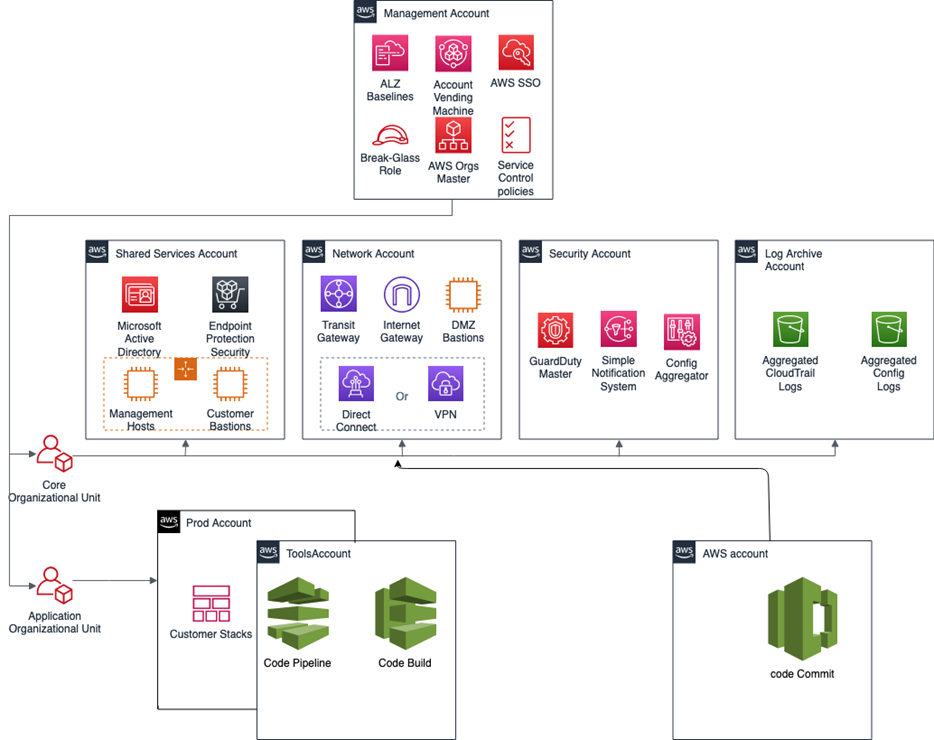
Use the Deployment | Managed landing zone | Management account | Create tools account (with VPC) change type (ct-2j7q1hgf26x5c), to quickly deploy a tools account and instantiate a Workload Ingestion process within a Multi-Account Landing Zone environment. See Management account, Tools account: Creating (with VPC).
Note
We recommend having two availability zones (AZs), since this is a migration hub.
By default, AMS creates the following two security groups (SGs) in every account. Confirm that these two SGs are present. If they are not present, please open a new service request with the AMS team to request them.
SentinelDefaultSecurityGroupPrivateOnlyEgressAll
InitialGarden-SentinelDefaultSecurityGroupPrivateOnly
Ensure that CloudEndure replication instances are created in the private subnet where there are routes back to on-premise. You can confirm that by ensuring that the route tables for the private subnet has a default route back to TGW. However, performing a CloudEndure machine cut over should go into the "isolated" private subnet where there is no route back to on-premise, only Internet outbound traffic is allowed. It is critical to ensure cutover occurs in the isolated subnet to avoid potential issues to the on-premise resources.
Prerequisites:
Either Plus or Premium support level.
The application account IDs for the KMS key where the AMIs are deployed.
The tools account, created as described previously.
