Upgrade your application to a new Apache Flink version
You can upgrade your Flink application by using the UpdateApplication action.
You can call the UpdateApplication API in multiple ways:
-
Use the existing Configuration workflow on the AWS Management Console.
-
Go to your app page on the AWS Management Console.
-
Choose Configure.
-
Select the new runtime and the snapshot that you want to start from, also known as restore configuration. Use the latest setting as the restore configuration to start the app from the latest snapshot. Point to the new upgraded application JAR/zip on Amazon S3.
-
-
Use the AWS CLI update-application
action. -
Use CloudFormation (CFN).
-
Update the RuntimeEnvironment field. Previously, CloudFormation deleted the application and created a new one, causing your snapshots and other app history to be lost. Now CloudFormation updates your RuntimeEnvironment in place and does not delete your application.
-
-
Use the AWS SDK.
-
Consult the SDK documentation for the programming language of your choice. See UpdateApplication.
-
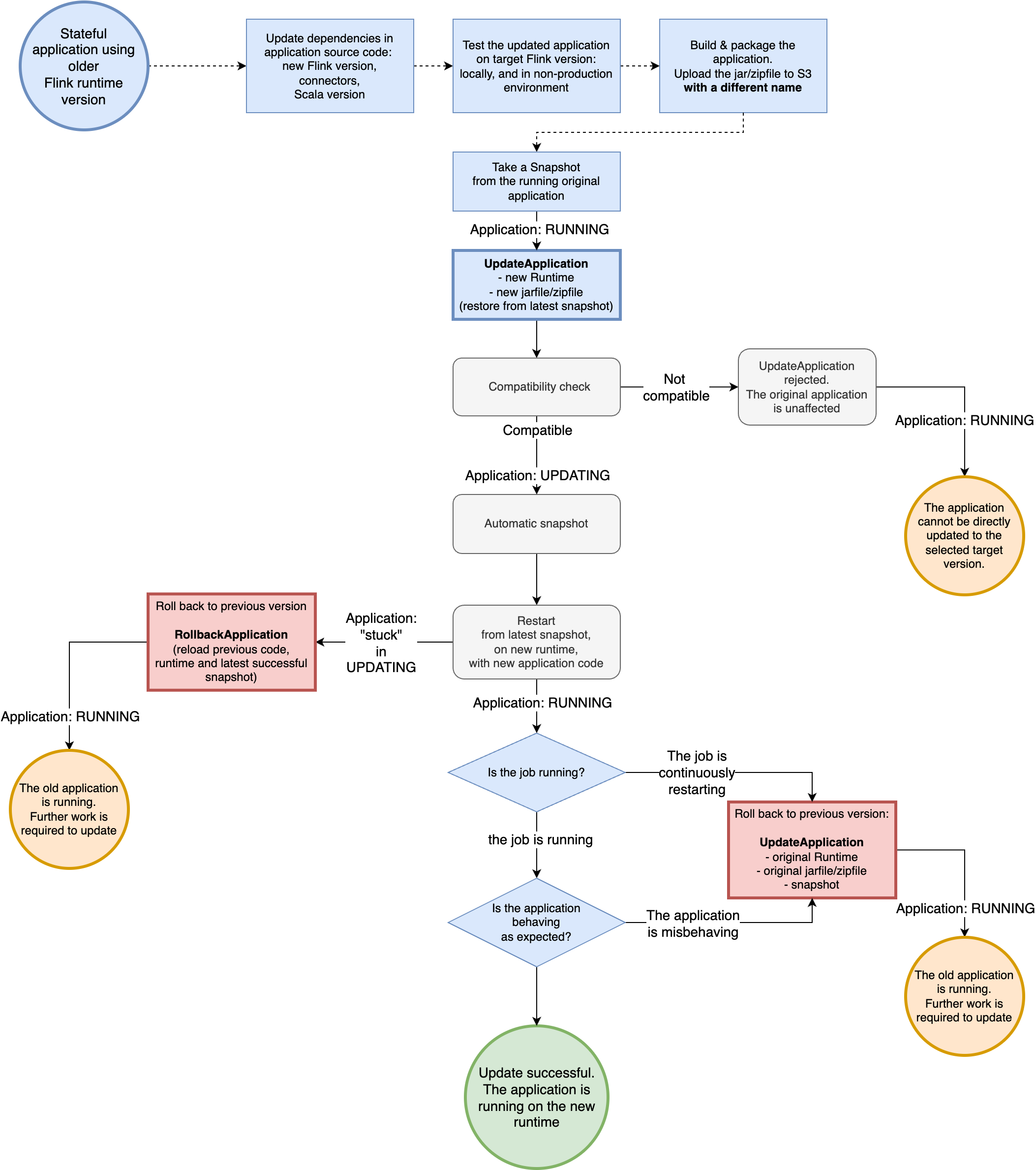
You can perform the upgrade while the application is in RUNNING state or
while the application is stopped in READY state. Amazon Managed Service for Apache Flink validates to
verify the compatibility between the original runtime version and the target runtime
version. This compatibility check runs when you perform UpdateApplication while in RUNNING state or at the next StartApplication if you upgrade while in READY state.
The following example shows upgrading an app in RUNNING state
named UpgradeTest to Flink 1.18 in US East (N. Virginia) using
the AWS CLI and starting the upgraded app from the latest snapshot.
aws --region us-east-1 kinesisanalyticsv2 update-application \
--application-name UpgradeTest --runtime-environment-update "FLINK-1_18" \
--application-configuration-update '{"ApplicationCodeConfigurationUpdate": '\
'{"CodeContentUpdate": {"S3ContentLocationUpdate": '\
'{"FileKeyUpdate": "flink_1_18_app.jar"}}}}' \
 --run-configuration-update '{"ApplicationRestoreConfiguration": '\
 '{"ApplicationRestoreType": "RESTORE_FROM_LATEST_SNAPSHOT"}}' \
 --current-application-version-id ${current_application_version}
-
If you enabled service snapshots and want to continue the application from the latest snapshot, Amazon Managed Service for Apache Flink verifies that the current
RUNNINGapplication's runtime is compatible with the selected target runtime. -
If you have specified a snapshot from which to continue the target runtime, Amazon Managed Service for Apache Flink verifies that the target runtime is compatible with the specified snapshot. If the compatibility check fails, your update request is rejected and your application remains untouched in the
RUNNINGstate. -
If you choose to start your application without a snapshot, Amazon Managed Service for Apache Flink doesn't run any compatibility checks.
-
If your upgraded application fails or gets stuck in a transitive
UPDATINGstate, follow the instructions in the Roll back application upgrades section to return to the healthy state.
Process flow for running state applications
The following example shows upgrading an app in READY state named
UpgradeTest to Flink 1.18 in US East (N. Virginia) using
the AWS CLI. There is no specified snapshot to start the app because the
application is not running. You can specify a snapshot when you issue the start
application request.
aws --region us-east-1 kinesisanalyticsv2 update-application \
--application-name UpgradeTest --runtime-environment-update "FLINK-1_18" \
--application-configuration-update '{"ApplicationCodeConfigurationUpdate": '\
'{"CodeContentUpdate": {"S3ContentLocationUpdate": '\
'{"FileKeyUpdate": "flink_1_18_app.jar"}}}}' \
 --current-application-version-id ${current_application_version}
-
You can update the runtime of your applications in
READYstate to any Flink version. Amazon Managed Service for Apache Flink does not run any checks until you start your application. -
Amazon Managed Service for Apache Flink only runs compatibility checks against the snapshot you selected to start the app. These are basic compatibility checks following the Flink Compatibility Table
. They only check the Flink version with which the snapshot was taken and the Flink version you are targeting. If the Flink runtime of the selected snapshot is incompatible with the app's new runtime, the start request might be rejected.
Process flow for ready state applications

