AWS Mainframe Modernization self-managed experience is no longer open to new customers. For capabilities similar to AWS Mainframe Modernization self-managed experience, explore capabilities from vendor-direct offerings and from AWS Transform. Existing customers can continue to use the service as normal. For more information, see AWS Mainframe Modernization availability change.
AWS Mainframe Modernization Service (Managed Runtime Environment experience) is no longer open to new customers. For capabilities similar to AWS Mainframe Modernization Service (Managed Runtime Environment experience) explore AWS Mainframe Modernization Service (Self-Managed Experience). Existing customers can continue to use the service as normal. For more information, see AWS Mainframe Modernization availability change.
Endpoints for Gapwalk application in AWS Transform for mainframe
In this topic, learn about the endpoints for the Gapwalk web application. These use the root
path /gapwalk-application.
Topics
Batch jobs (modernized JCLs and alike) related endpoints
Batch jobs can be run either synchronously or asynchronously (see details below). Batch jobs are being executed using groovy scripts that are the results of the modernization of legacy scripts (JCL).
Topics
List deployed scripts
-
Supported method: GET
Requires authentication and one of the following roles: ROLE_ADMIN, ROLE_SUPER_ADMIN, ROLE_USER
-
Path:
/scripts -
Arguments: none
-
This endpoint returns the list of deployed groovy scripts on the server, as a String. This endpoint is primarily intended to be used from a web browser, since the resulting String is a HTML page, with active links (a link per launchable script -- see sample below).
Sample response:
<p><a href=./script/COMBTRAN>COMBTRAN</a></p><p><a href=./script/CREASTMT>CREASTMT</a></p><p><a href=./script/INTCALC>INTCALC</a></p><p><a href=./script/POSTTRAN>POSTTRAN</a></p><p><a href=./script/REPROC>REPROC</a></p><p><a href=./script/TRANBKP>TRANBKP</a></p><p><a href=./script/TRANREPT>TRANREPT</a></p><p><a href=./script/functions>functions</a></p>
Note
The links represent the url to use to launch each listed script synchronously.
-
Supported method: GET / POST
Requires authentication and one of the following roles: ROLE_ADMIN, ROLE_SUPER_ADMIN, ROLE_USER
-
Path:
/triggerscripts -
Arguments: none
-
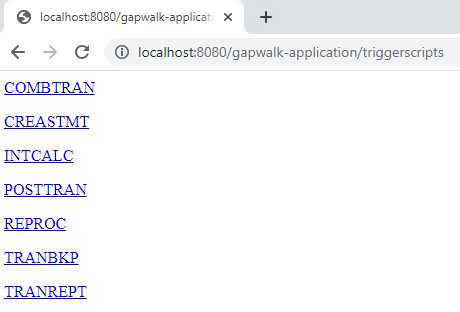
This endpoint returns the list of deployed groovy scripts on the server, as a String. This endpoint is primarily intended to be used from a web browser, since the resulting String is a HTML page, with active links (a link per launch-able script -- see sample below).
As opposed to the previous endpoint response, the links represent the url to use to launch each listed script asynchronously.
Launch a script synchronously
This endpoint has two variants with dedicated paths for GET and POST usage (see below).
-
Supported method: GET
Requires authentication and one of the following roles: ROLE_ADMIN, ROLE_SUPER_ADMIN, ROLE_USER
-
Path:
/script/{scriptId:.+} -
Supported method: POST
Requires authentication and one of the following roles: ROLE_ADMIN, ROLE_SUPER_ADMIN, ROLE_USER
-
Path:
/post/script/{scriptId:.+} -
Arguments:
-
identifier of the script to launch Input validation: Script ID must not be blank, cannot exceed 255 characters, and must match the pattern:
^[a-zA-Z0-9._-]+$ -
optionally: parameters to pass to the script, using request parameters (seen as a
Map<String,String>). The given parameters will be automatically added to the bindingsof the invoked groovy script. Input validation: Parameter map cannot exceed 50 entries.
-
-
The call executes the script (identified by scriptId) with optional parameters and waits for completion before returning a
ResponseEntityStringwith either:-
HTTP 200: "Done." or JSON success message on successful execution
-
HTTP 200: A JSON error message with execution failure details. Additional information available in server logs.
Note
Runtime now supports returning HTTP 500 status code for failed job executions. See Available properties for the main application to configure this response code.
-
Input Validation: Invalid script ID or parameters will return HTTP 400 Bad Request with validation error details.
{
    "exitCode": -1,
    "stepName": "STEP15",
    "program": "CBACT04C",
    "status": "Error"
}
Looking at the server logs, we can figure out that this a deployment issue (the expected program has not been properly deployed, so it cannot be found, making job execution fail):

-
Note
The synchronous calls should be reserved for short time running jobs. Long times running jobs should rather be launched asynchronously (see dedicated endpoint below).
Launch a script asynchronously
-
Supported methods: GET / POST
Requires authentication and one of the following roles: ROLE_ADMIN, ROLE_SUPER_ADMIN, ROLE_USER
-
Path:
/triggerscript/{scriptId:.+} -
Arguments:
-
identifier of the script to launch Input validation: Script ID must not be blank, cannot exceed 255 characters, and must match the pattern:
^[a-zA-Z0-9._-]+$ -
optionally: parameters to pass to the script, using request parameters (seen as a
Map<String,String>). The given parameters will be automatically added to the bindingsof the invoked groovy script. Input validation: Parameter map cannot exceed 50 entries.
-
-
As opposed to the synchronous mode above, the endpoint is not waiting for the job execution to finish to send a response. The job execution is launched at once, if an available thread can be found to do so, and a response is sent immediately to caller, with the job execution id, a unique identifier representing the job execution, that can be used to query job execution status or force kill a job execution that is supposed to be malfunctioning. The format of the response is:
Triggered script <script identifier> [unique job execution id] @ <date and time> -
Since the job asynchronous execution relies on a fixed limited number of threads, the job execution might not be launched if no available thread could be found. In that case, the returned message will rather look like:
Script [<script identifier>] NOT triggered - Thread limit reached (<actual thread limit>) - Please retry later or increase thread limit.See the
settriggerthreadlimitendpoint below to learn how to increase the thread limit.
Sample response:
Triggered script INTCALC [d43cbf46-4255-4ce2-aac2-79137573a8b4] @ 06-12-2023 16:26:15
The unique job execution identifier permits to quickly retrieve related log entries in the server logs if required. It is also used by several other endpoints detailed below.
Listing triggered scripts
-
Supported methods: GET / POST
Requires authentication and one of the following roles: ROLE_ADMIN, ROLE_SUPER_ADMIN, ROLE_USER
-
Paths:
/triggeredscripts/{status:.+},/triggeredscripts/{status:.+}/{namefilter} -
Arguments:
-
Status (mandatory): the status of the triggered scripts to retrieve. Input validation: Status must not be blank and cannot exceed 50 characters. Possibles values are:
-
all: show all job execution details, whether the jobs are still running or not. -
running: only show jobs details for jobs that are currently running. -
done: only show jobs details for jobs whose execution is over. -
killed: only show jobs details for jobs whose execution has been forcefully killed using the dedicated endpoint (see below). -
triggered: only show jobs details for jobs which have been triggered but not yet launched. -
failed: only show jobs details for jobs whose execution has been marked as failed. -
_namefilter (optional)_ : retrieve only executions for the given script identifier. Input validation: Cannot exceed 255 characters
-
-
-
Returns a collection of job executions details as JSON. For more information, see Job execution details message structure.
Sample response:
[
    {
      "scriptId": "INTCALC",
      "caller": "127.0.0.1",
      "identifier": "d43cbf46-4255-4ce2-aac2-79137573a8b4",
      "startTime": "06-12-2023 16:26:15",
      "endTime": "06-12-2023 16:26:15",
      "status": "DONE",
      "executionResult": "{ \"exitCode\": -1, \"stepName\": \"STEP15\", \"program\": \"CBACT04C\", \"status\": \"Error\" }",
      "executionMode": "ASYNCHRONOUS"
    }
  ]
Retrieving job execution details
-
Supported method: GET
Requires authentication and one of the following roles: ROLE_ADMIN, ROLE_SUPER_ADMIN, ROLE_USER
-
Path:
/getjobexecutioninfo/{jobexecutionid:.+} -
Arguments:
-
jobexecutionid (mandatory): the unique job execution identifier to retrieve the corresponding job execution details. Input validation: Job execution ID must not be blank and cannot exceed 255 characters
-
-
Returns a JSON string representing a single job execution details (see Job execution details message structure) or an empty response if no job execution details could be found for the given identifier.
Listing asynchronously launched scripts that can be killed
-
Supported method: GET
Requires authentication and one of the following roles: ROLE_ADMIN, ROLE_SUPER_ADMIN, ROLE_USER
-
Path:
/killablescripts -
Returns a collection of job execution identifiers of jobs which have been launched asynchronously that are still currently running and can be forcefully killed (see the
/killendpoint below).
Listing synchronously launched scripts that can be killed
-
Supported method: GET
Requires authentication and one of the following roles: ROLE_ADMIN, ROLE_SUPER_ADMIN, ROLE_USER
-
Path:
/killablesyncscripts -
Returns a collection of job execution identifiers of jobs which have been launched synchronously, are still currently running and can be forcefully killed (see the
/killendpoint below).
Killing a given job execution
-
Supported method: POST
Requires authentication and one of the following roles: ROLE_ADMIN, ROLE_SUPER_ADMIN
-
Path:
/kill/{identifier:.+} -
Argument: job execution identifier (mandatory): the unique job execution identifier to point at the job execution to be forcefully killed. Input validation: Identifier must not be blank and cannot exceed 255 characters
-
Returns a textual message detailing the job execution kill attempt outcome; the message will contain the script identifier, the job execution unique identifier and the date and time at which the execution kill occurred. If no running job execution could be found for the given identifier, an error message will be returned instead.
Warning
-
The runtime makes its best effort to kill the target job execution nicely. Thus, the response from the /kill endpoint might take a bit of time to reach the caller, as the AWS Transform for mainframe runtime will try to minimize the business impact of killing the job.
-
Forcefully killing a job execution should not be done lightly, as it may have direct business consequences, including possible data loss or corruption. It should be reserved for cases where a given job execution has gone sideways and data remediation means are clearly identified.
-
Killing a job should lead to further investigations (post-mortem analysis) to figure out what went wrong and take proper remediations actions.
-
In any case, attempt to kill a running job will be logged in the server logs with warning level messages.
Listing existing checkpoints for restartability
Job restartability relies on the ability for the scripts to register checkpoints in the
CheckpointRegistry to track down the job execution progress. If a job execution
fails to end properly, and restart checkpoints have been registered, one can simply restart the
job execution from the last known registered checkpoint (without having to execute the
predecessor steps above the checkpoint).
-
Supported method: POST
Requires authentication and one of the following roles: ROLE_ADMIN, ROLE_SUPER_ADMIN
-
Path:
/restarts/{scriptId}/{jobId} -
Arguments:
-
scriptId (optional - string): the script being restarted.
-
jobId (optional - string): the unique identifier of a job execution.
-
-
Returns a JSON formatted list of existing restart points, that can be used to restart a job whose execution did not come to and end properly or trigger a delayed restart by bypassing previously executed steps. If no checkpoints were registered by any scripts, the page contents will be "No registered checkpoints".
Restarting a job (synchronously)
-
Supported method: POST
Requires authentication and one of the following roles: ROLE_ADMIN, ROLE_SUPER_ADMIN
-
Path:
/restart/{hashcode}/{scriptId}/{skipflag} -
Arguments:
-
hashcode (integer - mandatory): restart the most recent execution of a job, using the provided hashcode as checkpoint value (see the
/restartsendpoint above to learn how to retrieve a valid checkpoint value). -
scriptId (optional - string): the script being restarted.
-
skipflag (optional - boolean): skip execution of selected (checkpoint) step and issue a restart from immediate successor step (if any).
-
-
Returns: see
/scriptreturn description above.
Restarting a job (asynchronously)
-
Supported method: GET
Requires authentication and one of the following roles: ROLE_ADMIN, ROLE_SUPER_ADMIN, ROLE_USER
-
Path:
/triggerrestart/{hashcode}/{scriptId}/{skipflag} -
Arguments:
-
hashcode (integer - mandatory): restart the most recent execution of a job, using the provided hashcode as checkpoint value (see the
/restartsendpoint above to learn how to retrieve a valid checkpoint value). -
scriptId (optional - string): the script being restarted.
-
skipflag (optional - boolean): skip execution of selected (checkpoint) step and issue a restart from immediate successor step (if any).
-
-
Returns: see
/triggerscriptreturn description above.
Setting thread limit for asynchronous job executions
The job asynchronous execution relies on a dedicated pool of threads in the JVM. That pool has a fixed limit regarding the number of available threads. The used has the ability to adjust the limit according to the host capabilities (number of CPUs, available memory, etc...). By default, the thread limit is set to 5 threads.
-
Supported method: POST
Requires authentication and one of the following roles: ROLE_ADMIN, ROLE_SUPER_ADMIN
-
Path:
/settriggerthreadlimit/{threadlimit:.+} -
Argument (integer): the new thread limit to apply. Input validation: Must be between 1 and 1000 inclusive.
-
Returns a message (
String) giving the new thread limit and the previous one, or en error message if the provided thread limit value is not valid (not a strictly positive integer).
Sample response:
Set thread limit for Script Tower Control to 10 (previous value was 5)
Counting currently running triggered job executions
-
Supported method: GET
Requires authentication and one of the following roles: ROLE_ADMIN, ROLE_SUPER_ADMIN, ROLE_USER
-
Path:
/countrunningtriggeredscripts -
Returns a message indicating the number of running jobs launched asynchronously and the thread limit (that is the maximum number of triggered jobs that can run simultaneously).
Sample response:
0 triggered script(s) running (limit =10)
Note
This can be used to check, prior to launching a job, if the thread limit has not been reached (which would prevent the job from being launched).
Purge job executions information
The job executions information remain in the server memory as long as the server is up. It might be convenient to purge oldest informations from the memory, as they are not relevant anymore; this is the purpose of this endpoint.
-
Supported method: POST
Requires authentication and one of the following roles: ROLE_ADMIN, ROLE_SUPER_ADMIN
-
Path:
/purgejobinformation/{age:.+} -
Arguments: a strictly positive integer value representing the age in hours of informations to be purged. Input validation: Must be between 0 and 365 inclusive.
-
Returns a message with the following informations:
-
Name of the purge file where purged job execution informations are being stored for archiving purpose.
-
Number of purged job execution informations.
-
Number of remaining job execution informations in memo
-
Metrics endpoints
Input validation: All metrics endpoints validate request parameters and return HTTP 400 Bad Request for invalid values.
JVM
This endpoint returns available metrics related to the JVM.
-
Supported method: GET
Requires authentication and one of the following roles: ROLE_ADMIN, ROLE_SUPER_ADMIN, ROLE_USER
-
Path:
/metrics/jvm -
Arguments: none
-
Returns a message with the following information:
-
threadActiveCount: Number of active threads.
-
jvmMemoryUsed: Memory actively used by the Java Virtual Machine.
-
jvmMemoryMax: Maximum memory allowed for the Java Virtual Machine.
-
jvmMemoryFree: Available memory not currently in use by the Java Virtual Machine.
-
Session
This endpoint returns metrics related to currently opened HTTP sessions.
-
Supported method: GET
Requires authentication and one of the following roles: ROLE_ADMIN, ROLE_SUPER_ADMIN, ROLE_USER
-
Path:
/metrics/session -
Arguments: none
-
Returns a message with the following information:
-
sessionCount: Number of active user sessions currently maintained by the server.
-
Batch
-
Supported method: GET
Requires authentication and one of the following roles: ROLE_ADMIN, ROLE_SUPER_ADMIN, ROLE_USER
-
Path:
/metrics/batch -
Arguments:
-
startTimestamp (optional, number): Starting timestamp for data filtering. Input validation: Must be a valid numeric value.
-
endTimestamp (optional, number): Ending timestamp for data filtering. Input validation: Must be a valid numeric value.
-
page (optional, number): Page number for pagination. Input validation: Must be a positive integer.
-
pageSize (optional, number): Number of items per page in pagination. Input validation: Must be a strictly positive integer, maximum 500.
-
Input validation: Parameter map cannot exceed 20 entries
-
-
Returns a message with the following information:
-
content: List of batch execution metrics.
-
pageNumber: Current page number in pagination.
-
pageSize: Number of items displayed per page.
-
totalPages: Total number of pages available.
-
numberOfElements: Count of items on the current page.
-
last: Boolean flag for the last page.
-
first: Boolean flag for the first page.
-
Transaction
-
Supported method: GET
Requires authentication and one of the following roles: ROLE_ADMIN, ROLE_SUPER_ADMIN, ROLE_USER
-
Path:
/metrics/transaction -
Arguments:
-
startTimestamp (optional, number): Starting timestamp for data filtering. Input validation: Must be a valid numeric value.
-
endTimestamp (optional, number): Ending timestamp for data filtering. Input validation: Must be a valid numeric value.
-
page (optional, number): Page number for pagination. Input validation: Must be a positive integer.
-
pageSize (optional, number): Number of items per page in pagination. Input validation: Must be a strictly positive integer, maximum 500.
-
Input validation: Parameter map cannot exceed 20 entries
-
-
Returns a message with the following information:
-
content: List of transaction execution metrics.
-
pageNumber: Current page number in pagination.
-
pageSize: Number of items displayed per page.
-
totalPages: Total number of pages available.
-
numberOfElements: Count of items on the current page.
-
last: Boolean flag for the last page.
-
first: Boolean flag for the first page.
-
Other endpoints
Use these endpoints to list list registered programs or services, discover health status, and manage JICS transactions.
Topics
Listing registered programs
-
Supported method: GET
Requires authentication and one of the following roles: ROLE_ADMIN, ROLE_SUPER_ADMIN, ROLE_USER
-
Path:
/programs -
Returns the list of registered programs, as a html page. Each program is designated by its main program identifier. Both modernized legacy programs and utility programs (IDCAMS, IEBGENER, etc ...) are being returned in the list. Please note that the available utility programs will depend on the utility web-applications that have been deployed on your tomcat server. For instance, z/OS utility support programs might not be available for modernized iSeries assets, as they are not relevant.
Listing registered services
-
Supported method: GET
Requires authentication and one of the following roles: ROLE_ADMIN, ROLE_SUPER_ADMIN, ROLE_USER
-
Path:
/services -
Returns the list of registered runtime services, as a html page. The given services are brought by the AWS Transform for mainframe runtime as utilities, that can be used for instance in groovy scripts. Blusam load services (to create Blusam datasets from legacy datasets) fall into that category.
Sample response:
<p>BluesamESDSFileLoader</p><p>BluesamKSDSFileLoader</p><p>BluesamRRDSFileLoader</p>
Health status
-
Supported method: GET
Requires authentication and one of the following roles: ROLE_ADMIN, ROLE_SUPER_ADMIN, ROLE_USER
-
Path:
/ -
Returns a simple message, indicating that the gapwalk-application is up and running (
Jics application is running.)
Listing available JICS transactions
-
Supported method: GET
Requires authentication and one of the following roles: ROLE_ADMIN, ROLE_SUPER_ADMIN, ROLE_USER
-
Path:
/transactions -
Returns a html page listing all available JICS transactions. This only makes sense for environments with JICS elements (modernization of legacy CICS elements).
Sample response:
<p>INQ1</p><p>MENU</p><p>MNT2</p><p>ORD1</p><p>PRNT</p>
Launch a JICS transaction
-
Supported methods: POST
Requires authentication and one of the following roles: ROLE_ADMIN, ROLE_SUPER_ADMIN, ROLE_USER
-
Path:
/jicstransrunner/{jtrans:.+} -
Arguments:
-
JICS transaction identifier (string, required) : identifier of the JICS transaction to be launched (8 characters long at max.)
-
required: additional input data to pass to the transaction, as a Map<String,Object>. The contents of this map will be used to feed the COMMAREA
that will be consumed by the JICS transaction. The map can be empty if no data is required to run the transaction. -
optional: Http headers entries, to customize the run environment for the given transaction. The following header keys are being supported:
-
jics-channel: The name of the JICS CHANNEL to be used by the program that will be launched by this transaction launch. -
jics-container: The name of the JICS CONTAINER to be used for this JICS transaction launch. -
jics-startcode: the STARTCODE (String, up to 2 characters) to use at JICS transaction start. See STARTCODEfor possible values (browse down the page). -
jicxa-xid: The XID (X/Open transaction identifier XID structure) of a "global transaction" (XA), initiated by the caller, to which the current JICS transaction launch will participate. Input validation: XID must not be blank and cannot exceed 255 characters.
-
-
-
Returns a
com.netfective.bluage.gapwalk.rt.shared.web.TransactionResultBeanJSON serialization, representing the outcome of the JICS transaction launch. -
Input validation: Invalid XID values (blank or exceeding 255 characters) will return HTTP 400 Bad Request with validation error details.
For more information about the details of the structure, see Transaction launch outcome structure.
Launch a JICS transaction (alternative)
-
supported methods: POST
Requires authentication and one of the following roles: ROLE_ADMIN, ROLE_SUPER_ADMIN, ROLE_USER
-
path:
/jicstransaction/{jtrans:.+} -
Arguments:
- JICS transaction identifier (string, required)
-
identifier of the JICS transaction to be launched (8 characters long at max.)
- required: additional input data to pass to the transaction, as a Map<String,Object>
-
The contents of this map will be used to feed the COMMAREA
that will be consumed by the JICS transaction. The map can be empty if no data is required to run the transaction. - optional: Http headers entries, to customize the run environment for the given transaction.
-
The following header keys are being supported:
-
jics-channel: The name of the JICS CHANNEL to be used by the program that will be launched by this transaction launch. -
jics-container: The name of the JICS CONTAINER to be used for this JICS transaction launch. -
jics-startcode: the STARTCODE (String, up to 2 characters) to use at JICS transaction start. For possible values, see STARTCODE(browse down the page). -
jicxa-xid: The XID (X/Open transaction identifier XID structure) of a "global transaction" (XA), initiated by the caller, to which the current JICS transaction launch will participate. Input validation: XID must not be blank and cannot exceed 255 characters.
-
-
Returns a
com.netfective.bluage.gapwalk.rt.shared.web.RecordHolderBeanJSON serialization, representing the outcome of the JICS transaction launch. The details of the structure can be found in Transaction launch record outcome structure. -
Input validation: Invalid XID values (blank or exceeding 255 characters) will return HTTP 400 Bad Request with validation error details.
List active sessions
-
supported methods: GET
Requires authentication and one of the following roles: ROLE_ADMIN, ROLE_SUPER_ADMIN
-
path:
/activesessionlist -
Arguments: none
-
Input validation: Parameter map cannot exceed 20 entries
-
Returns a list of
com.netfective.bluage.gapwalk.application.web.sessiontracker.SessionTrackerObjectin JSON serialization, representing the list of active user sessions. When session tracking is disabled, an empty list will be returned.
Job queues related endpoints
Job queues are the AWS Transform for mainframe support for the AS400 jobs submission mechanism. Job queues are used in AS400 to run job on specific thread pools. A job queue is defined by a name and a maximum number of threads that corresponds to the maximum number of programs that can be run simultaneously on that queue. If more jobs are submitted on the queue than the maximum number of threads, jobs will wait for a thread to be available.
For an exhaustive list of status for a job on a queue, see Possible status of a job on a queue.
Operations on job queues are handled through the following dedicated endpoints. You can
invoke these operations from the Gapwalk Application URL with the following root URL:
http://.server:port/gapwalk-application/jobqueue
Topics
List available queues
-
Supported method: GET
Requires authentication and one of the following roles: ROLE_ADMIN, ROLE_SUPER_ADMIN, ROLE_USER
-
Path:
list-queues -
Returns the list of available queues along with their status, as a JSON list of key-values.
Sample response:
{"Default":"STAND_BY","queue1":"STARTED","queue2":"STARTED"}
Possible status for a job queue are:
- STAND_BY
-
the job queue is waiting to be started.
- STARTED
-
the job queue is up and running.
- UNKNOWN
-
the job queue status cannot be determined.
Start or restart a job queue
-
Supported method: POST
Requires authentication and one of the following roles: ROLE_ADMIN, ROLE_SUPER_ADMIN
-
Path:
/restart/{name} -
Argument: the name of the queue to be started/restarted, as a String - mandatory. Input validation: Queue name must not be blank and cannot exceed 255 characters.
-
The endpoint does not return anything but rather relies on http status to indicate the outcome of the start/restart operation:
- HTTP 200
-
the start/restart operation went well: the given job queue is now STARTED.
- HTTP 404
-
the job queue does not exist.
- HTTP 503
-
an exception occurred during the start/restart attempt (server logs should be inspected to figure out what went wrong).
Submit a job for launch
-
Supported method: POST
Requires authentication and one of the following roles: ROLE_ADMIN, ROLE_SUPER_ADMIN, ROLE_USER
-
Path:
/submit -
Argument: mandatory as request body, a JSON serialization of a
com.netfective.bluage.gapwalk.rt.jobqueue.SubmitJobMessageobject. For more information, see Submit job and schedule job input. -
Returns a JSON containing the original
SubmitJobMessageand a log indicating if the job has been submitted or not.
List all submitted jobs
-
Supported method: GET
Requires authentication and one of the following roles: ROLE_ADMIN, ROLE_SUPER_ADMIN, ROLE_USER
-
Path:
/list-jobs?status={status}&size={size}&page={page}&sort={sort} -
Arguments:
-
page: Page number to retrieve (default = 1)
-
size: Size of the page (default = 50, max = 300)
-
sort: The order of the Jobs. (default = “executionId”). “executionId” is currently the only supported value
-
status: (optional) If present, it will filter on the status.
-
-
Returns a list of all scheduled jobs, as a JSON string. For a sample response, see List of scheduled jobs response.
Release all jobs that are "on hold"
-
Supported method: POST
Requires authentication and one of the following roles: ROLE_ADMIN, ROLE_SUPER_ADMIN, ROLE_USER
-
Path:
/release-all -
Returns a message indicating the outcome for the release attempt operation. Two possible cases here:
-
HTTP 200 and a message "All job released with success!" if all jobs were successfully released.
-
HTTP 503 and a message "Jobs not released. An unknown error occurred. See log for more details" if something went wrong with the release attempt.
-
Release all jobs that are "on hold" for a given job name
For a given job name, multiple jobs can be submitted, with different job numbers (the unicity of a job run is granted by a couple <job name, job number>). The endpoint will attempt to release all job submissions with the given job name, which are "on hold".
-
Supported method: POST
Requires authentication and one of the following roles: ROLE_ADMIN, ROLE_SUPER_ADMIN, ROLE_USER
-
Path:
/release/{name} -
Arguments: the job name to look for, as a string. Mandatory.
-
Returns a message indicating the outcome for the release attempt operation. Two possible cases here:
-
HTTP 200 and a message "Jobs in group <name> (<number of released jobs>) released with success!" jobs were successfully released.
-
HTTP 503 and a message "Jobs in group <name> not released. An unknown error occured. See log for more details" if something went wrong with the release attempt.
-
Release a given job for a job number
The endpoint will attempt to release the unique job submission which is "on hold", for the given couple <job name, job number>.
-
Supported method: POST
Requires authentication and one of the following roles: ROLE_ADMIN, ROLE_SUPER_ADMIN, ROLE_USER
-
Path:
/release/{name}/{number} -
Arguments:
- name
-
the job name to look for, as a string. Mandatory.
- number
-
the job number to look for, as an integer. Mandatory.
- returns
-
a message indicating the outcome for the release attempt operation. Two possible cases here:
-
HTTP 200 and a message ""Job <name/number> released with success!" if the job was successfully released.
-
HTTP 503 and a message "Job <name/number>>not released. An unknown error occured. See log for more details" if something went wrong with the release attempt.
-
Submit a job on repeating schedule
Schedule a job that will be executed with a repeating schedule.
-
Supported method: POST
Requires authentication and one of the following roles: ROLE_ADMIN, ROLE_SUPER_ADMIN, ROLE_USER
-
Path:
/schedule -
Argument: the request body must contain a JSON serialization of a
com.netfective.bluage.gapwalk.rt.jobqueue.SubmitJobMessageobject.
List all submitted repeating jobs
-
Supported method: GET
Requires authentication and one of the following roles: ROLE_ADMIN, ROLE_SUPER_ADMIN
-
Path:
/schedule/list?status={status}&size={size}&page={page}&sort={sort} -
Arguments:
-
page: Page number to retrieve (default = 1)
-
size: Size of the page (default = 50, max = 300)
-
sort: The order of the Jobs. (default = “id”). “id” is the only supported value for now.
-
status: (optional) If present, it will filter on the status. Possible values are the one mentioned in section 1.
-
status: (optional) If present, it will filter on the status. Possible values are the one mentioned in section 1.
-
Returns a list of all scheduled jobs, as a JSON string.
-
Cancel the scheduling of a repeating job
Removes a job that was created on a repeating schedule. The job scheduling status is set to INACTIVE.
-
Supported method: POST
Requires authentication and one of the following roles: ROLE_ADMIN, ROLE_SUPER_ADMIN
-
Path:
/schedule/remove/{schedule_id} -
Argument:
schedule_id, the identifier of the scheduled job to remove.
