The Amazon Linux Kernel
Amazon Linux 2023 (AL2023) releases a new Long-Term Support (LTS) kernel in Q1 of every year, based on the upstream Linux community's annual LTS kernel. Each new LTS kernel brings the latest security fixes, performance improvements, hardware support, and features from the upstream Linux kernel.
Kernel Lifecycle
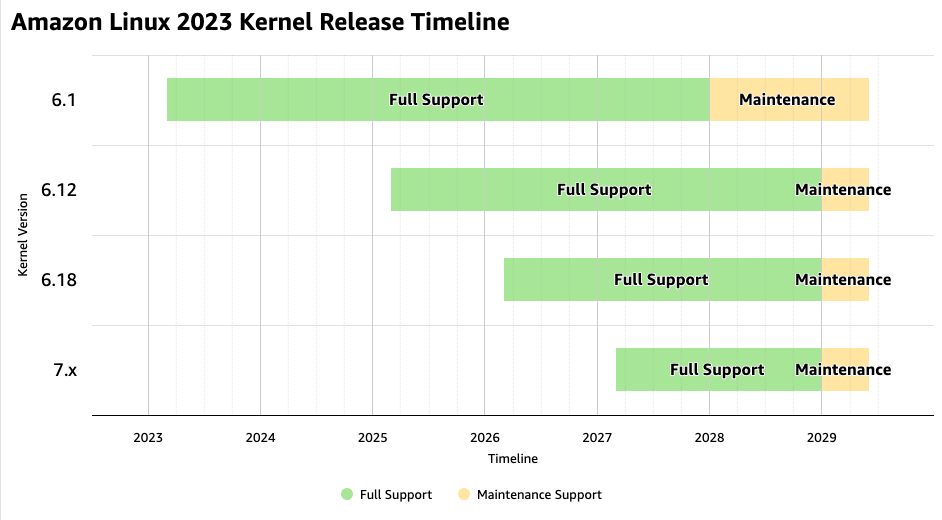
Each AL2023 LTS kernel is supported for four years in two phases:
-
Full support (years 1–2) – The kernel receives fixes for all CVE severities through regular rebases on the upstream LTS kernel. This phase aligns with the upstream Linux community's LTS support window. If upstream extends the LTS support window, Amazon Linux will follow suit.
-
Maintenance support (years 3–4) – After the upstream LTS support period ends, the Amazon Linux team continues to backport primarily fixes for critical and important CVEs (CVSS score 7.0 and above), as well as known exploited vulnerabilities. Low and medium severity CVEs are not backported during this phase.
After four years, the kernel reaches end of life and no longer receives security updates. Older kernels remain available via repositories and you can continue using them. You should not expect any further patches or fixes. We recommend upgrading to a supported kernel before this date. Kernel-specific AMIs will no longer be updated after the end of support date of a kernel.
The following chart shows the support timeline for current Amazon Linux LTS kernels:
Kernel Updates
Starting in June 2026, AL2023 will update the default kernel annually. The al2023-ami-kernel-default set of AMIs will be updated to the latest LTS kernel, so that newly launched instances will come up with the new kernel version.
Running instances are not automatically updated to a new kernel. To upgrade the kernel on an existing instance, you must explicitly install the new kernel package and reboot. For details, see Updating the Linux Kernel on AL2023.
We strongly recommend adopting new kernels promptly to benefit from the latest security and performance improvements. Older kernels receive fewer and slower security fixes over time. Incorporate kernel updates into your existing testing and deployment pipelines to validate compatibility before rolling out to production.
Kernel Version Overlap Between Distributions
To simplify migrations between Amazon Linux distributions, at least one kernel version will be available on both the current and the next Amazon Linux distribution. This allows you to upgrade to a new kernel on your existing distribution first, validate your workloads, and then migrate to the new distribution with confidence that the same kernel version is available there.
CVE Handling
AL2023 addresses kernel CVEs as follows:
-
Critical and important CVEs (CVSS 7.0 and above) and known exploited vulnerabilities are backported to all supported kernels.
-
Low and medium CVEs (CVSS below 7.0) are addressed through regular upstream LTS rebases during the full support phase. During the maintenance support phase, these CVEs are not backported. If a low or medium CVE is not resolved by an upstream LTS rebase within 60 days, it will be marked as "No fix planned" in the Amazon Linux Security Center
.
Running the latest available kernel is the best way to get recent security, performance, and functional updates.
What You Should Do
-
Implement Continuous Integration (CI) for your applications – Before making any change to your production setup, make sure it is properly validated in a testing stage. Include kernel updates in your validation.
-
Stay on the latest kernel – Adopt each new annual LTS kernel as soon as it is available. Newer kernels receive security fixes faster. Consume the al2023-ami-kernel-default series of AMIs to automatically be on the kernel version recommended by the Amazon Linux team.
-
Automate updates – Use tools like AWS Systems Manager
to manage kernel updates across your fleet. -
Plan for reboots – Every kernel update requires a reboot. Build reboot windows into your maintenance schedules.
