기계 번역으로 제공되는 번역입니다. 제공된 번역과 원본 영어의 내용이 상충하는 경우에는 영어 버전이 우선합니다.
시작 템플릿 추가
프로젝트를 생성하거나 편집할 때 프로젝트 구성 내에서 고급 옵션을 사용하여 시작 템플릿을 추가할 수 있습니다. 시작 템플릿은 보안 그룹, IAM 정책 및 시작 스크립트와 같은 추가 구성을 프로젝트 내의 모든 VDI 인스턴스에 제공합니다.
정책 추가
IAM 정책을 추가하여 프로젝트에 배포된 모든 인스턴스의 VDI 액세스를 제어할 수 있습니다. 정책을 온보딩하려면 다음 키-값 페어로 정책에 태그를 지정합니다.
res:Resource/vdi-host-policy
IAM 역할에 대한 자세한 내용은 IAM의 정책 및 권한을 참조하세요.
보안 그룹 추가
보안 그룹을 추가하여 프로젝트의 모든 VDI 인스턴스에 대한 송신 및 수신 데이터를 제어할 수 있습니다. 보안 그룹을 온보딩하려면 보안 그룹에 다음 키-값 페어로 태그를 지정합니다.
res:Resource/vdi-security-group
보안 그룹에 대한 자세한 내용은 Amazon VPC 사용 설명서의 보안 그룹을 사용하여 리소스에 대한 트래픽 제어를 참조하세요AWS.
시작 스크립트 추가
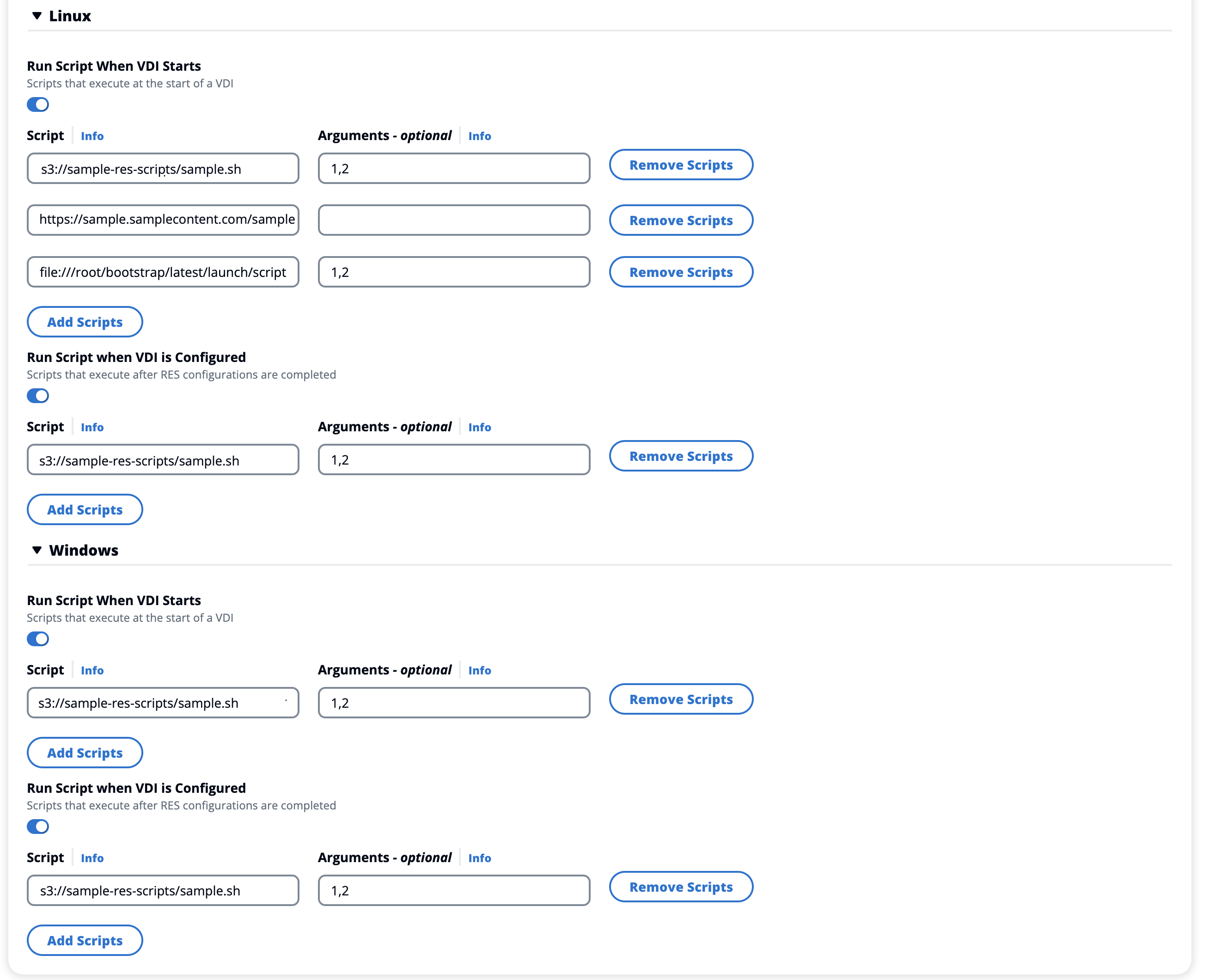
프로젝트 내의 모든 VDI 세션에서 시작되는 시작 스크립트를 추가할 수 있습니다. RES는 Linux 및 Windows에 대한 스크립트 시작을 지원합니다. 스크립트 시작의 경우 다음 중 하나를 선택할 수 있습니다.
- VDI 시작 시 스크립트 실행
-
이 옵션은 RES 구성 또는 설치가 실행되기 전에 VDI 인스턴스 시작 시 스크립트를 시작합니다.
- VDI가 구성된 경우 스크립트 실행
-
이 옵션은 RES 구성이 완료된 후 스크립트를 시작합니다.
스크립트는 다음 옵션을 지원합니다.
| 스크립트 구성 |
예제 |
| S3 URI |
s3://bucketname/script.sh |
| HTTPS URL |
https://sample.samplecontent.com/sample |
| 로컬 파일 |
file:///user/scripts/example.sh |
S3 버킷에서 호스팅되는 모든 사용자 지정 스크립트는 다음 태그로 프로비저닝해야 합니다.
res:EnvironmentName/<res-environment>
인수의 경우 쉼표로 구분된 모든 인수를 제공합니다.
시작 스크립트용 템플릿의 예입니다.
- Linux
-
#  Copyright Amazon.com, Inc. or its affiliates. All Rights Reserved.
#
#  Licensed under the Apache License, Version 2.0 (the "License"). You may not use this file except in compliance
#  with the License. A copy of the License is located at
#
#      http://www.apache.org/licenses/LICENSE-2.0
#
#  or in the 'license' file accompanying this file. This file is distributed on an 'AS IS' BASIS, WITHOUT WARRANTIES
#  OR CONDITIONS OF ANY KIND, express or implied. See the License for the specific language governing permissions
#  and limitations under the License.

#!/bin/bash

echo "start_script.sh running" >> /test_scripts
echo "All arguments: $@" >> /test_scripts
echo "Argument count: $#" >> /test_scripts
echo "Argument 1, $1" >> /test_scripts
echo "Argument 2, $2" >> /test_scripts
echo "end of start_script.sh" >> /test_scripts
- Windows
-
#  Copyright Amazon.com, Inc. or its affiliates. All Rights Reserved.
#
#  Licensed under the Apache License, Version 2.0 (the "License"). You may not use this file except in compliance
#  with the License. A copy of the License is located at
#
#      http://www.apache.org/licenses/LICENSE-2.0
#
#  or in the 'license' file accompanying this file. This file is distributed on an 'AS IS' BASIS, WITHOUT WARRANTIES
#  OR CONDITIONS OF ANY KIND, express or implied. See the License for the specific language governing permissions
#  and limitations under the License.

#!pwsh

Write-Output "configure_script.ps1 running" | Out-File -Append -FilePath "/test_scripts"
Write-Output "All arguments: $args" | Out-File -Append -FilePath "/test_scripts"
Write-Output "Argument count: $($args.Count)" | Out-File -Append -FilePath "/test_scripts"
Write-Output "Argument 1, $($args[0])" | Out-File -Append -FilePath "/test_scripts"
Write-Output "Argument 2, $($args[1])" | Out-File -Append -FilePath "/test_scripts"
Write-Output "end of configure_script.ps1" | Out-File -Append -FilePath "/test_scripts"