기계 번역으로 제공되는 번역입니다. 제공된 번역과 원본 영어의 내용이 상충하는 경우에는 영어 버전이 우선합니다.
파트너 계정에 대한 서비스 할당량 증가 요청
Amazon Lightsail 파트너가 되면 현재 계정과 조직 전체의 멤버 계정에 대해 Lightsail 인스턴스의 기본 서비스 할당량이 증가합니다. 멤버 계정에 대한 한도를 추가로 늘리려는 경우, 다음 프로세스를 사용하여 할당량 증가를 요청해야 합니다. Lightsail 콘솔에서 현재 할당량을 확인하고 증가를 요청할 수 있습니다.
참고
멤버 계정은 Service Quotas 콘솔에서 즉시 증가된 할당량을 볼 수 없습니다. 업데이트된 할당량은 멤버 계정이 리전에서 첫 번째 인스턴스를 시작한 후 콘솔에 나타납니다.
참고
Lightsail 파트너 계정에 연결된 여러 멤버 계정의 경우 파트너 피드백 양식을 사용하여 서비스 할당량 증가를 요청해야 합니다. 자세한 내용은 파트너Lightsail로 문의 단원을 참조하십시오.
파트너 계정에 대한 서비스 할당량 증가를 요청하려면
-
Lightsail 콘솔
에 로그인합니다. -
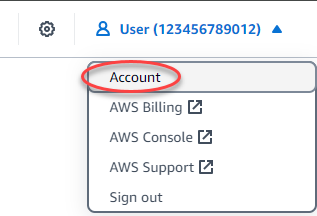
Lightsail 홈 페이지의 상단 탐색 메뉴에서 계정을 선택합니다.
-
드롭다운 메뉴에서 계정(Account)을 선택합니다.
-
서비스 할당량 탭을 선택합니다.
-
늘리려는 할당량에 대해 할당량 증가 요청을 선택합니다.

-
Service Quotas 콘솔에서 계정 수준의 증가 요청을 선택합니다.
-
할당량 값 증가에 증가량을 입력합니다.
-
요청을 제출하려면 요청을 선택합니다.
할당량 증가 요청이 제출되면 업데이트를 모니터링할 수 있는 지원 사례가 생성될 수 있습니다. 증가가 승인되면 리전당 모든 파트너 계정에 적용됩니다. 목록에 없는 할당량 증가는 파트너Lightsail로 문의 섹션을 참조하세요.
