FileFreshness
FileFreshness를 사용하면 사용자가 제공한 조건에 따라 데이터 파일을 새로 고칩니다. 파일의 마지막 수정 시간을 사용하여 데이터 파일 또는 전체 폴더가 최신 상태인지 확인합니다.
이 규칙은 두 가지 지표를 수집합니다.
-
설정한 규칙에 따른 FileFreshness 규정 준수
-
규칙에 따라 스캔된 파일 수
Dataset.*.FileFreshness.Compliance: 1, Dataset.*.FileCount: 1
이상 탐지에서는 이러한 지표를 고려하지 않습니다.
파일 최신성 확인
다음 규칙은 tickets.parquet가 지난 24시간 동안 생성되도록 보장합니다.
FileFreshness "s3://amzn-s3-demo-bucket/artifacts/file/tickets/tickets.parquet" > (now() - 24 hours)
폴더 최신성 확인
다음 규칙은 폴더의 모든 파일이 지난 24시간 이내에 생성되거나 수정된 경우 통과됩니다.
FileFreshness "s3://bucket/" >= (now() - 1 days)
FileFreshness "s3://amzn-s3-demo-bucket/artifacts/file/tickets/" >= (now() - 24 hours)
임계치를 사용하여 폴더 또는 파일 최신성 확인
다음 규칙은 지난 10일 동안 "tickets" 폴더에 있는 파일의 10%가 생성되거나 수정된 경우 통과됩니다.
FileFreshness "s3://amzn-s3-demo-bucket/artifacts/file/tickets/" > (now() - 10 days) with threshold > 0.1
특정 날짜의 파일 또는 폴더 확인
특정 날짜의 파일 최신성을 확인할 수 있습니다.
FileFreshness "s3://amzn-s3-demo-bucket/artifacts/file/tickets/" > "2020-01-01"
FileFreshness "s3://amzn-s3-demo-bucket/artifacts/file/tickets/" between "2023-01-01" and "2024-01-01"
시간 제한하여 파일 또는 폴더 확인
FileFreshness를 사용하여 특정 시간에 따라 파일이 도착했는지 확인할 수 있습니다.
FileFreshness "s3://amzn-s3-demo-bucket/artifacts/file/tickets/" between (now() - 45 minutes) and now()
FileFreshness "s3://amzn-s3-demo-bucket/artifacts/file/tickets/" between "9:30 AM" and "9:30 PM"
FileFreshness "s3://amzn-s3-demo-bucket/artifacts/file/tickets/" > (now() - 10 minutes)
FileFreshness "s3://amzn-s3-demo-bucket/artifacts/file/tickets/" > now()
FileFreshness "s3://amzn-s3-demo-bucket/artifacts/file/tickets/" between (now() - 2 hours) and (now() + 15 minutes)
FileFreshness "s3://amzn-s3-demo-bucket/artifacts/file/tickets/" between (now() - 3 days) and (now() + 15 minutes)
FileFreshness "s3://amzn-s3-demo-bucket/artifacts/file/tickets/" between "2001-02-07" and (now() + 15 minutes)
FileFreshness "s3://amzn-s3-demo-bucket/artifacts/file/tickets/" > "21:45"
FileFreshness "s3://amzn-s3-demo-bucket/artifacts/file/tickets/" > "2024-01-01"
FileFreshness "s3://amzn-s3-demo-bucket/artifacts/file/tickets/" between "02:30" and "04:30"
FileFreshness "s3://amzn-s3-demo-bucket/artifacts/file/tickets/" between "9:30 AM" and "22:15"
주요 고려 사항:
-
FileFreshness는 일, 시간 및 분 단위를 사용하여 파일을 평가할 수 있습니다.
-
경우에 따라 오전/오후 및 24시간을 지원합니다.
-
재정의가 지정되지 않는 한 시간은 UTC로 계산됩니다.
-
날짜는 00:00 시간의 UTC로 계산됩니다.
시간 기반 FileFreshness는 다음과 같이 작동합니다.
FileFreshness "s3://amzn-s3-demo-bucket/artifacts/file/tickets/" > "21:45"
-
먼저 시간 “21:45”를 UTC 형식의 오늘 날짜와 결합하여 날짜-시간 필드를 생성합니다.
-
다음 단계로, 시간대 재정의를 지정한 경우 날짜-시간이 해당 시간대로 변환됩니다(없으면 UTC 사용).
-
마지막으로 규칙이 평가됩니다.
선택적 파일 기반 규칙 태그:
태그를 사용하면 규칙 동작을 제어할 수 있습니다.
recentFiles
이 태그는 가장 최근 파일을 먼저 유지하여 처리되는 파일 수를 제한합니다.
FileFreshness "s3://amzn-s3-demo-bucket/" between (now() - 100 minutes) and (now() + 10 minutes) with recentFiles = 1
uriRegex
참고
uriRegex 태그는 AWS Glue 5.0 이상에서 사용할 수 있습니다.
이 태그는 파일 경로에 정규식 패턴을 적용하여 파일을 필터링합니다. 경로가 패턴과 일치하는 파일만 처리됩니다. 부정적 예측을 사용하여 패턴과 일치하는 파일을 제외할 수도 있습니다.
# Match only files with a .csv extension
FileFreshness "s3://amzn-s3-demo-bucket/" > (now() - 24 hours) with uriRegex = "\.csv$"
# Match Parquet files that contain "orders_" in the path
FileFreshness "s3://amzn-s3-demo-bucket/" > (now() - 24 hours) with uriRegex = ".*orders_.*\.parquet"
# Exclude files ending in .tmp using a negative lookahead
FileFreshness "s3://amzn-s3-demo-bucket/" > (now() - 24 hours) with uriRegex = "(?!.*\.tmp$).*"
filterOrder
참고
filterOrder 태그는 AWS Glue 5.0 이상에서 사용할 수 있습니다.
recentFiles 및 uriRegex와 같은 여러 필터 태그를 함께 사용하면 filterOrder 태그가 해당 태그의 적용 순서를 제어합니다. 기본 순서는 recentFiles 먼저, 그 다음에 uriRegex입니다.
FileFreshness "s3://amzn-s3-demo-bucket/" > (now() - 24 hours) with recentFiles = 1 with uriRegex = "inventory_" with filterOrder = ["uriRegex","recentFiles"]
위 예제에서 uriRegex 필터는 먼저 'inventory_'와 일치하는 파일만 선택하고 recentFiles = 1에서 필터링된 세트에서 최근 파일을 가져옵니다. filterOrder가 없으면 기본 동작은 하나의 최근 파일을 먼저 가져온 다음 정규식을 적용합니다. 이 경우 최근 파일이 패턴과 일치하지 않으면 일치하는 파일이 없을 수 있습니다.
참고
filterOrder 목록의 모든 값은 동일한 규칙에도 있는 다른 필터 태그(recentFiles 또는 uriRegex)를 참조해야 합니다. timeZone 또는 failFast와 같은 비필터 태그는 filterOrder에서 유효하지 않습니다.
failFast
"true"로 설정하면 규칙은 모든 파일을 평가하고 규정 준수 비율을 계산하는 대신 최신성 조건에 통과하지 못한 첫 번째 파일에서 즉시 실패를 반환합니다.
FileFreshness "s3://amzn-s3-demo-bucket/" > (now() - 24 hours) with failFast = "true"
timeZone
허용되는 시간대 재정의는 지원되는 시간대에 Allowed Time Zones
FileFreshness "s3://path/" > "21:45" with timeZone = "America/New_York"
FileFreshness "s3://path/" > "21:45" with timeZone = "America/Chicago"
FileFreshness "s3://path/" > "21:45" with timeZone = "Europe/Paris"
FileFreshness "s3://path/" > "21:45" with timeZone = "Asia/Shanghai"
FileFreshness "s3://path/" > "21:45" with timeZone = "Australia/Darwin"
데이터 프레임에서 직접 파일 이름 추론
항상 파일 경로를 제공하지 않아도 됩니다. 예를 들어 AWS Glue Data Catalog에서 규칙을 작성할 때 카탈로그 테이블에서 사용 중인 폴더를 찾기 어려울 수 있습니다. AWS Glue Data Quality에서는 데이터 프레임을 채우는 데 사용되는 특정 폴더나 파일을 찾고 해당 항목이 최신 상태인지를 감지할 수 있습니다.
참고
이 기능은 파일이 DynamicFrame 또는 DataFrame으로 성공적으로 읽기된 경우에만 작동합니다.
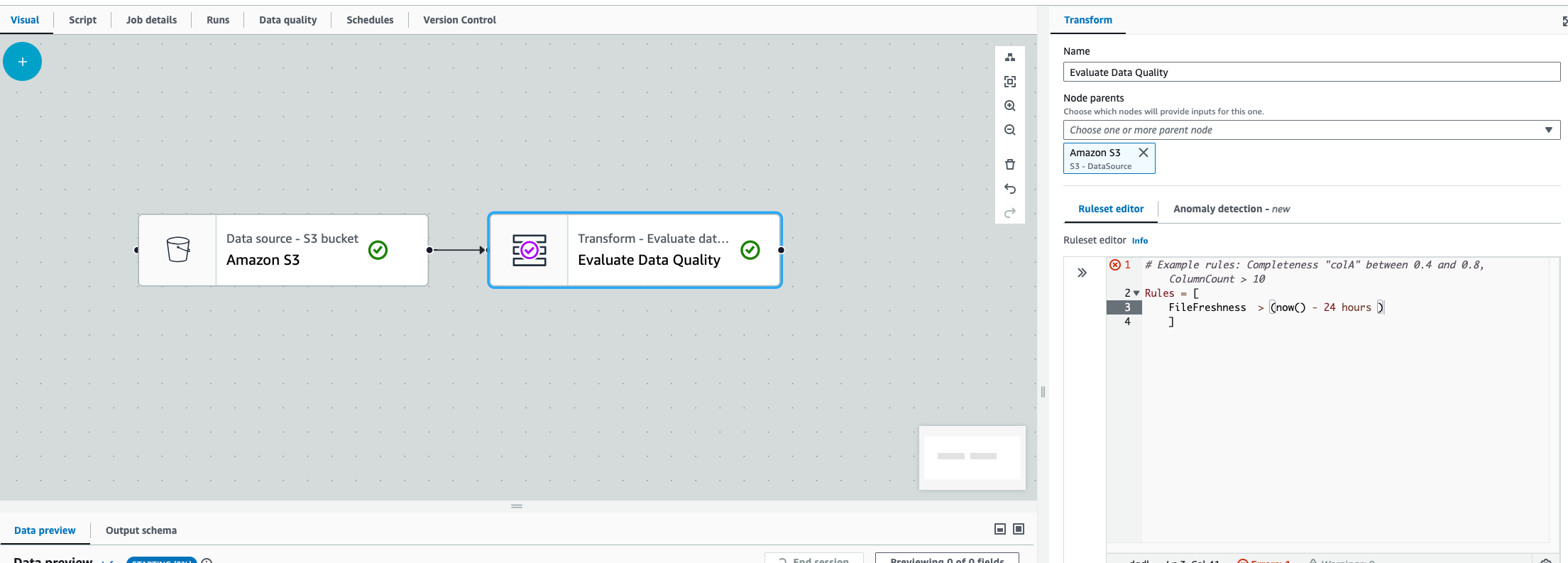
FileFreshness > (now() - 24 hours)
이 규칙은 동적 프레임 또는 데이터 프레임을 채우는 데 사용되는 폴더 경로나 파일을 찾습니다. Amazon S3 경로 또는 Amazon S3 기반 AWS Glue Data Catalog 테이블에 대해 사용할 수 있습니다. 이때 몇 가지 고려 사항이 있습니다.
-
AWS Glue ETL에서 Amazon S3 또는 AWS Glue Data Catalog 변환 직후 EvaluateDataQuality 변환이 있어야 합니다.
-
이 규칙은 AWS Glue 대화형 세션에서 작동하지 않습니다.
두 경우 모두에서 시도하거나 AWS Glue에서 파일을 찾을 수 없는 경우 AWS Glue에서 다음 오류가 발생합니다. “Unable to parse file path from DataFrame”
