DB 인스턴스 클래스의 CPU 코어 및 CPU 코어당 스레드 설정
다음 작업을 수행할 때 DB 인스턴스 클래스의 CPU 코어 및 코어당 스레드 수를 구성할 수 있습니다.
참고
DB 인스턴스의 CPU 코어 수 또는 코어당 스레드 수를 구성하기 위해 인스턴스를 수정하면 인스턴스 클래스를 수정할 때와 유사하게 짧은 서비스 중단이 발생합니다.
AWS Management 콘솔, AWS CLI 또는 RDS API를 사용하여 CPU 코어를 설정합니다.
코어 설정
AWS Management 콘솔에 로그인한 후 https://console.aws.amazon.com/rds/
에서 Amazon RDS 콘솔을 엽니다. 데이터베이스 생성을 선택합니다.
인스턴스 구성 옵션을 설정할 때 다음을 수행합니다.
CPU 최적화 옵션을 선택합니다.
코어 수를 선택하여 vCPU 옵션을 설정합니다.
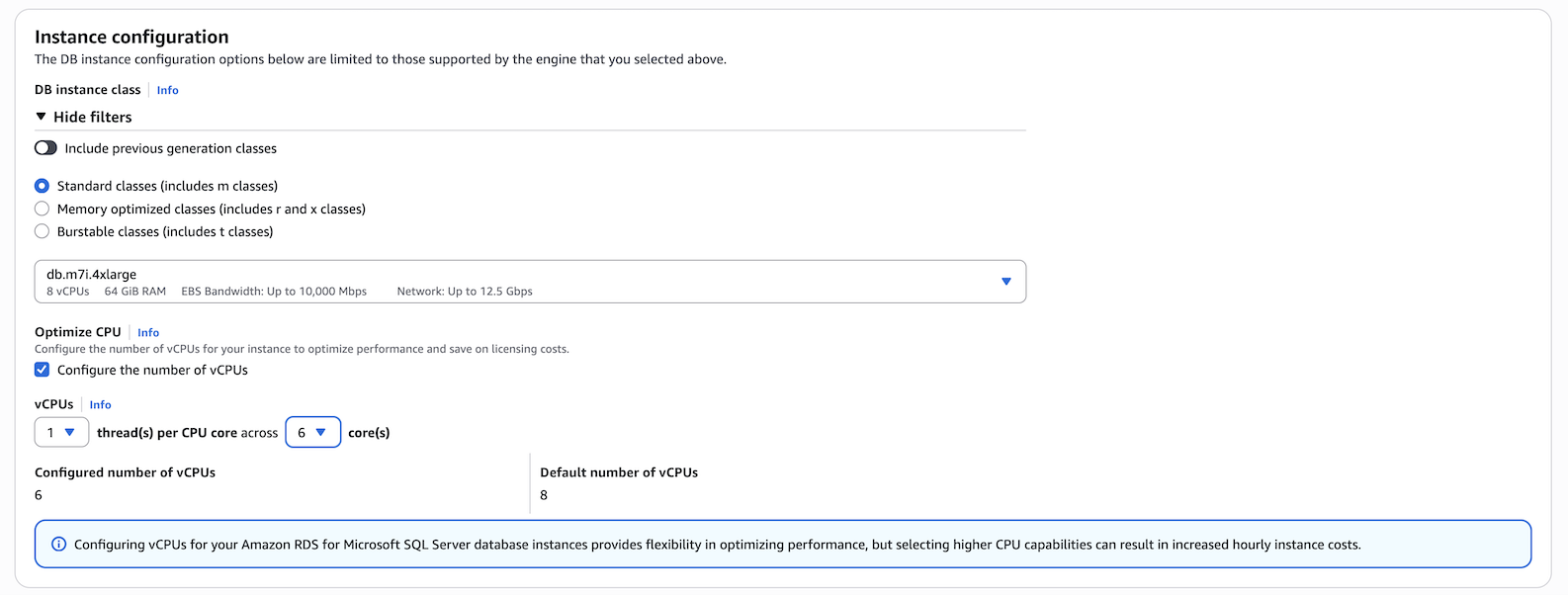
-
다른 선택을 완료한 후 데이터베이스 생성을 선택합니다.
코어 설정
AWS CLI를 사용하여 CPU 최적화를 구성하려면 명령에
--processor-features옵션을 포함합니다.coreCount및threadsPerCore를 사용하여 CPU 코어 수를1로 지정합니다.다음 구문을 사용합니다.
aws rds create-db-instance \ --engine sqlserver-ee \ --engine-version 16.00 \ --license-model license-included \ --allocated-storage 300 \ --master-usernamemyuser\ --master-user-passwordxxxxx\ --no-multi-az \ --vpc-security-group-ids myvpcsecuritygroup \ --db-subnet-group-name mydbsubnetgroup \ --db-instance-identifier my-rds-instance \ --db-instance-class db.m7i.4xlarge \ --processor-features "Name=coreCount,Value=6" "Name=threadsPerCore,Value=1"
예 DB 인스턴스 클래스에 유효한 프로세서 값 보기
describe-orderable-db-instance-options 명령을 사용하여 기본 vCPU, 코어 및 코어당 스레드를 표시합니다. 예를 들어, 다음 명령의 출력은 db.r7i.2xlarge 인스턴스 클래스의 프로세서 옵션을 보여 줍니다.
aws rds describe-orderable-db-instance-options --engine sqlserver-ee \
--db-instance-class db.r7i.2xlarge

Sample output:
-------------------------------------------------------------
|            DescribeOrderableDBInstanceOptions             |
+-----------------------------------------------------------+
||               OrderableDBInstanceOptions                ||
|+------------------------------------+--------------------+|
||  DBInstanceClass                   |  db.r7i.2xlarge    ||
||  Engine                            |  sqlserver-ee      ||
||  EngineVersion                     |  13.00.6300.2.v1   ||
||  LicenseModel                      |  license-included  ||
||  MaxIopsPerDbInstance              |                    ||
||  MaxIopsPerGib                     |                    ||
||  MaxStorageSize                    |  64000             ||
||  MinIopsPerDbInstance              |                    ||
||  MinIopsPerGib                     |                    ||
||  MinStorageSize                    |  20                ||
||  MultiAZCapable                    |  True              ||
||  OutpostCapable                    |  False             ||
||  ReadReplicaCapable                |  True              ||
||  StorageType                       |  gp2               ||
||  SupportsClusters                  |  False             ||
||  SupportsDedicatedLogVolume        |  False             ||
||  SupportsEnhancedMonitoring        |  True              ||
||  SupportsGlobalDatabases           |  False             ||
||  SupportsIAMDatabaseAuthentication |  False             ||
||  SupportsIops                      |  False             ||
||  SupportsKerberosAuthentication    |  True              ||
||  SupportsPerformanceInsights       |  True              ||
||  SupportsStorageAutoscaling        |  True              ||
||  SupportsStorageEncryption         |  True              ||
||  SupportsStorageThroughput         |  False             ||
||  Vpc                               |  True              ||
|+------------------------------------+--------------------+|
|||                   AvailabilityZones                   |||
||+-------------------------------------------------------+||
|||                         Name                          |||
||+-------------------------------------------------------+||
|||  us-west-2a                                           |||
|||  us-west-2b                                           |||
|||  us-west-2c                                           |||
||+-------------------------------------------------------+||
|||              AvailableProcessorFeatures               |||
||+-----------------+-----------------+-------------------+||
|||  AllowedValues  |  DefaultValue   |       Name        |||
||+-----------------+-----------------+-------------------+||
|||  1,2,3,4        |  4              |  coreCount        |||
|||  1              |  1              |  threadsPerCore   |||
||+-----------------+-----------------+-------------------+||
또한 DB 인스턴스 클래스 프로세서 정보에 대해 다음 명령을 실행할 수 있습니다.
-
describe-db-instances- 지정된 DB 인스턴스에 대한 프로세서 정보를 보여 줍니다. -
describe-db-snapshots- 지정된 DB 스냅샷에 대한 프로세서 정보를 보여 줍니다. -
describe-valid-db-instance-modifications– 지정된 DB 인스턴스에 유효한 프로세서 수정 사항을 보여 줍니다.
위 명령의 출력에서 프로세서 기능의 값은 CPU 최적화가 구성되지 않은 경우 null입니다.
예 DB 인스턴스의 CPU 코어 수 설정
다음 예제는 mydbinstance를 수정하여 CPU 코어 수를 4개로, threadsPerCore 값을 1로 설정합니다. --apply-immediately를 사용하여 변경 내용을 즉시 적용합니다. 다음 예약 유지 관리 기간 중에 변경 내용을 적용하려는 경우 --apply-immediately option을 생략합니다.
aws rds modify-db-instance \ --db-instance-identifiermydbinstance\ --db-instance-class db.r7i.8xlarge \ --processor-features "Name=coreCount,Value=4" "Name=threadsPerCore,Value=1" \ --apply-immediately
예 DB 인스턴스의 기본 프로세서 설정으로 돌아가기
다음 예제는 mydbinstance를 기본 프로세서 값으로 되돌려 수정합니다.
aws rds modify-db-instance \ --db-instance-identifiermydbinstance\ --db-instance-class db.r7i.8xlarge \ --use-default-processor-features \ --apply-immediately
