翻訳は機械翻訳により提供されています。提供された翻訳内容と英語版の間で齟齬、不一致または矛盾がある場合、英語版が優先します。
を使用した Step Functions イベント配信の自動化 EventBridge
EventBridge では、Step Functions の Standard ワークフローからイベントを選択して、追加の処理のために他のサービスに送信できます。この手法は、コンポーネントをゆるやかに接続し、リソースをモニタリングする柔軟な方法を提供します。
Amazon EventBridge は、アプリケーションコンポーネント同士を接続してスケーラブルなイベント駆動型アプリケーションを構築するサーバーレスサービスです。イベント駆動型アーキテクチャとは、イベントの発信と応答によって連携する、疎結合のソフトウェアシステムを構築するスタイルです。イベントは、状態の変化、または更新を表します。
EventBridge を使用して Step Functions イベントを他のサービスに配信することで、DescribeExecution を継続的に呼び出すことなく、Standard ワークフローをモニタリングしてステータスを取得できます。ステートマシン実行のステータス変更は EventBridge に自動的に送信されます。これらのイベントを使用してサービスをターゲットにできます。たとえば、イベントは AWS Lambda 関数を呼び出したり、Amazon Simple Notification Service (Amazon SNS) トピックにメッセージを発行したり、別の SFN ワークフローを実行したりできます。
イベント配信の仕組み
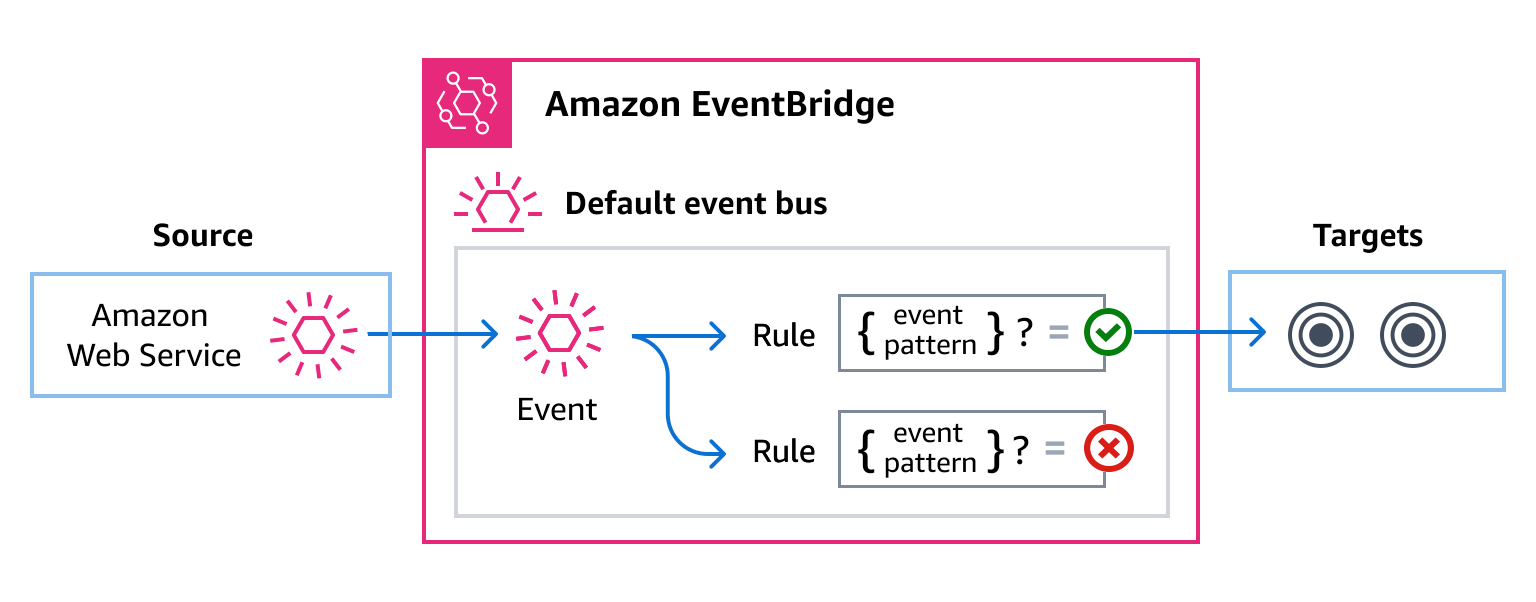
Step Functions は、すべての AWS アカウントで自動的にプロビジョニングされるデフォルトの EventBridge イベントバスを生成して送信します。イベントバスは、イベントを受信して、ゼロ個以上の送信先 (ターゲット) に配信するルーターです。ターゲットは他の AWS サービスです。イベントをルールのイベントパターンと比較するイベントバスのルールを指定できます。イベントがパターンと一致する場合、イベントバスはそのイベントを指定されたターゲットに送信します。以下の図はこのプロセスを示しています。
Standard ワークフローと Express ワークフロー
Standard ワークフローのみが EventBridge にイベントを出力します。Express ワークフローの実行をモニタリングするには、CloudWatch Logs を使用できます。「CloudWatch Logs でのログ記録」を参照してください。
Step Functions イベント
Step Functions は、次のイベントをデフォルトの EventBridge イベントバスに自動的に送信します。ルールのイベントパターンに一致するイベントは、ベストエフォートベースで指定されたターゲットに配信されます。イベントは順不同で配信される可能性があります。
詳細については、「Amazon EventBridge ユーザーガイド」の「EventBridge events」を参照してください。
| イベントの詳細のタイプ | 説明 |
|---|---|
|
ステートマシン実行のステータスの変化を表します。 |
EventBridge を使用した Step Functions イベントの配信
EventBridge のデフォルトイベントバスで Step Functions イベントをターゲットに送信させるには、ルールを作成する必要があります。各ルールにはイベントパターンが含まれており、EventBridge はイベントバスで受信した各イベントと照合します。イベントデータが指定したイベントパターンに一致すると、EventBridge は、ルールのターゲットにそのイベントを送信します。
イベントバスルールの詳細な作成方法については、「EventBridge ユーザーガイド」の「Creating rules that react to events」を参照してください。
Step Functions コンソールから特定のステートマシンのイベントバスルールを作成することもできます。
ステートマシンの [詳細] ページで、[アクション] を選択し、[EventBridge ルールを作成] を選択します。
EventBridge コンソールで [ルールの作成] ページが開き、ステートマシンがルールのイベントソースとして選択されます。
「EventBridge ユーザーガイド」の「Creating rules that react to events」に詳述されている手順に従ってください。
Step Functions イベントに一致するイベントパターンの作成
各イベントパターンは JSON 形式のオブジェクトで、以下が含まれています。
-
イベントを送信するサービスを識別する
source属性。Step Functions イベントの場合、ソースはaws.statesです。 -
(オプション): 照合するイベントタイプの配列を含む
detail-type属性。 -
(オプション): 照合対象となるその他のイベントデータを含む
detail属性。
例えば、以下のイベントパターンは、Step Functions のすべての実行ステータスの変更イベントと一致します。
{
  "source": ["aws.states"],
  "detail-type": ["Step Functions Execution Status Change"]
}
次の例は、実行が失敗またはタイムアウトした場合、特定のステートマシンに関連付けられた特定の実行と照合されます。
{
  "source": ["aws.states"],
  "detail-type": ["Step Functions Execution Status Change"],
  "detail": {
    "status": ["FAILED", "TIMED_OUT"],
    "stateMachineArn": ["arn:aws:states:region:account-id:stateMachine:state-machine"],
    "executionArn": ["arn:aws:states:region:account-id:execution:state-machine-name:execution-name"]
  }
}
イベントパターンの記述の詳細については、「EventBridge ユーザーガイド」の「Event patterns」を参照してください。
イベントを使用した Step Functions ステートマシンのトリガー
Step Functions ステートマシンを Eventbridge のイベントバスルールとして指定することもできます。これにより、別の AWS サービスからのイベントに応答して Step Functions ワークフローの実行をトリガーできます。
詳細については、「Amazon EventBridge ユーザーガイド」の「Amazon EventBridge ターゲット」を参照してください。
Step Functions イベントの詳細リファレンス
AWS サービスからのすべてのイベントには、イベントのソースである AWS サービス、イベントが生成された時刻、イベントが発生したアカウントとリージョンなど、イベントに関するメタデータを含む共通のフィールドセットがあります。これらの一般的なフィールドの定義については、「Amazon EventBridge ユーザーガイド」の「イベント構造リファレンス」を参照してください。
さらに、各イベントには、その特定のイベントに固有のデータを含む detail フィールドがあります。
EventBridge を使用して Step Functions イベントの選択と管理を行う場合、以下の点に留意するのが有用です。
-
すべてのイベントの
sourceフィールドは、aws.statesに設定されています。 -
detail-typeフィールドはイベントタイプを指定します。例えば、
Step Functions Execution Status Change。 -
detailフィールドには、その特定のイベントに固有のデータが含まれます。
Step Functions イベントに一致するようにルールを有効化するイベントパターンの作成方法については、「Amazon EventBridge ユーザーガイド」の「Event patterns」を参照してください。
詳細については、「Amazon EventBridge ユーザーガイド」の「Amazon EventBridge イベント」を参照してください。
実行ステータスの変更
ステートマシン実行のステータスの変化を表します。
source と detail-type のフィールドがあるのは、Step Functions イベントに特定の値が含まれているためです。すべてのイベントに含まれる他のメタデータフィールドの定義については、「Amazon EventBridge ユーザーガイド」の「Event structure reference」を参照してください。
イベントの構造
{
  . . .,
  "detail-type": "Step Functions Execution Status Change",
  "source": "aws.states",
  . . .,
  "detail": {
    "executionArn" : "string",
    "input" : "string",
    "inputDetails" : {
      "included" : "boolean"
    },
    "name" : "string",
    "output" : "string",
    "outputDetails" : {
      "included" : "boolean"
    },
    "startDate" : "integer",
    "stateMachineArn" : "string",
    "stopDate" : "integer",
    "status" : "RUNNING" | "SUCCEEDED" | "FAILED" | "TIMED_OUT" | "ABORTED" | "PENDING_REDRIVE",
    "stateMachineVersionArn" : "string",
    "stateMachineAliasArn" : "string",
    "redriveCount" : "integer",
    "redriveDate" : "string",
    "redriveStatus" : "NOT_REDRIVABLE" | "REDRIVABLE" | "REDRIVE_IN_PROGRESS",
    "redriveStatusReason" : "string",
    "error" : "string",
    "cause" : "string"
  }
}
解説
実行ステータスの変更イベントには、定義に入力プロパティを含めることができます。イベントによっては、実行ステータスの変更イベントの定義に出力プロパティを含めることもできます。
-
EventBridge に送信されたエスケープ入力とエスケープ出力の組み合わせが 248 KiB を超える場合、入力は除外されます。同様に、エスケープされた出力が 248 KiB を超える場合、出力は除外されます。これは EventBridge クォータの結果です。
-
inputDetailsとoutputDetailsプロパティでペイロードが切り捨てられているかどうかを判断できます。詳細については、CloudWatchEventsExecutionDataDetailsデータを参照してください。 -
Standard ワークフローでは、DescribeExecution を使用して完全な入力と出力を確認できます。
DescribeExecutionは、Express ワークフローでは使用できません。フル入出力を表示したいのであれば、次を実行できます。Express ワークフローを Standard ワークフローでラップします。
Amazon S3 ARN を使用します。ARN 使用の詳細については、Step Functions で大きなペイロードを渡す代わりに Amazon S3 の ARN を使用する を参照してください。
例
例実行ステータスの変更: 実行が開始されました
{
    "version": "0",
    "id": "315c1398-40ff-a850-213b-158f73e60175",
    "detail-type": "Step Functions Execution Status Change",
    "source": "aws.states",
    "account": "account-id",
    "time": "2019-02-26T19:42:21Z",
    "region": "us-east-2",
    "resources": [
      "arn:aws:states:us-east-2:account-id:execution:state-machine-name:execution-name"
    ],
    "detail": {
        "executionArn": "arn:aws:states:us-east-2:account-id:execution:state-machine-name:execution-name",
        "stateMachineArn": "arn:aws::states:us-east-2:account-id:stateMachine:state-machine",
        "name": "execution-name",
        "status": "RUNNING",
        "startDate": 1551225271984,
        "stopDate":  null,
        "input": "{}",
        "inputDetails": {
             "included": true
        },
        "output": null,
        "outputDetails": null,
        "stateMachineVersionArn": null,
        "stateMachineAliasArn": null,
        "redriveCount": 0,
        "redriveDate": null,
        "redriveStatus": "NOT_REDRIVABLE",
        "redriveStatusReason": "Execution is RUNNING and cannot be redriven",
        "error": null,
        "cause": null
    }
}
例実行ステータスの変更: 実行は成功しました
{
    "version": "0",
    "id": "315c1398-40ff-a850-213b-158f73e60175",
    "detail-type": "Step Functions Execution Status Change",
    "source": "aws.states",
    "account": "account-id",
    "time": "2019-02-26T19:42:21Z",
    "region": "us-east-2",
    "resources": [
      "arn:aws:states:us-east-2:account-id:execution:state-machine-name:execution-name"
    ],
    "detail": {
        "executionArn": "arn:aws:states:us-east-2:account-id:execution:state-machine-name:execution-name",
        "stateMachineArn": "arn:aws:states:us-east-2:account-id:stateMachine:state-machine",
        "name": "execution-name",
        "status": "SUCCEEDED",
        "startDate": 1547148840101,
        "stopDate": 1547148840122,
        "input": "{}",
        "inputDetails": {
             "included": true
        },
        "output": "\"Hello World!\"",
        "outputDetails": {
             "included": true
        },
        "stateMachineVersionArn": null,
        "stateMachineAliasArn": null,
        "redriveCount": 0,
        "redriveDate": null,
        "redriveStatus": "NOT_REDRIVABLE",
        "redriveStatusReason": "Execution is SUCCEEDED and cannot be redriven",
        "error": null,
        "cause": null
    }
}
例実行ステータスの変更: 実行に失敗しました
{
    "version": "0",
    "id": "315c1398-40ff-a850-213b-158f73e60175",
    "detail-type": "Step Functions Execution Status Change",
    "source": "aws.states",
    "account": "account-id",
    "time": "2019-02-26T19:42:21Z",
    "region": "us-east-2",
    "resources": [
      "arn:aws:states:us-east-2:account-id:execution:state-machine-name:execution-name"
    ],
    "detail": {
        "executionArn": "arn:aws:states:us-east-2:account-id:execution:state-machine-name:execution-name",
        "stateMachineArn": "arn:aws:states:us-east-2:account-id:stateMachine:state-machine",
        "name": "execution-name",
        "status": "FAILED",
        "startDate": 1551225146847,
        "stopDate": 1551225151881,
        "input": "{}",
        "inputDetails": {
             "included": true
        },
        "output": null,
        "outputDetails": null,
        "stateMachineVersionArn": null,
        "stateMachineAliasArn": null,
        "redriveCount": 0,
        "redriveDate": null,
        "redriveStatus": "REDRIVABLE",
        "redriveStatusReason": "Execution is FAILED and is redrivable",
        "error": "ErrorCode",
        "cause": "An error occurred."
    }
}
例実行ステータスの変更: タイムアウト
{
    "version": "0",
    "id": "315c1398-40ff-a850-213b-158f73e60175",
    "detail-type": "Step Functions Execution Status Change",
    "source": "aws.states",
    "account": "account-id",
    "time": "2019-02-26T19:42:21Z",
    "region": "us-east-2",
    "resources": [
      "arn:aws:states:us-east-2:account-id:execution:state-machine-name:execution-name"
    ],
    "detail": {
        "executionArn": "arn:aws:states:us-east-2:account-id:execution:state-machine-name:execution-name",
        "stateMachineArn": "arn:aws:states:us-east-2:account-id:stateMachine:state-machine",
        "name": "execution-name",
        "status": "TIMED_OUT",
        "startDate": 1551224926156,
        "stopDate": 1551224927157,
        "input": "{}",
        "inputDetails": {
             "included": true
        },
        "output": null,
        "outputDetails": null,
        "stateMachineVersionArn": null,
        "stateMachineAliasArn": null,
        "redriveCount": 0,
        "redriveDate": null,
        "redriveStatus": "REDRIVABLE",
        "redriveStatusReason": "Execution is TIMED_OUT and is redrivable",
        "error": "States.Timeout",
        "cause": "An error occurred."
    }
}
例実行ステータスの変更: 中止
{
    "version": "0",
    "id": "315c1398-40ff-a850-213b-158f73e60175",
    "detail-type": "Step Functions Execution Status Change",
    "source": "aws.states",
    "account": "account-id",
    "time": "2019-02-26T19:42:21Z",
    "region": "us-east-2",
    "resources": [
      "arn:aws:states:us-east-2:account-id:execution:state-machine-name:execution-name"
    ],
    "detail": {
        "executionArn": "arn:aws:states:us-east-2:account-id:execution:state-machine-name:execution-name",
        "stateMachineArn": "arn:aws:states:us-east-2:account-id:stateMachine:state-machine",
        "name": "execution-name",
        "status": "ABORTED",
        "startDate": 1551225014968,
        "stopDate": 1551225017576,
        "input": "{}",
        "inputDetails": {
             "included": true
        },
        "output": null,
        "outputDetails": null,
        "stateMachineVersionArn": null,
        "stateMachineAliasArn": null,
        "redriveCount": 0,
        "redriveDate": null,
        "redriveStatus": "NOT_REDRIVABLE",
        "redriveStatusReason": "Execution is ABORTED and cannot be redriven",
        "error": null,
        "cause": null
    }
}
