翻訳は機械翻訳により提供されています。提供された翻訳内容と英語版の間で齟齬、不一致または矛盾がある場合、英語版が優先します。
# S3 バケットを AWS CloudFormation スタックとして正常にインポートしました
*Amazon Web Services、Ram Kandaswamy*
## 概要
Amazon Simple Storage Service (Amazon S3) バケットなどのAmazon Web Services (AWS) リソースを使用し、コードとしての infrastructure as code (IaC) アプローチを使用したい場合は、リソースを AWS CloudFormation にインポートしてスタックとして管理できます。
このパターンは、S3 バケットを AWS CloudFormation スタックとして正常にインポートするための手順を示しています。このパターンの方法を使用すると、S3 バケットを 1 回のアクションでインポートした場合に発生する可能性のあるエラーを回避できます。
## 前提条件と制限事項
**前提条件**
+ アクティブな AWS アカウント。
+ 既存の S3 バケットおよび S3 バケットポリシー。この詳細については、「[AWS ナレッジセンターの AWS Config ルール s3-bucket-ssl-requests-only に準拠するために、どのような S3 バケットポリシーを使用すべきか](https://aws.amazon.com/premiumsupport/knowledge-center/s3-bucket-policy-for-config-rule/)」を参照してください。
+ 既存の AWS Key Management Service (AWS KMS) キーとそのエイリアス。詳細については、AWS KMS ドキュメント「[アラートの操作](https://docs.aws.amazon.com/kms/latest/developerguide/programming-aliases.html)」を参照してください。
+ サンプル `CloudFormation-template-S3-bucket` AWS CloudFormation テンプレート (添付)。お使いのコンピュータにダウンロードされます。
## アーキテクチャ
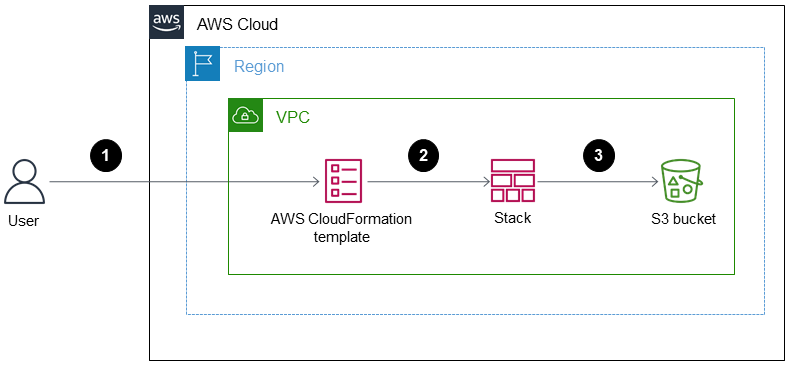
この図表は、次のワークフローを示しています:
1. ユーザーは JSON 形式または YAML 形式の AWS CloudFormation テンプレートを作成します。
1. このテンプレートは、S3 バケットをインポートするための AWS CloudFormation スタックを作成します。
1. AWS CloudFormation スタックは、テンプレートで指定した S3 バケットを管理します。
テクノロジースタック
+ AWS CloudFormation
+ AWS Identity and Access Management (IAM)
+ AWS KMS
+ Amazon S3
**ツール**
+ 「[AWS CloudFormation](https://docs.aws.amazon.com/AWSCloudFormation/latest/UserGuide/Welcome.html)」— AWS CloudFormation は、AWS インフラストラクチャのデプロイメントを予測可能かつ繰り返し作成し、プロビジョニングするのに役立ちます。
+ 「[AWS Identity and Access Management (IAM)](https://docs.aws.amazon.com/IAM/latest/UserGuide/introduction.html)」— IAM は、AWS サービスへのアクセスをセキュアに制御するためのウェブサービスです。
+ 「[AWS KMS](https://docs.aws.amazon.com/kms/latest/developerguide/overview.html)」— AWS Key Management Service (AWS KMS) は、クラウド向けに拡張された暗号化およびキー管理サービスです。
+ 「[Amazon S3](https://docs.aws.amazon.com/AmazonS3/latest/userguide/Welcome.html)」— Amazon Simple Storage Service (Amazon S3)は、インターネット用のストレージです。
## エピック
### AWS KMS keyベースの暗号化を使用して S3 バケットを AWS CloudFormation スタックとしてインポートする
| タスク | 説明 | 必要なスキル |
| --- | --- | --- |
| S3 バケットと KMS キーをインポートするテンプレートを作成します。 | ローカルコンピュータで、以下のサンプルテンプレートを使用して S3 バケットと KMS キーをインポートするテンプレートを作成します。AWSTemplateFormatVersion: 2010-09-09
Parameters:
bucketName:
Type: String
Resources:
S3Bucket:
Type: 'AWS::S3::Bucket'
DeletionPolicy: Retain
Properties:
BucketName: !Ref bucketName
BucketEncryption:
ServerSideEncryptionConfiguration:
- ServerSideEncryptionByDefault:
SSEAlgorithm: 'aws:kms'
KMSMasterKeyID: !GetAtt
- KMSS3Encryption
- Arn
KMSS3Encryption:
Type: 'AWS::KMS::Key'
DeletionPolicy: Retain
Properties:
Enabled: true
KeyPolicy: !Sub |-
{
"Id": "key-consolepolicy-3",
"Version": "2012-10-17",
"Statement": [
{
"Sid": "Enable IAM User Permissions",
"Effect": "Allow",
"Principal": {
"AWS": ["arn:aws:iam::${AWS::AccountId}:root"]
},
"Action": "kms:*",
"Resource": "*"
}
}
]
}
EnableKeyRotation: true
| AWS DevOps |
| スタックを作成します。 | [See the AWS documentation website for more details](http://docs.aws.amazon.com/ja_jp/prescriptive-guidance/latest/patterns/successfully-import-an-s3-bucket-as-an-aws-cloudformation-stack.html) | AWS DevOps |
| KMS キーエイリアスを作成します。 | [See the AWS documentation website for more details](http://docs.aws.amazon.com/ja_jp/prescriptive-guidance/latest/patterns/successfully-import-an-s3-bucket-as-an-aws-cloudformation-stack.html)KMSS3EncryptionAlias:
Type: 'AWS::KMS::Alias'
DeletionPolicy: Retain
Properties:
AliasName: alias/S3BucketKey
TargetKeyId: !Ref KMSS3Encryption
これに関する詳細については、AWS CloudFormation ドキュメントの「[AWS CloudFormation スタックの更新](https://docs.aws.amazon.com/AWSCloudFormation/latest/UserGuide/using-cfn-updating-stacks.html)」を参照してください。 | AWS DevOps |
| S3 バケットポリシーを含むようにスタックを更新する。 | [See the AWS documentation website for more details](http://docs.aws.amazon.com/ja_jp/prescriptive-guidance/latest/patterns/successfully-import-an-s3-bucket-as-an-aws-cloudformation-stack.html)S3BucketPolicy:
Type: 'AWS::S3::BucketPolicy'
Properties:
Bucket: !Ref S3Bucket
PolicyDocument: !Sub |-
{
"Version": "2008-10-17",
"Id": "restricthttp",
"Statement": [
{
"Sid": "denyhttp",
"Effect": "Deny",
"Principal": {
"AWS": "*"
},
"Action": "s3:*",
"Resource": ["arn:aws:s3:::${S3Bucket}","arn:aws:s3:::${S3Bucket}/*"],
"Condition": {
"Bool": {
"aws:SecureTransport": "false"
}
}
}
]
}
この S3 バケットポリシーには、安全ではない API コールを制限する拒否ステートメントがあります。 | AWS DevOps |
| キーポリシーを更新します。 | [See the AWS documentation website for more details](http://docs.aws.amazon.com/ja_jp/prescriptive-guidance/latest/patterns/successfully-import-an-s3-bucket-as-an-aws-cloudformation-stack.html)詳細については、AWS KMS ドキュメントの「[AWS KMSのキーポリシー](https://docs.aws.amazon.com/kms/latest/developerguide/key-policies.html)」を参照してください。 | AWS 管理者 |
| リソースレベルのタグを追加します。 | [See the AWS documentation website for more details](http://docs.aws.amazon.com/ja_jp/prescriptive-guidance/latest/patterns/successfully-import-an-s3-bucket-as-an-aws-cloudformation-stack.html)Tags:
- Key: createdBy
Value: Cloudformation
| AWS DevOps |
## 関連リソース
+ 「[既存のリソースを AWS CloudFormation の管理に取り込む](https://docs.aws.amazon.com/AWSCloudFormation/latest/UserGuide/resource-import.html)」
+ 「[AWS re: Invent 2017: AWS CloudFormation のディープダイブ](https://www.youtube.com/watch?v=01hy48R9Kr8)」(ビデオ)
## アタッチメント
このドキュメントに関連する追加コンテンツにアクセスするには、次のファイルを解凍してください。「[attachment.zip](samples/p-attach/aea7f6fe-8e67-46c4-8b90-1ab06b879111/attachments/attachment.zip)」