サポート終了通知: 2025 年 9 月 15 日、 AWS は Amazon Lex V1 のサポートを終了します。 V1 2025 年 9 月 15 日を過ぎると、Amazon Lex V1 コンソールまたは Amazon Lex V1 リソースにはアクセスできなくなります。Amazon Lex V2 を使用している場合は、代わりに [Amazon Lex V2 ガイド](https://docs.aws.amazon.com/lexv2/latest/dg/what-is.html)を参照してください。
翻訳は機械翻訳により提供されています。提供された翻訳内容と英語版の間で齟齬、不一致または矛盾がある場合、英語版が優先します。
# スロットタイプの作成
`OrderPizza` インテントで使用するスロットタイプ (パラメータ値) を作成します。
**スロットタイプを作成するには**
1. 左のメニューで、[**Slot types**] の横にあるプラス記号 (\+) を選択します。
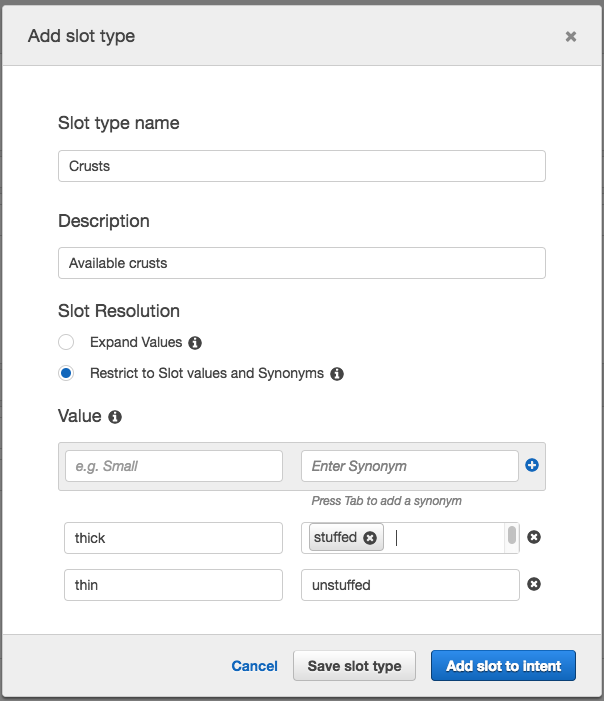
1. [**Add slot type**] ダイアログボックスで、以下を追加します。
+ [**Slot type name**] – Crusts
+ [**Description**] – Available crusts
+ [**Restrict to Slot values and Synonyms**] を選択します。
+ **[Value]** (値) - タイプ **thick**。タブを押して、**[Synonym]** フィールドに「**stuffed**」と入力します。プラス記号 (\+) を選択します。「**thin**」と入力し、再びプラス記号 (\+) を選択します。
ダイアログは以下の画像のようになります。
1. [**Add slot to intent**] を選択します。
1. [**Intent**] ページで、[**Required**] を選択します。スロット名を「**slotOne**」から「**crust**」に変更します。プロンプトを **What kind of crust would you like?** に変更します。
1. 次の表の値を使用して [Step 1](#slotTypeStart)〜[Step 4](#slotTypeFinish) を繰り返します。
[See the AWS documentation website for more details](http://docs.aws.amazon.com/ja_jp/lex/latest/dg/gs2-create-bot-slot-types.html)
## 次のステップ
[インテントの設定](gs2-create-bot-configure-intent.md)