翻訳は機械翻訳により提供されています。提供された翻訳内容と英語版の間で齟齬、不一致または矛盾がある場合、英語版が優先します。
# C2C (Cloud-to-Cloud) コネクタを使用する
C2C コネクタは、リクエストとレスポンスメッセージの翻訳を管理し、マネージド統合とサードパーティーベンダークラウド間の通信を可能にします。これにより、さまざまなデバイスタイプ、プラットフォーム、プロトコル間での統合制御が容易になり、サードパーティーのデバイスのオンボーディングと管理が可能になります。
次の手順では、C2C コネクタを使用するステップを一覧表示します。
**C2C コネクタを使用する手順:**
1. **CreateCloudConnector**
マネージド統合とサードパーティーベンダークラウド間の双方向通信を有効にするようにコネクタを設定します。
コネクタを設定するときは、次の詳細を指定します。
+ **名前**: コネクタのわかりやすい名前を選択します。
+ **説明**: コネクタの目的と機能の概要を提供します。
+ **AWS Lambda ARN**: コネクタに電力を供給する AWS Lambda 関数の Amazon リソースネーム (ARN) を指定します。
サードパーティーベンダー APIsしてコネクタを作成する AWS Lambda 関数を構築およびデプロイします。次に、マネージド統合内で [CreateCloudConnector](https://docs.aws.amazon.com/iot-mi/latest/APIReference/API_CreateCloudConnector.html) API を呼び出し、登録用の AWS Lambda 関数 ARN を指定します。 AWS Lambda 関数が、マネージド統合でコネクタを作成するのと同じ AWS アカウントにデプロイされていることを確認します。統合を識別するための一意の**コネクタ ID** が割り当てられます。
**CreateCloudConnector API リクエストとレスポンスの例:**
```
Request:
{
"Name": "CreateCloudConnector",
"Description": "Testing for C2C",
"EndpointType": "LAMBDA",
"EndpointConfig": {
"lambda": {
"arn": "arn:aws:lambda:us-east-1:xxxxxx:function:TestingConnector"
}
},
"ClientToken": "{{abc}}"
}
Response:
{
"Id": "string"
}
```
**作成フロー:**
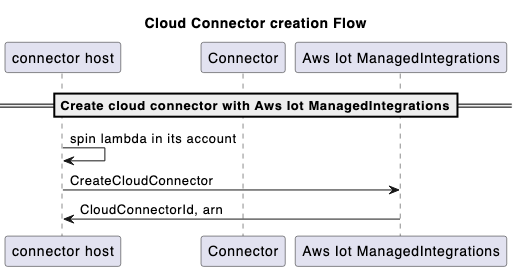
**注記**
この手順では、必要に応じて [GetCloudConnector](https://docs.aws.amazon.com/iot-mi/latest/APIReference/API_GetCloudConnector.html)、[UpdateCloudConnector](https://docs.aws.amazon.com/iot-mi/latest/APIReference/API_UpdateCloudConnector.html)、[DeleteCloudConnector](https://docs.aws.amazon.com/iot-mi/latest/APIReference/API_DeleteCloudConnector.html)、および [ListCloudConnectors](https://docs.aws.amazon.com/iot-mi/latest/APIReference/API_ListCloudConnectors.html) APIsを使用します。
1. **CreateConnectorDestination**
送信先を設定して、コネクタがサードパーティーベンダークラウドとの安全な接続を確立するために必要な設定と認証情報を提供します。Destinations を使用して、認可 URL、認証スキーム、認証情報の場所などの OAuth 2.0 認可の詳細など、マネージド統合にサードパーティーの認証情報を登録します AWS Secrets Manager。
**前提条件**
**ConnectorDestination** を作成する前に、以下を行う必要があります。
+ [CreateCloudConnector](https://docs.aws.amazon.com/iot-mi/latest/APIReference/API_CreateCloudConnector.html) API を呼び出してコネクタを作成します。関数が返す ID は、[CreateConnectorDestination](https://docs.aws.amazon.com/iot-mi/latest/APIReference/API_CreateConnectorDestination.html) API コールで使用されます。
+ コネクタ`tokenUrl`の 3P プラットフォームの を取得します。(**authCode** を **accessToken** と交換できます)。
+ コネクタの 3P プラットフォームの **authUrl** を取得します。(エンドユーザーはユーザー名とパスワードを使用して認証できます)。
+ アカウントのシークレットマネージャーで `clientSecret` (3P プラットフォームから) `clientId`と を使用します。
**CreateConnectorDestination API リクエストとレスポンスの例:**
```
Request:
{
"Name": "CreateConnectorDestination",
"Description": "CreateConnectorDestination",
"AuthType": "OAUTH",
"AuthConfig": {
"oAuth": {
"authUrl": "https://xxxx.com/oauth2/authorize",
"tokenUrl": "https://xxxx/oauth2/token",
"scope": "testScope",
"tokenEndpointAuthenticationScheme": "HTTP_BASIC",
"oAuthCompleteRedirectUrl": "about:blank",
"proactiveRefreshTokenRenewal": {
"enabled": false,
"DaysBeforeRenewal": 30
}
}
},
"CloudConnectorId": "", // The connectorID instance from response of Step 1.
"SecretsManager": {
"arn": "arn:aws:secretsmanager:*****:secret:*******",
"versionId": "********"
},
"ClientToken": "***"
}
Response:
{
"Id":"string"
}
```
**クラウド送信先の作成フロー:**
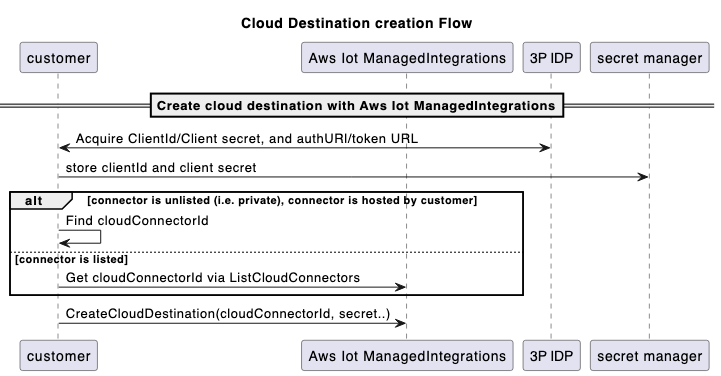
**注記**
この手順では、必要に応じて [GetCloudConnector](https://docs.aws.amazon.com/iot-mi/latest/APIReference/API_GetCloudConnector.html)、[UpdateCloudConnector](https://docs.aws.amazon.com/iot-mi/latest/APIReference/API_UpdateCloudConnector.html)、[DeleteCloudConnector](https://docs.aws.amazon.com/iot-mi/latest/APIReference/API_DeleteCloudConnector.html)、および [ListCloudConnectors](https://docs.aws.amazon.com/iot-mi/latest/APIReference/API_ListCloudConnectors.html) APIsを使用します。
1. **CreateAccountAssociation**
関連付けは、エンドユーザーのサードパーティーのクラウドアカウントとコネクタの送信先との関係を表します。関連付けを作成し、エンドユーザーをマネージド統合にリンクすると、そのデバイスは一意の**関連付け ID** を介してアクセスできるようになります。この統合により、デバイスの検出、コマンドの送信、イベントの受信の 3 つの主要な機能が有効になります。
**前提条件**
**AccountAssociation** を作成する前に、以下を完了する必要があります。
+ [CreateConnectorDestination](https://docs.aws.amazon.com/iot-mi/latest/APIReference/API_CreateConnectorDestination.html) API を呼び出して送信先を作成します。関数が返す ID は、[CreateAccountAssociation](https://docs.aws.amazon.com/iot-mi/latest/APIReference/API_CreateAccountAssociation.html) API コールで使用されます。
+ [CreateAccountAssociation](https://docs.aws.amazon.com/iot-mi/latest/APIReference/API_CreateAccountAssociation.html) API を呼び出します。
**CreateAccountAssociation API リクエストとレスポンスの例:**
```
Request:
{
"Name": "CreateAccountAssociation",
"Description": "CreateAccountAssociation",
"ConnectorDestinationId": "<{{destinationId}}>", //The destinationID from destination creation.
"ClientToken": "***"
}
Response:
{
"Id":"string"
}
```
**注記**
この手順では、必要に応じて [GetCloudConnector](https://docs.aws.amazon.com/iot-mi/latest/APIReference/API_GetCloudConnector.html)、[UpdateCloudConnector](https://docs.aws.amazon.com/iot-mi/latest/APIReference/API_UpdateCloudConnector.html)、[DeleteCloudConnector](https://docs.aws.amazon.com/iot-mi/latest/APIReference/API_DeleteCloudConnector.html)、および [ListCloudConnectors](https://docs.aws.amazon.com/iot-mi/latest/APIReference/API_ListCloudConnectors.html) APIsを使用します。
**AccountAssociation** には、[GetAccountAssociation](https://docs.aws.amazon.com/iot-mi/latest/APIReference/API_GetAccountAssociation.html) API と [ListAccountAssociations](https://docs.aws.amazon.com/iot-mi/latest/APIReference/API_ListAccountAssociations.html) APIs。これらの APIs、**関連付け**の状態を示します。[StartAccountAssociationRefresh](https://docs.aws.amazon.com/iot-mi/latest/APIReference/API_StartAccountAssociationRefresh.html) API を使用すると、更新トークンの有効期限が切れたときに **AccountAssociation** 状態を更新できます。
1. **デバイス検出**
各マネージド型モノは、シリアル番号やデータモデルなど、デバイス固有の詳細にリンクされます。データモデルはデバイスの機能を記述し、電球、スイッチ、サーモスタット、または別のタイプのデバイスであるかどうかを示します。3P デバイスを検出し、3P デバイス用の managedThing を作成するには、以下のステップを順番に実行する必要があります。
1. [StartDeviceDiscovery](https://docs.aws.amazon.com/iot-mi/latest/APIReference/API_StartDeviceDiscovery.html) API を呼び出して、デバイス検出プロセスを開始します。
**StartDeviceDiscovery API リクエストとレスポンスの例:**
```
Request:
{
"DiscoveryType": "CLOUD",
"AccountAssociationId": "*****",
"ClientToken": "abc"
}
Response:
{
"Id": "string",
"StartedAt": number
}
```
1. [GetDeviceDiscovery](https://docs.aws.amazon.com/iot-mi/latest/APIReference/API_GetDeviceDiscovery.html) API を呼び出して、検出プロセスのステータスを確認します。
1. [ListDiscoveredDevices](https://docs.aws.amazon.com/iot-mi/latest/APIReference/API_ListDiscoveredDevices.html) API を呼び出して、検出されたデバイスを一覧表示します。
**ListDiscoveredDevices API リクエストとレスポンスの例:**
```
Request:
//Empty body
Response:
{
"Items": [
{
"Brand": "string",
"ConnectorDeviceId": "string",
"ConnectorDeviceName": "string",
"DeviceTypes": [ "string" ],
"DiscoveredAt": number,
"ManagedThingId": "string",
"Model": "string",
"Modification": "string"
}
],
"NextToken": "string"
}
```
1. [CreateManagedThing](https://docs.aws.amazon.com/iot-mi/latest/APIReference/API_CreateManagedThing.html) API を呼び出して、検出リストからマネージド統合にインポートするデバイスを選択します。
**CreateManagedThing API リクエストとレスポンスのサンプル:**
```
Request:
{
"Role": "DEVICE",
"AuthenticationMaterial": "CLOUD:XXXX:",
"AuthenticationMaterialType": "DISCOVERED_DEVICE",
"Name": "sample-device-name"
"ClientToken": "xxx"
}
Response:
{
"Arn": "string", // This is the ARN of the managedThing
"CreatedAt": number,
"Id": "string"
}
```
1. [GetManagedThing](https://docs.aws.amazon.com/iot-mi/latest/APIReference/API_GetManagedThing.html) API を呼び出して、新しく作成されたこの を表示します`managedThing`。ステータスは になります`UNASSOCIATED`。
1. [RegisterAccountAssociation](https://docs.aws.amazon.com/iot-mi/latest/APIReference/API_RegisterAccountAssociation.html) API を呼び出して、これを特定の `managedThing`に関連付けます`accountAssociation`。[RegisterAccountAssociation](https://docs.aws.amazon.com/iot-mi/latest/APIReference/API_RegisterAccountAssociation.html) API が正常に終了すると、 は `ASSOCIATED`状態`managedThing`に変更されます。
**RegisterAccountAssociation API リクエストとレスポンスの例:**
```
Request:
{
"AccountAssociationId": "string",
"DeviceDiscoveryId": "string",
"ManagedThingId": "string"
}
Response:
{
"AccountAssociationId": "string",
"DeviceDiscoveryId": "string",
"ManagedThingId": "string"
}
```
1. **3P デバイスにコマンドを送信する**
新しくオンボーディングされたデバイスを制御するには、[SendManagedThingCommand](https://docs.aws.amazon.com/iot-mi/latest/APIReference/API_SendManagedThingCommand.html) API を使用し、以前に作成した**関連付け ID** と、デバイスでサポートされている機能に基づくコントロールアクションを使用します。コネクタは、アカウントリンクプロセスから保存された認証情報を使用して、サードパーティーのクラウドで認証し、オペレーションに関連する API コールを呼び出します。
**SendManagedThingCommand API リクエストとレスポンスの例:**
```
Request:
{
"AccountAssociationId": "string",
"ConnectorAssociationId": "string",
"Endpoints": [
{
"capabilities": [
{
"actions": [
{
"actionTraceId": "string",
"name": "string",
"parameters": JSON value,
"ref": "string"
}
],
"id": "string",
"name": "string",
"version": "string"
}
],
"endpointId": "string"
}
]
}
Response:
{
"TraceId": "string"
}
```
**3P デバイスフローにコマンドを送信します。**
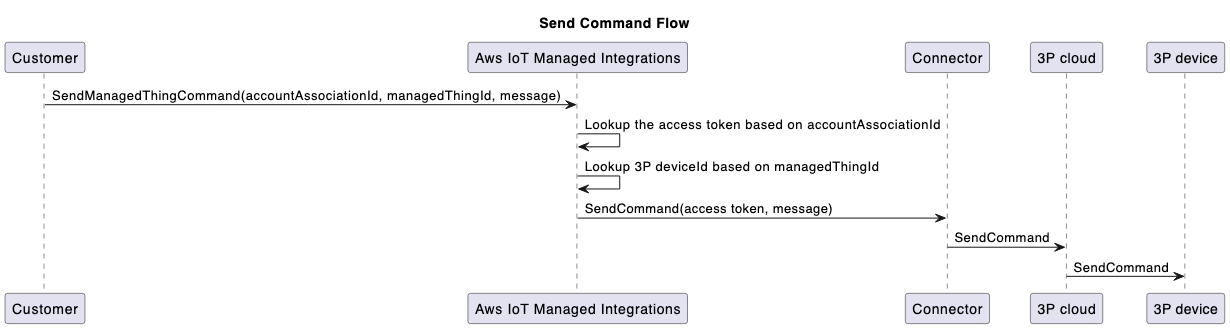
1. **コネクタがマネージド統合にイベントを送信する**
[SendConnectorEvent](https://docs.aws.amazon.com/iot-mi/latest/APIReference/API_SendConnectorEvent.html) API は、コネクタからマネージド統合への 4 種類のイベントをキャプチャします。これは、**Operation Type** パラメータの次の列挙値で表されます。
+ **DEVICE\_COMMAND\_RESPONSE**: コマンドに応答してコネクタが送信する非同期レスポンス。
+ **DEVICE\_DISCOVERY**: デバイス検出プロセスに応答して、コネクタは検出されたデバイスのリストをマネージド統合に送信し、[SendConnectorEvent](https://docs.aws.amazon.com/iot-mi/latest/APIReference/API_SendConnectorEvent.html) API を使用します。
+ **DEVICE\_EVENT**: 受信したデバイスイベントを送信します。
+ **DEVICE\_COMMAND\_REQUEST**: デバイスから開始されたコマンドリクエスト。例えば、WebRTC ワークフローなどです。
コネクタは、オプションの `userId`パラメータを指定して、[SendConnectorEvent](https://docs.aws.amazon.com/iot-mi/latest/APIReference/API_SendConnectorEvent.html) API を使用してデバイスイベントを転送することもできます。
+ を持つデバイスイベントの場合`userId`:
**SendConnectorEvent API リクエストとレスポンスの例:**
```
Request:
{
"UserId": "*****",
"Operation": "DEVICE_EVENT",
"OperationVersion": "1.0",
"StatusCode": 200,
"ConnectorId": "****",
"ConnectorDeviceId": "***",
"TraceId": "***",
"MatterEndpoint": {
"id": "**",
"clusters": [{
.....
}
}]
}
}
Response:
{
"ConnectorId": "string"
}
```
+ のないデバイスイベントの場合`userId`:
**SendConnectorEvent API リクエストとレスポンスの例:**
```
Request:
{
"Operation": "DEVICE_EVENT",
"OperationVersion": "1.0",
"StatusCode": 200,
"ConnectorId": "*****",
"ConnectorDeviceId": "****",
"TraceId": "****",
"MatterEndpoint": {
"id": "**",
"clusters": [{
....
}]
}
}
Response:
{
"ConnectorId": "string"
}
```
特定の `managedThing`とアカウントの関連付け間のリンクを削除するには、登録解除メカニズムを使用します。
**DeregisterAccountAssociation API リクエストとレスポンスの例:**
```
Request:
{
"AccountAssociationId": "****",
"ManagedThingId": "****"
}
Response:
HTTP/1.1 200 // Empty body
```
**イベントフローの送信:**
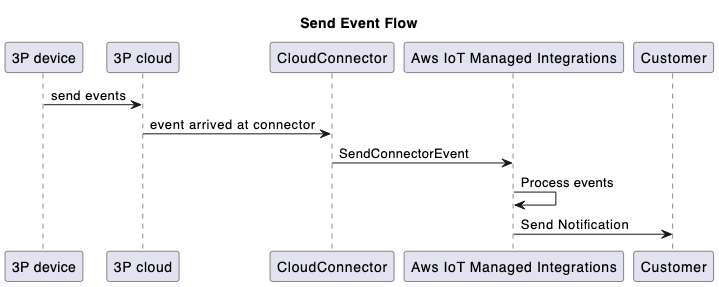
1. **コネクタのステータスを「Listed」に更新して、他のマネージド統合のお客様が表示できるようにします。**
デフォルトでは、コネクタはプライベートであり、コネクタを作成した AWS アカウントにのみ表示されます。コネクタを他のマネージド統合のお客様に表示することを選択できます。
コネクタを他のユーザーと共有するには、コネクタの詳細ページの AWS マネジメントコンソール **「表示**可能にする」オプションを使用して、レビュー AWS のためにコネクタ ID を に送信します。承認されると、コネクタは同じ 内のすべてのマネージド統合ユーザーが使用できます AWS リージョン。さらに、コネクタの関連 AWS Lambda 関数のアクセスポリシーを変更することで、特定の AWS アカウント IDs へのアクセスを制限できます。コネクタを他のお客様が使用できるようにするには、他の AWS アカウントから可視コネクタへの Lambda 関数に対する IAM アクセス許可を管理します。
コネクタを他のマネージド統合の顧客に表示する前に、コネクタの共有とアクセス許可を管理する AWS のサービス 用語と組織のポリシーを確認してください。