翻訳は機械翻訳により提供されています。提供された翻訳内容と英語版の間で齟齬、不一致または矛盾がある場合、英語版が優先します。
# 開始方法: Amazon EventBridge パイプを作成する
パイプとその機能に慣れるために、 CloudFormation テンプレートを使用して EventBridge パイプと関連するコンポーネントを設定します。その後、さまざまなパイプ機能を確認できるようになります。
**ヒント**
より包括的で実践的な学習体験を得るには、[EventBridge Pipes Workshop](https://catalog.workshops.aws/eb-pipes) をお試しください。このインタラクティブなワークショップでは、DynamoDB を Lambda エンリッチメントで API Gateway に接続するパイプの構築とトラブルシューティングについて説明します。
テンプレートを使用すると、DynamoDB テーブルから Amazon SQS キューにストリームを接続する EventBridge パイプを作成できます。パイプは、データベーステーブルでレコードが作成または変更されるたびに、結果のイベントをキューに送信します。
デプロイされたパイプは、以下で構成されます。
+ パイプのソースとなる DynamoDB テーブル (およびストリーム) と、ターゲットとなる Amazon SQS キュー。
+ DynamoDB テーブルと Amazon SQS キューにアクセスするために必要なアクセス許可を EventBridge に付与する実行ロール。
+ パイプ本体。テーブル項目の作成 (挿入) または変更時に生成されたイベントのみを選択するイベントフィルターが含まれています。
テンプレートの具体的な技術的詳細については、「[テンプレートの詳細](#pipes-get-started-template-details)」を参照してください。

## CloudFormation を使用したパイプの作成
パイプとその関連リソースを作成するには、CloudFormation テンプレートを作成し、それを使用してサンプルパイプおよびソースとターゲットが揃ったスタックを作成します。
**重要**
このテンプレートからスタックを作成した場合、Amazon リソースに対する料金が発生します。
### テンプレートの作成
まず、CloudFormation テンプレートを作成します。
1. [テンプレート](#pipes-get-started-template) セクションで、**[JSON]** または **[YAML]** タブのコピーアイコンをクリックして、テンプレートの内容をコピーします。
1. テンプレートの内容を新しいファイルに貼り付けます。
1. ファイルをローカルに保存します。
### スタックの作成
次に、保存したテンプレートを使用して CloudFormation スタックをプロビジョニングします。
1. クラウドフォーメーション コンソール の[https://console.aws.amazon.com/cloudformation/](https://console.aws.amazon.com/cloudformation/) 開きます:
1. **[スタック]** ページでは、**[スタックの作成]** メニューで **[新しいリソースを使用 (標準)]** を選択します。
1. テンプレートを指定します。
1. **[前提条件]** で、**[既存のテンプレートを選択]** を選択します。
1. **[テンプレートの指定]** で、**[テンプレートファイルのアップロード]** を選択します。
1. **[ファイルを選択]** を選択し、テンプレートファイルに移動して選択します。
1. [**次へ**] を選択します。
1. スタックの詳細を指定します:
1. スタック名を入力します。
1. パラメータについては、デフォルト値を受け入れるか独自の値を入力します。
1. [**次へ**] を選択します。
1. スタックオプションを設定します。
1. **[スタック障害オプション]** で、**[新しく作成されたリソースをすべて削除]** を選択します。
**注記**
このオプションを選択すると、スタックの作成に失敗した場合でも削除ポリシーで保持するように指定されているリソースに対して、課金される可能性を防ぐことができます。詳細については、「*CloudFormation ユーザーガイド*」の「[`DeletionPolicy` 属性](https://docs.aws.amazon.com/AWSCloudFormation/latest/UserGuide/aws-attribute-deletionpolicy.html)」を参照してください。
1. 他はすべて、デフォルト値を受け入れます。
1. **[機能]** では、チェックボックスをオンにして、CloudFormation によってアカウントに IAM リソースが作成される場合があることを承認します。
1. [**次へ**] を選択します。
1. スタックの詳細を確認して、**[送信]** を選択します。
**CloudFormation を使用してスタックを作成する (AWS CLI)**
を使用してスタック AWS CLI を作成することもできます。
+ [https://docs.aws.amazon.com/cli/latest/reference/cloudformation/create-stack.html](https://docs.aws.amazon.com/cli/latest/reference/cloudformation/create-stack.html) コマンドを使用します。
+ デフォルトのテンプレートパラメータ値を受け入れ、スタック名を指定します。`template-body` パラメータを使用してテンプレートコンテンツを渡すか、`template-url` で URL の場所を指定します。
```
aws cloudformation create-stack \
--stack-name {{eventbridge-rule-tutorial}} \
--template-body {{template-contents}} \
--capabilities CAPABILITY_IAM
```
+ 1 つまたは複数のテンプレートパラメータのデフォルト値を上書きします。例えば、次のようになります。
```
aws cloudformation create-stack \
--stack-name {{eventbridge-rule-tutorial}} \
--template-body {{template-contents}} \
--parameters \
ParameterKey=SourceTableName,ParameterValue={{pipe-example-source}} \
ParameterKey=TargetQueueName,ParameterValue={{pipe-example-target}} \
ParameterKey=PipeName,ParameterValue={{pipe-with-filtering-example}} \
--capabilities CAPABILITY_IAM
```
CloudFormation はスタックを作成します。スタックの作成が完了すると、スタックリソースを使用する準備が整います。スタックの詳細ページの **[リソース]** タブを使用して、アカウントにプロビジョニングされたリソースを表示できます。
## パイプ機能の確認
パイプが作成されたら、EventBridge コンソールを使用して、パイプの動作とテストイベントの配信を監視できます。
1. [https://console.aws.amazon.com/events/home?\#/pipes](https://console.aws.amazon.com/events/home?#/pipes) で、EventBridge コンソールを開きます。
1. 作成したパイプを選択します。
パイプの詳細ページの **[パイプコンポーネント]** セクションには、パイプを構成するリソースが表示されます。またこのページには、各コンポーネントの詳細を示すタブも表示されます。
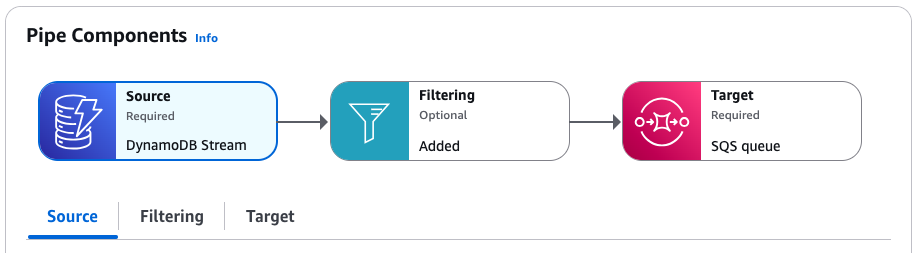
パイプ用に作成した実行ロールは、**[設定]** タブの **[アクセス許可]** セクションにあります。
### パイプフィルターの検証
パイプの動作をテストする前に、ターゲットに送信するイベントを制御するために指定したフィルターを確認しましょう。パイプは、フィルター条件に一致するイベントのみをターゲットに送信します。対象外のイベントはすべて破棄されます。この場合、テーブルエントリの作成または変更時に生成されたイベントのみが Amazon SQS キューに送信されるようにします。
+ パイプの詳細ページの **[パイプコンポーネント]** で、**[フィルタリング]** タブを選択します。
`eventName` が `INSERT` または `MODIFY` に設定されているイベントのみを選択するフィルターが含まれています。
```
{
"eventName": ["INSERT", "MODIFY"]
}
```
### パイプを介したイベントの送信
次に、パイプソースでイベントを生成して、パイプのフィルタリングと配信が正常に動作していることをテストします。このテストを行うには、パイプソースとして指定した DynamoDB テーブルで項目を作成および編集します。
1. パイプの詳細ページの **[パイプコンポーネント]** で、**[ソース]** タブを選択します。
1. **[ソース]** で、DynamoDB ストリーム名を選択します。
この操作で、DynamoDB コンソールが別のウィンドウで開き、ソーステーブルの詳細が表示されます。
1. **Explore items** を選択します。
1. テーブルに項目を作成して `INSERT` イベントを生成します。
1. **[項目を作成]** を選択します。
1. **[アルバム]** 属性と **[アーティスト]** 属性の値を追加します。
1. **[項目を作成]** を選択します。
1. 項目を編集して `DELETE` と `INSERT` のイベントを生成します。
1. リストから項目を選択し、**[アクション]** メニューから **[項目の編集]** を選択します。
1. **[アルバム]** または **[アーティスト]** 属性に新しい値を入力します。
1. 項目キーの値の変更確認チェックボックスをオンにし、**[項目を再作成]** を選択します。
この操作で、項目が削除および再作成され、`DELETE` イベントと新しい `INSERT` イベントが生成されます。
1. 項目に属性を追加して `MODIFY` イベントを生成します。
1. リストから項目を選択し、**[アクション]** メニューから **[項目の編集]** を選択します。
1. **[新しい属性を追加]** メニューから、**[数値]** を選択します。
1. 属性名に **[年]** と入力し、属性の値を入力します。**[保存して閉じる]** を選択します。
### パイプを介したイベント配信の確認
最後に、DynamoDB でテーブル項目を作成および編集することで生成したイベントを、パイプが正常にフィルタリングおよび配信したことを確認します。
1. パイプの詳細ページの **[パイプコンポーネント]** で、**[ターゲット]** タブを選択します。
1. **[ターゲット]** で、Amazon SQS キュー名を選択します。
この操作で、Amazon SQS コンソールが別のウィンドウで開き、ターゲットキューの詳細が表示されます。
1. **[メッセージの送信と受信]** を選択します。
1. **[メッセージを受信]** で、**[メッセージのポーリング]** を選択します。
Amazon SQS が、受信したメッセージをキューにロードします。個々のメッセージをクリックすると、その詳細が表示されます。
キューには 3 つのイベントメッセージがあります。
+ `INSERT` タイプが 2 つあります。1 つはテーブル項目を最初に作成したときに生成されます。もう 1 つは、キー値を変更して項目を再作成したときに生成されます。
+ `MODIFY` タイプ が 1 つあります。これはテーブル項目に属性を追加したときに生成されます。
キー値を変更してテーブル項目を削除および再作成したときにイベントメッセージが生成されましたが、キューには `DELETE` タイプのイベントメッセージがないことに注意してください。指定したパイプフィルターは `INSERT` と `MODIFY` のみ選択するため、パイプは `DELETE` イベントをキューに配信せずに除外します。
## クリーンアップ: リソースの削除
最後のステップとして、スタックとそれに含まれるリソースを削除します。
**重要**
スタックに含まれる Amazon リソースが存在する限り料金が発生するためです。
1. クラウドフォーメーション コンソール の[https://console.aws.amazon.com/cloudformation/](https://console.aws.amazon.com/cloudformation/) 開きます:
1. **[スタック]** ページで、テンプレートから作成されたスタックを選択し、**[削除]** を選択してから、**[削除]** で確定します。
CloudFormation は、スタックとそれに含まれるすべてのリソースの削除を開始します。
## CloudFormation テンプレートファイルの詳細
このテンプレートは、アカウントにリソースを作成し、アクセス許可を付与します。
### リソース
このチュートリアルで使用する CloudFormation テンプレートでは、以下のリソースがアカウントに作成されます。
**重要**
このテンプレートからスタックを作成した場合、Amazon リソースに対する料金が発生します。
+ [https://docs.aws.amazon.com/AWSCloudFormation/latest/UserGuide/aws-resource-dynamodb-table.html](https://docs.aws.amazon.com/AWSCloudFormation/latest/UserGuide/aws-resource-dynamodb-table.html): パイプのイベントソースとして機能する DynamoDB テーブル。
+ [https://docs.aws.amazon.com/AWSCloudFormation/latest/UserGuide/aws-resource-sqs-queue.html](https://docs.aws.amazon.com/AWSCloudFormation/latest/UserGuide/aws-resource-sqs-queue.html): パイプを流れるイベントのターゲットとして機能する Amazon SQS キュー。
+ [https://docs.aws.amazon.com/AWSCloudFormation/latest/UserGuide/aws-resource-iam-role.html](https://docs.aws.amazon.com/AWSCloudFormation/latest/UserGuide/aws-resource-iam-role.html): アカウントの EventBridge Pipes サービスにアクセス許可を付与する IAM 実行ロール。
+ [https://docs.aws.amazon.com/AWSCloudFormation/latest/UserGuide/aws-resource-pipes-pipe.html](https://docs.aws.amazon.com/AWSCloudFormation/latest/UserGuide/aws-resource-pipes-pipe.html): DynamoDB テーブルを Amazon SQS キューに接続するパイプ。
### アクセス許可
テンプレートには、実行ロールを表す `AWS::IAM::Role` リソースが含まれています。このロールは、EventBridge Pipes サービス (`pipes.amazonaws.com`) にアカウント内の次のアクセス許可を付与します。
次のアクセス許可は、DynamoDB テーブルと、テンプレートがパイプのイベントソースとして作成するストリームに限定されます。
+ `dynamodb:DescribeStream`
+ `dynamodb:GetRecords`
+ `dynamodb:GetShardIterator`
+ `dynamodb:ListStreams`
次のアクセス許可は、スタックがパイプのターゲットとして作成する Amazon SQS キューに限定されます。
+ `sqs:SendMessage`
## CloudFormation テンプレート
次の JSON または YAML コードを別のファイルとして保存し、このチュートリアルの CloudFormation テンプレートとして使用します。
------
#### [ JSON ]
```
{
"AWSTemplateFormatVersion": "2010-09-09",
"Description" : "[AWSDocs] EventBridge: pipes-get-started",
"Parameters" : {
"SourceTableName" : {
"Type" : "String",
"Default" : "pipe-example-source",
"Description" : "Specify the name of the table to provision as the pipe source, or accept the default."
},
"TargetQueueName" : {
"Type" : "String",
"Default" : "pipe-example-target",
"Description" : "Specify the name of the queue to provision as the pipe target, or accept the default."
},
"PipeName" : {
"Type" : "String",
"Default" : "pipe-with-filtering-example",
"Description" : "Specify the name of the table to provision as the pipe source, or accept the default."
}
},
"Resources": {
"PipeSourceDynamoDBTable": {
"Type": "AWS::DynamoDB::Table",
"Properties": {
"AttributeDefinitions": [{
"AttributeName": "Album",
"AttributeType": "S"
},
{
"AttributeName": "Artist",
"AttributeType": "S"
}
],
"KeySchema": [{
"AttributeName": "Album",
"KeyType": "HASH"
},
{
"AttributeName": "Artist",
"KeyType": "RANGE"
}
],
"ProvisionedThroughput": {
"ReadCapacityUnits": 10,
"WriteCapacityUnits": 10
},
"StreamSpecification": {
"StreamViewType": "NEW_AND_OLD_IMAGES"
},
"TableName": { "Ref" : "SourceTableName" }
}
},
"PipeTargetQueue": {
"Type": "AWS::SQS::Queue",
"Properties": {
"QueueName": { "Ref" : "TargetQueueName" }
}
},
"PipeTutorialPipeRole": {
"Type": "AWS::IAM::Role",
"Properties": {
"AssumeRolePolicyDocument": {
"Version": "2012-10-17",
"Statement": [{
"Effect": "Allow",
"Principal": {
"Service": "pipes.amazonaws.com"
},
"Action": "sts:AssumeRole",
"Condition": {
"StringLike": {
"aws:SourceArn": {
"Fn::Join": [
"",
[
"arn:",
{ "Ref": "AWS::Partition" },
":pipes:",
{ "Ref": "AWS::Region" },
":",
{ "Ref": "AWS::AccountId" },
":pipe/",
{ "Ref": "PipeName" }
]
]
},
"aws:SourceAccount": { "Ref" : "AWS::AccountId" }
}
}
}]
},
"Description" : "EventBridge Pipe template example. Execution role that grants the pipe the permissions necessary to send events to the specified pipe.",
"Path": "/",
"Policies": [{
"PolicyName": "SourcePermissions",
"PolicyDocument": {
"Version": "2012-10-17",
"Statement": [{
"Effect": "Allow",
"Action": [
"dynamodb:DescribeStream",
"dynamodb:GetRecords",
"dynamodb:GetShardIterator",
"dynamodb:ListStreams"
],
"Resource": [
{ "Fn::GetAtt" : [ "PipeSourceDynamoDBTable", "StreamArn" ] }
]
}]
}
},
{
"PolicyName": "TargetPermissions",
"PolicyDocument": {
"Version": "2012-10-17",
"Statement": [{
"Effect": "Allow",
"Action": [
"sqs:SendMessage"
],
"Resource": [
{ "Fn::GetAtt" : [ "PipeTargetQueue", "Arn" ] }
]
}]
}
}
]
}
},
"PipeWithFiltering": {
"Type": "AWS::Pipes::Pipe",
"Properties": {
"Description" : "EventBridge Pipe template example. Pipe that receives events from a DynamoDB stream, applies a filter, and sends matching events on to an SQS Queue.",
"Name": { "Ref" : "PipeName" },
"RoleArn": {"Fn::GetAtt" : ["PipeTutorialPipeRole", "Arn"] },
"Source": { "Fn::GetAtt" : [ "PipeSourceDynamoDBTable", "StreamArn" ] },
"SourceParameters": {
"DynamoDBStreamParameters" : {
"StartingPosition" : "LATEST"
},
"FilterCriteria" : {
"Filters" : [ {
"Pattern" : "{ \"eventName\": [\"INSERT\", \"MODIFY\"] }"
}]
}
},
"Target": { "Fn::GetAtt" : [ "PipeTargetQueue", "Arn" ] }
}
}
}
}
```
------
#### [ YAML ]
```
AWSTemplateFormatVersion: '2010-09-09'
Description: '[AWSDocs] EventBridge: pipes-get-started'
Parameters:
SourceTableName:
Type: String
Default: pipe-example-source
Description: Specify the name of the table to provision as the pipe source, or accept the default.
TargetQueueName:
Type: String
Default: pipe-example-target
Description: Specify the name of the queue to provision as the pipe target, or accept the default.
PipeName:
Type: String
Default: pipe-with-filtering-example
Description: Specify the name of the table to provision as the pipe source, or accept the default.
Resources:
PipeSourceDynamoDBTable:
Type: AWS::DynamoDB::Table
Properties:
AttributeDefinitions:
- AttributeName: Album
AttributeType: S
- AttributeName: Artist
AttributeType: S
KeySchema:
- AttributeName: Album
KeyType: HASH
- AttributeName: Artist
KeyType: RANGE
ProvisionedThroughput:
ReadCapacityUnits: 10
WriteCapacityUnits: 10
StreamSpecification:
StreamViewType: NEW_AND_OLD_IMAGES
TableName: !Ref SourceTableName
PipeTargetQueue:
Type: AWS::SQS::Queue
Properties:
QueueName: !Ref TargetQueueName
PipeTutorialPipeRole:
Type: AWS::IAM::Role
Properties:
AssumeRolePolicyDocument:
Version: '2012-10-17'
Statement:
- Effect: Allow
Principal:
Service: pipes.amazonaws.com
Action: sts:AssumeRole
Condition:
StringLike:
aws:SourceArn: !Join
- ''
- - 'arn:'
- !Ref AWS::Partition
- ':pipes:'
- !Ref AWS::Region
- ':'
- !Ref AWS::AccountId
- ':pipe/'
- !Ref PipeName
aws:SourceAccount: !Ref AWS::AccountId
Description: EventBridge Pipe template example. Execution role that grants the pipe the permissions necessary to send events to the specified pipe.
Path: /
Policies:
- PolicyName: SourcePermissions
PolicyDocument:
Version: '2012-10-17'
Statement:
- Effect: Allow
Action:
- dynamodb:DescribeStream
- dynamodb:GetRecords
- dynamodb:GetShardIterator
- dynamodb:ListStreams
Resource:
- !GetAtt PipeSourceDynamoDBTable.StreamArn
- PolicyName: TargetPermissions
PolicyDocument:
Version: '2012-10-17'
Statement:
- Effect: Allow
Action:
- sqs:SendMessage
Resource:
- !GetAtt PipeTargetQueue.Arn
PipeWithFiltering:
Type: AWS::Pipes::Pipe
Properties:
Description: EventBridge Pipe template example. Pipe that receives events from a DynamoDB stream, applies a filter, and sends matching events on to an SQS Queue.
Name: !Ref PipeName
RoleArn: !GetAtt PipeTutorialPipeRole.Arn
Source: !GetAtt PipeSourceDynamoDBTable.StreamArn
SourceParameters:
DynamoDBStreamParameters:
StartingPosition: LATEST
FilterCriteria:
Filters:
- Pattern: '{ "eventName": ["INSERT", "MODIFY"] }'
Target: !GetAtt PipeTargetQueue.Arn
```
------