翻訳は機械翻訳により提供されています。提供された翻訳内容と英語版の間で齟齬、不一致または矛盾がある場合、英語版が優先します。
Appium を使用してデバイスを操作する
リモートアクセスセッションを作成すると、デバイスは Appium テストに使用できます。リモートアクセスセッションの期間中は、デバイス上で必要な数の Appium セッションを実行できます。使用するクライアントに制限はありません。例えば、まず IDE のローカル Appium コードを使用してテストを実行し、Appium Inspector を使用して発生した問題のトラブルシューティングに切り替えることができます。セッションは最大 150 分かかることがありますが、5 分以上アクティビティがない場合 (インタラクティブコンソールまたは Appium エンドポイント経由)、セッションはタイムアウトします。
Appium セッションでのテストにアプリを使用する
Appium セッションで使用するアプリを提供するには、いくつかの方法があります。
-
Device Farm にアプリケーションをアップロードし、セッションにインストールします。
-
appium:app 機能として HTTPS URL または Amazon S3 URI を指定します。
-
既にインストールされているアプリをパッケージ名で参照します (Android または iOS appium:bundleId appium:appPackageで を使用)。
-
browserName 機能 (ChromeAndroid では 、iOS Safariでは ) を指定してウェブアプリケーションをテストします。
標準のアプリケーションサイズ制限 (4 GB) は、すべてのアプリケーションソースに適用されます。
Device Farm は、リモートアクセスセッションappium:app中に にローカルファイルシステムパスを渡すことをサポートしていません。
アプリケーションのアップロード、インストール、使用
アップロードしたアプリを Appium セッションで使用するには、次の手順に従います。
-
アプリをアップロードしてインストールする
テスト対象のデバイスにアプリをアップロードしてインストールするには、次の 2 つの方法があります。
-
インストールされたアプリを使用する
インストールされると、後続の Appium セッションのデフォルトappium:app機能としてアプリが自動的に挿入されます。補助アプリを含めた場合は、 appium:otherApps機能として設定されます。
たとえば、 をアプリcom.aws.devicefarm.sampleとして使用し、補助アプリの 1 つcom.aws.devicefarm.other.sampleとして使用してリモートアクセスセッションを作成する場合、Appium セッションの作成に移動すると、次のような機能があります。
{
    "value":
    {
        "sessionId": "abcdef123456-1234-5678-abcd-abcdef123456",
        "capabilities":
        {
            "app": "/tmp/com.aws.devicefarm.sample.apk",
            "otherApps": "[\"/tmp/com.aws.devicefarm.other.sample.apk\"]",
            ...
        }
    }
}
セッション中に新しいアプリをインストールすると、現在のappium:app機能が置き換えられます。以前にインストールされたアプリケーションに個別のパッケージ名がある場合、そのアプリケーションはデバイス上に残り、 appium:otherApps機能に移動します。
たとえば、最初にリモートアクセスセッションの作成com.aws.devicefarm.sample時に を使用し、セッションcom.aws.devicefarm.other.sample中に をインストールすると、Appium セッションには次のような機能があります。
{
    "value":
    {
        "sessionId": "abcdef123456-1234-5678-abcd-abcdef123456",
        "capabilities":
        {
            "app": "/tmp/com.aws.devicefarm.other.sample.apk",
            "otherApps": "[\"/tmp/com.aws.devicefarm.sample.apk\"]",
            ...
        }
    }
}
HTTPS URL の使用
Appium セッションを作成するときに、パブリックにアクセス可能な HTTPS URL をappium:app必要な機能として指定できます。URL は、ダウンロード可能なアプリファイル ( .apkや .ipa ファイルなど) を直接指している必要があります。Device Farm は、指定された URL からアプリケーションをダウンロードし、テスト対象のデバイスにインストールします。
HTTPS URLsされています。プレーン HTTP URLsは拒否されます。
たとえば、次の Appium セッション作成リクエストは、HTTPS URL からアプリをダウンロードします。
{
    "capabilities":
    {
        "alwaysMatch": {},
        "firstMatch":
        [
            {
                "appium:app": "https://example.com/path/to/MyApp.apk"
            }
        ]
    }
}
Amazon S3 URI の使用
Appium セッションを作成するときに、appium:app必要な機能として Amazon S3 URI ( などs3://my-bucket/path/to/MyApp.ipa) を指定できます。Device Farm は、指定された S3 の場所からアプリをダウンロードし、テスト対象のデバイスにインストールします。
S3 URI を使用するには、次の要件を満たす必要があります。
-
リモートアクセスセッションは、IAM 実行ロールが設定されたプロジェクトから開始する必要があります。
-
ロールはリモートアクセスセッションの期間中引き受けられるため、IAM 実行ロールの最大セッション時間は 150 分以上である必要があります。
-
IAM 実行ロールには、URI で指定された S3 オブジェクトs3:GetObjectで を呼び出すアクセス許可が必要です。また、同じオブジェクトに対するs3:HeadObjectアクセス許可を付与することをお勧めします。これにより、Device Farm はダウンロードを試みる前にオブジェクトの存在を検証できます。
たとえば、次の Appium セッション作成リクエストは、S3 URI からアプリをダウンロードします。
{
    "capabilities":
    {
        "alwaysMatch": {},
        "firstMatch":
        [
            {
                "appium:app": "s3://my-test-bucket/apps/MyApp.ipa"
            }
        ]
    }
}
以下は、オプションの アクセス許可を含め、Amazon S3 からアプリケーションをダウンロードするための推奨アクセス許可を付与する IAM s3:HeadObject アクセス許可ポリシーの例です。IAM 実行ロールの設定の詳細については、「」を参照してくださいIAM 実行ロールを使用して AWS リソースにアクセスする。
例
{
  "Version": "2012-10-17",
  "Statement": [
    {
      "Effect": "Allow",
      "Action": [
        "s3:GetObject",
        "s3:HeadObject"
      ],
      "Resource": "arn:aws:s3:::my-test-bucket/apps/*"
    }
  ]
}
既にインストールされているアプリの使用
テストするアプリがデバイスに既にインストールされている場合は、アップロードする代わりにパッケージ名で直接参照できます。Android の appium:appPackageおよび appium:appActivity機能、または iOS の appium:bundleId機能を使用します。
たとえば、次の Appium セッション作成リクエストは、既にインストールされている Android アプリを起動します。
{
    "capabilities":
    {
        "alwaysMatch": {},
        "firstMatch":
        [
            {
                "appium:appPackage": "com.example.myapp",
                "appium:appActivity": "com.example.myapp.MainActivity"
            }
        ]
    }
}
iOS では、appium:bundleId代わりに を使用します。
{
    "capabilities":
    {
        "alwaysMatch": {},
        "firstMatch":
        [
            {
                "appium:bundleId": "com.example.myapp"
            }
        ]
    }
}
ウェブアプリのテスト
ウェブアプリケーションをテストするには、Appium セッション作成リクエストで browserName機能を指定します。Android デバイスまたは Safari iOS デバイスで Chromeを使用します。
たとえば、次のリクエストは Android デバイスで Chrome を開きます。
{
    "capabilities":
    {
        "alwaysMatch": {},
        "firstMatch":
        [
            {
                "browserName": "Chrome"
            }
        ]
    }
}
Appium エンドポイントの使用方法
コンソール、、 AWS CLIおよび AWS SDKs からセッションの Appium エンドポイントにアクセスする手順は次のとおりです。これらのステップには、さまざまな Appium クライアントテストフレームワークを使用してテストの実行を開始する方法が含まれます。
- Console
-
-
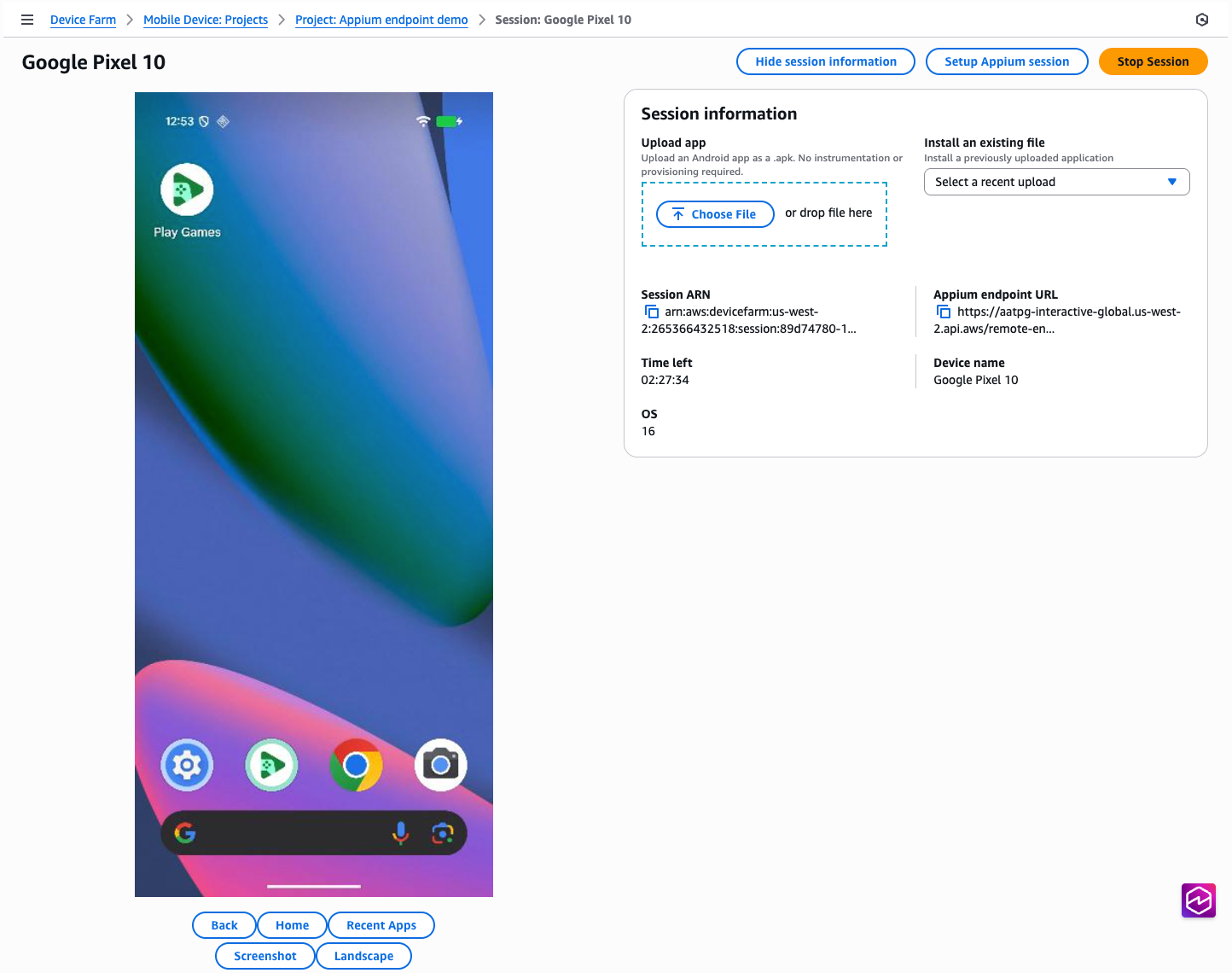
ウェブブラウザでリモートアクセスセッションページを開きます。
-
Appium Inspector を使用してセッションを実行するには、次の手順を実行します。
-
「Appium セッションのセットアップ」ボタンをクリックします。
-
Appium Inspector を使用してセッションを開始する方法については、ページの指示に従ってください。
-
ローカル IDE から Appium テストを実行するには、以下を実行します。
-
Appium エンドポイント URL テキストの横にある「コピー」アイコンをクリックします。
-
リモートアドレスまたはコマンドエグゼキュターを現在指定している場所に、この URL をローカル Appium コードに貼り付けます。言語固有の例については、このサンプルウィンドウのいずれかのタブをクリックして任意の言語を選択してください。
- AWS CLI
-
まず、最新バージョンをダウンロードしてインストールして、AWS CLI のバージョンがup-to-dateであることを確認します。
Appium エンドポイントフィールドは、古いバージョンの AWS CLI では使用できません。
セッションが起動して実行されると、GetRemoteAccessSessionAPI への呼び出しに対するレスポンスremoteDriverEndpointで という名前のフィールドを介して Appium エンドポイント URL が使用可能になります。
$ aws devicefarm get-remote-access-session \
    --arn "arn:aws:devicefarm:us-west-2:123456789876:session:abcdef123456-1234-5678-abcd-abcdef123456/abcdef123456-1234-5678-abcd-abcdef123456/00000"
これにより、次のような出力が表示されます。
{
    "remoteAccessSession": {
        "arn": "arn:aws:devicefarm:us-west-2:111122223333:session:abcdef123456-1234-5678-abcd-abcdef123456/abcdef123456-1234-5678-abcd-abcdef123456/00000",
        "name": "Google Pixel 8",
        "status": "RUNNING",
        "endpoints": {
            "remoteDriverEndpoint": "https://devicefarm-interactive-global.us-west-2.api.aws/remote-endpoint/ABCD1234...",
        ...
}
この URL は、現在リモートアドレスまたはコマンドエグゼキュターを指定しているローカル Appium コードで使用できます。言語固有の例については、このサンプルウィンドウのいずれかのタブをクリックして任意の言語を選択してください。
コマンドラインから直接エンドポイントを操作する方法の例については、コマンドラインツール curl を使用して WebDriver エンドポイントを直接呼び出すことができます。
$ curl "https://devicefarm-interactive-global.us-west-2.api.aws/remote-endpoint/ABCD1234.../status"
これにより、次のような出力が表示されます。
{
    "value":
    {
        "ready": true,
        "message": "The server is ready to accept new connections",
        "build":
        {
            "version": "2.5.1"
        }
    }
}
- Python
-
セッションが起動して実行されると、GetRemoteAccessSessionAPI への呼び出しに対するレスポンスremoteDriverEndpointで という名前のフィールドを介して Appium エンドポイント URL が使用可能になります。
# To get the URL
import sys
import boto3
from botocore.exceptions import ClientError

def get_appium_endpoint() -> str:
    session_arn = "arn:aws:devicefarm:us-west-2:111122223333:session:abcdef123456-1234-5678-abcd-abcdef123456/abcdef123456-1234-5678-abcd-abcdef123456/00000"
    device_farm_client = boto3.client("devicefarm", region_name="us-west-2")

    try:
        resp = device_farm_client.get_remote_access_session(arn=session_arn)
    except ClientError as exc:
        sys.exit(f"Failed to call Device Farm: {exc}")

    remote_access_session = resp.get("remoteAccessSession", {})
    endpoints = remote_access_session.get("endpoints", {})
    endpoint = endpoints.get("remoteDriverEndpoint")

    if not endpoint:
        sys.exit("Device Farm response did not include endpoints.remoteDriverEndpoint")

    return endpoint

# To use the URL
from appium import webdriver
from appium.options.android import UiAutomator2Options

opts = UiAutomator2Options()
driver = webdriver.Remote(get_appium_endpoint(), options=opts)
# ...
driver.quit()
- Java
-
注: この例では AWS SDK for Java v2 を使用し、JDK バージョン 11 以降と互換性があります。
セッションが起動して実行されると、GetRemoteAccessSessionAPI への呼び出しに対するレスポンスremoteDriverEndpointで という名前のフィールドを介して Appium エンドポイント URL が使用可能になります。
// To get the URL
import software.amazon.awssdk.auth.credentials.DefaultCredentialsProvider;
import software.amazon.awssdk.regions.Region;
import software.amazon.awssdk.services.devicefarm.DeviceFarmClient;
import software.amazon.awssdk.services.devicefarm.model.GetRemoteAccessSessionRequest;
import software.amazon.awssdk.services.devicefarm.model.GetRemoteAccessSessionResponse;

public class AppiumEndpointBuilder {
    public static String getAppiumEndpoint() throws Exception {
        String session_arn = "arn:aws:devicefarm:us-west-2:111122223333:session:abcdef123456-1234-5678-abcd-abcdef123456/abcdef123456-1234-5678-abcd-abcdef123456/00000";

        try (DeviceFarmClient client = DeviceFarmClient.builder()
                .region(Region.US_WEST_2)
                .credentialsProvider(DefaultCredentialsProvider.create())
                .build()) {

            GetRemoteAccessSessionResponse resp = client.getRemoteAccessSession(
                    GetRemoteAccessSessionRequest.builder().arn(session_arn).build()
            );

            String endpoint = resp.remoteAccessSession().endpoints().remoteDriverEndpoint();
            if (endpoint == null || endpoint.isEmpty()) {
                throw new IllegalStateException("remoteDriverEndpoint missing from response");
            }
            return endpoint;
        }
    }
}

// To use the URL
import io.appium.java_client.android.AndroidDriver;
import io.appium.java_client.android.options.UiAutomator2Options;

import java.net.URL;

public class ExampleTest {
    public static void main(String[] args) throws Exception {
        String endpoint = AppiumEndpointBuilder.getAppiumEndpoint();
        UiAutomator2Options options = new UiAutomator2Options();
        AndroidDriver driver = new AndroidDriver(new URL(endpoint), options);

        try {
            // ... your test ...
        } finally {
            driver.quit();
        }
    }
}
- JavaScript
-
注: この例では、 AWS SDK for JavaScript v3 と Node 18+ を使用する WebdriverIO v8+ を使用しています。
セッションが起動して実行されると、GetRemoteAccessSessionAPI への呼び出しに対するレスポンスremoteDriverEndpointで という名前のフィールドを介して Appium エンドポイント URL が使用可能になります。
// To get the URL
import { DeviceFarmClient, GetRemoteAccessSessionCommand } from "@aws-sdk/client-device-farm";

export async function getAppiumEndpoint() {
  const sessionArn = "arn:aws:devicefarm:us-west-2:111122223333:session:abcdef123456-1234-5678-abcd-abcdef123456/abcdef123456-1234-5678-abcd-abcdef123456/00000";

  const client = new DeviceFarmClient({ region: "us-west-2" });
  const resp = await client.send(new GetRemoteAccessSessionCommand({ arn: sessionArn }));

  const endpoint = resp?.remoteAccessSession?.endpoints?.remoteDriverEndpoint;
  if (!endpoint) throw new Error("remoteDriverEndpoint missing from response");
  return endpoint;
}

// To use the URL with WebdriverIO
import { remote } from "webdriverio";

(async () => {
  const endpoint = await getAppiumEndpoint();
  const u = new URL(endpoint);

  const driver = await remote({
    protocol: u.protocol.replace(":", ""),
    hostname: u.hostname,
    port: u.port ? Number(u.port) : (u.protocol === "https:" ? 443 : 80),
    path: u.pathname + u.search,
    capabilities: {
      platformName: "Android",
      "appium:automationName": "UiAutomator2",
      // ...other caps...
    },
  });

  try {
    // ... your test ...
  } finally {
    await driver.deleteSession();
  }
})();
- C#
-
セッションが起動して実行されると、GetRemoteAccessSessionAPI への呼び出しに対するレスポンスremoteDriverEndpointで という名前のフィールドを介して Appium エンドポイント URL が使用可能になります。
// To get the URL
using System;
using System.Threading.Tasks;
using Amazon;
using Amazon.DeviceFarm;
using Amazon.DeviceFarm.Model;

public static class AppiumEndpointBuilder
{
    public static async Task<string> GetAppiumEndpointAsync()
    {
        var sessionArn = "arn:aws:devicefarm:us-west-2:111122223333:session:abcdef123456-1234-5678-abcd-abcdef123456/abcdef123456-1234-5678-abcd-abcdef123456/00000";

        var config = new AmazonDeviceFarmConfig
        {
            RegionEndpoint = RegionEndpoint.USWest2
        };
        using var client = new AmazonDeviceFarmClient(config);

        var resp = await client.GetRemoteAccessSessionAsync(new GetRemoteAccessSessionRequest { Arn = sessionArn });
        var endpoint = resp?.RemoteAccessSession?.Endpoints?.RemoteDriverEndpoint;

        if (string.IsNullOrWhiteSpace(endpoint))
            throw new InvalidOperationException("RemoteDriverEndpoint missing from response");

        return endpoint;
    }
}

// To use the URL
using OpenQA.Selenium.Appium;
using OpenQA.Selenium.Appium.Android;

class Example
{
    static async Task Main()
    {
        var endpoint = await AppiumEndpointBuilder.GetAppiumEndpointAsync();

        var options = new AppiumOptions();
        options.PlatformName = "Android";
        options.AutomationName = "UiAutomator2";

        using var driver = new AndroidDriver(new Uri(endpoint), options);
        try
        {
            // ... your test ...
        }
        finally
        {
            driver.Quit();
        }
    }
}
- Ruby
-
セッションが起動して実行されると、GetRemoteAccessSessionAPI への呼び出しに対するレスポンスremoteDriverEndpointで という名前のフィールドを介して Appium エンドポイント URL が使用可能になります。
# To get the URL
require 'aws-sdk-devicefarm'

def get_appium_endpoint
  session_arn = "arn:aws:devicefarm:us-west-2:111122223333:session:abcdef123456-1234-5678-abcd-abcdef123456/abcdef123456-1234-5678-abcd-abcdef123456/00000"

  client = Aws::DeviceFarm::Client.new(region: 'us-west-2')
  resp = client.get_remote_access_session(arn: session_arn)
  endpoint = resp.remote_access_session.endpoints.remote_driver_endpoint
  raise "remote_driver_endpoint missing from response" if endpoint.nil? || endpoint.empty?
  endpoint
end

# To use the URL
require 'appium_lib_core'

endpoint = get_appium_endpoint
opts = {
  server_url: endpoint,
  capabilities: {
    'platformName' => 'Android',
    'appium:automationName' => 'UiAutomator2'
  }
}

driver = Appium::Core.for(opts).start_driver
begin
  # ... your test ...
ensure
  driver.quit
end