翻訳は機械翻訳により提供されています。提供された翻訳内容と英語版の間で齟齬、不一致または矛盾がある場合、英語版が優先します。
Amazon Braket での量子タスクの例
このセクションでは、デバイスの選択から結果の表示まで、量子タスク例の実行段階を順を追って説明します。Amazon Braket のベストプラクティスとして、まず SV1 などのシミュレーターで回路を実行することをお勧めします。
デバイスを指定する
まず、量子タスクのデバイスを選択して指定します。この例では、シミュレーター SV1 を選択する方法を示します。
from braket.aws import AwsDevice

# Choose the on-demand simulator to run the circuit
device = AwsDevice("arn:aws:braket:::device/quantum-simulator/amazon/sv1")
このデバイスのプロパティは、次のように表示できます。
print(device.name)
for iter in device.properties.action['braket.ir.openqasm.program']:
    print(iter)
SV1
('version', ['1.0'])
('actionType', 'braket.ir.openqasm.program')
('supportedOperations', ['ccnot', 'cnot', 'cphaseshift', 'cphaseshift00', 'cphaseshift01', 'cphaseshift10', 'cswap', 'cy', 'cz', 'ecr', 'h', 'i', 'iswap', 'pswap', 'phaseshift', 'rx', 'ry', 'rz', 's', 'si', 'swap', 't', 'ti', 'v', 'vi', 'x', 'xx', 'xy', 'y', 'yy', 'z', 'zz', 'gpi', 'gpi2', 'ms'])
('supportedModifiers', [])
('supportedPragmas', ['braket_unitary_matrix', 'braket_basis_rotation', 'braket_result_type_sample', 'braket_result_type_expectation', 'braket_result_type_variance', 'braket_result_type_probability', 'braket_result_type_amplitude', 'braket_result_type_adjoint_gradient'])
('forbiddenPragmas', ['braket_result_type_state_vector', 'braket_result_type_density_matrix', 'braket_noise_amplitude_damping', 'braket_noise_bit_flip', 'braket_noise_depolarizing', 'braket_noise_kraus', 'braket_noise_pauli_channel', 'braket_noise_generalized_amplitude_damping', 'braket_noise_phase_flip', 'braket_noise_phase_damping', 'braket_noise_two_qubit_dephasing', 'braket_noise_two_qubit_depolarizing'])
('maximumQubitArrays', 1)
('maximumClassicalArrays', 1)
('forbiddenArrayOperations', ['concatenation', 'negativeIndex', 'range', 'rangeWithStep', 'slicing', 'selection'])
('requiresAllQubitsMeasurement', True)
('supportPhysicalQubits', False)
('requiresContiguousQubitIndices', True)
('supportsPartialVerbatimBox', True)
('supportsUnassignedMeasurements', True)
('disabledQubitRewiringSupported', False)
('supportedResultTypes', [ResultType(name='Sample', observables=['x', 'y', 'z', 'h', 'i', 'hermitian'], minShots=1, maxShots=100000), ResultType(name='Expectation', observables=['x', 'y', 'z', 'h', 'i', 'hermitian'], minShots=0, maxShots=100000), ResultType(name='Variance', observables=['x', 'y', 'z', 'h', 'i', 'hermitian'], minShots=0, maxShots=100000), ResultType(name='Probability', observables=None, minShots=1, maxShots=100000), ResultType(name='Amplitude', observables=None, minShots=0, maxShots=0), ResultType(name='AdjointGradient', observables=['x', 'y', 'z', 'h', 'i'], minShots=0, maxShots=0)])
量子タスクの例を送信する
オンデマンドシミュレーターで実行する量子タスクの例を送信します。
from braket.circuits import Circuit, Observable

# Create a circuit with a result type
circ = Circuit().rx(0, 1).ry(1, 0.2).cnot(0, 2).variance(observable=Observable.Z(), target=0)
# Add another result type
circ.probability(target=[0, 2])

# Set up S3 bucket (where results are stored)
my_bucket = "amazon-braket-s3-demo-bucket"  # The name of the bucket
my_prefix = "your-folder-name"  # The name of the folder in the bucket
s3_location = (my_bucket, my_prefix)

# Submit the quantum task to run
my_task = device.run(circ, s3_location, shots=1000, poll_timeout_seconds=100, poll_interval_seconds=10)
# The positional argument for the S3 bucket is optional if you want to specify a bucket other than the default

# Get results of the quantum task
result = my_task.result()
device.run() コマンドを使用すると、CreateQuantumTask APIを介してタスクが作成されます。短い初期化時間が経過すると、量子タスクはデバイス上で実行するための容量ができるまでキューに入れられます。この場合、デバイスは SV1 です。デバイスが計算を完了すると、Amazon Braket は呼び出しで指定された Amazon S3 の場所に結果を書き込みます。位置引数 s3_location はローカルシミュレーターを除くすべてのデバイスで必要です。
注記
Braket 量子タスクアクションのサイズは 5MB に制限されています。
パラメータ化されたタスクを送信する
Amazon Braket オンデマンドおよびローカルシミュレーターと QPU では、タスクの送信時に自由パラメータの値を指定することも可能です。これを行うには、下記の例に示すように device.run() の inputs 引数を使用します。inputs には、文字列と浮動小数点のペアのディクショナリを指定する必要があります。ここで、キーはパラメータ名です。
パラメトリックコンパイルにより、特定の QPU 上でパラメトリック回路を実行する際のパフォーマンスが向上します。サポートされている QPU に量子タスクとしてパラメトリック回路を送信すると、Braket は回路を 1 回コンパイルし、結果をキャッシュします。同じ回路への後続のパラメータ更新の再コンパイルは行われないため、同じ回路を使用するタスクの実行時間が短縮されます。Braket は、回路をコンパイルするときに、ハードウェアプロバイダーからの更新されたキャリブレーションデータを自動的に使用して、最高品質の結果を実現します。
注記
パラメトリックコンパイルは、Rigetti Computing 製のあらゆる超伝導ゲートベース QPU でサポートされています。ただし、パルスレベルプログラムは例外です。
from braket.circuits import Circuit, FreeParameter, Observable

# Create the free parameters
alpha = FreeParameter('alpha')
beta = FreeParameter('beta')

# Create a circuit with a result type
circ = Circuit().rx(0, alpha).ry(1, alpha).cnot(0, 2).xx(0, 2, beta)
circ.variance(observable=Observable.Z(), target=0)

# Add another result type
circ.probability(target=[0, 2])

# Submit the quantum task to run
my_task = device.run(circ, inputs={'alpha': 0.1, 'beta': 0.2}, shots=100)
shots を指定する
shots 引数は、必要な測定 shots の数を示します。SV1 などのシミュレーターは、2 つのシミュレーションモードをサポートしています。
-
shots = 0 の場合、シミュレーターは正確なシミュレーションを実行し、すべての結果タイプの真の値を返します。
-
shots がゼロ以外の値の場合、シミュレーターは出力分布からサンプリングし、実際の QPU の shot ノイズをエミュレートします。QPU デバイスでは 0 を超える shots 数しか許可されません。
量子タスクあたりの最大ショット数の詳細については、「Braket Quotas」を参照してください。
結果のポーリング
my_task.result() の実行時、SDK は結果のポーリングを開始し、量子タスクの作成時に定義したパラメータを使用します。
-
poll_timeout_secondsは、オンデマンドシミュレーターまたは QPU デバイスで量子タスクを実行するときに、量子タスクがタイムアウトするまでのポーリングにかかる秒数です。デフォルト値は 432,000 秒 (5 日) です。 -
注意: Rigetti や IonQ などの QPU デバイスの場合、数日かけることを推奨します。ポーリングタイムアウトが短すぎると、ポーリング時間内に結果が返されないことがあります。例えば、QPU が利用できない場合、ローカルタイムアウトエラーが返されます。
-
poll_interval_secondsは、量子タスクがポーリングされる頻度です。これには、量子タスクがオンデマンドシミュレーターおよび QPU デバイスで実行されるときに、ステータスを取得するために Braket API を呼び出す頻度を指定します。デフォルト値は 1 秒です。
この非同期実行により、常に使用できるとは限らない QPU デバイスの操作が容易になります。例えば、通常のメンテナンス期間中はデバイスを使用できない場合があります。
返される結果には、量子タスクに関連付けられたメタデータの範囲が含まれています。測定結果は、次のコマンドで確認できます。
print('Measurement results:\n', result.measurements)
print('Counts for collapsed states:\n', result.measurement_counts)
print('Probabilities for collapsed states:\n', result.measurement_probabilities)
Measurement results:
 [[1 0 1]
 [0 0 0]
 [0 0 0]
 ...
 [0 0 0]
 [0 0 0]
 [1 0 1]]
Counts for collapsed states:
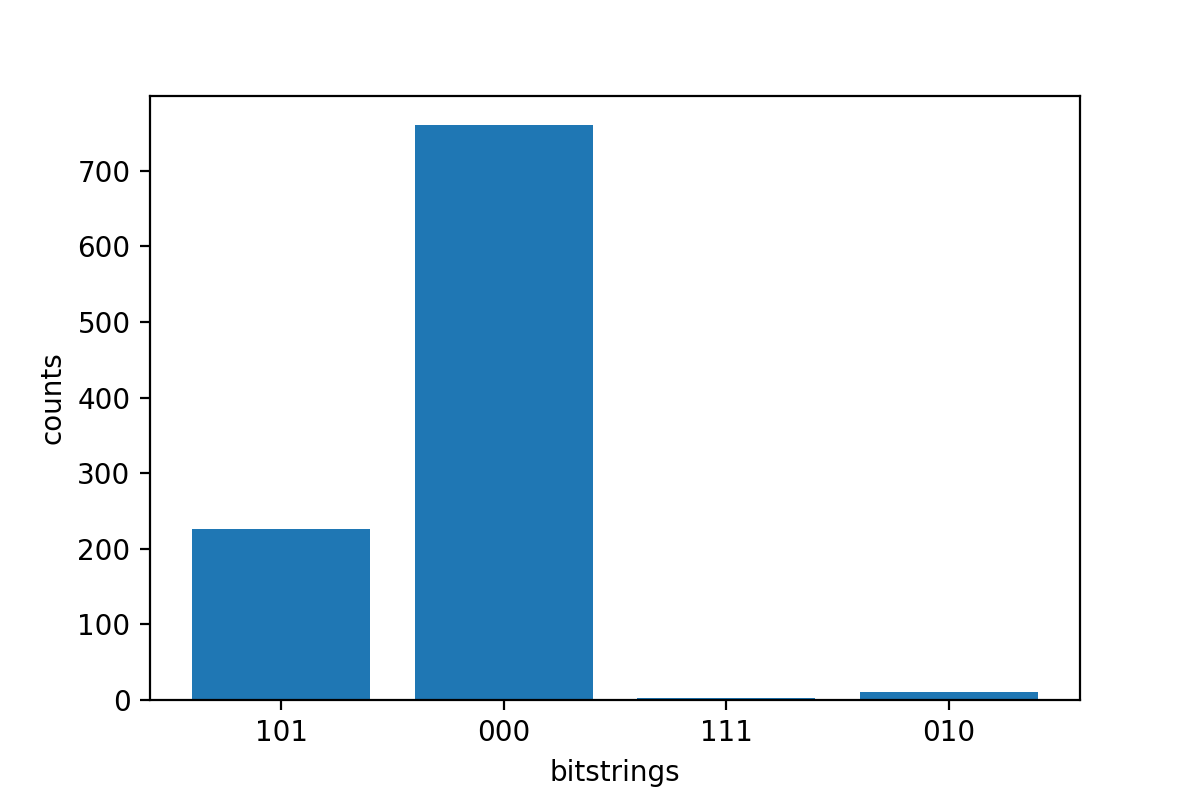
 Counter({'000': 766, '101': 220, '010': 11, '111': 3})
Probabilities for collapsed states:
 {'101': 0.22, '000': 0.766, '010': 0.011, '111': 0.003}
結果の例の表示
ResultType も指定したので、返される結果を表示できます。結果タイプは、回路に追加された順に表示されます。
print('Result types include:\n', result.result_types)
print('Variance=', result.values[0])
print('Probability=', result.values[1])

# Plot the result and do some analysis
import matplotlib.pyplot as plt
plt.bar(result.measurement_counts.keys(), result.measurement_counts.values())
plt.xlabel('bitstrings')
plt.ylabel('counts')
Result types include:
 [ResultTypeValue(type=Variance(observable=['z'], targets=[0], type=<Type.variance: 'variance'>), value=0.693084), ResultTypeValue(type=Probability(targets=[0, 2], type=<Type.probability: 'probability'>), value=array([0.777, 0.   , 0.   , 0.223]))]
Variance= 0.693084
Probability= [0.777 0.    0.    0.223]
Text(0, 0.5, 'counts')