このページは、ボールトと 2012 年リリース当時の REST API を使用する、Amazon Glacier サービスの既存のお客様のみを対象としています。
アーカイブストレージソリューションをお探しの場合は、Amazon S3 の Amazon Glacier ストレージクラス (S3 Glacier Instant Retrieval、S3 Glacier Flexible Retrieval、S3 Glacier Deep Archive) を使用することをお勧めします。これらのストレージオプションの詳細については、「Amazon Glacier ストレージクラス
Amazon Glacier (元のスタンドアロンボールトベースのサービス) は、新規顧客を受け入れなくなりました。Amazon Glacier は、ボールトにデータを保存する独自の API を備えたスタンドアロンサービスであり、Amazon S3 および Amazon S3 Glacier ストレージクラスとは異なります。既存のデータは Amazon Glacier で無期限に安全性が確保され、引き続きアクセス可能です。移行は必要ありません。低コストの長期アーカイブストレージの場合、 は Amazon S3 Glacier ストレージクラス
翻訳は機械翻訳により提供されています。提供された翻訳内容と英語版の間で齟齬、不一致または矛盾がある場合、英語版が優先します。
チェックサムの計算
アーカイブをアップロードする場合は、x-amz-sha256-tree-hash ヘッダーと x-amz-content-sha256 ヘッダーを両方とも含める必要があります。x-amz-sha256-tree-hash ヘッダーは、リクエストボディのペイロードのチェックサムです。このトピックでは、x-amz-sha256-tree-hash ヘッダーを計算する方法について説明します。x-amz-content-sha256 ヘッダーはペイロード全体のハッシュであり、認可に必要です。詳細については、「ストリーミング API の署名の計算例」を参照してください。
リクエストのペイロードは以下のようになります。
-
アーカイブ全体 - アーカイブのアップロード API を使用して単一のリクエストでアーカイブをアップロードする場合は、リクエストボディでアーカイブ全体を送信します。この場合は、アーカイブ全体のチェックサムを含める必要があります。
-
アーカイブのパート - マルチパートアップロード API を使用してアーカイブをパート単位でアップロードする場合は、リクエストボディでアーカイブのパートを 1 つのみ送信します。この場合は、アーカイブのパートのチェックサムを含めます。すべてのパートをアップロードしたら、マルチパートアップロードの完了リクエストを送信します。これにはアーカイブ全体のチェックサムを含める必要があります。
ペイロードのチェックサムは、SHA-256 木構造ハッシュです。チェックサムの計算中に SHA-256 ハッシュ値の木構造を計算することから、木構造ハッシュと呼ばれます。ルートのハッシュ値はアーカイブ全体のチェックサムです。
注記
このセクションでは、SHA-256 木構造ハッシュを計算する方法を説明します。ただし、同じ結果になる限り、任意の方法を使用できます。
次のように、SHA-256 木構造ハッシュを計算します。
-
ペイロードデータの 1 MB のチャンクごとに、SHA-256 ハッシュを計算します。データの最後のチャンクは 1 MB を下回ることがあります。たとえば、3.2 MB のアーカイブをアップロードする場合、データの最初の 3 個の 1 MB のチャンクごとに SHA-256 ハッシュ値を計算してから、残りの 0.2 MB のデータの SHA-256 ハッシュを計算します。これらのハッシュ値は木構造の葉ノードを構成します。
-
木構造の次のレベルを作成します。
-
2 つの連続した子ノードのハッシュ値を連結し、連結したハッシュ値の SHA-256 ハッシュを計算します。この連結と SHA-256 ハッシュの生成により、2 個の子ノードの親ノードが作成されます。
-
子ノードが 1 個だけ残った場合は、そのハッシュ値を木構造の次のレベルに昇格させます。
-
-
結果の木構造にルートが含まれるまで、ステップ 2 を繰り返します。木構造のルートではアーカイブ全体のハッシュが提供され、サブツリーのルートではマルチパートアップロードの対応するパートのハッシュが提供されます。
トピック
木構造ハッシュの例 1: 単一のリクエストでのアーカイブのアップロード
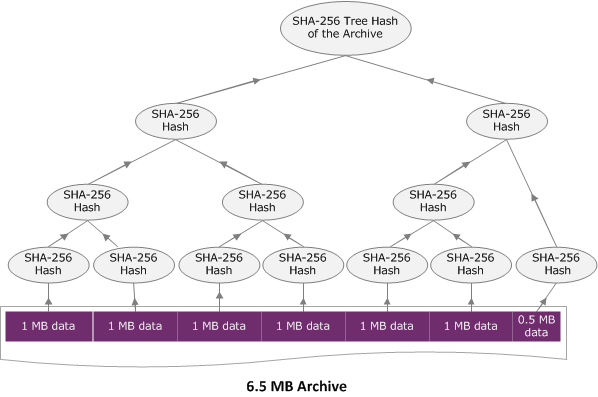
アーカイブのアップロード API を使用して単一のリクエストでアーカイブをアップロードする場合 (「アーカイブのアップロード (POST archive)」を参照)、リクエストのペイロードにはアーカイブ全体が含まれます。このため、アーカイブ全体の木構造ハッシュを x-amz-sha256-tree-hash リクエストヘッダーに含める必要があります。6.5 MB のアーカイブをアップロードするとします。次の図は、アーカイブの SHA-256 ハッシュを作成するプロセスを示しています。アーカイブを読み取り、1 MB のチャンクそれぞれの SHA-256 ハッシュを計算します。残りの 0.5 MB のデータのハッシュも計算し、前の手順で説明したように木構造を作成します。
木構造ハッシュの例 2: マルチパートアップロードを使用したアーカイブのアップロード
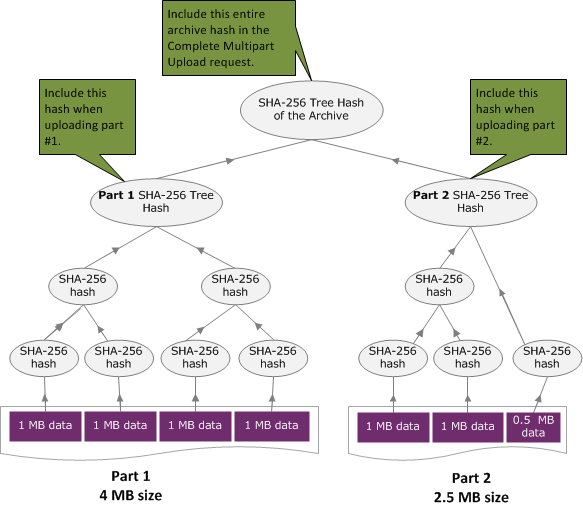
マルチパートアップロードでアーカイブをアップロードする場合の木構造ハッシュの計算のプロセスは、単一のリクエストでアーカイブをアップロードする場合と同じです。唯一の違いは、 (パートのアップロード (PUT uploadID) API を使用して) 各リクエストでアーカイブのパートを 1 つのみアップロードする点です。したがって、そのパートのチェックサムのみを x-amz-sha256-tree-hash リクエストヘッダーに含めます。ただし、すべてのパートをアップロードした後で、 マルチパートアップロードの完了 (POST uploadID)リクエストヘッダーにアーカイブ全体の木構造ハッシュを含めたマルチパートアップロードの完了 (「x-amz-sha256-tree-hash」を参照) リクエストを送信する必要があります。
ファイルの木構造ハッシュの計算
以下に示すアルゴリズムは、デモンストレーションのために選択したものです。実装シナリオでは、必要に応じてコードを最適化できます。Amazon Glacier で Amazon SDK を使用してプログラミングする場合は、木構造ハッシュの計算が自動的に行われるため、必要な作業はファイルの参照を指定することのみです。
例 1: Java の例
以下の例は、Java を使用してファイルの SHA256 木構造ハッシュを計算する方法を示しています。この例は、ファイルの場所を引数として指定するか、コードから直接 TreeHashExample.computeSHA256TreeHash メソッドを使用することで実行できます。
import java.io.File;
import java.io.FileInputStream;
import java.io.IOException;
import java.security.MessageDigest;
import java.security.NoSuchAlgorithmException;

public class TreeHashExample {

static final int ONE_MB = 1024 * 1024;

    /**
     * Compute the Hex representation of the SHA-256 tree hash for the specified
     * File
     *
     * @param args
     *            args[0]: a file to compute a SHA-256 tree hash for
     */
    public static void main(String[] args) {

        if (args.length < 1) {
            System.err.println("Missing required filename argument");
            System.exit(-1);
        }

        File inputFile = new File(args[0]);
        try {

            byte[] treeHash = computeSHA256TreeHash(inputFile);
            System.out.printf("SHA-256 Tree Hash = %s\n", toHex(treeHash));

        } catch (IOException ioe) {
            System.err.format("Exception when reading from file %s: %s", inputFile,
                    ioe.getMessage());
            System.exit(-1);

        } catch (NoSuchAlgorithmException nsae) {
            System.err.format("Cannot locate MessageDigest algorithm for SHA-256: %s",
                    nsae.getMessage());
            System.exit(-1);
        }
    }

    /**
     * Computes the SHA-256 tree hash for the given file
     *
     * @param inputFile
     *            a File to compute the SHA-256 tree hash for
     * @return a byte[] containing the SHA-256 tree hash
     * @throws IOException
     *             Thrown if there's an issue reading the input file
     * @throws NoSuchAlgorithmException
     */
    public static byte[] computeSHA256TreeHash(File inputFile) throws IOException,
            NoSuchAlgorithmException {

        byte[][] chunkSHA256Hashes = getChunkSHA256Hashes(inputFile);
        return computeSHA256TreeHash(chunkSHA256Hashes);
    }

    /**
     * Computes a SHA256 checksum for each 1 MB chunk of the input file. This
     * includes the checksum for the last chunk even if it is smaller than 1 MB.
     *
     * @param file
     *            A file to compute checksums on
     * @return a byte[][] containing the checksums of each 1 MB chunk
     * @throws IOException
     *             Thrown if there's an IOException when reading the file
     * @throws NoSuchAlgorithmException
     *             Thrown if SHA-256 MessageDigest can't be found
     */
    public static byte[][] getChunkSHA256Hashes(File file) throws IOException,
            NoSuchAlgorithmException {

        MessageDigest md = MessageDigest.getInstance("SHA-256");

        long numChunks = file.length() / ONE_MB;
        if (file.length() % ONE_MB > 0) {
            numChunks++;
        }

        if (numChunks == 0) {
            return new byte[][] { md.digest() };
        }

        byte[][] chunkSHA256Hashes = new byte[(int) numChunks][];
        FileInputStream fileStream = null;

        try {
            fileStream = new FileInputStream(file);
            byte[] buff = new byte[ONE_MB];

            int bytesRead;
            int idx = 0;
            int offset = 0;

            while ((bytesRead = fileStream.read(buff, offset, ONE_MB)) > 0) {
                md.reset();
                md.update(buff, 0, bytesRead);
                chunkSHA256Hashes[idx++] = md.digest();
                offset += bytesRead;
            }

            return chunkSHA256Hashes;

        } finally {
            if (fileStream != null) {
                try {
                    fileStream.close();
                } catch (IOException ioe) {
                    System.err.printf("Exception while closing %s.\n %s", file.getName(),
                            ioe.getMessage());
                }
            }
        }
    }

    /**
     * Computes the SHA-256 tree hash for the passed array of 1 MB chunk
     * checksums.
     *
     * This method uses a pair of arrays to iteratively compute the tree hash
     * level by level. Each iteration takes two adjacent elements from the
     * previous level source array, computes the SHA-256 hash on their
     * concatenated value and places the result in the next level's destination
     * array. At the end of an iteration, the destination array becomes the
     * source array for the next level.
     *
     * @param chunkSHA256Hashes
     *            An array of SHA-256 checksums
     * @return A byte[] containing the SHA-256 tree hash for the input chunks
     * @throws NoSuchAlgorithmException
     *             Thrown if SHA-256 MessageDigest can't be found
     */
    public static byte[] computeSHA256TreeHash(byte[][] chunkSHA256Hashes)
            throws NoSuchAlgorithmException {

        MessageDigest md = MessageDigest.getInstance("SHA-256");

        byte[][] prevLvlHashes = chunkSHA256Hashes;

        while (prevLvlHashes.length > 1) {

            int len = prevLvlHashes.length / 2;
            if (prevLvlHashes.length % 2 != 0) {
                len++;
            }

            byte[][] currLvlHashes = new byte[len][];

            int j = 0;
            for (int i = 0; i < prevLvlHashes.length; i = i + 2, j++) {

                // If there are at least two elements remaining
                if (prevLvlHashes.length - i > 1) {

                    // Calculate a digest of the concatenated nodes
                    md.reset();
                    md.update(prevLvlHashes[i]);
                    md.update(prevLvlHashes[i + 1]);
                    currLvlHashes[j] = md.digest();

                } else { // Take care of remaining odd chunk
                    currLvlHashes[j] = prevLvlHashes[i];
                }
            }

            prevLvlHashes = currLvlHashes;
        }

        return prevLvlHashes[0];
    }

    /**
     * Returns the hexadecimal representation of the input byte array
     *
     * @param data
     *            a byte[] to convert to Hex characters
     * @return A String containing Hex characters
     */
    public static String toHex(byte[] data) {
        StringBuilder sb = new StringBuilder(data.length * 2);

        for (int i = 0; i < data.length; i++) {
            String hex = Integer.toHexString(data[i] & 0xFF);

            if (hex.length() == 1) {
                // Append leading zero.
                sb.append("0");
            }
            sb.append(hex);
        }
        return sb.toString().toLowerCase();
    }
}
例 2: C# .NET の例
以下の例は、ファイルの SHA256 木構造ハッシュを計算する方法を示しています。この例は、ファイルの場所を引数として指定して実行できます。
using System;
using System.IO;

using System.Security.Cryptography;

namespace ExampleTreeHash
{
    class Program
    {
        static int ONE_MB = 1024 * 1024;

        /**
        * Compute the Hex representation of the SHA-256 tree hash for the
        * specified file
        *
        * @param args
        *            args[0]: a file to compute a SHA-256 tree hash for
        */
        public static void Main(string[] args)
        {
            if (args.Length < 1)
            {
                Console.WriteLine("Missing required filename argument");
                Environment.Exit(-1);
            }
            FileStream inputFile = File.Open(args[0], FileMode.Open, FileAccess.Read);
            try
            {
                byte[] treeHash = ComputeSHA256TreeHash(inputFile);
                Console.WriteLine("SHA-256 Tree Hash = {0}", BitConverter.ToString(treeHash).Replace("-", "").ToLower());
                Console.ReadLine();
                Environment.Exit(-1);
            }
            catch (IOException ioe)
            {
                Console.WriteLine("Exception when reading from file {0}: {1}",
                    inputFile, ioe.Message);
                Console.ReadLine();
                Environment.Exit(-1);
            }
            catch (Exception e)
            {
                Console.WriteLine("Cannot locate MessageDigest algorithm for SHA-256: {0}",
                    e.Message);
                Console.WriteLine(e.GetType());
                Console.ReadLine();
                Environment.Exit(-1);
            }
            Console.ReadLine();
        }


        /**
         * Computes the SHA-256 tree hash for the given file
         *
         * @param inputFile
         *            A file to compute the SHA-256 tree hash for
         * @return a byte[] containing the SHA-256 tree hash
         */
        public static byte[] ComputeSHA256TreeHash(FileStream inputFile)
        {
            byte[][] chunkSHA256Hashes = GetChunkSHA256Hashes(inputFile);
            return ComputeSHA256TreeHash(chunkSHA256Hashes);
        }


        /**
         * Computes a SHA256 checksum for each 1 MB chunk of the input file. This
         * includes the checksum for the last chunk even if it is smaller than 1 MB.
         *
         * @param file
         *            A file to compute checksums on
         * @return a byte[][] containing the checksums of each 1MB chunk
         */
        public static byte[][] GetChunkSHA256Hashes(FileStream file)
        {
            long numChunks = file.Length / ONE_MB;
            if (file.Length % ONE_MB > 0)
            {
                numChunks++;
            }

            if (numChunks == 0)
            {
                return new byte[][] { CalculateSHA256Hash(null, 0) };
            }
            byte[][] chunkSHA256Hashes = new byte[(int)numChunks][];

            try
            {
                byte[] buff = new byte[ONE_MB];

                int bytesRead;
                int idx = 0;

                while ((bytesRead = file.Read(buff, 0, ONE_MB)) > 0)
                {
                    chunkSHA256Hashes[idx++] = CalculateSHA256Hash(buff, bytesRead);
                }
                return chunkSHA256Hashes;
            }
            finally
            {
                if (file != null)
                {
                    try
                    {
                        file.Close();
                    }
                    catch (IOException ioe)
                    {
                        throw ioe;
                    }
                }
            }

        }

        /**
         * Computes the SHA-256 tree hash for the passed array of 1MB chunk
         * checksums.
         *
         * This method uses a pair of arrays to iteratively compute the tree hash
         * level by level. Each iteration takes two adjacent elements from the
         * previous level source array, computes the SHA-256 hash on their
         * concatenated value and places the result in the next level's destination
         * array. At the end of an iteration, the destination array becomes the
         * source array for the next level.
         *
         * @param chunkSHA256Hashes
         *            An array of SHA-256 checksums
         * @return A byte[] containing the SHA-256 tree hash for the input chunks
         */
        public static byte[] ComputeSHA256TreeHash(byte[][] chunkSHA256Hashes)
        {
            byte[][] prevLvlHashes = chunkSHA256Hashes;
            while (prevLvlHashes.GetLength(0) > 1)
            {

                int len = prevLvlHashes.GetLength(0) / 2;
                if (prevLvlHashes.GetLength(0) % 2 != 0)
                {
                    len++;
                }

                byte[][] currLvlHashes = new byte[len][];

                int j = 0;
                for (int i = 0; i < prevLvlHashes.GetLength(0); i = i + 2, j++)
                {

                    // If there are at least two elements remaining
                    if (prevLvlHashes.GetLength(0) - i > 1)
                    {

                        // Calculate a digest of the concatenated nodes
                        byte[] firstPart = prevLvlHashes[i];
                        byte[] secondPart = prevLvlHashes[i + 1];
                        byte[] concatenation = new byte[firstPart.Length + secondPart.Length];
                        System.Buffer.BlockCopy(firstPart, 0, concatenation, 0, firstPart.Length);
                        System.Buffer.BlockCopy(secondPart, 0, concatenation, firstPart.Length, secondPart.Length);

                        currLvlHashes[j] = CalculateSHA256Hash(concatenation, concatenation.Length);

                    }
                    else
                    { // Take care of remaining odd chunk
                        currLvlHashes[j] = prevLvlHashes[i];
                    }
                }

                prevLvlHashes = currLvlHashes;
            }

            return prevLvlHashes[0];
        }

        public static byte[] CalculateSHA256Hash(byte[] inputBytes, int count)
        {
            SHA256 sha256 = System.Security.Cryptography.SHA256.Create();
            byte[] hash = sha256.ComputeHash(inputBytes, 0, count);
            return hash;
        }
    }
}
