AWS アクションのアプリケーションオブザーバビリティ
AWS GitHub アクションのアプリケーションオブザーバビリティは、ソースコードとライブプロダクションテレメトリデータを AI エージェントに接続する、エンドツーエンドのアプリケーションオブザーバビリティ調査ワークフローを提供します。CloudWatch MCP を活用し、カスタムプロンプトを生成して、AI エージェントがトラブルシューティングやコード修正の適用に必要なコンテキストを提供します。
このアクションは、CloudWatch Application Signals MCP サーバー
開始するには、GitHub のIssue で @awsapm をメンションして AI エージェントをトリガーします。エージェントは、ライブアプリケーションデータに基づいて、本番環境の問題のトラブルシューティング、修正の実装、およびオブザーバビリティのカバー範囲の強化を行います。
このアクション自体には直接的なコストは発生しません。ただし、このアクションを使用すると、AWS サービスと AI モデルの使用に対して料金が発生する可能性があります。潜在的なコストに関する詳細情報については、コストに関する考慮事項のドキュメント
概要
このアクションは、AWS 固有の MCP 設定とカスタムオブザーバビリティプロンプトを生成して、GitHub ワークフロー内の AI エージェントを設定します。ユーザーの作業は、引き受ける IAM ロールと使用する Bedrock モデル ID、または既存の LLM サブスクリプションの API トークンを指定するだけです。以下の例は、このアクションを Anthropic の claude-code-base-action
前提条件
作業を開始する前に、次の項目があることを確認します。
-
GitHub リポジトリの権限: リポジトリへの書き込みアクセス権またはそれ以上の権限 (アクションをトリガーするために必要)。
-
AWS IAM ロール: GitHub Actions の OpenID Connect (OIDC) で設定された、以下の権限を持つ IAM ロール。
-
CloudWatch Application Signals および CloudWatch へのアクセス
-
Amazon Bedrock モデルアクセス (Bedrock モデルを使用している場合)
-
-
GitHub トークン: ワークフローでは、必要なアクセス許可を持つ GITHUB_TOKEN が自動的に使用されます。
セットアップ手順
ステップ 1: AWS 認証情報を設定する
このアクションは、GitHub Actions 環境で AWS 認証を設定する場合に aws-actions/configure-aws-credentials
-
IAM ID プロバイダーを作成する
まず、AWS マネジメントコンソールで GitHub の OIDC エンドポイントを信頼する IAM ID プロバイダーを作成します。
-
IAM コンソールを開きます。
-
[アクセス管理] で [ID プロバイダー] をクリックします。
-
GitHub ID プロバイダーをまだ作成していない場合は、[プロバイダーを追加] ボタンをクリックして追加します。
-
OpenID Connect タイプの ID プロバイダーを選択します。
-
[プロバイダーの URL] 入力ボックスに「
https://token.actions.githubusercontent.com」と入力します。 -
[対象者] 入力ボックスに「
sts.amazonaws.com」と入力します。 -
[プロバイダーを追加] ボタンをクリックします。
-
-
IAM ポリシーを作成する
このアクションに必要なアクセス許可を持つ IAM ポリシーを作成します。詳細については、以下の「必要な許可」セクションを参照してください。
-
IAM ロールを作成する
次の信頼ポリシーテンプレートを使用して、AWS マネジメントコンソールで IAM ロール (例:
AWS_IAM_ROLE_ARN) を作成します。これにより、承認された GitHub リポジトリがロールを引き受けることができます。{ "Version": "2012-10-17", "Statement": [ { "Effect": "Allow", "Principal": { "Federated": "arn:aws:iam::<AWS_ACCOUNT_ID>:oidc-provider/token.actions.githubusercontent.com" }, "Action": "sts:AssumeRoleWithWebIdentity", "Condition": { "StringEquals": { "token.actions.githubusercontent.com:aud": "sts.amazonaws.com" }, "StringLike": { "token.actions.githubusercontent.com:sub": "repo:<GITHUB_ORG>/<GITHUB_REPOSITORY>:ref:refs/heads/<GITHUB_BRANCH>" } } } ] }テンプレート内の以下のプレースホルダーを置き換えてください。
-
<AWS_ACCOUNT_ID>– AWS アカウント ID -
<GITHUB_ORG>– GitHub 組織名 -
<GITHUB_REPOSITORY>– リポジトリ名 -
<GITHUB_BRANCH>– ブランチ名 (例えば、main)
-
-
IAM ポリシーをアタッチする
ロールの [アクセス許可] タブで、ステップ 2 で作成した IAM ポリシーをアタッチします。
AWS での OIDC の設定について詳しくは、「configure-aws-credentials OIDC クイックスタートガイド
ステップ 2: シークレットを設定し、ワークフローを追加する
-
リポジトリシークレットを設定する
リポジトリの設定画面に移動し、[設定]、[シークレットと変数]、[アクション] を順に選択します。
-
AWS_IAM_ROLE_ARNという名前の新しいリポジトリシークレットを作成し、その値をステップ 1 で作成した IAM ロールの ARN に設定します。 -
(オプション)
AWS_REGIONという名前のリポジトリ変数を作成して AWS リージョンを指定します (設定されていない場合はデフォルトでus-east-1になります)。
-
-
ワークフローファイルを追加する
Amazon Bedrock モデルでこのアクションを実際に使用するワークフローの例を以下に紹介します。このテンプレートから、GitHub リポジトリのディレクトリ
.github/workflowsにアプリケーションオブザーバビリティ調査ワークフローを作成してください。name: Application observability for AWS on: issue_comment: types: [created, edited] issues: types: [opened, assigned, edited] jobs: awsapm-investigation: if: | (github.event_name == 'issue_comment' && contains(github.event.comment.body, '@awsapm')) || (github.event_name == 'issues' && (contains(github.event.issue.body, '@awsapm') || contains(github.event.issue.title, '@awsapm'))) runs-on: ubuntu-latest permissions: contents: write # To create branches for PRs pull-requests: write # To post comments on PRs issues: write # To post comments on issues id-token: write # Required for AWS OIDC authentication steps: - name: Checkout repository uses: actions/checkout@v4 - name: Configure AWS credentials uses: aws-actions/configure-aws-credentials@v4 with: role-to-assume: ${{ secrets.AWS_IAM_ROLE_ARN }} aws-region: ${{ vars.AWS_REGION || 'us-east-1' }} # Step 1: Prepare AWS MCP configuration and investigation prompt - name: Prepare Investigation Context id: prepare uses: aws-actions/application-observability-for-aws@v1 with: bot_name: "@awsapm" cli_tool: "claude_code" # Step 2: Execute investigation with Claude Code - name: Run Claude Investigation id: claude uses: anthropics/claude-code-base-action@beta with: use_bedrock: "true" # Set to any Bedrock Model ID model: "us.anthropic.claude-sonnet-4-5-20250929-v1:0" prompt_file: ${{ steps.prepare.outputs.prompt_file }} mcp_config: ${{ steps.prepare.outputs.mcp_config_file }} allowed_tools: ${{ steps.prepare.outputs.allowed_tools }} # Step 3: Post results back to GitHub issue/PR (reuse the same action) - name: Post Investigation Results if: always() uses: aws-actions/application-observability-for-aws@v1 with: cli_tool: "claude_code" comment_id: ${{ steps.prepare.outputs.awsapm_comment_id }} output_file: ${{ steps.claude.outputs.execution_file }} output_status: ${{ steps.claude.outputs.conclusion }}設定に関する注意事項:
-
このワークフローは、Issue またはコメントで
@awsapmがメンションされたときに自動的にトリガーされます。 -
このワークフローは、前のステップで設定した
AWS_IAM_ROLE_ARNシークレットを使用します。 -
ステップ 2 のモデルパラメータを更新して、ご希望の Amazon Bedrock モデル ID を指定します。
-
bot_name パラメータでボット名 (例:
@awsapm-prod、@awsapm-staging) をカスタマイズすることで、さまざまな環境に対応できます。
-
ステップ 3: アクションの使用を開始する
ワークフローの設定が完了したら、GitHub の Issue で @awsapm をメンションし、AI を活用した調査をトリガーします。このアクションはリクエストを分析し、ライブテレメトリデータにアクセスし、推奨事項を提供したり、修正を自動的に実装したりします。
ユースケースの例:
-
パフォーマンスの問題を調査し、その問題を投稿して修正します。
@awsapm, can you help me investigate availability issues in my appointment service?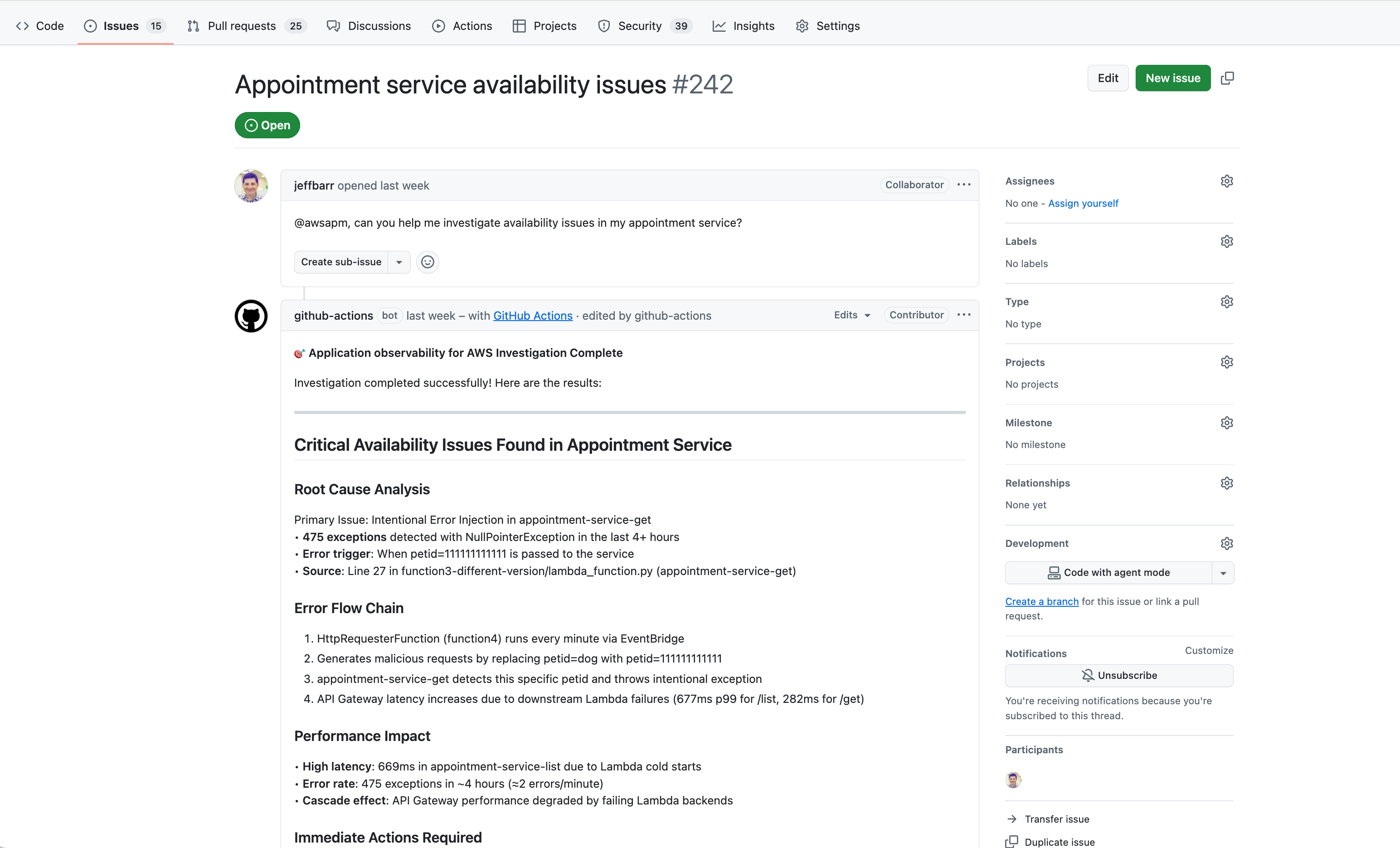
@awsapm, can you post a fix?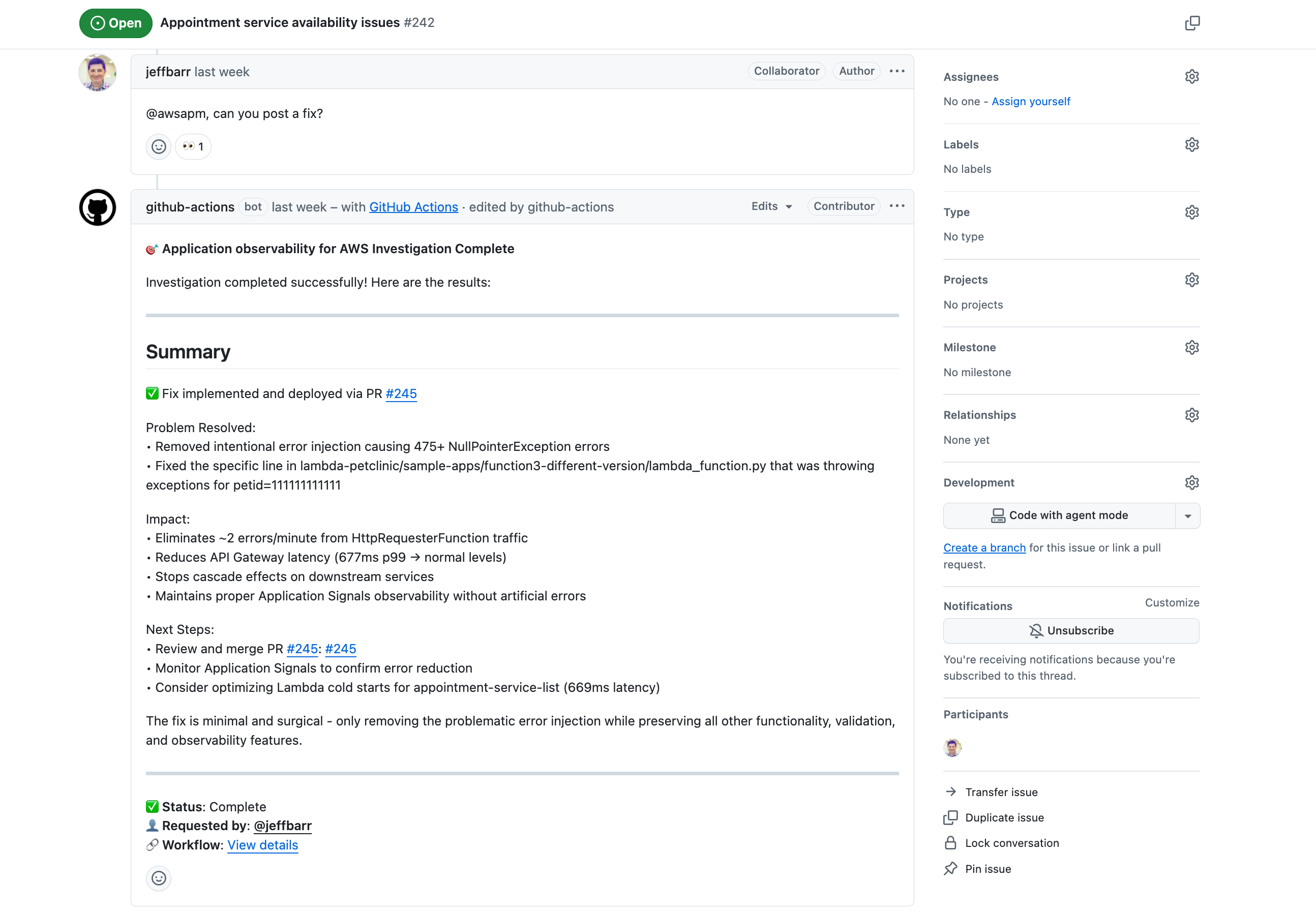
-
計測の有効化:
@awsapm, please enable Application Signals for lambda-audit-service and create a PR with the required changes. -
テレメトリデータのクエリ:
@awsapm, how many GenAI tokens have been consumed by my services in the past 24 hours?
その後の流れ:
-
ワークフローは
@awsapmメンションを検出し、調査をトリガーします。 -
AI エージェントは、設定された MCP サーバーを介してライブ AWS テレメトリデータにアクセスします。
-
エージェントは問題を分析し、次のいずれかを実行します。
-
検出結果と推奨事項を Issue に直接投稿します。
-
コード変更 (計測または修正用) を含むプルリクエストを作成します。
-
-
結果を確認し、フォローアップの質問で再度 @awsapm をメンションすることで、対話を継続できます。
セキュリティ
このアクションでは、厳格なアクセスコントロール、OIDC ベースの AWS 認証、およびプロンプトインジェクション攻撃に対する組み込みの保護機能により、セキュリティが最優先事項とされています。書き込みアクセス権以上の権限を持つユーザーのみがこのアクションをトリガーでき、すべての操作は特定のリポジトリに限定されます。
以下を含む詳細なセキュリティ情報については、以下を参照してください。
-
アクセスコントロールとアクセス許可の要件
-
AWS IAM アクセス許可と OIDC 設定
-
プロンプトインジェクションのリスクと緩和策
-
セキュリティのベストプラクティス
セキュリティに関するドキュメント
設定
必要な許可
GitHub Actions が引き受ける IAM ロールには、以下のアクセス許可が必要です。
注: bedrock:InvokeModel および bedrock:InvokeModelWithResponseStream は、Amazon Bedrock モデルを使用している場合にのみ必要です。
{
    "Version": "2012-10-17",
    "Statement": [
        {
            "Effect": "Allow",
            "Action": [
                "application-signals:ListServices",
                "application-signals:GetService",
                "application-signals:ListServiceOperations",
                "application-signals:ListServiceLevelObjectives",
                "application-signals:GetServiceLevelObjective",
                "application-signals:ListAuditFindings",
                "cloudwatch:DescribeAlarms",
                "cloudwatch:DescribeAlarmHistory",
                "cloudwatch:ListMetrics",
                "cloudwatch:GetMetricData",
                "cloudwatch:GetMetricStatistics",
                "logs:DescribeLogGroups",
                "logs:DescribeQueryDefinitions",
                "logs:ListLogAnomalyDetectors",
                "logs:ListAnomalies",
                "logs:StartQuery",
                "logs:StopQuery",
                "logs:GetQueryResults",
                "logs:FilterLogEvents",
                "xray:GetTraceSummaries",
                "xray:GetTraceSegmentDestination",
                "xray:BatchGetTraces",
                "xray:ListRetrievedTraces",
                "xray:StartTraceRetrieval",
                "servicequotas:GetServiceQuota",
                "synthetics:GetCanary",
                "synthetics:GetCanaryRuns",
                "s3:GetObject",
                "s3:ListBucket",
                "iam:GetRole",
                "iam:ListAttachedRolePolicies",
                "iam:GetPolicy",
                "iam:GetPolicyVersion",
                "bedrock:InvokeModel",
                "bedrock:InvokeModelWithResponseStream"
            ],
            "Resource": "*"
        }
    ]
}
ドキュメント
詳細については、以下をご覧ください。
-
CloudWatch Application Signals に関するドキュメント – CloudWatch Application Signals の機能と性能について説明しています
-
AWS アクションのアプリケーションオブザーバビリティに関するドキュメント
- 詳細なガイドとチュートリアルが記載されています
