Le traduzioni sono generate tramite traduzione automatica. In caso di conflitto tra il contenuto di una traduzione e la versione originale in Inglese, quest'ultima prevarrà.
Esempio: disegnare riquadri di delimitazione attorno alle protezioni del viso
Gli esempi seguenti mostrano come disegnare dei riquadri di delimitazione attorno alle protezioni del viso rilevate sulle persone. Per un esempio che utilizza AWS Lambda Amazon DynamoDB, consulta l'archivio degli esempi di Documentation AWS SDK
Per rilevare le coperture facciali, si utilizza l'operazione API non di storage DetectProtectiveEquipment. L'immagine viene caricata dal file system locale. Fornisci un'immagine di input a DetectProtectiveEquipment come matrice di byte dell'immagine (byte dell'immagine codificata in formato base64). Per ulteriori informazioni, consulta Lavorare con le immagini.
L'esempio visualizza un riquadro di delimitazione attorno alle protezioni del viso rilevate. Il riquadro di delimitazione è verde se la protezione del viso copre completamente la parte del corpo. Altrimenti viene visualizzato un riquadro di delimitazione rosso. Come avvertimento, se la confidenza di rilevamento è inferiore al valore di confidenza specificato, viene visualizzato un riquadro di delimitazione giallo all'interno del riquadro di delimitazione facciale. Se non viene rilevata una copertura facciale, attorno alla persona viene disegnato un riquadro di delimitazione rosso.
L’immagine output è simile a quello riportato di seguito.
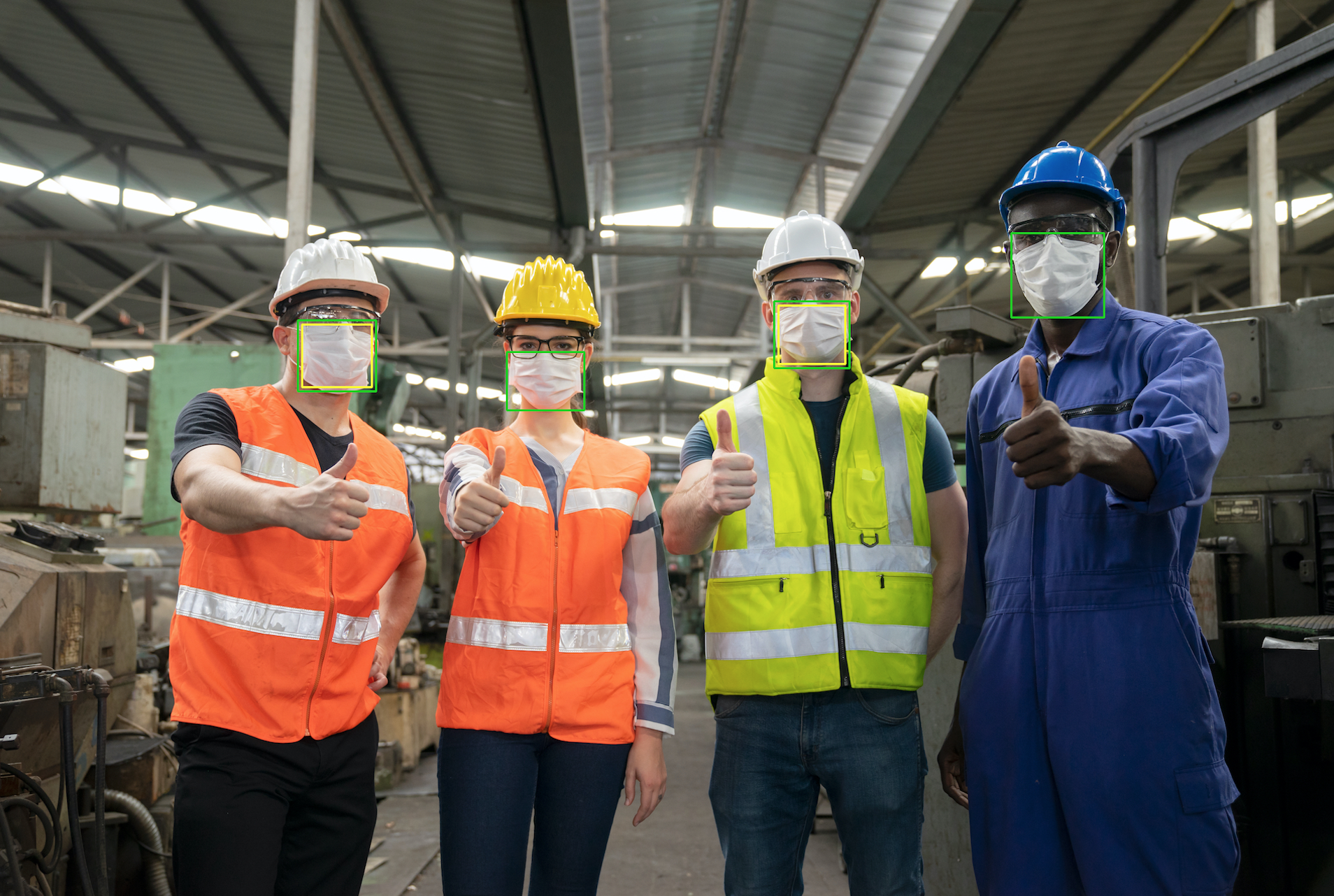
Per visualizzare i riquadri di delimitazione sulle protezioni del viso rilevate
Se non lo hai già fatto:
Crea o aggiorna un utente con le autorizzazioni
AmazonRekognitionFullAccess. Per ulteriori informazioni, consulta Fase 1: impostazione di un account AWS e creazione di un utente.Installa e configura AWS CLI gli AWS SDK. Per ulteriori informazioni, consulta Passaggio 2: configura il AWS CLI and AWS SDK.
Utilizzare i seguenti esempi per richiamare l'operazione
DetectProtectiveEquipment. Per informazioni sulla visualizzazione dei riquadri di delimitazione in un'immagine, consultare Visualizzazione di riquadri di delimitazione.- Java
-
Nella funzione
main, modificate quanto segue:Il valore di
photodel percorso e il nome di un file di immagine locale (PNG o JPEG).Il valore del livello
confidencedi confidenza desiderato (50-100).
//Loads images, detects faces and draws bounding boxes.Determines exif orientation, if necessary. package com.amazonaws.samples; import java.awt.*; import java.awt.image.BufferedImage; import java.util.List; import javax.imageio.ImageIO; import javax.swing.*; import java.io.ByteArrayInputStream; import java.io.ByteArrayOutputStream; import java.io.File; import java.io.FileInputStream; import java.io.InputStream; import java.nio.ByteBuffer; import com.amazonaws.util.IOUtils; import com.amazonaws.client.builder.AwsClientBuilder; import com.amazonaws.services.rekognition.AmazonRekognition; import com.amazonaws.services.rekognition.AmazonRekognitionClientBuilder; import com.amazonaws.services.rekognition.model.BoundingBox; import com.amazonaws.services.rekognition.model.DetectProtectiveEquipmentRequest; import com.amazonaws.services.rekognition.model.DetectProtectiveEquipmentResult; import com.amazonaws.services.rekognition.model.EquipmentDetection; import com.amazonaws.services.rekognition.model.Image; import com.amazonaws.services.rekognition.model.ProtectiveEquipmentBodyPart; import com.amazonaws.services.rekognition.model.ProtectiveEquipmentPerson; // Calls DetectFaces and displays a bounding box around each detected image. public class PPEBoundingBox extends JPanel { private static final long serialVersionUID = 1L; BufferedImage image; static int scale; DetectProtectiveEquipmentResult result; float confidence=80; public PPEBoundingBox(DetectProtectiveEquipmentResult ppeResult, BufferedImage bufImage, float requiredConfidence) throws Exception { super(); scale = 2; // increase to shrink image size. result = ppeResult; image = bufImage; confidence=requiredConfidence; } // Draws the bounding box around the detected faces. public void paintComponent(Graphics g) { float left = 0; float top = 0; int height = image.getHeight(this); int width = image.getWidth(this); int offset=20; Graphics2D g2d = (Graphics2D) g; // Create a Java2D version of g. // Draw the image. g2d.drawImage(image, 0, 0, width / scale, height / scale, this); g2d.setColor(new Color(0, 212, 0)); // Iterate through detected persons and display bounding boxes. List<ProtectiveEquipmentPerson> persons = result.getPersons(); for (ProtectiveEquipmentPerson person: persons) { BoundingBox boxPerson = person.getBoundingBox(); left = width * boxPerson.getLeft(); top = height * boxPerson.getTop(); Boolean foundMask=false; List<ProtectiveEquipmentBodyPart> bodyParts=person.getBodyParts(); if (bodyParts.isEmpty()==false) { //body parts detected for (ProtectiveEquipmentBodyPart bodyPart: bodyParts) { List<EquipmentDetection> equipmentDetections=bodyPart.getEquipmentDetections(); for (EquipmentDetection item: equipmentDetections) { if (item.getType().contentEquals("FACE_COVER")) { // Draw green or red bounding box depending on mask coverage. foundMask=true; BoundingBox box =item.getBoundingBox(); left = width * box.getLeft(); top = height * box.getTop(); Color maskColor=new Color( 0, 212, 0); if (item.getCoversBodyPart().getValue()==false) { // red bounding box maskColor=new Color( 255, 0, 0); } g2d.setColor(maskColor); g2d.drawRect(Math.round(left / scale), Math.round(top / scale), Math.round((width * box.getWidth()) / scale), Math.round((height * box.getHeight())) / scale); // Check confidence is > supplied confidence. if (item.getCoversBodyPart().getConfidence()< confidence) { // Draw a yellow bounding box inside face mask bounding box maskColor=new Color( 255, 255, 0); g2d.setColor(maskColor); g2d.drawRect(Math.round((left + offset) / scale), Math.round((top + offset) / scale), Math.round((width * box.getWidth())- (offset * 2 ))/ scale, Math.round((height * box.getHeight()) -( offset* 2)) / scale); } } } } } // Didn't find a mask, so draw person bounding box red if (foundMask==false) { left = width * boxPerson.getLeft(); top = height * boxPerson.getTop(); g2d.setColor(new Color(255, 0, 0)); g2d.drawRect(Math.round(left / scale), Math.round(top / scale), Math.round(((width) * boxPerson.getWidth()) / scale), Math.round((height * boxPerson.getHeight())) / scale); } } } public static void main(String arg[]) throws Exception { String photo = "photo"; float confidence =80; int height = 0; int width = 0; BufferedImage image = null; ByteBuffer imageBytes; // Get image bytes for call to DetectProtectiveEquipment try (InputStream inputStream = new FileInputStream(new File(photo))) { imageBytes = ByteBuffer.wrap(IOUtils.toByteArray(inputStream)); } //Get image for display InputStream imageBytesStream; imageBytesStream = new ByteArrayInputStream(imageBytes.array()); ByteArrayOutputStream baos = new ByteArrayOutputStream(); image=ImageIO.read(imageBytesStream); ImageIO.write(image, "jpg", baos); width = image.getWidth(); height = image.getHeight(); //Get Rekognition client AmazonRekognition rekognitionClient = AmazonRekognitionClientBuilder.defaultClient(); // Call DetectProtectiveEquipment DetectProtectiveEquipmentRequest request = new DetectProtectiveEquipmentRequest() .withImage(new Image() .withBytes(imageBytes)); DetectProtectiveEquipmentResult result = rekognitionClient.detectProtectiveEquipment(request); // Create frame and panel. JFrame frame = new JFrame("Detect PPE"); frame.setDefaultCloseOperation(JFrame.EXIT_ON_CLOSE); PPEBoundingBox panel = new PPEBoundingBox(result, image, confidence); panel.setPreferredSize(new Dimension(image.getWidth() / scale, image.getHeight() / scale)); frame.setContentPane(panel); frame.pack(); frame.setVisible(true); } } - Java V2
-
Questo codice è tratto dal repository degli esempi GitHub di AWS Documentation SDK. Guarda l'esempio completo qui
. import java.awt.*; import java.awt.image.BufferedImage; import java.io.*; import java.util.List; import javax.imageio.ImageIO; import javax.swing.*; import software.amazon.awssdk.auth.credentials.ProfileCredentialsProvider; import software.amazon.awssdk.core.ResponseBytes; import software.amazon.awssdk.core.SdkBytes; import software.amazon.awssdk.regions.Region; import software.amazon.awssdk.services.rekognition.model.BoundingBox; import software.amazon.awssdk.services.rekognition.model.DetectProtectiveEquipmentRequest; import software.amazon.awssdk.services.rekognition.model.EquipmentDetection; import software.amazon.awssdk.services.rekognition.model.ProtectiveEquipmentBodyPart; import software.amazon.awssdk.services.rekognition.model.ProtectiveEquipmentPerson; import software.amazon.awssdk.services.rekognition.model.ProtectiveEquipmentSummarizationAttributes; import software.amazon.awssdk.services.rekognition.model.Image; import software.amazon.awssdk.services.rekognition.model.RekognitionException; import software.amazon.awssdk.services.s3.S3Client; import software.amazon.awssdk.services.rekognition.RekognitionClient; import software.amazon.awssdk.services.s3.model.GetObjectRequest; import software.amazon.awssdk.services.s3.model.GetObjectResponse; import software.amazon.awssdk.services.s3.model.S3Exception; import software.amazon.awssdk.services.rekognition.model.DetectProtectiveEquipmentResponse; //snippet-end:[rekognition.java2.display_mask.import] /** * Before running this Java V2 code example, set up your development environment, including your credentials. * * For more information, see the following documentation topic: * * https://docs.aws.amazon.com/sdk-for-java/latest/developer-guide/get-started.html */ public class PPEBoundingBoxFrame extends JPanel { DetectProtectiveEquipmentResponse result; static BufferedImage image; static int scale; float confidence; public static void main(String[] args) throws Exception { final String usage = "\n" + "Usage: " + " <sourceImage> <bucketName>\n\n" + "Where:\n" + " sourceImage - The name of the image in an Amazon S3 bucket that shows a person wearing a mask (for example, masks.png). \n\n" + " bucketName - The name of the Amazon S3 bucket (for example, amzn-s3-demo-bucket). \n\n"; if (args.length != 2) { System.out.println(usage); System.exit(1); } String sourceImage = args[0]; String bucketName = args[1]; Region region = Region.US_EAST_1; S3Client s3 = S3Client.builder() .region(region) .credentialsProvider(ProfileCredentialsProvider.create("profile-name")) .build(); RekognitionClient rekClient = RekognitionClient.builder() .region(region) .credentialsProvider(ProfileCredentialsProvider.create("profile-name")) .build(); displayGear(s3, rekClient, sourceImage, bucketName); s3.close(); rekClient.close(); } // snippet-start:[rekognition.java2.display_mask.main] public static void displayGear(S3Client s3, RekognitionClient rekClient, String sourceImage, String bucketName) { float confidence = 80; byte[] data = getObjectBytes(s3, bucketName, sourceImage); InputStream is = new ByteArrayInputStream(data); try { ProtectiveEquipmentSummarizationAttributes summarizationAttributes = ProtectiveEquipmentSummarizationAttributes.builder() .minConfidence(70F) .requiredEquipmentTypesWithStrings("FACE_COVER") .build(); SdkBytes sourceBytes = SdkBytes.fromInputStream(is); image = ImageIO.read(sourceBytes.asInputStream()); // Create an Image object for the source image. software.amazon.awssdk.services.rekognition.model.Image souImage = Image.builder() .bytes(sourceBytes) .build(); DetectProtectiveEquipmentRequest request = DetectProtectiveEquipmentRequest.builder() .image(souImage) .summarizationAttributes(summarizationAttributes) .build(); DetectProtectiveEquipmentResponse result = rekClient.detectProtectiveEquipment(request); JFrame frame = new JFrame("Detect PPE"); frame.setDefaultCloseOperation(JFrame.EXIT_ON_CLOSE); PPEBoundingBoxFrame panel = new PPEBoundingBoxFrame(result, image, confidence); panel.setPreferredSize(new Dimension(image.getWidth() / scale, image.getHeight() / scale)); frame.setContentPane(panel); frame.pack(); frame.setVisible(true); } catch (RekognitionException e) { e.printStackTrace(); System.exit(1); } catch (Exception e) { e.printStackTrace(); } } public static byte[] getObjectBytes (S3Client s3, String bucketName, String keyName) { try { GetObjectRequest objectRequest = GetObjectRequest .builder() .key(keyName) .bucket(bucketName) .build(); ResponseBytes<GetObjectResponse> objectBytes = s3.getObjectAsBytes(objectRequest); return objectBytes.asByteArray(); } catch (S3Exception e) { System.err.println(e.awsErrorDetails().errorMessage()); System.exit(1); } return null; } public PPEBoundingBoxFrame(DetectProtectiveEquipmentResponse ppeResult, BufferedImage bufImage, float requiredConfidence) { super(); scale = 1; // increase to shrink image size. result = ppeResult; image = bufImage; confidence=requiredConfidence; } // Draws the bounding box around the detected masks. public void paintComponent(Graphics g) { float left = 0; float top = 0; int height = image.getHeight(this); int width = image.getWidth(this); int offset=20; Graphics2D g2d = (Graphics2D) g; // Create a Java2D version of g. // Draw the image. g2d.drawImage(image, 0, 0, width / scale, height / scale, this); g2d.setColor(new Color(0, 212, 0)); // Iterate through detected persons and display bounding boxes. List<ProtectiveEquipmentPerson> persons = result.persons(); for (ProtectiveEquipmentPerson person: persons) { List<ProtectiveEquipmentBodyPart> bodyParts=person.bodyParts(); if (!bodyParts.isEmpty()){ for (ProtectiveEquipmentBodyPart bodyPart: bodyParts) { List<EquipmentDetection> equipmentDetections=bodyPart.equipmentDetections(); for (EquipmentDetection item: equipmentDetections) { String myType = item.type().toString(); if (myType.compareTo("FACE_COVER") ==0) { // Draw green bounding box depending on mask coverage. BoundingBox box =item.boundingBox(); left = width * box.left(); top = height * box.top(); Color maskColor=new Color( 0, 212, 0); if (item.coversBodyPart().equals(false)) { // red bounding box. maskColor=new Color( 255, 0, 0); } g2d.setColor(maskColor); g2d.drawRect(Math.round(left / scale), Math.round(top / scale), Math.round((width * box.width()) / scale), Math.round((height * box.height())) / scale); // Check confidence is > supplied confidence. if (item.coversBodyPart().confidence() < confidence) { // Draw a yellow bounding box inside face mask bounding box. maskColor=new Color( 255, 255, 0); g2d.setColor(maskColor); g2d.drawRect(Math.round((left + offset) / scale), Math.round((top + offset) / scale), Math.round((width * box.width())- (offset * 2 ))/ scale, Math.round((height * box.height()) -( offset* 2)) / scale); } } } } } } } // snippet-end:[rekognition.java2.display_mask.main] } - Python
-
Nella funzione
main, modificate quanto segue:Il valore di
photodel percorso e il nome di un file di immagine locale (PNG o JPEG).Il valore del livello
confidencedi confidenza desiderato (50-100).-
Sostituisci il valore di
profile_namenella riga che crea la sessione di Rekognition con il nome del tuo profilo di sviluppatore.
#Copyright 2020 Amazon.com, Inc. or its affiliates. All Rights Reserved. #PDX-License-Identifier: MIT-0 (For details, see https://github.com/awsdocs/amazon-rekognition-developer-guide/blob/master/LICENSE-SAMPLECODE.) import boto3 import io from PIL import Image, ImageDraw, ExifTags, ImageColor def detect_ppe(photo, confidence): fill_green='#00d400' fill_red='#ff0000' fill_yellow='#ffff00' line_width=3 #open image and get image data from stream. image = Image.open(open(photo,'rb')) stream = io.BytesIO() image.save(stream, format=image.format) image_binary = stream.getvalue() imgWidth, imgHeight = image.size draw = ImageDraw.Draw(image) client=boto3.client('rekognition') response = client.detect_protective_equipment(Image={'Bytes': image_binary}) for person in response['Persons']: found_mask=False for body_part in person['BodyParts']: ppe_items = body_part['EquipmentDetections'] for ppe_item in ppe_items: #found a mask if ppe_item['Type'] == 'FACE_COVER': fill_color=fill_green found_mask=True # check if mask covers face if ppe_item['CoversBodyPart']['Value'] == False: fill_color=fill='#ff0000' # draw bounding box around mask box = ppe_item['BoundingBox'] left = imgWidth * box['Left'] top = imgHeight * box['Top'] width = imgWidth * box['Width'] height = imgHeight * box['Height'] points = ( (left,top), (left + width, top), (left + width, top + height), (left , top + height), (left, top) ) draw.line(points, fill=fill_color, width=line_width) # Check if confidence is lower than supplied value if ppe_item['CoversBodyPart']['Confidence'] < confidence: #draw warning yellow bounding box within face mask bounding box offset=line_width+ line_width points = ( (left+offset,top + offset), (left + width-offset, top+offset), ((left) + (width-offset), (top-offset) + (height)), (left+ offset , (top) + (height -offset)), (left + offset, top + offset) ) draw.line(points, fill=fill_yellow, width=line_width) if found_mask==False: # no face mask found so draw red bounding box around body box = person['BoundingBox'] left = imgWidth * box['Left'] top = imgHeight * box['Top'] width = imgWidth * box['Width'] height = imgHeight * box['Height'] points = ( (left,top), (left + width, top), (left + width, top + height), (left , top + height), (left, top) ) draw.line(points, fill=fill_red, width=line_width) image.show() def main(): photo='photo' confidence=80 detect_ppe(photo, confidence) if __name__ == "__main__": main() - CLI
-
Nel seguente esempio di CLI, modifica il valore degli argomenti elencati di seguito:
Il valore di
photodel percorso e il nome di un file di immagine locale (PNG o JPEG).Il valore del livello
confidencedi confidenza desiderato (50-100).-
Sostituisci il valore di
profile_namenella riga che crea la sessione di Rekognition con il nome del tuo profilo di sviluppatore.
                                aws rekognition detect-protective-equipment  --image "{"S3Object":{"Bucket":"amzn-s3-demo-bucket","Name":"image-name"}}" --profile profile-name \
                                --summarization-attributes "{"MinConfidence":MinConfidenceNumber,"RequiredEquipmentTypes":["FACE_COVER"]}"
Se accedi alla CLI da un dispositivo Windows, usa le virgolette doppie anziché le virgolette singole ed evita le virgolette doppie interne tramite barra rovesciata (ovvero, \) per risolvere eventuali errori del parser che potresti riscontrare. Per un esempio, consulta quanto segue:
                                aws rekognition detect-protective-equipment  --image "{\"S3Object\":{\"Bucket\":\"amzn-s3-demo-bucket\",\"Name\":\"image-name\"}}" \
                                --profile profile-name --summarization-attributes "{\"MinConfidence\":MinConfidenceNumber,\"RequiredEquipmentTypes\":[\"FACE_COVER\"]}"
