Le traduzioni sono generate tramite traduzione automatica. In caso di conflitto tra il contenuto di una traduzione e la versione originale in Inglese, quest'ultima prevarrà.
Politiche EC2
Le policy EC2 consentono di dichiarare e applicare centralmente le configurazioni desiderate per Amazon EC2, Amazon VPC e Amazon EBS su larga scala all'interno dell'organizzazione. Una volta collegata, la configurazione viene sempre mantenuta quando il servizio aggiunge nuove funzionalità o API.
Argomenti
Messaggi di errore personalizzati per le politiche EC2
Le politiche EC2 consentono di creare messaggi di errore personalizzati. Ad esempio, se un'operazione API fallisce a causa di una policy EC2, puoi impostare il messaggio di errore o fornire un URL personalizzato, come un link a un wiki interno o un link a un messaggio che descrive l'errore. Se non si specifica un messaggio di errore personalizzato, AWS Organizations fornisce il seguente messaggio di errore predefinito:Example: This action is denied due to an organizational
policy in effect.
Puoi anche controllare il processo di creazione delle politiche EC2, aggiornamento delle politiche EC2 ed eliminazione delle politiche EC2 con. AWS CloudTrail CloudTrail può segnalare gli errori operativi delle API dovuti alle politiche EC2. Per ulteriori informazioni, consulta Registrazione e monitoraggio.
Importante
Non includere informazioni di identificazione personale (PII) o altre informazioni sensibili in un messaggio di errore personalizzato. Le PII includono informazioni generali che possono essere utilizzate per identificare o localizzare un individuo. Copre dati come quelli finanziari, medici, educativi o occupazionali. Gli esempi di PII includono indirizzi, numeri di conto corrente e numeri di telefono.
Rapporto sullo stato dell'account per le politiche EC2
Il rapporto sullo stato dell'account consente di esaminare lo stato attuale di tutti gli attributi supportati dalle politiche EC2 per gli account interessati. Puoi scegliere gli account e le unità organizzative (OU) da includere nell'ambito del rapporto oppure scegliere un'intera organizzazione selezionando la radice.
Questo rapporto consente di valutare lo stato di preparazione fornendo una suddivisione per regione e indicando se lo stato corrente di un attributo è uniforme tra gli account (fino alnumberOfMatchedAccounts) o incoerente (tramite il). numberOfUnmatchedAccounts È inoltre possibile visualizzare il valore più frequente, ovvero il valore di configurazione osservato più frequentemente per l'attributo.
Nella Figura 1, è disponibile un rapporto sullo stato dell'account generato, che mostra l'uniformità tra gli account per i seguenti attributi: Accesso pubblico a blocchi VPC e Accesso pubblico a blocchi di immagini. Ciò significa che, per ogni attributo, tutti gli account inclusi nell'ambito hanno la stessa configurazione per quell'attributo.
Il rapporto sullo stato dell'account generato mostra account incoerenti per i seguenti attributi: impostazioni delle immagini consentite, impostazioni predefinite dei metadati delle istanze, Serial Console Access e Snapshot Block Public Access. In questo esempio, ogni attributo con un account non coerente è dovuto al fatto che esiste un account con un valore di configurazione diverso.
Se esiste un valore più frequente, questo viene visualizzato nella rispettiva colonna. Per informazioni più dettagliate su cosa controlla ogni attributo, consulta la sintassi delle policy EC2 e le policy di esempio.
Puoi anche espandere un attributo per visualizzare una suddivisione per regione. In questo esempio, Image Block Public Access è stato ampliato e in ogni regione, puoi vedere che c'è anche uniformità tra gli account.
La scelta di allegare una policy EC2 per applicare una configurazione di base dipende dal caso d'uso specifico. Utilizza il rapporto sullo stato dell'account per valutare la tua preparazione prima di allegare una policy EC2.
Per ulteriori informazioni, consulta Generazione del rapporto sullo stato dell'account.
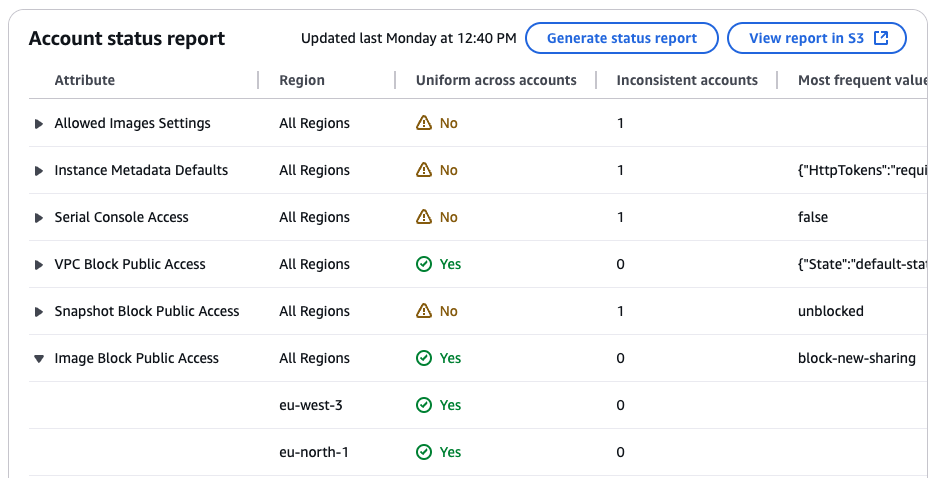
Figura 1: Esempio di rapporto sullo stato dell'account con uniformità tra gli account per VPC Block Public Access e Image Block Public Access.
Attributi supportati per le politiche EC2
La tabella seguente mostra gli attributi supportati per i servizi correlati ad Amazon EC2.
| AWS servizio | Attributo | Effetto politico | Contenuto della politica | Ulteriori informazioni |
|---|---|---|---|---|
| Amazon VPC | VPC blocca l'accesso pubblico | Controlla se le risorse in Amazon VPC e sottoreti possono raggiungere Internet tramite gateway Internet (IGW). | Visualizza la politica | Per ulteriori informazioni, consulta Bloccare l'accesso pubblico a VPC e sottoreti nella Amazon VPC User Guide. |
| Controlli di crittografia VPC | Controlla se i controlli di crittografia di Amazon VPC sono abilitati e la relativa modalità (disattiva, monitora, applica), applicando la crittografia in transito all'interno e tra VPC in una regione. | Visualizza la politica | Per ulteriori informazioni, consulta VPC Encryption Controls nella Amazon VPC User Guide. | |
| Amazon EC2 | Accesso alla console seriale | Controlla se la console seriale EC2 è accessibile. | Visualizza la politica | Per ulteriori informazioni, consulta Configurare l'accesso alla console seriale EC2 nella Guida per l'utente di Amazon Elastic Compute Cloud. |
| Image Block Public Access | Controlla se Amazon Machine Images (AMI) sono condivisibili pubblicamente. | Visualizza la politica | Per ulteriori informazioni, consulta Understand block public access for AMI nella Amazon Elastic Compute Cloud User Guide. | |
| Impostazioni delle immagini consentite | Controlla l'individuazione e l'uso di Amazon Machine Images (AMI) in Amazon EC2 con AMI consentite. | Visualizza la politica | Per ulteriori informazioni, consulta Amazon Machine Images (AMI) nella Amazon Elastic Compute Cloud User Guide. | |
| Impostazioni predefinite dei metadati delle istanze | Controlla le impostazioni IMDS predefinite per il lancio di tutte le nuove istanze EC2. | Visualizza la politica | Per ulteriori informazioni, consulta Configurare le opzioni di metadati delle istanze per le nuove istanze nella Amazon Elastic Compute Cloud User Guide. | |
| Amazon EBS | Snapshot Block Public Access | Controlla se gli snapshot di Amazon EBS sono accessibili pubblicamente. | Visualizza la politica | Per ulteriori informazioni, consulta Bloccare l'accesso pubblico agli snapshot di Amazon EBS nella Guida per l'utente di Amazon Elastic Block Store. |
