Vehicle simulator
The solution includes an integrated vehicle simulator that generates realistic fleet telemetry without requiring physical vehicles. The simulator operates in two modes — MQTT Direct for simple JSON telemetry, and FleetWise Edge (FWE) for CAN bus simulation with campaign-driven data collection.
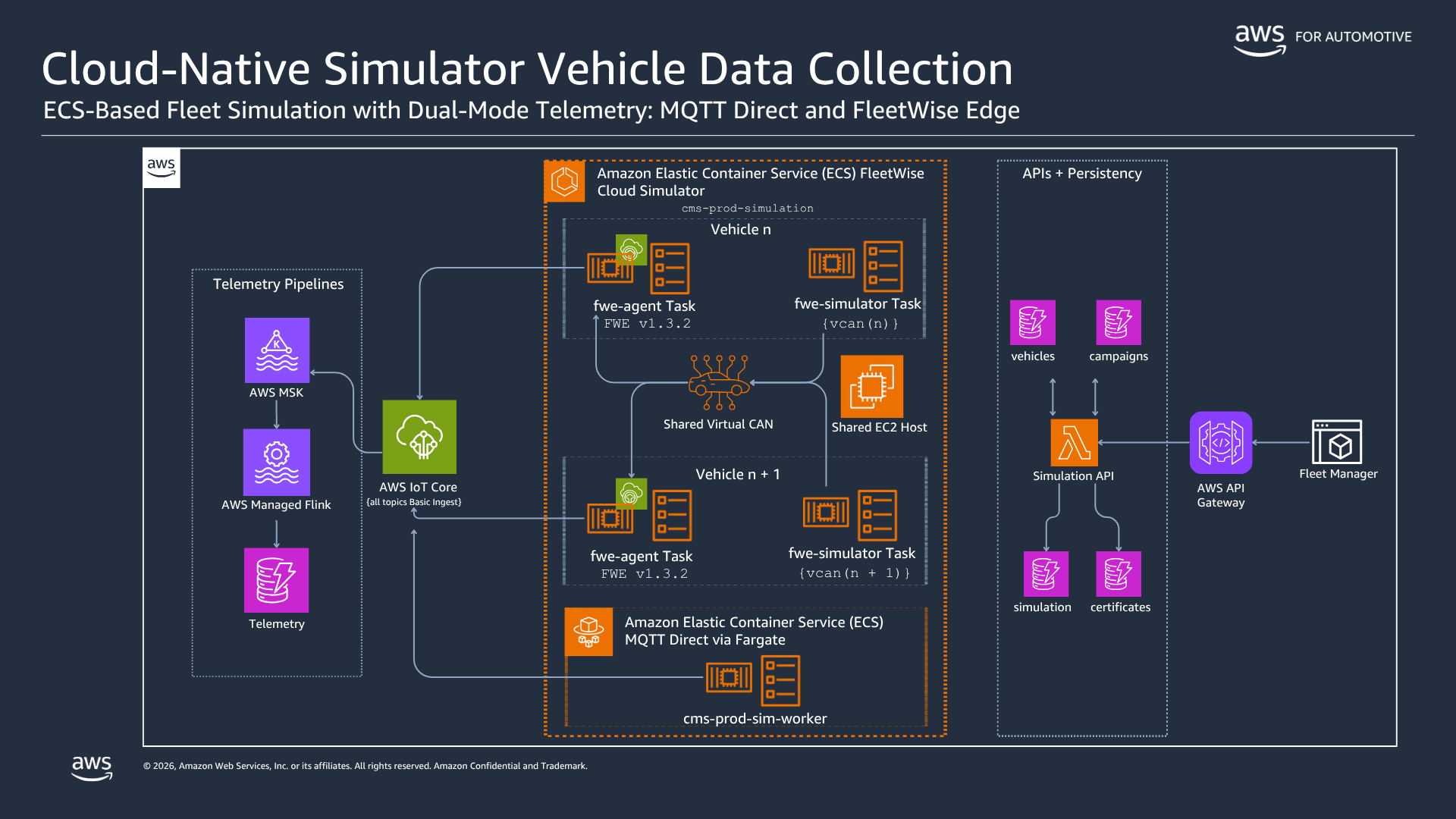
Simulation launch flow
The Fleet Manager UI triggers simulations through a multi-step orchestration:
-
Fleet Manager UI — The operator selects vehicles, configures trip parameters (route, duration, driving behavior), and chooses the simulation mode (MQTT Direct or FleetWise Edge).
-
API Gateway → Simulation Lambda — The request hits the Simulation API Lambda, which acts as a thin orchestrator. It validates the configuration, generates a simulation ID, and launches ECS tasks.
-
ECS task launch — The Lambda calls
ecs:RunTaskto start worker containers. In MQTT Direct mode, this is a single Fargate task. In FWE mode, this is two separate EC2-backed tasks on the same host (explained below). -
State tracking — The Lambda records the simulation ID, task ARN, and configuration in the simulations DynamoDB table with a 24-hour TTL.
MQTT Direct mode
In MQTT Direct mode, the simulator runs as a single Fargate task:
Simulation Lambda → ecs:RunTask (Fargate, private subnet)
  → sim-worker container
    → realtime_telemetry_simulator.py --mode mqtt
    → generates GPS, speed, RPM, tire pressure, fuel level
    → gzip + base64 encodes each message
    → publishes to IoT Core: cms/telemetry/{vin}
    → IoT Rule routes to MSK: cms-telemetry-raw
The simulator generates realistic driving patterns including acceleration curves, GPS routes following real road networks (via Amazon Location Service route calculator), fuel consumption models, and tire pressure variations with temperature correlation. Each simulated vehicle runs as a separate thread within the container.
FleetWise Edge mode
FWE mode simulates the full CAN bus data collection pipeline — the same architecture used by real vehicles with physical FWE agents. This requires two containers sharing a virtual CAN bus on the same EC2 host.
Why EC2 instead of Fargate
FWE mode uses EC2-backed ECS tasks (not Fargate) for two reasons:
-
Kernel CAN modules — Virtual CAN (
vcan) requires Linux kernel modules (can,can_raw,vcan) that are not available in Fargate’s managed runtime. The EC2 instance loads these modules via UserData at boot. -
HOST network mode — Both containers must share the same network namespace to access the same
vcaninterfaces. ECS HOST network mode places containers directly on the host’s network stack. Fargate only supportsawsvpcmode, which gives each task its own network interface.
EC2 host setup
The simulation stack deploys an Auto Scaling Group with EC2 instances (t4g.small, ARM) running Amazon Linux 2023 with the ECS-optimized AMI. The UserData script runs at boot:
# Load CAN kernel modules
modprobe can
modprobe can_raw
modprobe vcan

# Create 10 virtual CAN interfaces (supports 10 concurrent FWE vehicles)
for i in $(seq 0 9); do
  ip link add dev vcan$i type vcan
  ip link set vcan$i up
done
The ASG maintains 1 warm instance (starts in seconds when a simulation is requested) and scales to 3 for concurrent simulations. An ECS Capacity Provider manages placement.
Two-container architecture
When the Simulation Lambda receives an FWE mode request, it launches two separate ECS tasks on the same EC2 host:
EC2 Host (t4g.small, ARM, Amazon Linux 2023)
┌──────────────────────────────────────────────────────┐
│  Kernel: vcan0, vcan1, ... vcan9 (created at boot)   │
│                                                      │
│  ┌────────────────────┐  ┌─────────────────────────┐ │
│  │ Task 1: FWE Agent  │  │ Task 2: Simulator       │ │
│  │ (long-lived)       │  │ (per-trip)              │ │
│  │                    │  │                         │ │
│  │ Reads CAN frames ←─┼──┼── Writes CAN frames    │ │
│  │ from vcanN         │  │   to vcanN              │ │
│  │                    │  │                         │ │
│  │ Receives GPS    ←──┼──┼── Injects GPS coords   │ │
│  │ via Unix socket    │  │   via Unix socket       │ │
│  │                    │  │                         │ │
│  │ Encodes protobuf   │  │ Generates realistic     │ │
│  │ Publishes to       │  │ CAN signals: speed,     │ │
│  │ IoT Core           │  │ RPM, tire pressure,     │ │
│  │                    │  │ fuel, temperature        │ │
│  └────────────────────┘  └─────────────────────────┘ │
│                                                      │
│  HOST Network Mode — shared kernel network stack     │
└──────────────────────────────────────────────────────┘
Task 1: FWE Agent (long-lived, one per vehicle):
-
The Lambda checks if an FWE agent is already running for this VIN. If not, it calls
ecs:RunTaskwith thefwe-agenttask definition. -
The container starts the AWS IoT FleetWise Edge Agent
(open source, Apache 2.0 license). The solution uses a custom-built container image based on the official source. -
At startup, the agent writes the vehicle’s X.509 certificate and private key (retrieved from DynamoDB) to the filesystem.
-
The agent is configured with a custom MQTT topic prefix (
cms/fleetwise/) so telemetry publishes tocms/fleetwise/vehicles/{vin}/signalsinstead of the default$aws/iotfleetwise/path. -
The agent connects to IoT Core, receives its decoder manifest and collection scheme (pushed by the CampaignSyncProcessor), and begins reading CAN frames from the assigned
vcanNinterface. -
A health check verifies the agent has received both
DecoderManifest.binandCollectionSchemeList.binbefore marking the task healthy.
Task 2: Simulator (per-trip, short-lived):
-
The Lambda calls
ecs:RunTaskwith thefwe-simulatortask definition, passing the samevcanNinterface as the agent. -
The container runs
realtime_telemetry_simulator.py --mode can. -
The simulator generates CAN frames matching the decoder manifest’s signal definitions (message IDs, start bits, lengths, factors, offsets) and writes them to
vcanNusing SocketCAN. -
GPS coordinates are injected into the FWE agent via a Unix domain socket (FWE’s location API), since GPS is not a CAN bus signal.
-
When the trip completes, the simulator container exits. The FWE agent remains running for the next trip.
vcan interface assignment
The Simulation Lambda tracks which vcan interfaces are in use by querying running FWE agent tasks and reading their CAN_BUS0 environment variable. Each new vehicle gets the next available interface (vcan0, vcan1, etc.), supporting up to 10 concurrent FWE vehicles per EC2 host.
Pre-flight validation
Before launching FWE tasks, the Lambda validates:
-
Active campaign — Queries the campaigns DynamoDB table to confirm a RUNNING campaign with signals exists for the target VIN. Without a campaign, the FWE agent has no collection scheme and will not collect data.
-
Vehicle certificate — Retrieves the X.509 certificate and private key from the vehicle-certificates DynamoDB table. Without a certificate, the FWE agent cannot authenticate to IoT Core.
